
Latest ads
-
V2ray VPN for Tunneling
- hu KANNA
- Updated:
-
 ඕනම රටකට සෙට් වෙන CV එකක්
- ErMurazor
- Updated:
-
 Hambantota 7 Acres Beachfront Land For Sell DownSouth , PerPerch Price 420 000
- 1024 Digital
- Updated:
-
 Baseus PI LITE INDOOR CAMERA
- ErMurazor
- Updated:

You are using an out of date browser. It may not display this or other websites correctly.
You should upgrade or use an alternative browser.
You should upgrade or use an alternative browser.
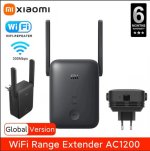


ahh.. ehenam hari machan, ThnxADSL da Fiber da kiyana eka adala ne machan. Dekatama use karanna puluwan. It's just extending wifi signals.
Haven't used this one, even though have used other popular brands... If you search the Net, you will find mixed reviews, mostly advising against.
Here's a recent one dated 4 Jan 2022.
<snip>
Xiaomi Mi WiFi Range Extender AC1200 review: an affordable, but limited repeater.
To assess the performance of Xiaomi’s repeater, we repeated the 5 GHz signal from our Netgear RAX200 router to which we connected a laptop PC via an adapter to the 2.5 Gb / s socket. In order to measure the speeds, we transferred a 4.73 GB file (a disk image) from the first laptop PC to a second equipped with an Intel AX200 Wi-Fi 6 chip, but also to a stationary desktop PC located at upstairs and connected to a Gigabyte GC-WBAX200 PCIe card, also with the Intel AX200 chip, but with an external antenna.
The router is positioned in a corner of the housing, the repeater plugged into a socket 15 cm from the floor almost in the middle of the latter. We take a measurement 1 m from the router which gives us the optimal flow rates (point 1), a measurement in the center of the housing 1 m from the repeater (point n ° 2), another in a room about 5 m from the repeater with a load-bearing wall opposite the router (point 4), a third measurement on the fixed PC upstairs through a concrete floor (point 3), and the last measurement on the second floor as well, but above of the first room where the router’s speeds are the lowest (point 5).
The 5 GHz band of the Xiaomi Mi WiFi Range Extender AC1200 offers fairly low speeds, since even in the best case the performance remains below 200 Mb / s. It delivers almost the same performance as the Netgear EX3110 which has a speed cumulative (2.4 GHz + 5 GHz) of 750 Mb / s. More problematic: despite its external antennas, the 5 GHz signal is not even picked up by our laptop PC located at our measurement point n ° 5. A failure that we had never suffered until then.
The performance on the 2.4 GHz band is close to the performance of the 5 GHz band, which is quite logical: the 5 GHz band is used to communicate with the router when the repeated signal is that of 2.4 GHz, and Conversely. Thus, in all cases, we find ourselves limited by the maximum theoretical bandwidth of the 2.4 GHz band of this repeater, i.e. 300 Mb / s. Although the signal is in this case picked up at our point n ° 5, it was not possible for us to complete the transfer of our 4.73 GB file. It would be difficult to use it for anything other than very light internet browsing – forget about video streaming.
</snip>
Here's a recent one dated 4 Jan 2022.
<snip>
Xiaomi Mi WiFi Range Extender AC1200 review: an affordable, but limited repeater.
To assess the performance of Xiaomi’s repeater, we repeated the 5 GHz signal from our Netgear RAX200 router to which we connected a laptop PC via an adapter to the 2.5 Gb / s socket. In order to measure the speeds, we transferred a 4.73 GB file (a disk image) from the first laptop PC to a second equipped with an Intel AX200 Wi-Fi 6 chip, but also to a stationary desktop PC located at upstairs and connected to a Gigabyte GC-WBAX200 PCIe card, also with the Intel AX200 chip, but with an external antenna.
The router is positioned in a corner of the housing, the repeater plugged into a socket 15 cm from the floor almost in the middle of the latter. We take a measurement 1 m from the router which gives us the optimal flow rates (point 1), a measurement in the center of the housing 1 m from the repeater (point n ° 2), another in a room about 5 m from the repeater with a load-bearing wall opposite the router (point 4), a third measurement on the fixed PC upstairs through a concrete floor (point 3), and the last measurement on the second floor as well, but above of the first room where the router’s speeds are the lowest (point 5).
The 5 GHz band of the Xiaomi Mi WiFi Range Extender AC1200 offers fairly low speeds, since even in the best case the performance remains below 200 Mb / s. It delivers almost the same performance as the Netgear EX3110 which has a speed cumulative (2.4 GHz + 5 GHz) of 750 Mb / s. More problematic: despite its external antennas, the 5 GHz signal is not even picked up by our laptop PC located at our measurement point n ° 5. A failure that we had never suffered until then.
The performance on the 2.4 GHz band is close to the performance of the 5 GHz band, which is quite logical: the 5 GHz band is used to communicate with the router when the repeated signal is that of 2.4 GHz, and Conversely. Thus, in all cases, we find ourselves limited by the maximum theoretical bandwidth of the 2.4 GHz band of this repeater, i.e. 300 Mb / s. Although the signal is in this case picked up at our point n ° 5, it was not possible for us to complete the transfer of our 4.73 GB file. It would be difficult to use it for anything other than very light internet browsing – forget about video streaming.
</snip>

tp link re505x ekak use karanne..patta..tp link ganin kalayak use karanna ona nam.
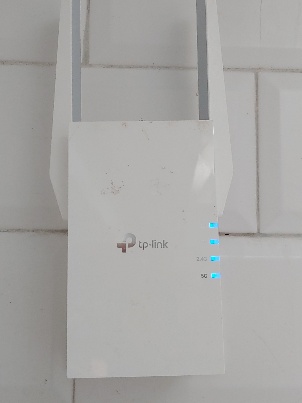
me review eka godak awul ne banHaven't used this one, even though have used other popular brands... If you search the Net, you will find mixed reviews, mostly advising against.
Here's a recent one dated 4 Jan 2022.
<snip>
Xiaomi Mi WiFi Range Extender AC1200 review: an affordable, but limited repeater.
To assess the performance of Xiaomi’s repeater, we repeated the 5 GHz signal from our Netgear RAX200 router to which we connected a laptop PC via an adapter to the 2.5 Gb / s socket. In order to measure the speeds, we transferred a 4.73 GB file (a disk image) from the first laptop PC to a second equipped with an Intel AX200 Wi-Fi 6 chip, but also to a stationary desktop PC located at upstairs and connected to a Gigabyte GC-WBAX200 PCIe card, also with the Intel AX200 chip, but with an external antenna.
The router is positioned in a corner of the housing, the repeater plugged into a socket 15 cm from the floor almost in the middle of the latter. We take a measurement 1 m from the router which gives us the optimal flow rates (point 1), a measurement in the center of the housing 1 m from the repeater (point n ° 2), another in a room about 5 m from the repeater with a load-bearing wall opposite the router (point 4), a third measurement on the fixed PC upstairs through a concrete floor (point 3), and the last measurement on the second floor as well, but above of the first room where the router’s speeds are the lowest (point 5).
The 5 GHz band of the Xiaomi Mi WiFi Range Extender AC1200 offers fairly low speeds, since even in the best case the performance remains below 200 Mb / s. It delivers almost the same performance as the Netgear EX3110 which has a speed cumulative (2.4 GHz + 5 GHz) of 750 Mb / s. More problematic: despite its external antennas, the 5 GHz signal is not even picked up by our laptop PC located at our measurement point n ° 5. A failure that we had never suffered until then.
The performance on the 2.4 GHz band is close to the performance of the 5 GHz band, which is quite logical: the 5 GHz band is used to communicate with the router when the repeated signal is that of 2.4 GHz, and Conversely. Thus, in all cases, we find ourselves limited by the maximum theoretical bandwidth of the 2.4 GHz band of this repeater, i.e. 300 Mb / s. Although the signal is in this case picked up at our point n ° 5, it was not possible for us to complete the transfer of our 4.73 GB file. It would be difficult to use it for anything other than very light internet browsing – forget about video streaming.
</snip>
tp link re505x ekak use karanne..patta..tp link ganin kalayak use karanna ona nam.
View attachment 171773
kiyada ban ? mehe ganna nane.. upstairs walata signal ganna ona mata
------ Post added on May 18, 2022 at 5:51 AM
me review eka godak awul ne ban
kiyada ban ? mehe ganna nane.. upstairs walata signal ganna ona mata
------ Post added on May 18, 2022 at 5:51 AM
Mama yaluwek gen gaththe..ubata upstair walata ekak ganna onanam oka ganna epa kohen hari hoyala meka ganin.. TP-Link AC1750 wifi extender.
TPLINK RE450 AC1750 WiFi Range Extender, 450Mbps on 2.4GHz, 1300Mbps on 5GHz, Gigabit Ethernet port, Access Point, Easy Installation
- TPLINK RE450 AC1750 WiFi Range Extender,
- 450Mbps on 2.4GHz, 1300Mbps on 5GHz,
- Gigabit Ethernet port, Access Point,
- Easy Installation
- Expand Wi-Fi Network for Ultimate Performance
- Expanded 450Mbps on 2.4GHz + 1300Mbps on 5GHz totals 1750Mbps Wi-Fi speeds*
- Three adjustable external antennas provide optimal Wi-Fi coverage and reliable connections
- Gigabit Ethernet port acts as a wireless adapter to connect a wired device to your network at gigabit speed
- Intelligent signal light helps to find the best location for optimal Wi-Fi coverage by showing the signal strength
- Works with any Wi-Fi router or wireless access point
Oya uba dala thiyena Xiaomi eka ganna epa..aparade salli..

Mama yaluwek gen gaththe..ubata upstair walata ekak ganna onanam oka ganna epa kohen hari hoyala meka ganin.. TP-Link AC1750 wifi extender.
View attachment 171774
TPLINK RE450 AC1750 WiFi Range Extender, 450Mbps on 2.4GHz, 1300Mbps on 5GHz, Gigabit Ethernet port, Access Point, Easy Installation
- TPLINK RE450 AC1750 WiFi Range Extender,
- 450Mbps on 2.4GHz, 1300Mbps on 5GHz,
- Gigabit Ethernet port, Access Point,
- Easy Installation
- Expand Wi-Fi Network for Ultimate Performance
- Expanded 450Mbps on 2.4GHz + 1300Mbps on 5GHz totals 1750Mbps Wi-Fi speeds*
- Three adjustable external antennas provide optimal Wi-Fi coverage and reliable connections
- Gigabit Ethernet port acts as a wireless adapter to connect a wired device to your network at gigabit speed
- Intelligent signal light helps to find the best location for optimal Wi-Fi coverage by showing the signal strength
- Works with any Wi-Fi router or wireless access point
Oya uba dala thiyena Xiaomi eka ganna epa..aparade salli..
mewa lankawe dan nane ganna? thibbath Xiaomi eka ta wada wadi ne


menna me link eka balanna.. TP link, Murcusys authorized distributor in Sri Lanka
https://www.sense.lk/product-category/networking/network-expansion/wi-fi-extenders/?orderby=by_stock
https://www.sense.lk/product-category/networking/network-expansion/wi-fi-extenders/?orderby=by_stock
මෙයාලගෙත් බලපං මචන් . SLT එකෙත් බලපන්
https://eteleshop.slt.lk/categories/wi-fi-devices
https://www.sala.lk/product/s/extender__accesspoint__
https://eteleshop.slt.lk/categories/wi-fi-devices
https://www.sala.lk/product/s/extender__accesspoint__


Similar threads


- Replies
- 3
- Views
- 375