How to Root and Unlock You Galaxy S2

navodwickra

Well-known member
  • Jan 17, 2007
    11,419
    2,136
    113
    Leeds, UK
    This is a dedicated help thread for Samsung Galaxy S2 so any question you've got all you have to do is ask.

    I'll start this thread by showing you how to root your phone, unlock, installing custom ROMS/themes stuff like that. One good thing about android phones is that once you root it you can do a lot of things. for starters you can install Sinhala fonts and enjoy the elakiri app on your SGS 2 :D

    14j00hj.jpg


    2eeeb1g.jpg


    317d4rn.png


    2mrgpkk.png


    25oyzjp.png


    126451y.png


    6f9zbq.png


    67l0yo.png


    k3rgxv.png
     
    Last edited:

    navodwickra

    Well-known member
  • Jan 17, 2007
    11,419
    2,136
    113
    Leeds, UK
    Follow these steps to the last instruction

    Things you need
    ========================

    1. Samsung Galaxy S2 (obiviously ;) )
    2. USB cable (which comes with your box). Buy one if just bought the phone.
    3. Odin
    4. CF-Root Kernel
    5. Original Kernel (this is optional)


    Now before downloading the CF-Root kernel for your device you need to find out the exact match for it.

    Go to Settings - > About Phone and read the Build Number. Mine says GINGERBREAD.XWKI4

    So my firmware version is XWKI4 like that match the firmware version and download the CF-Root Kernel for you device.

    Do the same for when you download the original kernel for your device.

    Now you have a hacked kernel with root access and an original kernel from samsung.


    Ok then make sure you take a back up of your data before doing anything.
    Now let put your phone to download mode. When your phone is in download mode you can flash any ROM using Odin. I'll explain further about this anyway.

    1. Turn your phone off. take off the battery put it back.
    2. Hold volume down + home button + power (don't press all at once just one by one )
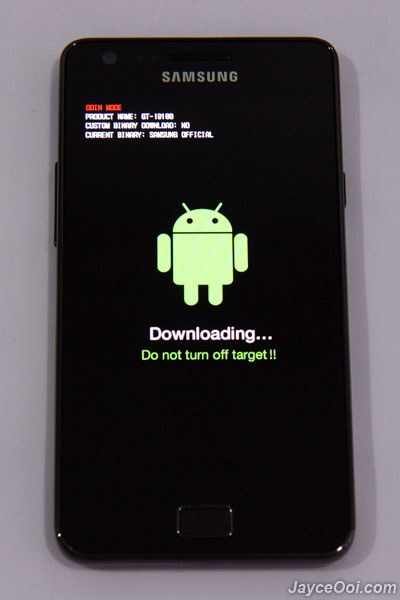
    3. Now if it works you will see this


    SGS2-Odin-Download-Mode_01.jpg

    ---- Reserved
     
    Last edited:

    navodwickra

    Well-known member
  • Jan 17, 2007
    11,419
    2,136
    113
    Leeds, UK
    How to flash using odin
    ======================

    1 .connect your phone to the PC and wait till it install the drivers for Samsung Android device. If your PC fails to install it automatically install Samsung Kies software from samsung mobile web site (90~MB).

    2. Open Odin and if it detects your phone then you will see this

    Odin-yellow-box-sign_thumb.png


    3. Make sure you do exactly the same in the image below
    -uncheck repartition, check Autoboot, check Reset

    odinm.jpg


    Click on PDA and select the downloaded CF-Root Kernel and Click Start

    4. When everthing is Over it will auto reboot the phone and you will see this don't be afraid it's just because you flashed an unsecure kernel :)

    d8dfa_rootingsgs5.jpg


    5. Now your phone is rooted check if you have Super User and CWM applications installed after reboot if they are there then you are good to go.

    6. Now go to market place and find this app Galaxy_S Unlock if you can't find it on the market place(because some apps depend on the country you live in ) then try this http://www.appbrain.com/app/galaxy-s-unlock/com.helroz.galaxysunlock

    7. Run that app and follow the instruction and it'll unlock your phone in less than 2 mins. Mine took a min ;) and it'll auto reboot the phone when finishes. If it doesn't auto reboot then do it yourself and try a different sim card to check whether it works.


    How to remove the ugly yellow sign
    ==========================


    you see this because you have an unofficial/unsecure kernel. Not to worry you can remove this in a min.

    1. Put your phone back to download mode and run Odin.

    2. When Odin detects your phone do the same like the last time but make sure you select the original kernal this time as the PDA file. So the Odin can flash the Original kernel again.

    3. Hit Start and when it's done phone will auto reboot. You can see the yellow triangle has been disappeared now :)

    4. Now you have an unlocked Rooted phone.
     
    Last edited:

    sEE_dA_trUth

    Well-known member
  • May 15, 2009
    1,504
    399
    83
    පට්ටනෙ මචෝ.... එළකිරි කොල්ලෙක් නෙ.. .. .. ..
    මරු වැඩක්... +

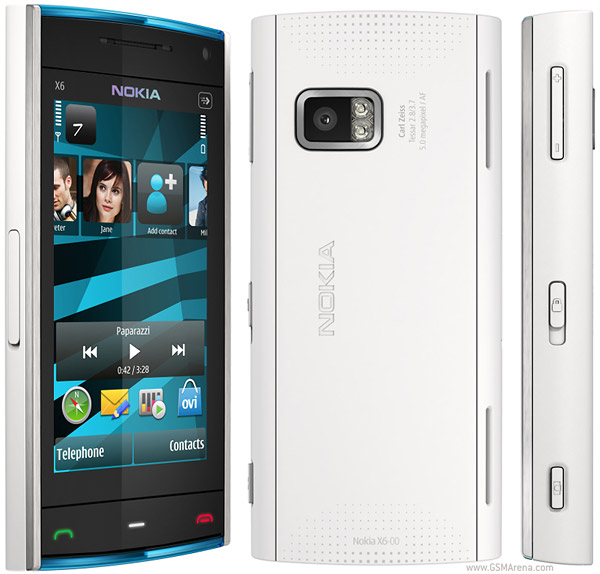
    මචන් උඹට මේ භාණ්ඩෙ Unlock කරන හැටි කියන්න පුළුවන්ද??

    nokia x-6

    nokia-x6-1.jpg