


PLEASE MAIL ME/COMMENT IF THERE ARE ANY COPYRIGHT ISSUES
I recently bricked my Nokia N8 while installing belle updated mod...
This is how I unbricked my precious N8 :*
Bricked N8 Symptoms:
1. The phone doesn't start
2. When you try to switch it on, it vibrates and then nothing happens
3. When you connect the USB cable or charger, the charging indicator flashes for sometime and then stops
4. When you connect the USB to N8, the computer detects your phone and N8 immediately gets disconnected
Tutorial to unbrick your N8 :
Requirements:
1. Symbian Belle CFW files availablehttp://www.n8fanclub.com/2011/08/how-to-flash-symbian-belle-update-on.html
2. Symbian Anna Firmware file available http://www.n8fanclub.com/2011/08/how-to-flash-symbian-belle-update-on.html
3http://www.megaupload.com/?d=HF2NA53Z
(Phoenix Service Software)
Tutorial:
Donot connect your N8 till step 13
1. Install phoenix.
2. Copy the downloaded Anna files to
C:/Program Files/Nokia/Phoenix/Products/RM-596 (OR)
C:/Program Files(x86)/Nokia/Phoenix/Products/RM-596
3. Run Phoenix

4. Click File>Open Product
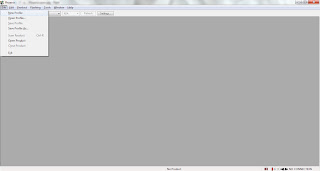
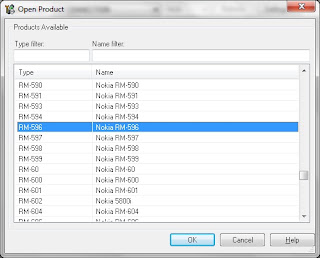
5. Select RM-596 and click OK.
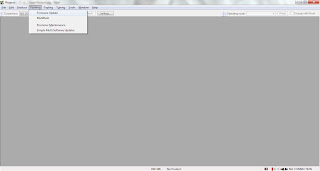
6. Click Flashing>Firmware Update.
7. Click the 3 dots(...) and choose the available Product Code.
8. Click 'Options' at the bottom of the dialog box.

9. Replace Anna files with the downloaded Belle files by clicking 'Edit'.

10. IMPORTANT: Delete the remaining 2 files present below the 4 Belle Firmware files....
RM596_APE_ONLY_ENO_11w15_v0.148.fpsx and
RM-596_M025.44.emmc.fpsx
11. Click OK.
12. Check 'Dead phone USB flashing'.

13. Click 'Refurbish' (Donot connect your N8 till this step).
14. You will get a prompt asking you to connect the phone.
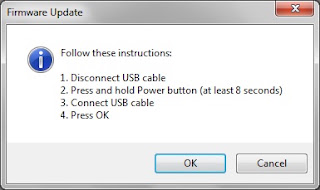
15. IMPORTANT: Keep the power button pressed until you feel
three vibrations(beeps). Once your phone vibrates thrice, connect it via USB to your PC and click OK.
16. Phoenix starts flashing your N8... Please be patient...
17. That's it.... Your N8 is back to life again
I recently bricked my Nokia N8 while installing belle updated mod...
This is how I unbricked my precious N8 :*
Bricked N8 Symptoms:
1. The phone doesn't start
2. When you try to switch it on, it vibrates and then nothing happens
3. When you connect the USB cable or charger, the charging indicator flashes for sometime and then stops
4. When you connect the USB to N8, the computer detects your phone and N8 immediately gets disconnected
Tutorial to unbrick your N8 :
Requirements:
1. Symbian Belle CFW files availablehttp://www.n8fanclub.com/2011/08/how-to-flash-symbian-belle-update-on.html
2. Symbian Anna Firmware file available http://www.n8fanclub.com/2011/08/how-to-flash-symbian-belle-update-on.html
3http://www.megaupload.com/?d=HF2NA53Z
(Phoenix Service Software)
Tutorial:
Donot connect your N8 till step 13
1. Install phoenix.
2. Copy the downloaded Anna files to
C:/Program Files/Nokia/Phoenix/Products/RM-596 (OR)
C:/Program Files(x86)/Nokia/Phoenix/Products/RM-596
3. Run Phoenix

4. Click File>Open Product
5. Select RM-596 and click OK.
6. Click Flashing>Firmware Update.
7. Click the 3 dots(...) and choose the available Product Code.
8. Click 'Options' at the bottom of the dialog box.

9. Replace Anna files with the downloaded Belle files by clicking 'Edit'.

10. IMPORTANT: Delete the remaining 2 files present below the 4 Belle Firmware files....
RM596_APE_ONLY_ENO_11w15_v0.148.fpsx and
RM-596_M025.44.emmc.fpsx
11. Click OK.
12. Check 'Dead phone USB flashing'.

13. Click 'Refurbish' (Donot connect your N8 till this step).
14. You will get a prompt asking you to connect the phone.
15. IMPORTANT: Keep the power button pressed until you feel
three vibrations(beeps). Once your phone vibrates thrice, connect it via USB to your PC and click OK.
16. Phoenix starts flashing your N8... Please be patient...
17. That's it.... Your N8 is back to life again
Last edited:


