ANDROID වැඩකාරයෝ

Status
Not open for further replies.

vpsupun

Well-known member
  • Dec 5, 2006
    982
    650
    93
    40
    Na hariyanne na :no: CWM eken official rom danna ba. Official rom ekaka format eka dakala thitenawada? Eke enne wenama image files hatiyata sure nattnam oya lagadi flash krapu rom eka aragena balanna. HTC walath ehemai CWM eka thibbata official ewa danna ba. Kawuru hari developer kenek official eka extract karala rooted kernel ekak daala aye repackage kloth witharai CWM eken danna puluwan.

    ඒ කතාවට නම් එකඟ වෙන්න අමාරුයි මචෝ. CWM එකෙන් මම දන්න විදියට නම් Stock ROMs දාන්න පුළුවන්. මෙතන බලන්න. Mobile Odin එකෙනුයි පස්සේ CWM එකෙනුයි දෙකෙම්ම stock ROMs දාන විදිය කියල තියනවා. Mobile Odin අනිත් ඒවට වැඩ නොකලට, CWM වැඩ කරන නිසා CWM දාගන්න පුළුවන් නම් ඕන ෆෝන් එකකට මේක කරන්න පුළුවන්.
    ඔච්චර ඔනේ නෑ, CWM එකේ Advance app එක නේද ROM Manager? ඒක දා ගන්න පුළුවන් නම් ඒත් ඔය වැඩේ කරන්න පුළුවන්(ඒක නම් කරල බලල නෑ) ඇති
     

    Kasunrock619

    Well-known member
  • May 18, 2009
    16,840
    1,459
    113
    Colombo
    මචන්:):):) මගේ XPERIA RAY 1 ROOT කර ගන්න සොෆ්ට් 1කුයි.:P:P:PROOT කරන හැටි තියෙන YOUTUBE විඩියෝ 1කුයි පොස්ට් කරපන්කො,,,:rofl::rofl::rofl:ඉක්මනින්ම,:rolleyes::rolleyes::rolleyes:
    warranty nati wai ne machan:eek:
     
    :D :D :D ඔන්න මචංලා චිරි චිරිය අද ඉදන් ආය වැඩේට සෙට් වෙනවා,,,, :D :D :D
    මට සනීපවෙන්න කියල කියපු හැමෝටම තැන්කූ වේවා,,,,
    jbQh3eUdovmJ9dskgMLI0u4alZjd-QyWwVKROct0Xp7qudpi_jJBHuUOC4iqyxnolAh_1fHuD6M6R3ydN74ngoGCmA=s512

     
    Last edited:
    No Root Screenshot It 3.32

    No Root Screenshot It 3.32
    Overview: Take a screenshot of your phone's screen. Root is NOT required.
    FINALLY, A SCREENSHOT APP THAT DOESN'T REQUIRE ROOT

    Requirements: Android 1.5+
    eLrL-vtNtEA9Lpljusz1wsRJyuFAUbONMNK.jpg


    FLxmUTxzW_enCXGptxrd-nNFULp89NIKEGi.jpg
    _22G7_sRFwT9Q2SWAB5pj3z_JQ0OuJP6ulc.jpg


    "No Root Screenshot It" is an application that lets you take screenshots of your phone. This application works on ALL phones except Honeycomb. Root is NOT required.

    This application is for those users who need to take screenshots, but don't have root access to their phones.

    PLEASE READ CAREFULLY BEFORE INSTALLING:
    This application will instruct you to download and install a free desktop application on your Wind ows or Mac. Once installed, you must run the desktop application with your phone attached to your computer. This will enable screenshots on your phone.

    Once you've done this, you can disconnect your phone and take screenshots whenever you want. However, every time you restart your phone, you'll have to connect it to your computer and run the desktop application again. If you restart your phone frequently, this app may not be for you, as it may prove to be too inconvenient.

    Your phone will NOT be rooted or temp-rooted in any way. No system files on your phone will be altered.
    If your phone is already rooted, please download the normal "Screenshot It" application from the Android market.


    FEATURES:
    - Take a screenshot of your phone's screen
    - Save as a jpg or png file and share anywhere
    - Crop screenshots
    - Annotate and draw on screenshots
    - Screen shot status bar button
    - Screenshot widget button
    - Shake to screen shot
    - Delayed screenshot timer
    - "Share" menu integration
    - Custom save directory
    - Works on ALL devices, except Honeycomb


    Please exclude this app from any task killer or anti-virus software on your phone. If you don't, you'll have to run the enabler more often.


    What's in this version:
    Fix crash issue on older Android 1.5 devices
    Improved the setup instructions for Kindle Fire users

    More info:


    thilan##

    Well-known member
  • Feb 21, 2009
    2,343
    51
    48
    36
    Kurunegala
    Ane help me!!! mama xperia mini eka root wenna dala tynne superoneclick eken.dan waiting for device kiyala watila software eka respond karanne ne:( udaw karandooo
     
    Photaf Panorama Pro 3.1.0

    Photaf Panorama Pro 3.1.0
    Overview: Photaf - The best Android App for creating panoramas
    Requirements: Android version 2.1+
    fqxh252wGIqzeLGmUYRMmEz5ebX-3gizqma.jpg


    JFAW_b-oT-luhc28cBja0SEdAe6Jyw8MRqx.jpg


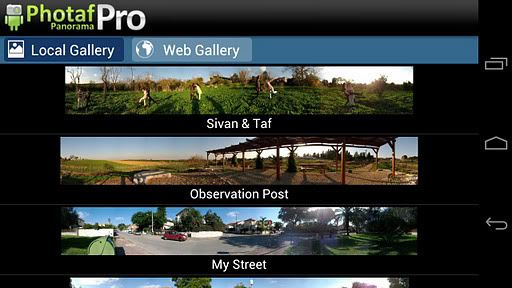
    Create beautiful, seamless panoramic photos easily by utilizing the camera and the orientation sensor to know the exact angle each picture was taken.

    When done, you can move your phone around to see the complete panoramic view by using the phone's compass or the touch screen.

    View Photaf's online panoramas gallery and get tips for taking better panoramas at Photaf website.

    Features:

    ● Facebook Share - Share panoramas with your friends!
    ● Upload to Photaf.com website and view it from your computer!
    ● Automatic Image Stitching
    ● Pinch to Zoom
    ● Move to SD
    ● Set as Live wallpaper (Pro version)
    ● HD Mode (Pro Version)
    ● Use Camera in portrait mode (Pro Version)
    ● Export to gallery folder
    ● Optimized for Honeycomb - Works on the Motorola Xoom, Asus Transformer, Samsung Galaxy Tab 10.1, and all other Honeycomb tablets

    Please read the troubleshooting section bellow as it may help with common problems.

    Common issues and troubleshooting:

    ● Cannot take the next picture \ Sensor inaccurately follows movement

    This is a compass calibration problem, go to Photaf picture taking mode and before taking the first picture, wave your phone in a figure 8 pattern to reset the magnetometer in your device.

    ● Cannot create file, make sure to use a valid file name

    Usually, this is a file creation error, due to SD card either not available, full or corrupted.
    This error can also popup when the specified name already exists.

    Try the following:
    - Use a different unique name
    - Make sure the SD card is not mounted to your PC via USB
    - Make sure you have enough space on your SD card
    - Move some unused files from your SD to your computer, sometimes too many files on the SD can cause problems too
    - Reboot your device

    ● Colors on the Motorola defy are wrong

    Use the defy hack option, under settings. Then, restitch your panorama.

    Photaf Panorama is the best app for making panoramas from your Android device.

    Recent changes:
    Fixed auto focusing issues
    Polish translation

    More info:


    Neutron Music Player v1.51

    Neutron Music Player v1.51
    Requirements: Android version 2.1 and higher, supports App2SD
    Overview: Professional audio quality and unique UI!
    sXFj5bkHF1-dnEaPo68ckUR-AAGoR1meuSMHutk184SAZ1GcYYHv8y526Alv5tTgDKE=w705


    JWw9sYf-tkEzezaScOw-Slw-Xco0jmhRi1NlX9XMr9efd2R9nfJb5js1-3iXxfA6qw
    5VXWrO1SEiOIdnCj8D5_8eB5BWv1eRFlGdvf6RJ82F6Zj8a4TPUsJ37al3bi2zbD1E8
    2Fa2hSyphUs0CTR0s2i6IHCW-jQByLqjSFE7ltFz5S62sXzoFp3V_utKeAmO9Ef_RQ

    Tdu68YUzg1rZK71JA08kzOprYemYqWnzbQ7beXfaYchc-UOL3vOQpCXLUt44P020mA
    ML-NOLHOj1LzVR0Tdzfv398p1SWUY3KnJ6ay5ip8zCepfgcVnwuRIjoEcmTvQ_He0A
    EHHsE_w_G0GDb5icOeXVfIYszKNZJhAbGOA_USdayUcE7qt3eUCbp6C_0QaMC2vx6Yo


    Neutron features own professional HD 32-bit audio rendering core which helps to deliver best possible sound quality from your Android device to the external speakers, or headphones.

    Neutron has sophisticated UI which provides advanced controls for music playback. It is not easy, or another pop music player, it is developed for audiophiles and those who love music. Recommended for use with Hi-Fi/High-End audio hardware.

    Hope you'll like Neutron! and have fun with it!

    FEATURES:

    * 32-bit audio decoding/processing for high quality HD audio.
    * Audio formats: MP1, MP2, MP3, OGG (Vorbis), FLAC, WMA, AC3, AAC, M4A, M4B, M4R, MP4, 3GP, 3G2, MOV, ALAC, APE (Monkey's Audio), WV (WavPack), MPC (MusePack), WAV, AU, AIFF, MPG/MPEG (audio only), AVI (audio only), iTunes/Windows Media inclusive except DRM-protected.
    * Modular audio formats: MOD, IM, XM, S3M.
    * Voice audio format: SPEEX.
    * Surround sound DSP (Ambiophonic R.A.C.E. technology).
    * Crossfeed DSP (for better stereo music listening experience with headphones).
    * Rumble Filter DSP (to protect speakers from overloading with frequencies below 20 Hz).
    * Normalization (post EQ re-mastering of tracks).
    * Streaming audio: M3U, PLS, ASX, RAM.
    * HQ 4-band parametric equalizer.
    * Accurate gapless playback.
    * Replay Gain.
    * HQ Resampling with 3 modes: fast, quality, audiophile.
    * Dithering (to improve audio quality by eliminating quantization in signal).
    * Crossfading (including manual track switching in playlist).
    * Balance.
    * Shuffle playback.
    * Looped playback.
    * Database/Folder modes.
    * Queuing.
    * CUE Sheet support (including built into metadata).
    * Media database grouping by: album, artist, genre.
    * Unicode tags.
    * Real-time multi-band spectrum analyzer.
    * Real-time RMS bar.
    * Master and Preamp digital volume adjustment.
    * Android widgets and Lock Screen mode.
    * Movable to external SD Card.
    * Night UI mode with colorful audio visualization.
    * Album art (supported: PNG, JPG, BMP, incl. metadata from tags).
    * Album art visual effect based on currently playing music.
    * Clock mode.
    * Sleep timer: 15,30,45,60,90 minutes.
    * Wake timer.
    * Automatic key-lock with colorful audio visualization.
    * Highly customizable through Settings.
    * Smart CPU/Battery consumption.

    SUPPORT:

    Neutron Music Player is under active development. Tech. support e-mail: [email protected], or forum: http://neutronmp.com/forum

    BUGS:

    To report bugs please use dedicated Forum or e-mail to developer directly. Your help and participation is highly appreciated.

    RECOMMENDED HARDWARE:

    - 1GHz+ CPU (single, or multi-core).
    - 480x800 screen resolution, or higher.


    NOTE:

    - !!! Please try time limited trial version before buying. Get it here: http://market.android.com/details?id=co ... ode.mpeval

    - All features of application are thoroughly TESTED and WORKING. If you can't make some of the features work for you then it is most probably due to misuse. Please use forum, or direct e-mail to resolve the problem, try not polluting application rating (be kind to developer!) - developer can't reply to Android Market comments.

    - Lower than minimal specification of your hardware does not guarantee that application will operate fast enough!

    - On screens other than 480x800 quality of graphics can be lower due to automatic UI graphics re-scaling.

    PERMISSIONS:

    - WRITE_EXTERNAL_STORAGE: to store Neutron database (playlists, settings), plugins, docs in /sdcard/Android/data/com.neutroncode.mp folder.

    - READ_PHONE_STATE: to auto-stop music playback when phone starts ringing.

    - GET_ACCOUNTS: to generate unique hardware/account key for Licensing and Trial expiration. Only Google primary account is used for that. This information will be auto-deleted from Licensing server in 1 month time.

    - INTERNET: to provide communication with License server, audio streaming.

    - WRITE_SETTINGS: for ringtone setting.

    Recent changes:
    * Improved lookup result matching.
    * AGP: reset gain to current Preamp value which was set manually, settings (Settings -> AGP).
    * Show Display with letter when scrolling lists sorted by Title.
    * Better AVRCP BT support.
    * Improved shuffle history behavior.
    * Skip .nomedia tagged directories from scanning.
    ! Fixed file-based playlist loading.
    ! Fixed Playlist name lost during Refresh/REBUILD.
    ! Fixed SETUP for sections.
    ! Fixed double playback bug.
    ! Fixed playlist UI level not restored.

    More Info:


    (ARMv7+NEON)


    (ARMv6)


    Status
    Not open for further replies.