.:: ANDROID වැඩකාරයෝ Part II ::.

TeMpDeCaL

Member
Jan 27, 2012
320
15
0
1.පුළුවන්.
[Tutorial] Xperia S/P/U/Sola Bootloader Unlocking & Relocking

2.මං හිතන්නේ ඔවු.ඒත් මේකනම් මං හරියටම දන්නේ නෑ.

3.තවම JB official updates නෑ. ඕනෙනම් JB custom rom දාන්න පුළුවන්.

Thnx for Reply ! :D
1.Root කරන හැටි හැටි කියල දෙන්න පුලුවන්ද?;) [Bootloader Unlock කරගන්න පුළුවන් වෙයි කලින් Post එකේ විදියට]
2.Kernel එකකින්ග් Battery Life වැඩිකරගන්න පුලුවන්ද?
3.තව එකක් , දැන් 4n එකට Istall කරලා තියෙන Games Data Files එක්කම Backup කරන්න පුලුවන්ද?


ඔව් bootloader එක unlock කරාම අපහු re-lock කරන්න පුලුවන්. එත් European රටවල් වල service center එකෙදින් bootloader එක unlock කරා කියල DRM keys වලින් හොයනවලු
. මම www.xperiablog.net මිට ටික කාලෙකට කලින් post එකක් දාල තියනව දැක්ක.

තාම jelly bean නෑ. අප්‍රෙල් පහු වෙනවලු. custom ROM තමයි.

Thnx for Reply !:D
 
Last edited:

mjayanatha

Well-known member
  • Jan 9, 2008
    28,378
    1,885
    113
    යන එන මං නැහැ
    GO SMS iPhone (iOS) Theme

    s3tujSCMFapp7yKXNA7V9yExKkb_x1_oDvLemehFDR-tY2YGVLIlXVuw5WHVjpiy6jcw=h230
    gTp6BGUlcCpdgLEjsXS_ttYBUWHuHAh5e73jNeEvVguwjmuhOhVxlqN_OR6jtDcdHdY=h230
    lDHax33MtPCiKw75CzGT9t5q2i07SvmoltebzozqpH-ZuSjlu6ZVCPNMXZw-r2nXamA=h230
    ivlrVFKkRJ7XqMEbk1uld-dBCLY5coztBSo31gMGvACd3Et3YyXW0bI5R40Gf03O77U=h230


    N°1 PAID GO SMS PRO THEME ON THE PLAY STORE! THANK YOU!! :)
    **GO SMS Pro needed! Install it from the Play Store if you don't already have it!**
    The best and more accurate GO SMS Pro iPhone style theme on the android market, with all the buttons and conversation bubbles like the original. A perfect match for your GO Launcher EX and GO Locker iPhone theme. Try it and rate it if you like it (5 stars make me happy! :P)
    If you have any problems, write me an email, I'll answer to you as quick as possible.
    Follow Me on Twitter http://bit.ly/Q0cPDk for the last news and updates. You can also write me there for support.
    FONT:
    I can't add the iPhone font in my theme for legal reasons, but probably you have already the right font in your phone! Try to go in Appearance settings and select "Scan Font Packages".
    Then go into Conversation customization and in Incoming and Outgoing font try to find the HelveticaNueueRegular and apply. Don't change the conversation list font because you will loose the color effect on selection. If you don't already have the font in your phone, you can buy it here
    Helvetica Nueue. I'm not affiliated in any way to the font seller.
    SENDING BAR:
    I'm sorry but for now go sms pro doesn't allow those modification to the animations, so I really can't add the sending bar and the sending animation of the bubble for now. If and when they will add those features I will immediately update the theme.
    Thanks
    **Disclaimer**:
    The word iPhone is used here to describe a graphic style. I don't own the trademark on that word and I'm not affiliated in any way with it's owners. This is only a GO SMS Pro theme that mimics the sms interface of the most famous phone in the world.
    ***Remember***: this is a GO SMS Pro theme, so you need GO SMS Pro installed on your phone (it's free). Then you can select the theme called "Iphone (iOS) Theme" from the GO SMS Pro Theme settings, it will be the last theme down on the list.
    If you want the support for the Iphone emoji you simply need to install the GO SMS emoji plugin (it's free).
    CHECK OUT AND TRY ALL MY GO SMS iPhone THEMES!!!
    iPhone (iOS) Theme
    iPhone Messages Theme
    iPhone Dark Black Theme
    iPhone Pink Theme


    DOWNLOAD FREE

    GOOGLE PLAY $1.74
     

    U-tag

    Well-known member
  • Nov 18, 2011
    12,732
    14,352
    113
    Thnx for Reply ! :D
    මං ඇහුවේ Custom Rom තමයි .දන හැටි කියල දෙන්න පුලුවන්ද?;) [Bootloader Unlock කරගන්න පුළුවන් වෙයි කලින් Post එකේ විදියට]
    Kernel එකකින්ග් Battery Life වැඩිකරගන්න පුලුවන්ද?
    තව එකක් , දැන් 4n එකට Istall කරලා තියෙන Games Data Files එක්කම Backup කරන්න පුලුවන්ද?


    Thnx for Reply !:D

    සමහර custom ROM වලට blootloader එක unlock කරන්න ඔනෙ, සමහර එවට ඔනෙ නෑ. kernel එකක් install කරන්න ඔනෙනම් හරි ඒ custom ROM එකට kernel එකක් ඔනෙනම් අනිවා bootloader unlock කරන්න වෙනව.


    ඔව් kernel එකෙ තියන governor එහෙම වෙනස් කරල battery life එක එතුරු කරගන්න පුලුවන්. එකට ඉතින් custom kernel ඔනෙ වෙනව. තව processor එකෙ CPU governor එක් වෙනස් කරලත් battery life එක ඉතුරු කර ගන්න පුලුවන්.

    backup apps වලින් නම් additional data files මම දන්න විදිහට බෑ. මම titanium backup එක පාවිච්චි කරන්නෙ. එකටනම් එහෙම බෑ. එත් මම වගෙ, ඒ additional files computer hard disk එකට copy කරන්න.:D
     
    Last edited:

    TeMpDeCaL

    Member
    Jan 27, 2012
    320
    15
    0

    සමහර custom ROM වලට blootloader එක unlock කරන්න ඔනෙ, සමහර එවට ඔනෙ නෑ. kernel එකක් install කරන්න ඔනෙනම් හරි ඒ custom ROM එකට kernel එකක් ඔනෙනම් අනිවා bootloader unlock කරන්න වෙනව.


    ඔව් kernel එකෙ තියන governor එහෙම වෙනස් කරල battery life එක එතුරු කරගන්න පුලුවන්. එකට ඉතින් custom kernel ඔනෙ වෙනව. තව processor එකෙ CPU governor එක් වෙනස් කරලත් battery life එක ඉතුරු කර ගන්න පුලුවන්.

    backup apps වලින් නම් additional data files මම දන්න විදිහට බෑ. මම titanium backup එක පාවිච්චි කරන්නෙ. එකටනම් එහෙම බෑ. එත් මම වගෙ, ඒ additional files computer hard disk එකට copy කරන්න.:D

    Thnx මචන් reply එකට ! :D
    Root කරගන්නේ කොහොමද ?
     

    Max_r

    Well-known member
  • May 10, 2007
    12,661
    1
    15,298
    113
    ඇන්ඩ්‍රොයිඩ් වැඩ්ඩො සීසන් 2 :D
     

    ÆSP

    Well-known member
  • Dec 31, 2011
    1,265
    175
    63
    Xperia 2011\2012 Bootloader Unlock කරමුද.................?


    මුලින්ම කියන්න ඕනේ warranty නැති වෙනවා.ඒවගේම හරියට නොකර අනාගත්තොතින් මට කරන්න දෙයක් නෑ. ;)
    කැමතිනම් වැඩේ කරන්න පටන් ගමු.


    1.මුලින්ම බලන්න ඕනේ ෆෝන් එකේ Bootloader unlock කරන්න පුලුවන්ද කියලා.
    මේකට ෆොන් එකේ *#*#7378423#*#* දීල Service menu එකට යන්න.
    දැන් Service info\Configuration වලට ගියාම පහළින්ම "
    Bootloader unlock allowed : Yes " කියලා තියෙනවනම් unlock කරන්න පුළුවන්.

    81505977.jpg


    2.Unlock කරන්න Flashtool එක ඕනේ වෙනවා.ඒක මෙතනින් Download කරගෙන install කරගන්න.
    දැන් C :\Flashtool\drivers වලට ගිහින් drivers ටික install කරගන්න.


    3.දැන් මේ Site එකට ගිහින් unlock code එක ගන්න ඕනේ.
    steps කිහිපයක් ගියාම මේ විදියේ page එකක් එනවා.


    21304101.jpg


    මෙතනට නම, IMEI number එක, email එක දීල code එක ගන්න ඕනේ.
    IMEI එකෙන් මුල් ඉලක්කම් 14 විතරයි දෙන්න ඕනේ.
    Unlock code එක email එකට එනවා.


    4.දැන් Flashtool එක open කරලා ෆෝන් එක PC එකට connect කරන්න.

    84252220.jpg


    5.මීලගට Plugins\Bootloader unlock\Run දෙන්න.

    28991423.jpg


    6.දැන් මෙහෙම msg එකක් එයි.

    45026343.jpg


    ෆෝන් PC එකෙන් ගලවලා off කරලා Back key\Volume Down key එක press කරගෙන ආයිත් USB එකට Connect කරගන්න.


    7.දැන් එන window එකෙන් අපි කලින් ගත්තු unlock code එක දීලා OK කරන්න.

    ඉවරයි.

    Unlock උනාද කියලා හරියටම දැනගන්න ඕනෙනම් කලින් විදියටම Service menu එකට ගිහින් බලන්න.


    65703728.jpg


    :):):):):):):):):):)

    allrightreservedhasinth.png

    23_30_126.gif
     

    supun_sg

    Well-known member
  • Sep 5, 2010
    15,871
    24,215
    113
    tracing Geo-location.. ... ...
    machanla...kawda triangle away app eka use karala yellow triangle ekai flash counter ekai reset karagaththa aya inne? eken phone eka brick wenna thiyana chance wadiyi da? poddak karapu aya innawanam help ekak denna...
     

    dileeshakr

    Well-known member
  • Jan 9, 2009
    3,600
    656
    113
    127.0.0.1
    machan mehe 2n step eka tikak aul wage. eka karaddi error ekak enawa!! thawa tikak pehedili karanawada plz..:confused::confused:

    ඒ කෝඩ් එක Space එකක් තියලා type කරන්න.. :yes:

    [64-Bit නම්]
    "C:\Program Files (x86)\Google\Chrome\Application\chrome.exe" --ignore-certificate-errors

    [32-bit නම්]
    "C:\Program Files\Google\Chrome\Application\chrome.exe" --ignore-certificate-errors


    මේ උඩ තියෙන එක copy paste කරලා බලපන් :yes:
     
    Last edited:

    susitha87

    Well-known member
  • May 21, 2009
    2,678
    363
    83
    kandy
    makgoaadm.jpg


    riptide-gp_3.jpg


    riptide-gp-android-600x453.jpg


    මන් මේක දාලා බැලුවා..එලට වැඩ..:D:D:yes::yes:
    බාගන්න අය බාගන්න..:cool::cool::cool::cool:
    මන් තාම ඇන්ඩ්‍රොයිඩ් වලට අලුත්..:nerd::nerd:
    මේක ටොරන්ට් එකක්...apk ෆයිල් එක බාලා SD card එකට කොපි කරලා ඉන්ස්ට්‍රොල් කරන්න..:):)

    http://thepiratebay.se/torrent/6791283

    මන් තාම නන් රූටඩ්..airdroid එක SD card explore කරන්න යූස් කරන්නේ..tegra නැති ඒවාගෙත් වැඩලූ..:):)කමෙන්ට් බලන්න..:):)
     
    Last edited:

    vpsupun

    Well-known member
  • Dec 5, 2006
    982
    650
    93
    40
    චිරි චිරි වැස්ස;14107729 said:

    මම මේක දැං තමා බැලුවේ... වැඩේ නම් එල චිරියෝ .... ඒත් පොඩි අව්ලක් තියනව නේද මචං.
    පලවෙනි එක තාමා මෙතනදි අපි 3rd party එකකට අපේ Gmail එකයි, Password එකයි දෙනවා. ඒක ලොකු security issue එකක්.
    දෙවනි එක තමා, මෙතන " --ignore-certificate-errors " වලින් කරන්නේ, chrome එකෙන් දෙන certificate security warnings diable වෙන එක. එතකොට හොර, වැරදි, expire වෙච්ච certificate සම්බන්ධ warnings පෙන්නන්නේ නෑ. කව්රුහරි phishing attack එකක් කරන්න හැදුවත් හොයන්න බෑ.

    මේකට විසඳුමක් තියනවාද කියලත් මම හොයලා බැලුවා. ඔවු කරන්න පුළුවන් දේවල් කීපයක් තියනවා.

    Google password ප්‍රශ්ණයට විදඳුම තමා, google -> Accounts -> Security වල ,
    2-step verification ( Account එකට login වෙනකොට phone එකට security code එකක් එනවා. ඒක නැතුව log වෙන්න බෑ ) එක enable කරලා, Authorizing applications and sites වලින්. ඔය වැඩේ කරන්න වෙනම password එකක් generate කරලා දෙන එක. එහෙම කරාම, ඕන වෙලාවක අර වැඩේට දීපු permissions revoke කරලා දාන්න පුළුවන්.

    දෙවනි එකට විසඳුමක් කියලා තියෙන්නේ. මෙන්න මේ ( http://apps.evozi.com/apk-downloader/ ) සයිට් එකෙන් ඔය Extension එකේ අලුත් version එක දා ගන්න එකයි. අලුත් Chrome එකයි, අලුත් Extension එකයි තියනවා නම්, " --ignore-certificate-errors " කරන්න අවශ්‍ය නෑ ලු.

    මෙන්න YouTube video එක :D .


    U-tag

    Well-known member
  • Nov 18, 2011
    12,732
    14,352
    113
    කවුරු හරි දන්නවද PDroid 2.0 එක install කරන හැටි. මෙ thread එක කියෙවුවට මුකුත් අදහසක් නෑ. :D

    http://forum.xda-developers.com/showthread.php?t=1923576
    Code:
    [SIZE=5][U]Installation Instruction(for own compiling):[/U][/SIZE]:
    1) Do sync
     	Quote:
     	 	 		 			 				repo sync -j16 			 		 	 	 
    2) Apply the patches in attachment[files in patches.rar]
     	Quote:
     	 	 		 			 				patch -p1 < ~/JB_build.patch
    patch -p1 < ~/JB_libcore.patch
    patch -p1 < ~/JB_framework.patch
    patch -p1 < ~/JB_mms.patch 			 		 	 	 
    3) go to source tree:  yourdir/device/your_manufacturer(e.g.samsung)/your_device_model/your_device.mk  and edit the file(your_device.mk) adding following: 
     	Quote:
     	 	 		 			 				# Secure Fake Image
    PRODUCT_COPY_FILES += \
                 privacy/PDroid.jpeg:system/media/PDroid.jpeg 			 		 	 	 
    4) Copy the privacy folder from attachment (patches.rar) to your source directory [B](should look like this -> yourdir/privacy/PDroid.jpeg)[/B]. [B]For people who don't compile on their own, make sure that PDroid.jpeg is in system/media/ ![/B]
    5) Compile the source:
     	Quote:
     	 	 		 			 				. build/envsetup.sh
    brunch your_device 			 		 	 	 
    6) [B]DO NANDROID BACKUP[/B]
    7) Flash the *.zip
    8) Install PDroid2.0_USER.apk
    9) Have fun!
     
    • Like
    Reactions: vpsupun

    vpsupun

    Well-known member
  • Dec 5, 2006
    982
    650
    93
    40
    කවුරු හරි දන්නවද PDroid 2.0 එක install කරන හැටි. මෙ thread එක කියෙවුවට මුකුත් අදහසක් නෑ. :D

    http://forum.xda-developers.com/showthread.php?t=1923576
    Code:
    [SIZE=5][U]Installation Instruction(for own compiling):[/U][/SIZE]:
    1) Do sync
     	Quote:
     	 	 		 			 				repo sync -j16 			 		 	 	 
    2) Apply the patches in attachment[files in patches.rar]
     	Quote:
     	 	 		 			 				patch -p1 < ~/JB_build.patch
    patch -p1 < ~/JB_libcore.patch
    patch -p1 < ~/JB_framework.patch
    patch -p1 < ~/JB_mms.patch 			 		 	 	 
    3) go to source tree:  yourdir/device/your_manufacturer(e.g.samsung)/your_device_model/your_device.mk  and edit the file(your_device.mk) adding following: 
     	Quote:
     	 	 		 			 				# Secure Fake Image
    PRODUCT_COPY_FILES += \
                 privacy/PDroid.jpeg:system/media/PDroid.jpeg 			 		 	 	 
    4) Copy the privacy folder from attachment (patches.rar) to your source directory [B](should look like this -> yourdir/privacy/PDroid.jpeg)[/B]. [B]For people who don't compile on their own, make sure that PDroid.jpeg is in system/media/ ![/B]
    5) Compile the source:
     	Quote:
     	 	 		 			 				. build/envsetup.sh
    brunch your_device 			 		 	 	 
    6) [B]DO NANDROID BACKUP[/B]
    7) Flash the *.zip
    8) Install PDroid2.0_USER.apk
    9) Have fun!

    මචන් මේ තියෙන්නේ Source codes download කරලා, ඒක පැච් කරලා, තමන්ම compile කරලා, ඒකෙන් zip file එක හදලා, එක CWM වලින් flash කරලා, ඊට පස්සේ apk එක install කරන්න කියලා. උඔට මේ ටිට කරන්න නම් repo එක මුලින් download කරගෙන ඉන්න ඕනේ.
     
    • Like
    Reactions: U-tag

    මම මේක දැං තමා බැලුවේ... වැඩේ නම් එල චිරියෝ .... ඒත් පොඩි අව්ලක් තියනව නේද මචං.
    පලවෙනි එක තාමා මෙතනදි අපි 3rd party එකකට අපේ Gmail එකයි, Password එකයි දෙනවා. ඒක ලොකු security issue එකක්.
    දෙවනි එක තමා, මෙතන " --ignore-certificate-errors " වලින් කරන්නේ, chrome එකෙන් දෙන certificate security warnings diable වෙන එක. එතකොට හොර, වැරදි, expire වෙච්ච certificate සම්බන්ධ warnings පෙන්නන්නේ නෑ. කව්රුහරි phishing attack එකක් කරන්න හැදුවත් හොයන්න බෑ.

    මේකට විසඳුමක් තියනවාද කියලත් මම හොයලා බැලුවා. ඔවු කරන්න පුළුවන් දේවල් කීපයක් තියනවා.

    Google password ප්‍රශ්ණයට විදඳුම තමා, google -> Accounts -> Security වල ,
    2-step verification ( Account එකට login වෙනකොට phone එකට security code එකක් එනවා. ඒක නැතුව log වෙන්න බෑ ) එක enable කරලා, Authorizing applications and sites වලින්. ඔය වැඩේ කරන්න වෙනම password එකක් generate කරලා දෙන එක. එහෙම කරාම, ඕන වෙලාවක අර වැඩේට දීපු permissions revoke කරලා දාන්න පුළුවන්.

    දෙවනි එකට විසඳුමක් කියලා තියෙන්නේ. මෙන්න මේ ( http://apps.evozi.com/apk-downloader/ ) සයිට් එකෙන් ඔය Extension එකේ අලුත් version එක දා ගන්න එකයි. අලුත් Chrome එකයි, අලුත් Extension එකයි තියනවා නම්, " --ignore-certificate-errors " කරන්න අවශ්‍ය නෑ ලු.

    මෙන්න YouTube video එක :D .


    යා යා... security effect එකක්නම් නැත්තෙනම් නෑ.:nerd: ඒකට fake gmail එකක් වගේ use කලාම අව්ලක් වෙන්නෙ නෑ, අනික මම දීල තියෙන්නෙ Latest ම Extension එක තමා.:yes: ඒකට ignore-certificate ඕනෙ නෑ. ඒත් සමහර වෙලාවට ignore-certificate නොදා වැඩ කරන්නෙ නැතුව යනවලු,.:no: ඒකයි ignore-certificate දැම්මෙ. :)
    Anyway
    likepng.png


    Srimaster

    Well-known member
  • Nov 10, 2010
    2,440
    389
    83
    මෙතනම තමයි
    මටත් හෙට අනිද්දා xperia x10 එකක් එනවා
    කොහෙමද මේකේ තත්වේ උඔලා මේ කියලා තියන දේවල් එකේ කරන්න පුලුවන්ද
    මන් ඇන්ඩ්‍රොයිඩ් ගැන දන්නෙම නෑ
    මට මේක ආවට පස්සේ මේ දාන සිද්ධි ටික දාගන්න පුලුවන්ද මචංලා
     
    Last edited:
    [TOOL] Real APK Leecher - Download apk from your PC

    Real APK Leecher - Download apk from your PC
    Real APK Leecher allows you to download android APK files from Android Market to your PC.

    Features:
    • Download APK from market to your PC
    • Download apk icon)
    • Download multiple files at once
    • Supports to search in:
      - Vendor name
      - Package name. Ex: com.android.helloworld
      - Custom
    22817714.jpg


    Instruction:

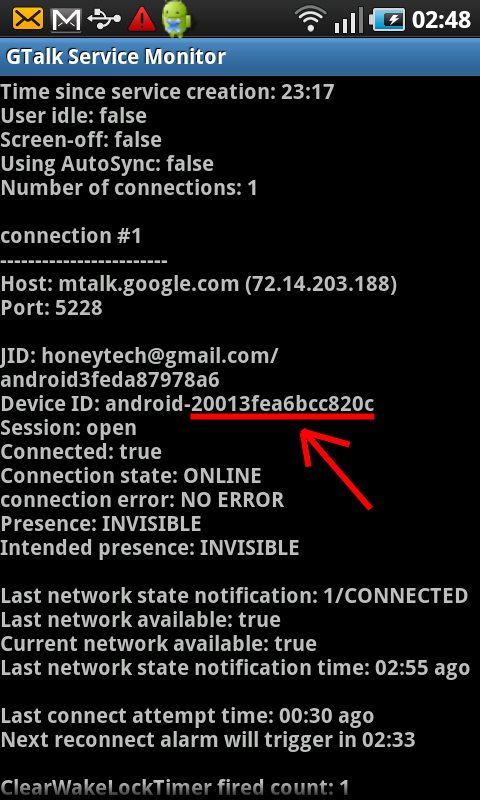
    • *#*#8255#*#* code එකෙන් Device ID එක ගන්න.
    gtalk-service-monitor.png


    මේකට Gmail/Pw/Device ID දීල save කරන්න
    84627284.jpg


    දැන් බාගන්න
    30387236.jpg


    Real APK Leecher

     
    Last edited:
    • Like
    Reactions: RaZor_911