


Nexus 4 and Android Softwares
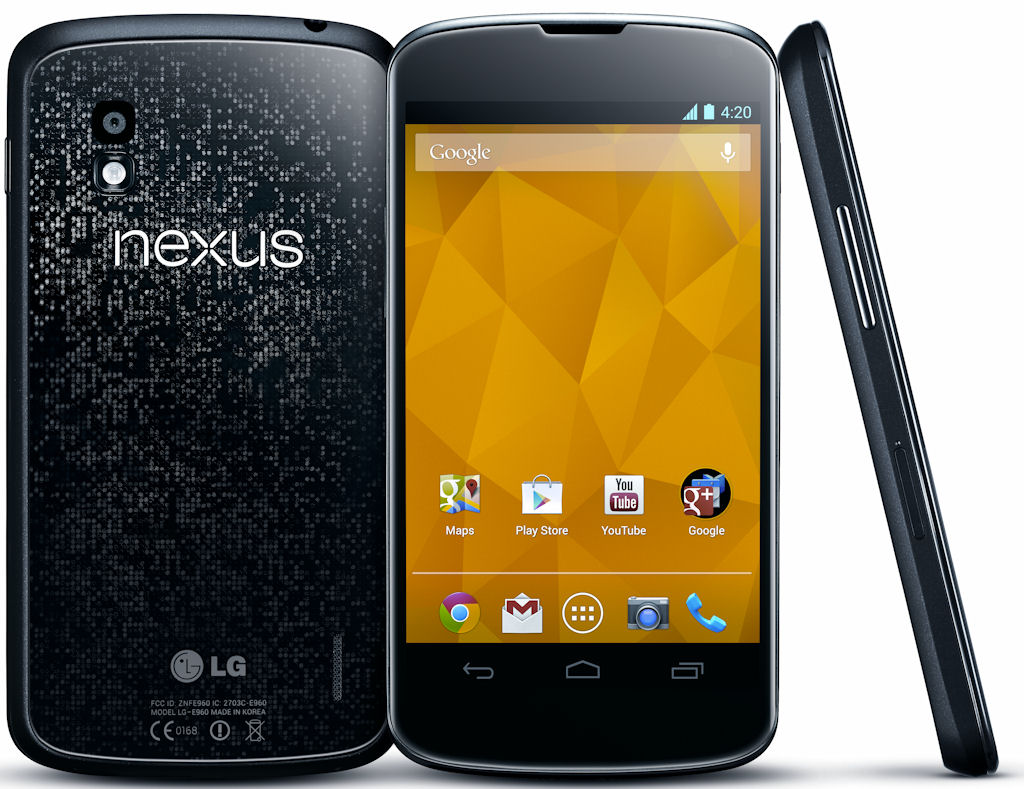
Nexus 4 use කරන කට්ටිය මෙතනට එන්න .Nexus 4 use කරන කට්ටියට nexus 4 එකෙන් කරන්න පුවලන් වැඩ ගොඩක් මම අද පිළිවෙලට කියල දෙන්නම් . මුලින්ම කියන්න ඕනේ අද තම මුලින්ම සිංහල type කරන්න ගත්තේ වැරදි තියෙනවා නම් සමා වන්න .
1. මුලින්ම Nexus 4 root කරන විදිහ
රූට් කිරීමෙන් තියෙන වාසි
*Nexus 4 එකේ display full screen ගන්න
*Touch Buttons වලට Pie Buttons දැමීම
*OTG Cable එකෙන් Usb flash drives, USB keybord mouse සම්බන්ද කරන්න
*Samba Filesharing Enable කරන්න (මේකෙන් phone එක PC එකක් වගේ wireless network එකෙන් acces කරන්න පුළුවන් files copy paste කරන්න )
මේ වැඩ මම ටිකෙන් ටික කරණ විදිහ මෙතන දාන්නම් මේ කරනවා දේවල් අනිත් phones වලටත් කරන්න පුළුවන් එත් root කරලා තියෙන්න ඕනේ
Root කරද්දී warrenty cancel වන බව මතක තියාගන්න. root කරන එක හරියට කලේ නැත්නම් brick වෙන්න පුළුවන් ඒගැන සැලකිලිමත් වන්න.
මෙතනින් root toolkit එක බාගන්න
පහල video එකේ තියෙන විස්තරය අනුව පිළිවෙලට රූට් කරන්න ප්රශ්නයක් තියෙංවනම් මගෙන් අහන්න
2. Black Mart application එකෙන් paid apps free download කරමු
මෙතනින් Blackmart application එක බාගන්න
3. Nexus 4 එකේ display full screen ගන්න
මෙතනින් Hide bar application එක බාගන්න
මේ app එක free google play එකෙන් root කරලා තියෙන්න ඕනේ මේක වැඩ කරන්න . google play එකේ Hide Bar කියල search කරහම එනවා
5. Nexus 4 එකේ Touch Buttons වලට Pie Buttons දැමීම
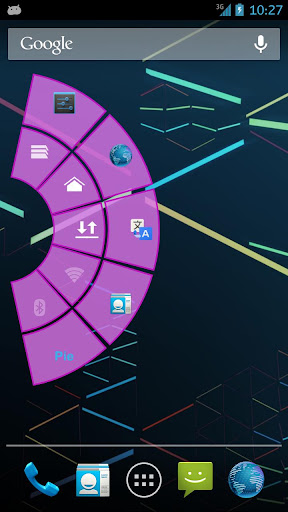
මේ app එක free google play එකෙන් root කරලා තියෙන්න ඕනේ මේක වැඩ කරන්න . google play එකේ Pie control කියල search කරහම එනවා
මෙතනින් Pie control application එක බාගන්න
Pie Control pro version එක download කරන්න පුළුවන් black mart එකේ serach කරන්න Pie control pro කියල
6. OTG Cable එකෙන් Usb flash drives, USB keybord mouse සම්බන්ද කරන්න
ගොඩක් nexus 4 use කරන කට්ටියට ප්රශ්නයක් තමා phone එකේ builting memory මදි වෙන එක . phone එකට flash drive එකක් plug කරන විදිහ මෙතන මම දාන්නම් මේකට nexus 4 වලට විශේෂ cable එකක් ඕනේ මේකට කියන්නේ OTG Y cable කියල මම මේක ebay එකෙන් ගත්තේ . මේකේ විශේෂත්වය මේ cable එකෙන් වෙනම power දෙන්න පුළුවන් . nexus 4 වලට අමතර සමහර phones වලටත් meka ඕන වෙයි .සමහර phones වලට noraml OTG cable එක විටහ්රක් ඇති power අවශ්ය ණෑ Galaxy S 2 එකට අවශ්ය වෙන්නේ නෑ OTG Y cable එක
Deafult nexus 4 rom එකේ තියෙන kernal එකෙන් USB devices access කරන්න බෑ එනිසා එකට custom kernal එකක් flash කරනන් ඕනේ මේකට පහලින් තියෙන link එකෙන් file download කරලා phone එකේ memory එකට copy karala phone එකේ recovery mode එකට ගිහින් install කරන්න
http://fs1.d-h.st/download/00051/CVI/ziddey-otg-r154-06121429.zip
මෙන්න මේ cable එක තම nexus 4 එකට ඕනේ
1Ijw~~60_12.JPG)
Power අවශ්ය නැති phones වලට OTG normal cable එක ගන්න

7. Samba Filesharing Enable කරන විදිහ
මේ filesharing system එක ඕනෑම android phone ekakata දන්නා පුළුවන් හැබැයි එකට root කරලා තියෙන්න ඕනේ .මේකෙදි wifi network එකකට connect වෙලා ඔයාගේ pc එකේ හෝ වෙන android phone එකක files wifi හරහා 1.2Mbps -2Mbps අතර speed එකකින් copy කරගන්න පුළුවන් .Phone to Phone නම් Bluetooth වලට වඩා 5 ගුණයකින් speed.පහල තියෙන link එකෙන් download කරගන්න . android 4.2.1 හෝ 4.2.2 නම් samba jelly bean update version එක blackmart එකෙන් download කරන්න හැබැයි normal samba app එක install කරලා තියෙන්න ඕනේ mulinma
phone to phone copy කරන කොට එක phone එකක් wifi hostpot එකක් විදිහට කරලා එකේම samba enable කලානම් අනිත් phone එකෙන් ඒ network එකට connect වෙලා ES Filemanager වගේ filemanager එකකින් අර phone එකේ files චොප්ය් කරගන්න පුළුවන්

Download
කට්ටිය බම්පියක් දාගෙන යන්න Android Phones Use කරන හැමෝටම මේකෙන් වැඩක් ගන්න පුළුවන්
Thread is updating please wait...................
Nexus 4 use කරන කට්ටිය මෙතනට එන්න .Nexus 4 use කරන කට්ටියට nexus 4 එකෙන් කරන්න පුවලන් වැඩ ගොඩක් මම අද පිළිවෙලට කියල දෙන්නම් . මුලින්ම කියන්න ඕනේ අද තම මුලින්ම සිංහල type කරන්න ගත්තේ වැරදි තියෙනවා නම් සමා වන්න .
1. මුලින්ම Nexus 4 root කරන විදිහ
රූට් කිරීමෙන් තියෙන වාසි
*Nexus 4 එකේ display full screen ගන්න
*Touch Buttons වලට Pie Buttons දැමීම
*OTG Cable එකෙන් Usb flash drives, USB keybord mouse සම්බන්ද කරන්න
*Samba Filesharing Enable කරන්න (මේකෙන් phone එක PC එකක් වගේ wireless network එකෙන් acces කරන්න පුළුවන් files copy paste කරන්න )
මේ වැඩ මම ටිකෙන් ටික කරණ විදිහ මෙතන දාන්නම් මේ කරනවා දේවල් අනිත් phones වලටත් කරන්න පුළුවන් එත් root කරලා තියෙන්න ඕනේ
Root කරද්දී warrenty cancel වන බව මතක තියාගන්න. root කරන එක හරියට කලේ නැත්නම් brick වෙන්න පුළුවන් ඒගැන සැලකිලිමත් වන්න.
මෙතනින් root toolkit එක බාගන්න
පහල video එකේ තියෙන විස්තරය අනුව පිළිවෙලට රූට් කරන්න ප්රශ්නයක් තියෙංවනම් මගෙන් අහන්න
2. Black Mart application එකෙන් paid apps free download කරමු
මෙතනින් Blackmart application එක බාගන්න
3. Nexus 4 එකේ display full screen ගන්න
මෙතනින් Hide bar application එක බාගන්න
මේ app එක free google play එකෙන් root කරලා තියෙන්න ඕනේ මේක වැඩ කරන්න . google play එකේ Hide Bar කියල search කරහම එනවා
5. Nexus 4 එකේ Touch Buttons වලට Pie Buttons දැමීම
මේ app එක free google play එකෙන් root කරලා තියෙන්න ඕනේ මේක වැඩ කරන්න . google play එකේ Pie control කියල search කරහම එනවා
මෙතනින් Pie control application එක බාගන්න
Pie Control pro version එක download කරන්න පුළුවන් black mart එකේ serach කරන්න Pie control pro කියල
6. OTG Cable එකෙන් Usb flash drives, USB keybord mouse සම්බන්ද කරන්න
ගොඩක් nexus 4 use කරන කට්ටියට ප්රශ්නයක් තමා phone එකේ builting memory මදි වෙන එක . phone එකට flash drive එකක් plug කරන විදිහ මෙතන මම දාන්නම් මේකට nexus 4 වලට විශේෂ cable එකක් ඕනේ මේකට කියන්නේ OTG Y cable කියල මම මේක ebay එකෙන් ගත්තේ . මේකේ විශේෂත්වය මේ cable එකෙන් වෙනම power දෙන්න පුළුවන් . nexus 4 වලට අමතර සමහර phones වලටත් meka ඕන වෙයි .සමහර phones වලට noraml OTG cable එක විටහ්රක් ඇති power අවශ්ය ණෑ Galaxy S 2 එකට අවශ්ය වෙන්නේ නෑ OTG Y cable එක
Deafult nexus 4 rom එකේ තියෙන kernal එකෙන් USB devices access කරන්න බෑ එනිසා එකට custom kernal එකක් flash කරනන් ඕනේ මේකට පහලින් තියෙන link එකෙන් file download කරලා phone එකේ memory එකට copy karala phone එකේ recovery mode එකට ගිහින් install කරන්න
http://fs1.d-h.st/download/00051/CVI/ziddey-otg-r154-06121429.zip
මෙන්න මේ cable එක තම nexus 4 එකට ඕනේ
1Ijw~~60_12.JPG)
Power අවශ්ය නැති phones වලට OTG normal cable එක ගන්න

7. Samba Filesharing Enable කරන විදිහ
මේ filesharing system එක ඕනෑම android phone ekakata දන්නා පුළුවන් හැබැයි එකට root කරලා තියෙන්න ඕනේ .මේකෙදි wifi network එකකට connect වෙලා ඔයාගේ pc එකේ හෝ වෙන android phone එකක files wifi හරහා 1.2Mbps -2Mbps අතර speed එකකින් copy කරගන්න පුළුවන් .Phone to Phone නම් Bluetooth වලට වඩා 5 ගුණයකින් speed.පහල තියෙන link එකෙන් download කරගන්න . android 4.2.1 හෝ 4.2.2 නම් samba jelly bean update version එක blackmart එකෙන් download කරන්න හැබැයි normal samba app එක install කරලා තියෙන්න ඕනේ mulinma
phone to phone copy කරන කොට එක phone එකක් wifi hostpot එකක් විදිහට කරලා එකේම samba enable කලානම් අනිත් phone එකෙන් ඒ network එකට connect වෙලා ES Filemanager වගේ filemanager එකකින් අර phone එකේ files චොප්ය් කරගන්න පුළුවන්
Download
කට්ටිය බම්පියක් දාගෙන යන්න Android Phones Use කරන හැමෝටම මේකෙන් වැඩක් ගන්න පුළුවන්
Thread is updating please wait...................
Last edited:


