
uba mahansi wenna epa. porn generate karanna be(lu)Machan, mata meka karana hati kiyala diyan puluwan nam..


uba mahansi wenna epa. porn generate karanna be(lu)Machan, mata meka karana hati kiyala diyan puluwan nam..

Set up a dedicated Finance Manager workflow for me.@isurutmv matath danaganna ona machan.
Thank you machan. I do really appreciate it.Set up a dedicated Finance Manager workflow for me.
Use the Gmail and Google Drive access I have already connected.
Monitor my Gmail for finance-related emails such as:
Extract the important information and maintain a Google Sheet in my Drive with these tabs:
- Bank statements
- Credit card statements
- Subscription invoices
- Payment reminders
- Utility bills
- Other recurring financial documents
For transactions, extract and record:
- Transactions
- Credit Cards
- Subscriptions
- Bills
- Receipts
- Monthly Summary
For credit card statements, extract:
- Date
- Merchant
- Amount
- Currency
- Card or account
- Transaction type
- Expense category
Update the sheet whenever a new statement arrives.
- Card name
- Statement balance
- Minimum payment
- Due date
- Statement period
Before a credit card or important bill is due, remind me through WhatsApp.
When I paste a bank transaction SMS into WhatsApp, read it and automatically add the transaction to the correct sheet.
When I send a receipt photo through WhatsApp, extract:
Save the receipt summary and item-level details in the sheet.
- Merchant/store name
- Date
- Total amount
- Tax if available
- Individual purchased items
- Price of each item
Try to match receipts with existing bank or credit card transactions so the same expense is not recorded twice.
Avoid duplicate entries.
Also maintain a monthly summary showing:
I should be able to ask you questions through WhatsApp such as:
- Total spending
- Spending by category
- Subscription costs
- Credit card balances
- Upcoming payments
- Largest expenses
- Recurring expenses
Use the information from Gmail and the Google Sheet to answer these questions.
- How much did I spend this month?
- What did I spend the most money on?
- How much am I paying for subscriptions?
- What credit card payment is due next?
- How much did I spend on food this month?
- What are my upcoming bills?
Do not ask for or store my online banking username, password, OTP, PIN, or other bank login credentials.
Use only the authorized Gmail, Google Drive, WhatsApp messages, statements, transaction notifications, and receipts I provide.
After setting everything up, send me a short WhatsApp summary explaining:
- What you created
- What you are monitoring
- What sheet you created
- What reminders are active
- What I can ask you through WhatsApp


Your code worked.ගොඩක් අය අහලා තිබ්බා “Muse AI එකෙන් ඇත්තටම වැඩක් ගත්තද?” කියලා
මම නම් හොඳට වැඩ ගත්තා.
දැනට Muse එක use කරලා Mac apps 14ක් වගේ build කරලා publish කරලා තියෙනවා. App එක code කරන එක විතරක් නෙවෙයි, GitHub repo setup, bugs fix කරන එක, features add කරන එක, marketing website හදන එක, Vercel deploy කරන එක, Cloudflare config කරන එක වගේ වැඩත් කරලා තියෙනවා.
දැන් Muse එකට මගේ GitHub + Vercel + Cloudflare access තියෙන නිසා idea එකක් දුන්නම ඒක research කරලා, plan කරලා, code කරලා, test කරලා deploy වෙන තැන දක්වා ගෙනියන්න පුළුවන්.
දැන් තව level එකකට ගිහින් හැම පැය 5කටම AI team එකක් start වෙලා:
• මගේ current apps check කරනවා
• bugs/issues තියෙනවද බලනවා
• competitors සහ market එක research කරනවා
• useful feature එකක් හම්බුණොත් dev team එකක් දාලා implement කරනවා
• හොඳ new product idea එකක් හම්බුණොත් ඒකට වෙනම team එකක් දාලා build කරනවා
• GitHub push / site deploy / testing ටික කරනවා
• අන්තිමට මට WhatsApp report එකක් එවනවා
Useful දෙයක් හම්බුණේ නැත්තම් random හදන්නේ නැහැ, ඒ cycle එක close කරනවා.
මම use කරන්නේ basically research + product planning + development + testing + deployment කරන virtual software team එකක් වගේ.
අලුතින් Muse account එකක් හදාගන්න කෙනෙක් ඉන්නවනම්,මගේ code එක KON7L8 use කරලා බලන්න

methana AI team ekak kiyala mean kale mokakda?ගොඩක් අය අහලා තිබ්බා “Muse AI එකෙන් ඇත්තටම වැඩක් ගත්තද?” කියලා
මම නම් හොඳට වැඩ ගත්තා.
දැනට Muse එක use කරලා Mac apps 14ක් වගේ build කරලා publish කරලා තියෙනවා. App එක code කරන එක විතරක් නෙවෙයි, GitHub repo setup, bugs fix කරන එක, features add කරන එක, marketing website හදන එක, Vercel deploy කරන එක, Cloudflare config කරන එක වගේ වැඩත් කරලා තියෙනවා.
දැන් Muse එකට මගේ GitHub + Vercel + Cloudflare access තියෙන නිසා idea එකක් දුන්නම ඒක research කරලා, plan කරලා, code කරලා, test කරලා deploy වෙන තැන දක්වා ගෙනියන්න පුළුවන්.
දැන් තව level එකකට ගිහින් හැම පැය 5කටම AI team එකක් start වෙලා:
• මගේ current apps check කරනවා
• bugs/issues තියෙනවද බලනවා
• competitors සහ market එක research කරනවා
• useful feature එකක් හම්බුණොත් dev team එකක් දාලා implement කරනවා
• හොඳ new product idea එකක් හම්බුණොත් ඒකට වෙනම team එකක් දාලා build කරනවා
• GitHub push / site deploy / testing ටික කරනවා
• අන්තිමට මට WhatsApp report එකක් එවනවා
Useful දෙයක් හම්බුණේ නැත්තම් random හදන්නේ නැහැ, ඒ cycle එක close කරනවා.
මම use කරන්නේ basically research + product planning + development + testing + deployment කරන virtual software team එකක් වගේ.
අලුතින් Muse account එකක් හදාගන්න කෙනෙක් ඉන්නවනම්,මගේ code එක KON7L8 use කරලා බලන්න

31B tokens kiyanne oyage CODE eka minissu 30 times redeem krlada?mechara video hadalath thama limit athule.
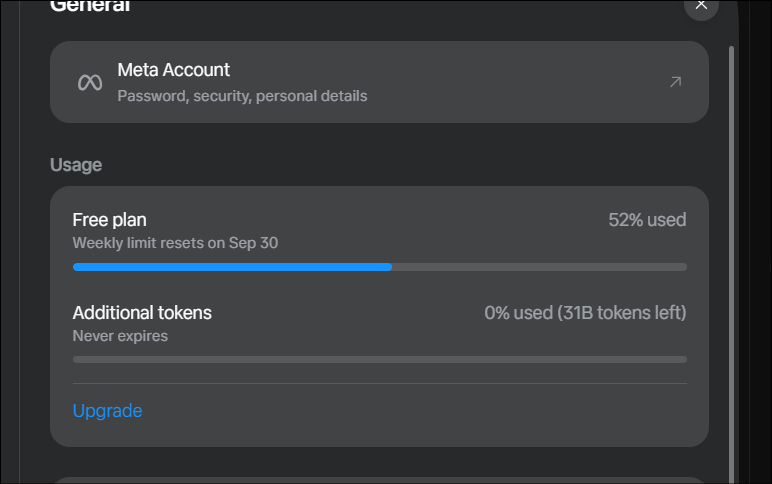
31B tokens kiyanne oyage CODE eka minissu 30 times redeem krlada?

Image generation නම් ලොකුවටම හොඳයි කියලා කියන්න බෑ මචං.
Video generation නම් මට පේන විදිහට හොඳයි. මේ video එකත් Muse එකෙන්ම generate කරපු එකක්.
හැබැයි මම image/video generation side එක ලොකුවට test කරලා බලලා නෑ. මම වැඩිපුර Muse use කරන්නේ coding, app development, research, deployment වගේ වැඩ වලට.

sinhala voice try kare na mcnsinhala voice poddak aul neda, uba try kalada
@isurutmv Whatsapp ekata kohomada connect wenne
USA witharai mcn thama avilable, vpn dala yanna one account eka hadagannaMuse isn’t available in your country or region yet. We’ll let you know when it’s available to you.
View attachment 270481
ඔව් මචං, AI team කියලා මම mean කරේ different sub agentsmethana AI team ekak kiyala mean kale mokakda?
different AI agents?


