


I know that many of you are now using Windows 7. But still there are some people using Windows XP. So if you are fed up with Windows XP and just feel to change it try this out!! 
This is actually not a theme. It is color scheme. We know we have standard blue, olive and silver themes in windows XP.
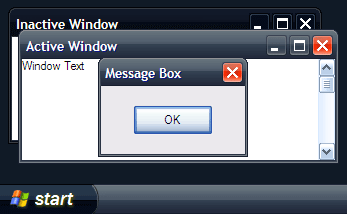
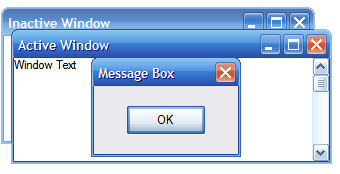
As an alternative to the standard blue, olive and silver themes in windows XP, Microsoft has released an aesthetic black and blue themes respectively named Royale Noir and Royale. The skins are refreshingly different compared to the traditional Windows XP themes named Luna.
Below is a screenshot of the Royale Noir skin:
Below is a screenshot of the blue Royale skin:
Please follow this step carefully:
Just download the theme and extract the .zip into “C:\Windows\Resources\Themes\”, open the folder Royale Noir (“C:\Windows\Resources\Themes\Royale Noir\”) and doubleclick the “luna.msstyles”. Select “Royale” or “Royale Noir” from color scheme.
This works 100% perfectly for me!! Don't worry there is no any virus in this and it just take few seconds to do!
Here are some screen shots i took after done it.


Please add ++rep if you like this post.
This is actually not a theme. It is color scheme. We know we have standard blue, olive and silver themes in windows XP.
As an alternative to the standard blue, olive and silver themes in windows XP, Microsoft has released an aesthetic black and blue themes respectively named Royale Noir and Royale. The skins are refreshingly different compared to the traditional Windows XP themes named Luna.
Below is a screenshot of the Royale Noir skin:
Below is a screenshot of the blue Royale skin:
Please follow this step carefully:
Just download the theme and extract the .zip into “C:\Windows\Resources\Themes\”, open the folder Royale Noir (“C:\Windows\Resources\Themes\Royale Noir\”) and doubleclick the “luna.msstyles”. Select “Royale” or “Royale Noir” from color scheme.
This works 100% perfectly for me!!
Don't worry there is no any virus in this and it just take few seconds to do! Here are some screen shots i took after done it.


Please add ++rep if you like this post.


