۩ ►◄Google Tricks & Hacks►◄ ۩

Google Tricks & Hacks

0002013F.gif
►◄ My 2000[FONT=&quot]th[/FONT] Post ►◄
0002013F.gif


Google Penguin (Tux)


To get the penguin, type in "google linux" in the Google search bar.
Then press "I'm Feeling Lucky."
Google-Penguin-Tux.jpg


------


Backwards Google
Type in "elgoog" in the Google search bar.
Then press "I'm Feeling Lucky."
It should show Google backwards. Whatever you type in on the search bar turns backwards.
Backwards-Google.jpg


-------


Gothic Google
Type in "google gothic" on the Google search bar.
Then press "I'm Feeling Lucky."

FQQEJFZGB4CYRM0.SMALL.jpg


------


Google Loco

Go to the Google homepage and type in "google loco" on the google search bar.
Then press "I'm Feeling Lucky." The words should dance and jiggle constantly.
The search bar changes colors and Google Search and I'm Feeling Lucky have been changed to "Loco Search" and "I'm Feeling Loco."
Google-Loco.jpg


-------


Hacker's Font
Go to the Google homepage and type in "google l33t" in the google search bar.
Then press "I'm Feeling Lucky."
Everything on the page has been change to a font with letters and numbers.

Hackers-Font.jpg


------


Elmer Fudd
To get Elmer Fudd, type in "ewmew fudd" on the Google search bar.
Then press "I'm Feeling Lucky."

Elmer-Fudd.jpg


--------


Devil Google (Beastie)

To get devil Google, type in "google bsd" in the Google search bar.
Then press "I'm feeling lucky."

Devil-Google-Beastie.jpg


------


Xx-klingon

To get xx-klingon, type in "xx-klingon" in the Google search bar.
Then press "I'm Feeling Lucky."

xx-klingon.jpg


-------


Last edited:
Thursday?
Go on google and type in
is it thursday
.
Then click i'm feeling lucky

thursday.jpg


--------------

11.gif
Google Earth Easter Egg: Flight Simulator


Apparently, the latest version of Google Earth has an easter egg: a flight simulator. It's not quite like Microsoft Flight Simulator, but it's a promising start.

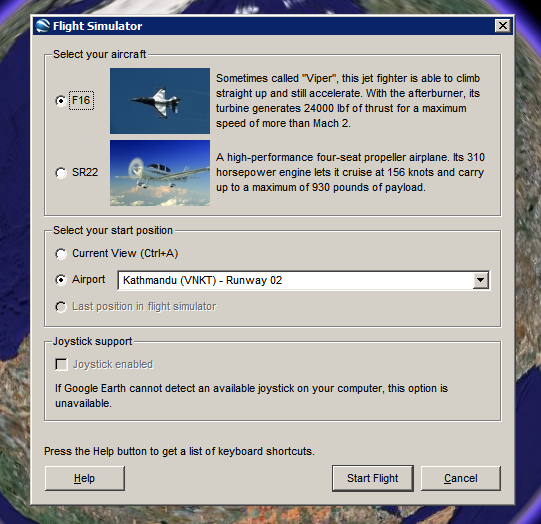
How to see this feature. Make sure you have Google Earth 4.2. Open the application, click on the globe and then press Ctrl+Alt+A. You should see this dialog that lets you choose one of the two aircrafts (F16 "Viper" and SR22) and an airport.

google-earth-flight-simulator.png

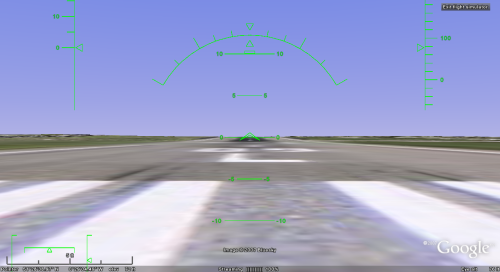
Here's the initial view from London Heathrow Airport:

google-earth-simulator.png

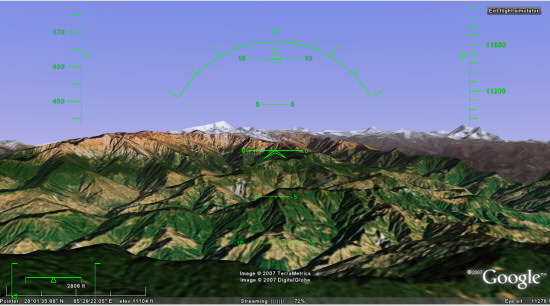
... and here's a nice view from Kathmandu:

google-earth-simulator-2.jpg


To fly, you need to read this list of keyboard shortcuts, but you can also use a mouse or a joystick. "To disable or enable mouse controls, left click (single click on a Mac). Once mouse controls are active, the pointer shape changes to a cross on your screen."

Marco Gallotta, who found this feature, has some tricks: "Moving on though, you can get a quick start by holding Page Up for a few seconds to increase to maximum thrust (thrust meter is the left bar of the lower-left meters). Once you've accelerated to a sufficient velocity use the arrow keys to take-off. The keys are in reverse as one would expect with any flight simulator, so use the down arrow to take-off. When you've gained enough altitude then stabalise the aircraft to a straight flight path. It can be rather tricky to get the hang of as the controls are quite sensitive."

This easter egg could become a standard feature in the next versions of Google Earth and it will bring even more fun to the application.
keyd.jpg

 
Last edited:
Google Trick -1 :- GOOGLE OPERATOR
Type the following highlited words in google search box.

Google has several google operators that can help you find specific information, specific websites or inquire about the indexing of your own site, below you will find the most important ones:

define: - This google operator will find definitions for a certain term or word over the Internet. Very useful when you come across a strange word when writing a post. I use this as a google dictionary. example : (define computer)

info: - The google info operator will list the sets of information that Google has from a specific website (i.e. info:http://hack2007.50webs.com)

site: - This google operator can be used to see the number of indexed pages on your site (i.e.site:www.hack2007.50webs.com). Alternative it can also be used to search for information inside a specific site or class of sites.


link: - This google link operator allows you to find backlinks pointing to your site. Unfortunately the count is not updated frequently and not all backlinks are shown

allinurl: - Using this Google operator will limit the search to results that contain the desired keywords on the URL structure. (i.e. allinurl:dailyblogtips)

fileformat: - Useful Google operator for finding specific file formats. Sometimes you know that the information you are looking for is likely to be contained in a PDF document or on a PowerPoint presentation, for instance. (i.e. “fileformat:.pdf market research” will search for PDF documents that contain the terms “market” and “research”)


Google trick -2 Top 10 Cool Google Search Tricks
well as we have gained enough knowledge regarding google operators, lets have a look at the following 10 cool google search tricks. Click on the example google trick, and You will be redirected to google.


  1. Google trick to search different file formats (keyword filetype:doc)
  2. Google trick to search educational resources (keyword site:.edu) example (computer site:.edu)
  3. Finding the time of any location (time romania)
  4. Finding the weather of any location (boston weather)
  5. Tracking commentary of live events (Olympic games Beijing 2008)
  6. Using Google as a calculator (9 * 10)(143+234)(119-8)
  7. Converting currencies (1 USD in INR)(10 US Dollars in Indian Rupee)
  8. Find how many teaspoons are in a quarter cup (quarter cup in teaspoons)
  9. how many seconds there are in a year (seconds in a year)
  10. Tracking stocks (stocks:MSFT)
  11. Finding faces (add imgtype=face to the URL)​
 
Google trick -3 Top Essential Google Search shortcuts

1: Get Local Weather

Type:
“weather [city name or zip/postal code]”
Example: “weather 500054″ or “weather boston”


2: Check Flight Status


Google automagically pulls flight data from FlightStats.com. All you have to do is enter the flight number.
Type:
[flight name and/or number]
Example:
“bc254″ or “newyork21″


3: Convert Distances


Type: “[value] [first distance unit] to [second distance unit]” Example: “100 kilometers to miles”


4: Find a Phone Number

Find a Person:

Type: “[person’s name], [city or zip/postal code]”
Example:
“john smith, london”

Find a Business/store:


Type: “[business name or type], [city or zip/postal code]” Example: “book store, boston”


Google trick -4 :Google search trick for Rapidshare files search:


1 site:rapidshare.com inurl:users "*"

2 site:rapidshare.de inurl:users "*"

3 site:rapidshare.com inurl:files "*"

4 site:rapidshare.de inurl:files "*"

5 site:rapidshare.com inurl:users (pass|password)

6 site:rapidshare.de inurl:users (pass|password)

Suppose u need some info on ebooks. Then u can try following keyword to see all rapidshare folders having any hacking related thing in it

site:rapidshare.com inurl:users "ebooks"

 
Google Calculator

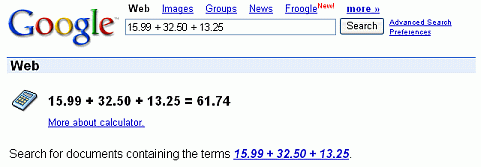
Want to add up a list of numbers, convert from miles to kilometers, or evaluate some other mathematical expression? Instead of using a piece of paper, your calculator, or a computer math software program, you can now solve mathematical problems with Google’s built-in calculator function.
Simply enter the expression you’d like evaluated in Google’s web search box and click the ENTER key or click the Google Search button.
calculator.gif


Basic Arithmetic

Compute expressions containing standard mathematical symbols. The following table lists operators that come between the two numbers on which they operate, e.g., to multiply 2 times 3, use 2 * 3.
basicy.jpg


Advanced Math


Compute results involving mathematical constants, such as e, pi, i (the square root of –1), and mathematical functions. The following table lists just some of the functions built into Google’s calculator.
advancea.jpg
 
  • Like
Reactions: Silver bird

zzjjj89

Banned
Dec 31, 2010
21
0
0
www.bingshop.us

Dear friends, do you want to have some different things? Whether you want to

give your relatives and friends, take a few different exotic gifts? Whether you

want to buy some cheap benefits of thing? So please, let us begin now!

Click on our website


Will bring you different surprise
 

Banks PLK

Well-known member
  • Apr 18, 2010
    3,994
    411
    83
    AUH, CMB , DXB
    තොත්තබබා;9125577 said:
    Thursday?
    Go on google and type in
    is it thursday
    .
    Then click i'm feeling lucky

    thursday.jpg


    --------------

    11.gif
    Google Earth Easter Egg: Flight Simulator


    Apparently, the latest version of Google Earth has an easter egg: a flight simulator. It's not quite like Microsoft Flight Simulator, but it's a promising start.

    How to see this feature. Make sure you have Google Earth 4.2. Open the application, click on the globe and then press Ctrl+Alt+A. You should see this dialog that lets you choose one of the two aircrafts (F16 "Viper" and SR22) and an airport.

    google-earth-flight-simulator.png

    Here's the initial view from London Heathrow Airport:

    google-earth-simulator.png

    ... and here's a nice view from Kathmandu:

    google-earth-simulator-2.jpg


    To fly, you need to read this list of keyboard shortcuts, but you can also use a mouse or a joystick. "To disable or enable mouse controls, left click (single click on a Mac). Once mouse controls are active, the pointer shape changes to a cross on your screen."

    Marco Gallotta, who found this feature, has some tricks: "Moving on though, you can get a quick start by holding Page Up for a few seconds to increase to maximum thrust (thrust meter is the left bar of the lower-left meters). Once you've accelerated to a sufficient velocity use the arrow keys to take-off. The keys are in reverse as one would expect with any flight simulator, so use the down arrow to take-off. When you've gained enough altitude then stabalise the aircraft to a straight flight path. It can be rather tricky to get the hang of as the controls are quite sensitive."

    This easter egg could become a standard feature in the next versions of Google Earth and it will bring even more fun to the application.
    keyd.jpg


    :shocked::shocked::shocked::shocked::shocked::shocked::shocked::shocked::shocked::shocked::shocked::shocked::shocked::shocked::shocked::shocked::shocked::shocked::shocked::shocked::shocked::shocked::shocked::shocked::shocked::shocked::shocked::shocked::shocked::shocked::shocked::shocked::shocked::shocked::shocked::shocked::shocked::shocked::shocked::shocked::shocked::shocked::shocked::shocked::shocked::shocked::shocked::shocked::shocked::shocked::shocked::shocked::shocked::shocked::shocked::shocked::shocked::shocked::shocked::shocked::shocked::shocked::shocked::shocked: