


මොකක්ද මෙ hard disk raid කියන්නේ?
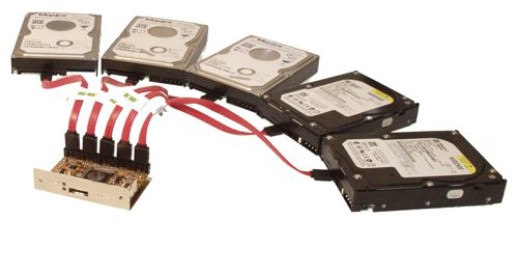
RAID (originally redundant array of inexpensive disks; now commonly redundant array of independent disks)
RAID කියන එකේ දීර්ග තේරුම තමයි Redundant Array Of Inexpensive Disks කියන එක නමුත් දැන් නම් පාවිච්චි වෙන්නේ Redundant Array Of Independent Disks.
ඉතින් මේ RAID කියන වචනේ මුලින්ම පාවිච්චි කරලා තියෙන්නේ 1987 තේ David Patterson, Garth Gibson සහ Randy Katz කියන තුන් දෙනා University of California, Berkeley දී.
ඔන්න ඔය උඩ පින්තුරේ තියෙන්නේ place එක.පොඩ්ඩක් මෙන්න මෙහෙම හිතන්න. දැන් ඔයාලගේ පරිගණකයේ තියෙනවා 500 GB විතර HDD එකක්. ඉතින් ගැටළුවක් නැතුවා අවුරුද්දක් වැඩ කරා කියමුකෝ. ඔන්න හිටි ගමන් එක පාරටම උදේ PC එක on කරද්දී HDD එක වැඩ නැ.
HDD එක ආපහු ප්රයෝජනයක් ගන්න බැරි වෙන්නේ පිච්චිලා නම් දැන් ඉතින් අර ඇතුලේ තිබුන Data ගැන මතක් කර කර අඩන්න තමයි වෙන්නේ. මොකද එව්වා ආපහු ගන්න බැනේ HDD එක වැඩ නැතුව. backup තිබුනා නම් පුළුවන්. නමුත් හුගක් විට ඔයාලා ගාව backup නැති වෙන්න පුළුවන්. ඔන්න ඔතනදි තමයි RAID උදවු වෙන්නේ. ඔයා ඔයාගේ PC එකට අඩුම තරමින් RAID Level 1 එකක්වත් දාලා තිබුනානම් එක HDD එකක් පිච්චුනා කියලා ඔයාගේ Data වලින් පොඩ්ඩක්වත් loss වෙන්නේ නැ. මොකද RAID Level 1 වලදී ඒ වගේම clone එකක් වදිනවා තවත් HDD Disk එකක.
හැබැයි ඔයාට 500 GB RAID 1 එකක් දාන්න ඕනිනම් 500 GB HDD Disk දෙකක් ඕනි වෙනවා. සල්ලි දීලා HDD ගත්තොත් පස්සේ පසු තැවිලි වෙන්න ඕනි නැ.
දැන් ඔයාලට හිතෙන්න පුළුවන් RAID එකක් තිබුනත් එකයි backup එකක් තිබුනත් එකයිනේ කියලා. ඇයි දැන් මම විස්තර කරපු විදියට ක්රම දෙකෙන්ම වෙන්නේ Data loss නොවී තියෙන එකනේ. හැබැයි backup එකක් තිබුනොත් ඔයාට එක restore කරන්න වෙනවා. එකට යම් කිසි වෙලාවක් ගත වෙනවා වගේම එක ටිකක් කරදර වැඩක්. අනිත් පැත්තෙන් බලනකොට server එකක් වගේ නම් ටිකක් හිතන්න client ලා 2000 ක් 3000 ක් ඉන්න shared server එකක් වගේ කියලා.
දැන් හදිස්සියකවත් HDD එකක් ගියොත් සේරම හබක්. backup එක restore වෙනකොට සැලකිය යුතු කාලයක් යනවනේ. ඉතින් අන්න ඒ වගේ වෙලාවල් වලදී තමයි backup සහ RAID කියන දෙක එකිනෙකට වෙනස් වෙන්නේ.
අඩුම තරමේ RAID 1 එකක්වත් තිබුනා නම් අර වගේ HDD එකක් fail උනාට server එක වැඩ කරනවා සහ data තියෙනවා. ඔයාට ආපැහු fail උන HDD එකට අලුත් එකක් replace කරලා RAID එක දාන්න විතරයි තියෙන්නේ. ඊටත් අමතරව ලොකු speed වැඩි වීමක් තියෙනවා RAID එකකදී. ඒ විස්තර පස්සේ දාන්නම් හෙමිහිට. හරි එහෙනම් ආපහු එන්නම් දිගටම RAID ගැන විස්තර අරගෙන.
(උපුටා ගැනීමකි)
මෙන්න මේ video එකත් බලලම යන්න එහෙනම්.
Standard level
A number of standard schemes have evolved. These are called levels. Originally, there were five RAID levels, but many variations have evolved—notably several nested levels and many non-standard levels (mostly proprietary). RAID levels and their associated data formats are standardized by the Storage Networking Industry Association (SNIA) in the Common RAID Disk Drive Format (DDF) standard:
RAID 0
RAID 0 consists of striping, without mirroring or parity. The capacity of a RAID 0 volume is the sum of the capacities of the disks in the set, the same as with a spanned volume. There is no added redundancy for handling disk failures, just as with a spanned volume. Thus, failure of one disk causes the loss of the entire RAID 0 volume, with reduced possibilities of data recovery when compared to a broken spanned volume. Striping distributes the contents of files roughly equally among all disks in the set, which makes concurrent read or write operations on the multiple disks almost inevitable. The concurrent operations make the throughput of most read and write operations equal to the throughput of one disk multiplied by the number of disks. Increased throughput is the big benefit of RAID 0 versus spanned volume.
RAID 1
RAID 1 consists of mirroring, without parity or striping. Data is written identically to two (or more) drives, thereby producing a "mirrored set". Thus, any read request can be serviced by any drive in the set. If a request is broadcast to every drive in the set, it can be serviced by the drive that accesses the data first (depending on its seek time and rotational latency), improving performance. Sustained read throughput, if the controller or software is optimized for it, approaches the sum of throughputs of every drive in the set, just as for RAID 0. Actual read throughput of most RAID 1 implementations is slower than the fastest drive. Write throughput is always slower because every drive must be updated, and the slowest drive limits the write performance. The array continues to operate as long as at least one drive is functioning.
RAID 2
RAID 2 consists of bit-level striping with dedicated Hamming-code parity. All disk spindle rotation is synchronized and data is striped such that each sequential bit is on a different drive. Hamming-code parity is calculated across corresponding bits and stored on at least one parity drive. This level is of historical significance only; although it was used on some early machines (for example, the Thinking Machines CM-2), as of 2014 it is not used by any of the commercially available systems.
RAID 3
RAID 3 consists of byte-level striping with dedicated parity. All disk spindle rotation is synchronized and data is striped such that each sequential byte is on a different drive. Parity is calculated across corresponding bytes and stored on a dedicated parity drive.Although implementations exist,RAID 3 is not commonly used in practice.
RAID 4
RAID 4 consists of block-level striping with dedicated parity. This level was previously used by NetApp, but has now been largely replaced by a proprietary implementation of RAID 4 with two parity disks, called RAID-DP.
RAID 5
RAID 5 consists of block-level striping with distributed parity. Unlike in RAID 4, parity information is distributed among the drives. It requires that all drives but one be present to operate. Upon failure of a single drive, subsequent reads can be calculated from the distributed parity such that no data is lost. RAID 5 requires at least three disks. RAID 5 is seriously affected by the general trends regarding array rebuild time and chance of failure during rebuild. In August 2012, Dell posted an advisory against the use of RAID 5 in any configuration and of RAID 50 with "Class 2 7200 RPM drives of 1 TB and higher capacity" for business-critical data.
RAID 6
RAID 6 consists of block-level striping with double distributed parity. Double parity provides fault tolerance up to two failed drives. This makes larger RAID groups more practical, especially for high-availability systems, as large-capacity drives take longer to restore. As with RAID 5, a single drive failure results in reduced performance of the entire array until the failed drive has been replaced. With a RAID 6 array, using drives from multiple sources and manufacturers, it is possible to mitigate most of the problems associated with RAID 5. The larger the drive capacities and the larger the array size, the more important it becomes to choose RAID 6 instead of RAID 5. RAID 10 also minimizes these problems.
RAID (originally redundant array of inexpensive disks; now commonly redundant array of independent disks)
RAID කියන එකේ දීර්ග තේරුම තමයි Redundant Array Of Inexpensive Disks කියන එක නමුත් දැන් නම් පාවිච්චි වෙන්නේ Redundant Array Of Independent Disks.
ඉතින් මේ RAID කියන වචනේ මුලින්ම පාවිච්චි කරලා තියෙන්නේ 1987 තේ David Patterson, Garth Gibson සහ Randy Katz කියන තුන් දෙනා University of California, Berkeley දී.
ඔන්න ඔය උඩ පින්තුරේ තියෙන්නේ place එක.පොඩ්ඩක් මෙන්න මෙහෙම හිතන්න. දැන් ඔයාලගේ පරිගණකයේ තියෙනවා 500 GB විතර HDD එකක්. ඉතින් ගැටළුවක් නැතුවා අවුරුද්දක් වැඩ කරා කියමුකෝ. ඔන්න හිටි ගමන් එක පාරටම උදේ PC එක on කරද්දී HDD එක වැඩ නැ.
HDD එක ආපහු ප්රයෝජනයක් ගන්න බැරි වෙන්නේ පිච්චිලා නම් දැන් ඉතින් අර ඇතුලේ තිබුන Data ගැන මතක් කර කර අඩන්න තමයි වෙන්නේ. මොකද එව්වා ආපහු ගන්න බැනේ HDD එක වැඩ නැතුව. backup තිබුනා නම් පුළුවන්. නමුත් හුගක් විට ඔයාලා ගාව backup නැති වෙන්න පුළුවන්. ඔන්න ඔතනදි තමයි RAID උදවු වෙන්නේ. ඔයා ඔයාගේ PC එකට අඩුම තරමින් RAID Level 1 එකක්වත් දාලා තිබුනානම් එක HDD එකක් පිච්චුනා කියලා ඔයාගේ Data වලින් පොඩ්ඩක්වත් loss වෙන්නේ නැ. මොකද RAID Level 1 වලදී ඒ වගේම clone එකක් වදිනවා තවත් HDD Disk එකක.
හැබැයි ඔයාට 500 GB RAID 1 එකක් දාන්න ඕනිනම් 500 GB HDD Disk දෙකක් ඕනි වෙනවා. සල්ලි දීලා HDD ගත්තොත් පස්සේ පසු තැවිලි වෙන්න ඕනි නැ.
දැන් ඔයාලට හිතෙන්න පුළුවන් RAID එකක් තිබුනත් එකයි backup එකක් තිබුනත් එකයිනේ කියලා. ඇයි දැන් මම විස්තර කරපු විදියට ක්රම දෙකෙන්ම වෙන්නේ Data loss නොවී තියෙන එකනේ. හැබැයි backup එකක් තිබුනොත් ඔයාට එක restore කරන්න වෙනවා. එකට යම් කිසි වෙලාවක් ගත වෙනවා වගේම එක ටිකක් කරදර වැඩක්. අනිත් පැත්තෙන් බලනකොට server එකක් වගේ නම් ටිකක් හිතන්න client ලා 2000 ක් 3000 ක් ඉන්න shared server එකක් වගේ කියලා.
දැන් හදිස්සියකවත් HDD එකක් ගියොත් සේරම හබක්. backup එක restore වෙනකොට සැලකිය යුතු කාලයක් යනවනේ. ඉතින් අන්න ඒ වගේ වෙලාවල් වලදී තමයි backup සහ RAID කියන දෙක එකිනෙකට වෙනස් වෙන්නේ.
අඩුම තරමේ RAID 1 එකක්වත් තිබුනා නම් අර වගේ HDD එකක් fail උනාට server එක වැඩ කරනවා සහ data තියෙනවා. ඔයාට ආපැහු fail උන HDD එකට අලුත් එකක් replace කරලා RAID එක දාන්න විතරයි තියෙන්නේ. ඊටත් අමතරව ලොකු speed වැඩි වීමක් තියෙනවා RAID එකකදී. ඒ විස්තර පස්සේ දාන්නම් හෙමිහිට. හරි එහෙනම් ආපහු එන්නම් දිගටම RAID ගැන විස්තර අරගෙන.
(උපුටා ගැනීමකි)
මෙන්න මේ video එකත් බලලම යන්න එහෙනම්.
Standard level
A number of standard schemes have evolved. These are called levels. Originally, there were five RAID levels, but many variations have evolved—notably several nested levels and many non-standard levels (mostly proprietary). RAID levels and their associated data formats are standardized by the Storage Networking Industry Association (SNIA) in the Common RAID Disk Drive Format (DDF) standard:
RAID 0
RAID 0 consists of striping, without mirroring or parity. The capacity of a RAID 0 volume is the sum of the capacities of the disks in the set, the same as with a spanned volume. There is no added redundancy for handling disk failures, just as with a spanned volume. Thus, failure of one disk causes the loss of the entire RAID 0 volume, with reduced possibilities of data recovery when compared to a broken spanned volume. Striping distributes the contents of files roughly equally among all disks in the set, which makes concurrent read or write operations on the multiple disks almost inevitable. The concurrent operations make the throughput of most read and write operations equal to the throughput of one disk multiplied by the number of disks. Increased throughput is the big benefit of RAID 0 versus spanned volume.
RAID 1
RAID 1 consists of mirroring, without parity or striping. Data is written identically to two (or more) drives, thereby producing a "mirrored set". Thus, any read request can be serviced by any drive in the set. If a request is broadcast to every drive in the set, it can be serviced by the drive that accesses the data first (depending on its seek time and rotational latency), improving performance. Sustained read throughput, if the controller or software is optimized for it, approaches the sum of throughputs of every drive in the set, just as for RAID 0. Actual read throughput of most RAID 1 implementations is slower than the fastest drive. Write throughput is always slower because every drive must be updated, and the slowest drive limits the write performance. The array continues to operate as long as at least one drive is functioning.
RAID 2
RAID 2 consists of bit-level striping with dedicated Hamming-code parity. All disk spindle rotation is synchronized and data is striped such that each sequential bit is on a different drive. Hamming-code parity is calculated across corresponding bits and stored on at least one parity drive. This level is of historical significance only; although it was used on some early machines (for example, the Thinking Machines CM-2), as of 2014 it is not used by any of the commercially available systems.
RAID 3
RAID 3 consists of byte-level striping with dedicated parity. All disk spindle rotation is synchronized and data is striped such that each sequential byte is on a different drive. Parity is calculated across corresponding bytes and stored on a dedicated parity drive.Although implementations exist,RAID 3 is not commonly used in practice.
RAID 4
RAID 4 consists of block-level striping with dedicated parity. This level was previously used by NetApp, but has now been largely replaced by a proprietary implementation of RAID 4 with two parity disks, called RAID-DP.
RAID 5
RAID 5 consists of block-level striping with distributed parity. Unlike in RAID 4, parity information is distributed among the drives. It requires that all drives but one be present to operate. Upon failure of a single drive, subsequent reads can be calculated from the distributed parity such that no data is lost. RAID 5 requires at least three disks. RAID 5 is seriously affected by the general trends regarding array rebuild time and chance of failure during rebuild. In August 2012, Dell posted an advisory against the use of RAID 5 in any configuration and of RAID 50 with "Class 2 7200 RPM drives of 1 TB and higher capacity" for business-critical data.
RAID 6
RAID 6 consists of block-level striping with double distributed parity. Double parity provides fault tolerance up to two failed drives. This makes larger RAID groups more practical, especially for high-availability systems, as large-capacity drives take longer to restore. As with RAID 5, a single drive failure results in reduced performance of the entire array until the failed drive has been replaced. With a RAID 6 array, using drives from multiple sources and manufacturers, it is possible to mitigate most of the problems associated with RAID 5. The larger the drive capacities and the larger the array size, the more important it becomes to choose RAID 6 instead of RAID 5. RAID 10 also minimizes these problems.
Last edited:


