
Latest ads
-
 Google Pixel 9 Pro
- vgp
- Updated:
-
Jobreceive.com for sale
- Blogerwiki
- Updated:
-
 Post Your Vehicle for Sale — FREE! - https://libro.lk
- Kalu_Puth
- Updated:
-
 ඔයාගෙ Assignment හෝ Thesis එක හරියට හදාගමු
- ErMurazor
- Updated:
-
BlackWall V2ray servers
- hu KANNA
- Updated:
You are using an out of date browser. It may not display this or other websites correctly.
You should upgrade or use an alternative browser.
You should upgrade or use an alternative browser.


matath okanam dena ganna one,
mama nam digatama plug karala thiyenne bn
මමත් දැනට එහෙම තමයි කරන්නෙ මචං...


මේ ගැන මටත් ප්රශ්නයක් තියෙනවා. සමහරු කියනවා දිගටම ප්ලග් කරලා තියන්න කියලා. තවත් සමහරු කියනවා බැටරියෙන් පාවිච්චි කරලා බහිනකොට ආපහු චාජ් කරන්න කියලා......

battery plug karannatuwa battery ekenma use kaloth capacity eka adu wenawa nedanot sure bro .... hariytama math danne
thanx machanla


කෝරලේමහත්තයා;12832765 said:බටරිය අනිවර්යයන් පවිචීකල යුතුයි නෙත්නම් බටරිය අබසරණං...
බම්ප් මටත් දැනගන්න ඕනේ
samanyen machnla digatama charge ekata gahala tiyanna epa.eka battery ekata honda ne.eke kalaya adu wenawa.puluwan taram try karanna battery low aawama charge karanna. harine den.okama thamay mobile 4n walatath karanna oone.
thanx macha...

Having a battery fully charged and the laptop plugged in is not harmful, because as soon as the charge level reaches 100% the battery stops receiving charging energy and this energy is bypassed directly to the power supply system of the laptop.
However there's a disadvantage in keeping the battery in its socket when the laptop is plugged in, but only if it's currently suffering from excessive heating caused by the laptop hardware.

So:
- In a normal usage, if the laptop doesn't get too hot (CPU and Hard Disk around 40ºC to 50ºC) the battery should remain in the laptop socket;
- In an intensive usage which leads to a large amount of heat produced (i.e. Games, temperatures above 60ºC) the battery should be removed from the socket in order to prevent unwanted heating.
The heat, among the fact that it has 100% of charge, is the great enemy of the lithium battery and not the plug, as many might think so.
Battery discharges
Full battery discharges (until laptop power shutdown, 0%) should be avoided, because this stresses the battery a lot and can even damage it. It's recommended to perform partial discharges to capacity levels of 20~30% and frequent charges, instead of performing a full discharging followed by a full charging.
Laptop batteries contain a capacity gauge that allows us to know the exact amount of energy stored. However, due to the charging/ discharging cycles, this sensor tends to be inaccurate overtime.

Some laptops include in their BIOS, tools to recalibrate this battery gauge, which is nothing more than a full discharge followed by a full charge.
So to calibrate the gauge, it should be performed, in every 30 discharge cycles, a full discharge non-stop , followed by a also, non-stop, full charge.
An inaccurate gauge can lead to the fact that the the battery capacity values are are wrong. The battery may report that it still has 10% of capacity when in fact it has a much lower value, and this causes the computer to shutdown unexpectedly.
gráfico 3Discharge (or charge) cycles consist of using all that battery charge (100%) but not necessarily all at once.

For example, you can use the laptop for some minutes in a day, using half its capacity e then fully charge it. If you did the same thing in the next day, it would be counted a discharge cycle and not two, so it may take several days until a full discharge cycle is completed.
How to perform a calibration (full discharge)?
The most adequate method to do a full discharge (100% to a minimum of 3%) consists of the following procedure:
1. Fully charge the battery to its maximum capacity (100%);
2. Let the battery "rest" fully charged for 2 hours or more in order to cool down from the charging process. You may use the computer normally within this period;
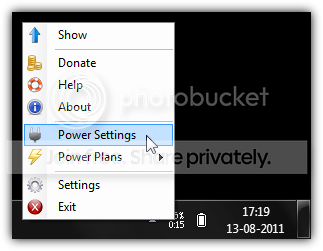
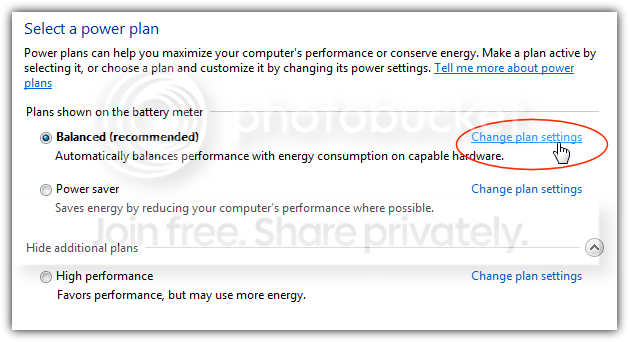
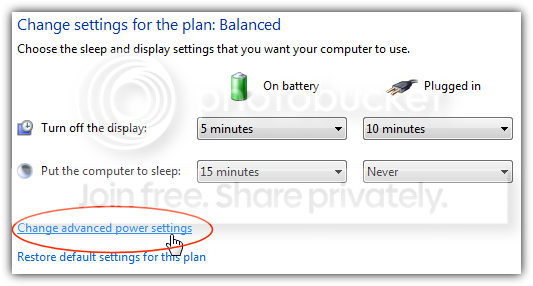
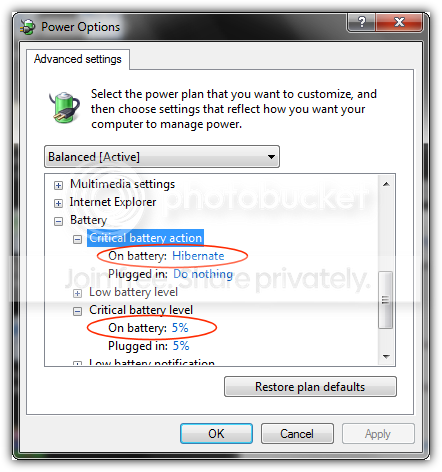
3. Unplug the power cord and set the computer to hibernate automatically at the minimum percentage possible as described by the image sequence below (click images to enlarge);

4. Leave the computer discharging, non-stop, until it hibernates itself. You may use the computer normally within this period;
5. When the computer shuts down completely, let it stay in the hibernation state for 5 hours or even more;
6. Plug the computer to the A/C power to perform a full charge non-stop until its maximum capacity (100%). You may use the computer normally within this period.
After the calibration process, the reported wear level is usually higher than before. This is natural, since it now reports the true current capacity that the battery has to hold charge. Lithium Ion batteries have a limit amount of discharge cycles (generally 200 to 300 cycles) and they will retain less capacity over time.
Many people tend to think "If calibrating gives higher wear level, then it's a bad thing". This is wrong, because like said, the calibration is meant to have your battery report the true capacity it can hold, and it's meant to avoid surprises like, for example, being in the middle of a presentation and suddenly the computer shuts down at 30% of charge.
Prolonged storage
To store a battery for long periods of time, its charge capacity should be around 40% and it should be stored in a place as fresh and dry as possible. A fridge can be used (0ºC - 10ºC), but only if the battery stays isolated from any humidity.
One must say again that the battery's worst enemy is the heat, so leaving the laptop in the car in a hot summer day is half way to kill the battery.
Purchasing a replacement battery
If you intend to purchase another battery, it's recommended that you do it only when the current battery is very degraded. If it's not the case, the non usage of a battery leads to its degradation.
If a spare battery is purchased and won't be used for a long time, the above storage method should be used.
Besides that, when purchasing a battery you must pay attention to the manufacturing date.
Advantages in using Battery Care
Battery Care allows you to have the control over the discharge cycles number, and when this reaches 30 (or other configured value), it notifies you that it's time to perform a full discharge in order to keep the battery gauge calibrated.
Like this, it's guaranteed to always have the correct capacity values reported by the battery.
Besides, when using the battery, there's the possibility to suspend some Operating System features that help degrading the autonomy (only in Windows Vista or higher):
- Windows Aero, the theme that allows for visual effects like window transparency, requires graphics card acceleration, which obviously will help decreasing the battery lifetime;
- SuperFetch, ReadyBoost and SearchIndexer are three Windows Vista (and higher) services that, even in battery mode, are using the hard disk a lot and increase total power consumption, thus decreasing battery lifetime. Suspending these services has absolutely no negative impact on the performance or security of the system.
These features are resumed once the laptop is plugged in to A/C power.
However there's a disadvantage in keeping the battery in its socket when the laptop is plugged in, but only if it's currently suffering from excessive heating caused by the laptop hardware.

So:
- In a normal usage, if the laptop doesn't get too hot (CPU and Hard Disk around 40ºC to 50ºC) the battery should remain in the laptop socket;
- In an intensive usage which leads to a large amount of heat produced (i.e. Games, temperatures above 60ºC) the battery should be removed from the socket in order to prevent unwanted heating.
The heat, among the fact that it has 100% of charge, is the great enemy of the lithium battery and not the plug, as many might think so.
Battery discharges
Full battery discharges (until laptop power shutdown, 0%) should be avoided, because this stresses the battery a lot and can even damage it. It's recommended to perform partial discharges to capacity levels of 20~30% and frequent charges, instead of performing a full discharging followed by a full charging.
Laptop batteries contain a capacity gauge that allows us to know the exact amount of energy stored. However, due to the charging/ discharging cycles, this sensor tends to be inaccurate overtime.
Some laptops include in their BIOS, tools to recalibrate this battery gauge, which is nothing more than a full discharge followed by a full charge.
So to calibrate the gauge, it should be performed, in every 30 discharge cycles, a full discharge non-stop , followed by a also, non-stop, full charge.
An inaccurate gauge can lead to the fact that the the battery capacity values are are wrong. The battery may report that it still has 10% of capacity when in fact it has a much lower value, and this causes the computer to shutdown unexpectedly.
gráfico 3Discharge (or charge) cycles consist of using all that battery charge (100%) but not necessarily all at once.
For example, you can use the laptop for some minutes in a day, using half its capacity e then fully charge it. If you did the same thing in the next day, it would be counted a discharge cycle and not two, so it may take several days until a full discharge cycle is completed.
How to perform a calibration (full discharge)?
The most adequate method to do a full discharge (100% to a minimum of 3%) consists of the following procedure:
1. Fully charge the battery to its maximum capacity (100%);
2. Let the battery "rest" fully charged for 2 hours or more in order to cool down from the charging process. You may use the computer normally within this period;
3. Unplug the power cord and set the computer to hibernate automatically at the minimum percentage possible as described by the image sequence below (click images to enlarge);
4. Leave the computer discharging, non-stop, until it hibernates itself. You may use the computer normally within this period;
5. When the computer shuts down completely, let it stay in the hibernation state for 5 hours or even more;
6. Plug the computer to the A/C power to perform a full charge non-stop until its maximum capacity (100%). You may use the computer normally within this period.
After the calibration process, the reported wear level is usually higher than before. This is natural, since it now reports the true current capacity that the battery has to hold charge. Lithium Ion batteries have a limit amount of discharge cycles (generally 200 to 300 cycles) and they will retain less capacity over time.
Many people tend to think "If calibrating gives higher wear level, then it's a bad thing". This is wrong, because like said, the calibration is meant to have your battery report the true capacity it can hold, and it's meant to avoid surprises like, for example, being in the middle of a presentation and suddenly the computer shuts down at 30% of charge.
Prolonged storage
To store a battery for long periods of time, its charge capacity should be around 40% and it should be stored in a place as fresh and dry as possible. A fridge can be used (0ºC - 10ºC), but only if the battery stays isolated from any humidity.
One must say again that the battery's worst enemy is the heat, so leaving the laptop in the car in a hot summer day is half way to kill the battery.
Purchasing a replacement battery
If you intend to purchase another battery, it's recommended that you do it only when the current battery is very degraded. If it's not the case, the non usage of a battery leads to its degradation.
If a spare battery is purchased and won't be used for a long time, the above storage method should be used.
Besides that, when purchasing a battery you must pay attention to the manufacturing date.
Advantages in using Battery Care
Battery Care allows you to have the control over the discharge cycles number, and when this reaches 30 (or other configured value), it notifies you that it's time to perform a full discharge in order to keep the battery gauge calibrated.
Like this, it's guaranteed to always have the correct capacity values reported by the battery.
Besides, when using the battery, there's the possibility to suspend some Operating System features that help degrading the autonomy (only in Windows Vista or higher):
- Windows Aero, the theme that allows for visual effects like window transparency, requires graphics card acceleration, which obviously will help decreasing the battery lifetime;
- SuperFetch, ReadyBoost and SearchIndexer are three Windows Vista (and higher) services that, even in battery mode, are using the hard disk a lot and increase total power consumption, thus decreasing battery lifetime. Suspending these services has absolutely no negative impact on the performance or security of the system.
These features are resumed once the laptop is plugged in to A/C power.
Having a battery fully charged and the laptop plugged in is not harmful, because as soon as the charge level reaches 100% the battery stops receiving charging energy and this energy is bypassed directly to the power supply system of the laptop.
However there's a disadvantage in keeping the battery in its socket when the laptop is plugged in, but only if it's currently suffering from excessive heating caused by the laptop hardware.
So:
- In a normal usage, if the laptop doesn't get too hot (CPU and Hard Disk around 40ºC to 50ºC) the battery should remain in the laptop socket;
- In an intensive usage which leads to a large amount of heat produced (i.e. Games, temperatures above 60ºC) the battery should be removed from the socket in order to prevent unwanted heating.
The heat, among the fact that it has 100% of charge, is the great enemy of the lithium battery and not the plug, as many might think so.
Battery discharges
Full battery discharges (until laptop power shutdown, 0%) should be avoided, because this stresses the battery a lot and can even damage it. It's recommended to perform partial discharges to capacity levels of 20~30% and frequent charges, instead of performing a full discharging followed by a full charging.
Laptop batteries contain a capacity gauge that allows us to know the exact amount of energy stored. However, due to the charging/ discharging cycles, this sensor tends to be inaccurate overtime.
Some laptops include in their BIOS, tools to recalibrate this battery gauge, which is nothing more than a full discharge followed by a full charge.
So to calibrate the gauge, it should be performed, in every 30 discharge cycles, a full discharge non-stop , followed by a also, non-stop, full charge.
An inaccurate gauge can lead to the fact that the the battery capacity values are are wrong. The battery may report that it still has 10% of capacity when in fact it has a much lower value, and this causes the computer to shutdown unexpectedly.
gráfico 3Discharge (or charge) cycles consist of using all that battery charge (100%) but not necessarily all at once.
For example, you can use the laptop for some minutes in a day, using half its capacity e then fully charge it. If you did the same thing in the next day, it would be counted a discharge cycle and not two, so it may take several days until a full discharge cycle is completed.
How to perform a calibration (full discharge)?
The most adequate method to do a full discharge (100% to a minimum of 3%) consists of the following procedure:
1. Fully charge the battery to its maximum capacity (100%);
2. Let the battery "rest" fully charged for 2 hours or more in order to cool down from the charging process. You may use the computer normally within this period;
3. Unplug the power cord and set the computer to hibernate automatically at the minimum percentage possible as described by the image sequence below (click images to enlarge);
4. Leave the computer discharging, non-stop, until it hibernates itself. You may use the computer normally within this period;
5. When the computer shuts down completely, let it stay in the hibernation state for 5 hours or even more;
6. Plug the computer to the A/C power to perform a full charge non-stop until its maximum capacity (100%). You may use the computer normally within this period.
After the calibration process, the reported wear level is usually higher than before. This is natural, since it now reports the true current capacity that the battery has to hold charge. Lithium Ion batteries have a limit amount of discharge cycles (generally 200 to 300 cycles) and they will retain less capacity over time.
Many people tend to think "If calibrating gives higher wear level, then it's a bad thing". This is wrong, because like said, the calibration is meant to have your battery report the true capacity it can hold, and it's meant to avoid surprises like, for example, being in the middle of a presentation and suddenly the computer shuts down at 30% of charge.
Prolonged storage
To store a battery for long periods of time, its charge capacity should be around 40% and it should be stored in a place as fresh and dry as possible. A fridge can be used (0ºC - 10ºC), but only if the battery stays isolated from any humidity.
One must say again that the battery's worst enemy is the heat, so leaving the laptop in the car in a hot summer day is half way to kill the battery.
Purchasing a replacement battery
If you intend to purchase another battery, it's recommended that you do it only when the current battery is very degraded. If it's not the case, the non usage of a battery leads to its degradation.
If a spare battery is purchased and won't be used for a long time, the above storage method should be used.
Besides that, when purchasing a battery you must pay attention to the manufacturing date.
Advantages in using Battery Care
Battery Care allows you to have the control over the discharge cycles number, and when this reaches 30 (or other configured value), it notifies you that it's time to perform a full discharge in order to keep the battery gauge calibrated.
Like this, it's guaranteed to always have the correct capacity values reported by the battery.
Besides, when using the battery, there's the possibility to suspend some Operating System features that help degrading the autonomy (only in Windows Vista or higher):
- Windows Aero, the theme that allows for visual effects like window transparency, requires graphics card acceleration, which obviously will help decreasing the battery lifetime;
- SuperFetch, ReadyBoost and SearchIndexer are three Windows Vista (and higher) services that, even in battery mode, are using the hard disk a lot and increase total power consumption, thus decreasing battery lifetime. Suspending these services has absolutely no negative impact on the performance or security of the system.
These features are resumed once the laptop is plugged in to A/C power.
fatta machan thanx....


මචන්zලා මම දන්න විඩිහට කියන්නම්... ප්ලග් කරන් වැඩ කරාට නෝ අවුල්.. එත් ඉන්දලා හිටලා බැටරියෙන්ම වැඩ කරපන්zලා 10% වෙනකම්.. ඊට පස්සෙ ආයෙත් ප්ලග් කරලා වැඩ කරපන්zලා. මම නම් එහෙමයි තාම බැටරි ගින්දර වගේ
RePost බුවා;12833343 said:ane manda ban...... math hariyatama dan ne
mata oka prashnayak nam thmai
digatama plug karan innaa epa baattry eka sauththu wenawa......
මම අහල තියෙන විදිහතථ් බැටරිය දිගටම ගහලා තියන්න හොද නෑ
මචන්zලා මම දන්න විඩිහට කියන්නම්... ප්ලග් කරන් වැඩ කරාට නෝ අවුල්.. එත් ඉන්දලා හිටලා බැටරියෙන්ම වැඩ කරපන්zලා 10% වෙනකම්.. ඊට පස්සෙ ආයෙත් ප්ලග් කරලා වැඩ කරපන්zලා. මම නම් එහෙමයි තාම බැටරි ගින්දර වගේ
thanx macnala....


Similar threads

- Replies
- 16
- Views
- 602

- Replies
- 4
- Views
- 178

- Replies
- 35
- Views
- 1K

- Replies
- 54
- Views
- 2K
