


හොදම ඉන්ක් බෝටල් ප්රින්ටර් එක
මේ tiken හොද mokadda ?
epson L 130
Highlights
Specifications
IN THE BOXSales PackageMain UnitGENERALBrandEpsonModelL130TypePrinterColorBlackPRINTINGPrint MethodOn-demand ink jet (piezoelectric)Nozzle Configuration180 nozzles Black, 59 nozzles, each colour (Cyan, Magenta, Yellow)Print DirectionBi-directional printing, Uni-directional printingMaximum Resolution5760 x 1440 dpi (with Variable-Sized Droplet Technology)Minimum Ink Droplet Volume3plPRINT SPEEDMax Black Draft Text - Memo (A4)Approx. 27 ppm No. 1 / 15 ppm No. 2 (Bk/Cl)ISO 24734, A4Approx. 7.0 ipm / 3.5 ipm (Bk/Cl))Max Photo Draft - 10 x 15 cm (4 x 6)Approx. 27 sec per photo (W/Border)Photo Default - 10 x 15 cm (4 x 6)Approx. 69 sec per photo (W/Border)Double-sided PrintingManualPAPER HANDLINGPaper Feed MethodFriction feedNumber of Paper Trays1Paper Hold CapacityInput Capacity: 50 sheets, A4 Plain paper (75g/m square) 10 sheets, Premium Glossy Photo Paper; Output Capacity: 30 sheets, A4 Plain paper (Default Text - Memo) (Draft Text - Memo) 20 sheets, Premium Glossy Photo Paper (10 x 15 cm (4x6), 13 x 18 cm (5 x 7), 9 x 13 cm (3.5 x 5))Paper SizeA4, A5, A6, B5, 10 x 15 cm (4 x 6), 13 x 18 cm (5 x 7), 9 x 13 cm (3.5 x 5), Letter (8 1/2 x 27.94 cm (11)), Legal (8 1/2 x 35.56 cm (14)), Half Letter(5 1/2 x 8, 1.27 cm (1/2)), 13 x 20 cm (5 x 8), 20 x 25 cm (8 x 10), 16:9 wide size, 100 x 148 mm, Envelopes: No. 10 (4 1/8 x 9, 1.27 cm (1/2)), DL (110 x 220 mm), C6 (114 x 162 mm)Maximum Paper Size8.5 x 111.76 cm (44)Print Margin3 mm top, left, right, bottomCONNECTIVITYStandardUSB - Compatible with the USB 2.0 SpecificationPRINTER SOFTWAREOperating System CompatibilityWindows XP/XP Professional x64 Edition/Vista/7/8/8.1, Mac OS X 10.6.8, 10.7.x, 10.8.x, 10.9.xELECTRICAL SPECIFICATIONSRated VoltageAC 100 - 240 V/220 - 240 VRated Frequency50 - 60 HzPower ConsumptionPrinting: Approx. 9 Watts, Standby: Approx. 2.2 Watts, Sleep: Approx. 0.7 Watts, Power Off: Approx. 0.3 WattsEPSON GENUINE INK BOTTLEBlackT6641: 4000 Pages YieldCyanT6642: 6500 Pages Composite YieldMagnetaT6643: 6500 Pages Composite YieldYellowT6644: 6500 Pages Composite YieldEPSON SPECIALITY MEDIAMatte Paper Heavyweight A4C13S041259Glossy Photo Paper 4RC13S042070Glossy Photo Paper A4C13S042071Premium Glossy Photo Paper 4RC13S041863Premium Glossy Photo Paper A4C13S041285Photo Quality Inkjet Paper A4C13S041786Premium Semigloss Photo Paper 4RC13S041925Premium Semigloss Photo Paper A4C13S041332ADDITIONAL FEATURESFeaturesSuperb Savings and Page Yield; Superb Print Speed; Space-saving Design; Unsurpassed Print QualityPHYSICAL SPECIFICATIONSDimension(L x W x H): 482 x 222 x 130 mmWeight2.7 KgWARRANTYWarranty1 Year
Description
Epson L130 Single Function Colour Printer is the best to deal for homes that are looking for ultra low-cost quality printing solution. Equipped with high capacity ink systems, the printer manages to print documents at fractions of the prices to that of other printers. It is simple and hassle-free to set up and helps the users to start working immediately, enhancing their productivity while at work. The durable printer ensures high-quality output along with reliable results. Buy Epson L130 Single Function Colour Printer from Snapdeal and get a best online deal on your purchase.
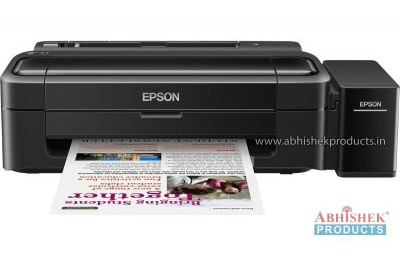 Easy and Quick Setup
Setting up Epson L130 Single Function Colour Printer is easier and puts the user to start printing quickly. It is embedded with the fast top up technology to get the refilling done in short time. The ink bottles are easy to be refilled and come with drip free nozzle to save ink spillage. The colour printer produces high-quality prints without the mess.
No Cartridges
The best part of Epson L130 Single Function Colour Printer is that this easy to use printer requires no cartridges. You can use the integrated ink tank to fill up and get reliable, cost-effective printing in no time. The inkjet printer comes with 2 years worth of ink.
Low-Cost Printing
Epson L130 Single Function Colour Printer offers extra low cost for both collared and black and white prints to a massive count of 4,000 pages in black and 6,500 pages in collared. No more need to change cartridges every month.
Epson-Quality Printing
The main purpose of providing the printer with the inbuilt tank is to make the labelling and refilling easier. The printer comes with one year manufacturer’s warranty for user’s peace of mind. Bidirectional and Unidirectional printing is easier and requires low human interference while printing.
Connectivity
You can connect the cost effective printer to your PC or any other via USB 2.0 interface. The printer supports Windows XP/XP Professional x64 Edition/Vista/7/8/8.1, Mac OS X 10.6.8, 10.7.x, 10.8.x, 10.9.x. The maximum paper print size being supported by this low cost branded printer is 8.5 x 111.76 cm (44).
Buy from Snapdeal at high discounts.
Features Summary
මේ tiken හොද mokadda ?
epson L 130
Highlights
- Product Type: Inkjet Printers
- Yield (No. of Pages): 6500
- Warranty: 1 Year Manufacturer Warranty
- Printing Output: Black and White; Colored
- Print Technology: Inkjet
- Size: (L x W x H): 482 x 222 x 130 mm
- Other Features: Superb Savings and Page Yield; Superb Print Speed; Space-saving Design; Unsurpassed Print Quality
- SUPC: SDL845603524
Specifications
IN THE BOXSales PackageMain UnitGENERALBrandEpsonModelL130TypePrinterColorBlackPRINTINGPrint MethodOn-demand ink jet (piezoelectric)Nozzle Configuration180 nozzles Black, 59 nozzles, each colour (Cyan, Magenta, Yellow)Print DirectionBi-directional printing, Uni-directional printingMaximum Resolution5760 x 1440 dpi (with Variable-Sized Droplet Technology)Minimum Ink Droplet Volume3plPRINT SPEEDMax Black Draft Text - Memo (A4)Approx. 27 ppm No. 1 / 15 ppm No. 2 (Bk/Cl)ISO 24734, A4Approx. 7.0 ipm / 3.5 ipm (Bk/Cl))Max Photo Draft - 10 x 15 cm (4 x 6)Approx. 27 sec per photo (W/Border)Photo Default - 10 x 15 cm (4 x 6)Approx. 69 sec per photo (W/Border)Double-sided PrintingManualPAPER HANDLINGPaper Feed MethodFriction feedNumber of Paper Trays1Paper Hold CapacityInput Capacity: 50 sheets, A4 Plain paper (75g/m square) 10 sheets, Premium Glossy Photo Paper; Output Capacity: 30 sheets, A4 Plain paper (Default Text - Memo) (Draft Text - Memo) 20 sheets, Premium Glossy Photo Paper (10 x 15 cm (4x6), 13 x 18 cm (5 x 7), 9 x 13 cm (3.5 x 5))Paper SizeA4, A5, A6, B5, 10 x 15 cm (4 x 6), 13 x 18 cm (5 x 7), 9 x 13 cm (3.5 x 5), Letter (8 1/2 x 27.94 cm (11)), Legal (8 1/2 x 35.56 cm (14)), Half Letter(5 1/2 x 8, 1.27 cm (1/2)), 13 x 20 cm (5 x 8), 20 x 25 cm (8 x 10), 16:9 wide size, 100 x 148 mm, Envelopes: No. 10 (4 1/8 x 9, 1.27 cm (1/2)), DL (110 x 220 mm), C6 (114 x 162 mm)Maximum Paper Size8.5 x 111.76 cm (44)Print Margin3 mm top, left, right, bottomCONNECTIVITYStandardUSB - Compatible with the USB 2.0 SpecificationPRINTER SOFTWAREOperating System CompatibilityWindows XP/XP Professional x64 Edition/Vista/7/8/8.1, Mac OS X 10.6.8, 10.7.x, 10.8.x, 10.9.xELECTRICAL SPECIFICATIONSRated VoltageAC 100 - 240 V/220 - 240 VRated Frequency50 - 60 HzPower ConsumptionPrinting: Approx. 9 Watts, Standby: Approx. 2.2 Watts, Sleep: Approx. 0.7 Watts, Power Off: Approx. 0.3 WattsEPSON GENUINE INK BOTTLEBlackT6641: 4000 Pages YieldCyanT6642: 6500 Pages Composite YieldMagnetaT6643: 6500 Pages Composite YieldYellowT6644: 6500 Pages Composite YieldEPSON SPECIALITY MEDIAMatte Paper Heavyweight A4C13S041259Glossy Photo Paper 4RC13S042070Glossy Photo Paper A4C13S042071Premium Glossy Photo Paper 4RC13S041863Premium Glossy Photo Paper A4C13S041285Photo Quality Inkjet Paper A4C13S041786Premium Semigloss Photo Paper 4RC13S041925Premium Semigloss Photo Paper A4C13S041332ADDITIONAL FEATURESFeaturesSuperb Savings and Page Yield; Superb Print Speed; Space-saving Design; Unsurpassed Print QualityPHYSICAL SPECIFICATIONSDimension(L x W x H): 482 x 222 x 130 mmWeight2.7 KgWARRANTYWarranty1 Year
Description
Epson L130 Single Function Colour Printer is the best to deal for homes that are looking for ultra low-cost quality printing solution. Equipped with high capacity ink systems, the printer manages to print documents at fractions of the prices to that of other printers. It is simple and hassle-free to set up and helps the users to start working immediately, enhancing their productivity while at work. The durable printer ensures high-quality output along with reliable results. Buy Epson L130 Single Function Colour Printer from Snapdeal and get a best online deal on your purchase.
Setting up Epson L130 Single Function Colour Printer is easier and puts the user to start printing quickly. It is embedded with the fast top up technology to get the refilling done in short time. The ink bottles are easy to be refilled and come with drip free nozzle to save ink spillage. The colour printer produces high-quality prints without the mess.
No Cartridges
The best part of Epson L130 Single Function Colour Printer is that this easy to use printer requires no cartridges. You can use the integrated ink tank to fill up and get reliable, cost-effective printing in no time. The inkjet printer comes with 2 years worth of ink.
Low-Cost Printing
Epson L130 Single Function Colour Printer offers extra low cost for both collared and black and white prints to a massive count of 4,000 pages in black and 6,500 pages in collared. No more need to change cartridges every month.
Epson-Quality Printing
The main purpose of providing the printer with the inbuilt tank is to make the labelling and refilling easier. The printer comes with one year manufacturer’s warranty for user’s peace of mind. Bidirectional and Unidirectional printing is easier and requires low human interference while printing.
Connectivity
You can connect the cost effective printer to your PC or any other via USB 2.0 interface. The printer supports Windows XP/XP Professional x64 Edition/Vista/7/8/8.1, Mac OS X 10.6.8, 10.7.x, 10.8.x, 10.9.x. The maximum paper print size being supported by this low cost branded printer is 8.5 x 111.76 cm (44).
Buy from Snapdeal at high discounts.
Features Summary
- Weight: 2.7 kg
- Output type: Colour/ Black and White
- Method: Inkjet
- Type: Printer
- Wireless: No
- Warranty: 1-year manufacturer warranty
Scanner type: Flatbed - Paper Size: A4, A5, A6, B5, 10 x 15 cm (4 x 6), 13 x 18 cm (5 x 7), 9 x 13 cm (3.5 x 5), Letter (8 1/2 x 27.94 cm (11)), Legal (8 1/2 x 35.56 cm (14)), Half Letter(5 1/2 x 8, 1.27 cm (1/2)), 13 x 20 cm (5 x 8), 20 x 25 cm (8 x 10), 16:9 wide size, 100 x 148 mm, Envelopes: No. 10 (4 1/8 x 9, 1.27 cm (1/2)), DL (110 x 220 mm), C6 (114 x 162 mm)
- Printing Resolution: 5760 x 1440 dpi
Last edited:
 rint Only


 දැනට මගේ එකේ කොපි තිස්පන්දාස් එකසිය ගානක් ගහලා තියන්නේ. එක සැරයක් කොළ අදින රෝල ඇජස් කරගත්තා. එක සැරයක් සර්විස් කර ගත්තා. එච්චරයි. කිසිම ලෙඩක් නැතුව වැඩ.


