
Latest ads
-
 RHCSA, RHCE, AWS, Docker, Kubernetes Training
- Sanjeewani95
- Updated:
-
 🛡️ Kaspersky Antivirus – 1 Year / 1 Device | Rs. 2,300 | Only 9 Left
- KSPathirana
- Updated:
-
Professional CCTV Installation Service
- Techguy231
- Updated:
-
I'll research & write an article - Rs. 2000 onwards
- Blogerwiki
- Updated:
-
 House Plan
- lenura
- Updated:
______^^^^^ MY SOFTWARE THREAD ^^^^^_______TO DAY UPDATES
- Thread starter DJ.ROCKSTAR
- Start date
You are using an out of date browser. It may not display this or other websites correctly.
You should upgrade or use an alternative browser.
You should upgrade or use an alternative browser.


marley said:maxxa tread ekak machan..puluwannam mata photoshop 4 full eka denawada...
thnxx machanzz

machanz try this one ban
Adobe Photoshop Elements v7.0

Adobe Photoshop Elements is the consumer version of the Adobe Photoshop raster image editing product, sold at a fraction (roughly 1/6th) of the cost of the [FONT=verdana,geneva,lucida,'lucida grande',arial,helvetica,sans-serif]professional product[/FONT] or bundled with related hardware such as scanners and digital cameras. It contains most of the features of the [FONT=verdana,geneva,lucida,'lucida grande',arial,helvetica,sans-serif]professional version[/FONT] but with fewer and simpler options. [FONT=verdana,geneva,lucida,'lucida grande',arial,helvetica,sans-serif]The program[/FONT] allows users to create, edit, organize and share images, all from the same product.
Originally introduced alongside Photoshop version 7, Photoshop Elements targets photography enthusiasts and thus lacks many features that make it useful in a proper [FONT=verdana,geneva,lucida,'lucida grande',arial,helvetica,sans-serif]print production[/FONT] environment. For example, Photoshop Elements cannot export files in the CMYK color mode, supports a simplified color management system, and excludes detailed soft-proofing. It also either eliminates completely or offers simplified versions of some of the more powerful plug-ins, along with a number of features aimed at non-experts (such as removing the red-eye effect or changing the skin tone in a picture). An example of a redesigned feature would be the Variations correction dialog. Some versions can, however, open, edit, and save PDFs.
Size : 455 MB (6x75+5)
http://w14.easy-share.com/1701977943.html
http://w14.easy-share.com/1701978447.html
http://w14.easy-share.com/1701979695.html
http://w14.easy-share.com/1701979693.html
http://w17.easy-share.com/1701981441.html
http://w14.easy-share.com/1701980572.html
http://w17.easy-share.com/1701980642.html

nelik said:thanzzzzzzzzzzz man gannavooooooooooooo
ahaa gonna gonna methana aduwe nne hehe

thnx 4 da commnt bt cnt understand wt did u say lol iz it uk lugldwkm said:yo hmz
GetDataBack will recover your data if the hard drive's partition table, boot
Download here:
record, NTFS or root directory are lost or damaged, data was lost due to a virus attack, the drive was formatted, fdisk has been run, a power failure has caused a system crash, files were lost due to a software failure, files were accidentally deleted... Code:
http://rapidshare.com/files/217589356/GetDataBack.for.NTFS.v2.31.rar
Download here:
record, NTFS or root directory are lost or damaged, data was lost due to a virus attack, the drive was formatted, fdisk has been run, a power failure has caused a system crash, files were lost due to a software failure, files were accidentally deleted... Code:
http://rapidshare.com/files/217589356/GetDataBack.for.NTFS.v2.31.rar
3herosoft iPhone to Computer Transfer V3.1
3herosoft iPhone to Computer Transfer V3.1
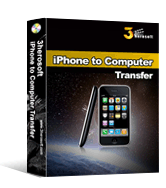
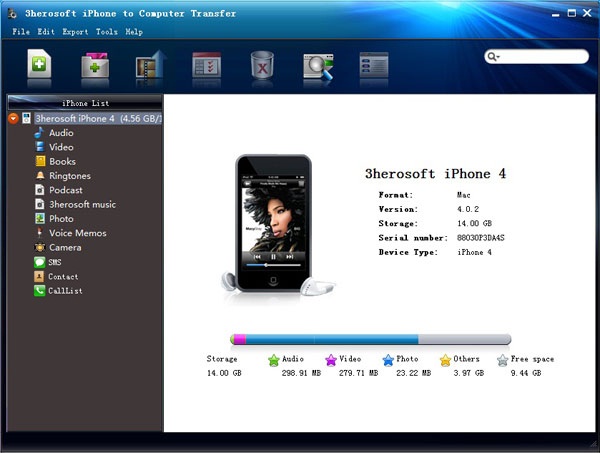
3herosoft iPhone to Computer Transfer is an easy-to-use iPhone to computer transfer, iPhone rip, iPhone backup software can fast transfer, rip, copy and manage your music, videos, photos, podcasts and TV Shows between iPhone or iPod and computer even without iTunes. All formats compatible with iPhone and iPod are supported.
Moreover, 3herosoft iPhone to Computer Transfer helps you create, edit and delete iPhone and iPod playlists. With the professional iPhone and iPod to computer transfer tools, you can copy files among multiple iPhones and iPods at one time.
With installation of iTunes, 3herosoft iPhone to Computer Transfer can even transfer music, videos, photos and so on between your iPhone and iPod. It manages your iPhone and iPod Touch like an external hard drive.
3herosoft iPhone to Computer Transfer supports all types of iPhone and iPod including iPhone, iPod classic, iPod nano, iPod touch, etc.
Your iPhone, your way. 3herosoft iPhone to Computer Transfer provides an ideal solution for you to manage, rip, copy, backup iPhone and iPod on personal computer.Free download 3herosoft iPhone to Computer Transfer and put control of the iPhone and iPod back in your hands now!
Quote:
Latest Version: 3.1.2.0402
Release Date: 2009-04-02
Fullsize: 5.82 MB
Language: English / Chinese
Platform: Windows 2000 / XP / 2003 / Vista
License Type: Free to try, $20.00 to buy.
Trial Limitation: Conversion limitations, Registration will unlock all limitations.
Software Download:
Code:
http://mirrorcreator.com/files/P6HMSMS2/iphonetocomputertransfer.exe_mirrors
Serial iNFO:
Code:
http://rapidshare.com/files/217126090/S.txt
Magix Movie Edit Pro 15 PLUS V8.0.5.8
Magix Movie Edit Pro 15 PLUS V8.0.5.8 | 192.5 MB

Magix Movie Edit Pro 15 PLUS V8.0.5.8s, the 75-time award winning video editing software solution, simply offers more: Powerful editing tools, a unique intuitive user interface and advanced MAGIX ProAudio dubbing technology help you transform all video recordings into an exciting movie.
Advantages of the Plus version
Professional video editing :
99 tracks, editing & effect automation, live preview, MultiCam editing, and much more..
Complete HD workflow :
Import HD videos, edit, burn & present on TV or online + native AVCHD editing...
Perfect audio dubbing :
Create 5.1 sound yourself, restore and master sound, Audio Mastering Suite, and much more..
Unique effects creation :
Chroma keying with alpha channel (bluescreen), 200 fades, 100 video effects, and more...
Advanced DVD authoring
All disc formats: DVD video, Blu-ray Disc?„?, professional DVD menus, ISO output, etc...
* Multicam editing (for 2 cameras)...
Perfectly synchronize recordings from 2 different cameras...
* Animated menus for Blu-ray Discs?„?...
Created professionally animated menus for Blu-ray Disc?„?...
* 3D presets for realistic 3D title effects...
Over 100 templates for top-quality three-dimensional effects...
* Easy color correction (color wheel)...
Conveniently adjust the color of your recordings with just a click...
* Native AVCHD editing...
Import & edit AVCHD recordings without recalculation...
* Simplified effects control...
All video effects have been concentrated centrally and clearly laid-out in the new Media Pool...
* Flexible user interface...
All user interface elements can be adjusted and moved individually...
* Quick navigation via shortcuts...
Navigate at lightning speed with the help of keyboard shortcuts like J, K, and L through your project...
* Batch conversion (for complete folders)...
Convert entire folders containing videos into any format you like...
* Many new DVD menu templates (also for Blu-ray Discs)...
Choose from many professionally designed menu templates for DVDs and Blu-ray Discs...
Download :
Code:
http://mirrorcreator.com/files/HQZHDJKG/magix.movie.edit.pro.15.plus.v8.0.5.8.part1.rar_mirrors
http://mirrorcreator.com/files/036RDRW1/magix.movie.edit.pro.15.plus.v8.0.5.8.part2.rar_mirrors
Universal Document Converter 4.2

Universal Document Converter 4.2
Size: 5.51 MB
Universal Document Converter converts to graphics any document you can print. It may be a Microsoft Word file, a PDF, a Web page, a graph or a chart and so on. UDC supports various image formats and resolutions, contains pre-built profiles covering the most typical conversion tasks and features flexible settings. The program is very friendly and really easy-to-use. If you ever printed documents to a printer, you should be able to start using UDC immediately.
Here are some key features of “Universal Document Converter”:
· Export into 8 formats. Documents of any type can be exported into Adobe PDF or graphical files in 7 popular formats: TIFF, JPEG, PNG, PCX, DCX, GIF or BMP.
· Work with multipage documents. Several documents of various types can be united into one multipage file.
· Universality. The technology of virtual printing makes it possible to convert documents of any type, including multipage reports, technical drawings and commercial posters, into a chosen format.
· Practicality. The direct export of a document into a graphical file (instead of printing and scanning a paper copy) economizes on expendable materials and time.
· Ease of use. For exporting documents of any type into Adobe PDF or graphical files all that is required is to print them using the printer named ‘Universal Document Converter’.
· Advanced algorithm of quantization.
Code:
http://mirrorcreator.com/files/09THZHTY/universal_document_converter_v4.2.rar_mirrors
SMART SECURITY 32 4.0.314
NOD 32 4.0.314 Smart Security FULL (lifetime update)


Code:
Antivirus | Antispyware | Firewall | Antispam
FACT: Surfing the web and using email is a part of daily life.
FACT: Criminals capitalize on this to their advantage, flooding the Internet with over 100,000 new attacks every day, in an effort to steal your identity or turn your computer into a "zombie" to launch email spam and other Internet crimes.
FACT: Over 70 million users worldwide trust ESET to defend themselves from these attacks.
ESET Smart Security is the most effective protection you can use to combat today's huge volumes of Internet and email threats. It combines ESET's award-winning NOD32® proactive antivirus and antispyware protection with a powerful yet easy–to-use firewall and robust antispam technology.
Using our advanced ThreatSense® technology, ESET Smart Security proactively protects you from new attacks during the critical first hours when other vendors' products are not even aware the attack exists. ESET Smart Security detects and disables both known and unknown viruses, trojans, worms, adware, spyware, rootkits and other Internet threats.
ESET Smart Security is also faster than any other Internet security suite, so fast you won't even notice it running. It's easy to use yet simple to optimize for your specific needs.
ESET Smart Security is security you can trust - every hour of every day.
Key Benefits
Protection from the Unknown — Our award-winning ThreatSense technology uses multiple layers of threat detection to deliver the most effective protection possible against attacks. And ThreatSense is smart; it not only generates far fewer annoying false positive alarms than any other products that use heuristics, but finds malware other antivirus products miss.
Built for Speed — ESET Smart Security is lightning fast, so fast you won't even notice it's there. Even disk-intensive operations like performing a "full disk scan" run smoothly in the background while you work.
Easy on Your System — ESET Smart Security is "lean and mean," using just 48 MB of memory, a fraction of what other products consume. Because it's fast and "light," upgrading your existing Internet security to ESET Smart Security can literally be like buying a new computer. And laptop users can rejoice in the new automatic energy-sipping battery mode.
Easy on You — From its compact and intuitive user interface to its minimal use of alerts, self-training firewall, and other new features, ESET Smart Security is easier to use than ever before.
What's New
Smarter Scanner — Threats don't always enter in ways you expect. ESET Smart Security inspects SSL-encrypted communication channels like HTTPS and POP3S, and intelligently scans compressed files to find threats that other products miss. ESET's Smart Optimization feature makes file scanning faster than ever.
Time-saving Firewall — The new Learning Mode saves time by automatically creating firewall rules by observing how you use your computer, while offering advanced firewall modes for power users.
Upgraded Antispam — ESET Smart Security now takes care of annoying spam with a smaller, faster, and even more effective spam filter.
Removable Media Security — Threats can enter your PC from removable media such as USB thumb drives. For self-running media, ESET Smart Security scans autorun.inf and associated files on mount, in addition to scanning any file on any removable device when it is accessed, or during a full-scan of the media. Power users can adjust ESET Smart Security to perform additional levels of scanning on removable media.
System Tools — ESET SysInspector and ESET SysRescue simplify diagnosis and cleaning of infected systems by allowing deep scans of system processes to find hidden threats, and creating bootable rescue CD/DVD or USB drives to help you repair an infected computer.
Self Defense — ESET Smart Security has built-in technology to prevent malicious software from corrupting or disabling it, so you can rest assured your system is always protected.
Usability Improvements — ESET Smart Security has numerous speed, security and usability upgrades.
* Energy-sipping battery mode extends laptop battery life without compromising security
* Advanced Protection Status screen informs you of detected threats
* Information pop-ups are hidden when running full screen applications like games, video players or presentations
* Password protection prevents ESET Smart Security from being uninstalled by strangers
* New interface and keyboard shortcuts simplify use for visually impaired users
System Requirements
Processors supported: Intel or AMD x86/x64
Operating Systems: Microsoft Windows 2000, Microsoft Windows XP (32- and 64-bit editions). Microsoft Windows Vista (32- and 64-bit editions)
Memory: 48 MB
Disk Space (download): 32 MB
Disk Space (installation): 46 MB


NOD 32 4.0.314 SMART SECURITY FULL
Code:
http://mirrorcreator.com/files/AVYQ0GIU/eset_smart_security_4.0.314.rar_mirrors
NOD 32 4.0.314 Smart Security FULL (lifetime update)


Code:
Antivirus | Antispyware | Firewall | Antispam
FACT: Surfing the web and using email is a part of daily life.
FACT: Criminals capitalize on this to their advantage, flooding the Internet with over 100,000 new attacks every day, in an effort to steal your identity or turn your computer into a "zombie" to launch email spam and other Internet crimes.
FACT: Over 70 million users worldwide trust ESET to defend themselves from these attacks.
ESET Smart Security is the most effective protection you can use to combat today's huge volumes of Internet and email threats. It combines ESET's award-winning NOD32® proactive antivirus and antispyware protection with a powerful yet easy–to-use firewall and robust antispam technology.
Using our advanced ThreatSense® technology, ESET Smart Security proactively protects you from new attacks during the critical first hours when other vendors' products are not even aware the attack exists. ESET Smart Security detects and disables both known and unknown viruses, trojans, worms, adware, spyware, rootkits and other Internet threats.
ESET Smart Security is also faster than any other Internet security suite, so fast you won't even notice it running. It's easy to use yet simple to optimize for your specific needs.
ESET Smart Security is security you can trust - every hour of every day.
Key Benefits
Protection from the Unknown — Our award-winning ThreatSense technology uses multiple layers of threat detection to deliver the most effective protection possible against attacks. And ThreatSense is smart; it not only generates far fewer annoying false positive alarms than any other products that use heuristics, but finds malware other antivirus products miss.
Built for Speed — ESET Smart Security is lightning fast, so fast you won't even notice it's there. Even disk-intensive operations like performing a "full disk scan" run smoothly in the background while you work.
Easy on Your System — ESET Smart Security is "lean and mean," using just 48 MB of memory, a fraction of what other products consume. Because it's fast and "light," upgrading your existing Internet security to ESET Smart Security can literally be like buying a new computer. And laptop users can rejoice in the new automatic energy-sipping battery mode.
Easy on You — From its compact and intuitive user interface to its minimal use of alerts, self-training firewall, and other new features, ESET Smart Security is easier to use than ever before.
What's New
Smarter Scanner — Threats don't always enter in ways you expect. ESET Smart Security inspects SSL-encrypted communication channels like HTTPS and POP3S, and intelligently scans compressed files to find threats that other products miss. ESET's Smart Optimization feature makes file scanning faster than ever.
Time-saving Firewall — The new Learning Mode saves time by automatically creating firewall rules by observing how you use your computer, while offering advanced firewall modes for power users.
Upgraded Antispam — ESET Smart Security now takes care of annoying spam with a smaller, faster, and even more effective spam filter.
Removable Media Security — Threats can enter your PC from removable media such as USB thumb drives. For self-running media, ESET Smart Security scans autorun.inf and associated files on mount, in addition to scanning any file on any removable device when it is accessed, or during a full-scan of the media. Power users can adjust ESET Smart Security to perform additional levels of scanning on removable media.
System Tools — ESET SysInspector and ESET SysRescue simplify diagnosis and cleaning of infected systems by allowing deep scans of system processes to find hidden threats, and creating bootable rescue CD/DVD or USB drives to help you repair an infected computer.
Self Defense — ESET Smart Security has built-in technology to prevent malicious software from corrupting or disabling it, so you can rest assured your system is always protected.
Usability Improvements — ESET Smart Security has numerous speed, security and usability upgrades.
* Energy-sipping battery mode extends laptop battery life without compromising security
* Advanced Protection Status screen informs you of detected threats
* Information pop-ups are hidden when running full screen applications like games, video players or presentations
* Password protection prevents ESET Smart Security from being uninstalled by strangers
* New interface and keyboard shortcuts simplify use for visually impaired users
System Requirements
Processors supported: Intel or AMD x86/x64
Operating Systems: Microsoft Windows 2000, Microsoft Windows XP (32- and 64-bit editions). Microsoft Windows Vista (32- and 64-bit editions)
Memory: 48 MB
Disk Space (download): 32 MB
Disk Space (installation): 46 MB


NOD 32 4.0.314 SMART SECURITY FULL
Code:
http://mirrorcreator.com/files/AVYQ0GIU/eset_smart_security_4.0.314.rar_mirrors
Abvent Artlantis Studio 2.0.3.3


Artlantis Studio is a unique 3D rendering application ideal for quickly and easily creating very high-quality real-time still images, QuickTime VR, Panoramas and Animations.
Ease of use, intuitive interface and powerful controls have made Artlantis must-have rendering software for over 75,000 architecture, design and urban design professionals in more than 80 countries.
Artlantis communicates directly with leading CAD Architecture software such as ArchiCAD™, VectorWorks™, SketchUp™ Pro, Arc+™), With the recent addition of the DWF, OBJ and FBX import formats and updated DXF, DWG and 3DS plug-ins, Artlantis seamlessly interacts with all the leading CAD software: Revit™ Architecture, 3ds Max™, VIZ™, Maya™, Rhino, CINEMA 4D™, LightWave™, modo™, Softimage|XSI™, Poser™ and many more.
Key features:
* Full radiosity
* Display your 3D model in global illumination !
* The new and improved rendering engine lets you generate accurate radiosity images in real time within the 3D preview window. The final rendering is consistent with the 3D preview window, giving you a faithful and accurate representation of the high-quality images you’ll produce from your 3D models.
* Real sky simulation
* The latest version of Artlantis improves all lightings conditions. With the addition of a “physical sky”, the sun, moon and stars are now visible elements that cast light onto the project using global illumination. A range of magnificent clouds are also available : cirrus, cumulonimbus or stratus add an extra realistic touch to the skies.
* Automatic light adjustment
* Thanks to its new automatic light adjustment feature, Artlantis dynamically balances the lighting levels in your scenes from dawn till sunset, and from outside to inside a building, and thus allows you to perform photorealistic four-stars images and animations.
* Integrated image post-processing
* Save time by doing your image post-processing in Artlantis… no need to use other image editing tools. Artlantis’ new options enable users to modify the luminance, the contrast and the color index of a rendered image during post-processing. It also allows users to add grain, contour lines or a pastel painting effect, for fantastic new stylistic possibilities. These effects are displayed directly in the 3D preview window and can be used individually or combined.
* Shader creator
* Artlantis new version offers new automatic texture definition. The shaders have new properties : specular reflection, shiningness, blur effect, normal mapping… for a considerable new shading quality. A new function is available for advanced users, they can now create their own shaders through a complete interface.
* Rich Media
* With an optional collection of 25 CD of media - shaders and 3D objects - Artlantis enables users to quickly work on different scenarios and simulate life-like virtual scenes in a realistic environment.
* When the new Artlantis version is released, Artlantis family will also introduce 5 new media CD’s : 3D Animated People, Bilboard People, Cars, Stones and Marble Floor. All easily controlled with a simple drag&drop into the 3D preview window, these shaders and objects enhance the photorealism of your scenes.
* And more Productivity Tools :
* Compatibility with Space NavigatorTM 3D mouse that allows intuitive and powerful 3D navigation ; anchored target point for a camera or a light that follows the trajectory ; magic wand for easy object extraction ; Open GL navigation with shadows ; automatic or manual view point update ; looped object animation, use of a movie as a texture
Code:
http://mirrorcreator.com/files/N1LEJ2ZZ/abvent_artlantis_studio_2.0.3.3.part1.rar_mirrors
http://mirrorcreator.com/files/EVC4YFKY/abvent_artlantis_studio_2.0.3.3.part2.rar_mirrors
http://mirrorcreator.com/files/BONORTSS/abvent_artlantis_studio_2.0.3.3.part3.rar_mirrors
Timbuktu® Pro Multi-Platform for Mac OS X (and Windows)
Timbuktu® Pro Multi-Platform for Mac OS X (and Windows)

Timbuktu Pro Multi-Platform for Windows and Mac OS X includes software for both Windows and Mac OS X.
With Timbuktu Pro, you can control or observe a remote PC or Macintosh, from anywhere on your network, including dialing in from off campus. Timbuktu is especially helpful for user support and management of remote servers. You can also transfer files between Macintosh and PC platforms easily, without using a server. More information is available on the Netopia Web site.
No special version of Timbuktu Pro cross-platform remote control software is needed to control a Windows computer with your Mac, or a Mac computer from Windows — all it takes is a copy of Timbuktu Pro on each computer.
If you own both Mac and Windows computers, we offer a convenient package containing versions for both platforms. For technical details and features, please refer to the pages for Timbuktu Pro for Mac OS X and Timbuktu Pro for Windows.
Code:
http://mirrorcreator.com/files/1BHKYEVN/timbuktu_multiplatform_.zip_mirrors
Intuit Turbo Tax - TurboTax - Deluxe 2008
Intuit TurboTax Deluxe Federal + State + eFile 2008

Product Features
* Prepare and print unlimited federal and state returns; e-file up to five federal returns (per IRS guidelines) at no additional charge
* Includes free federal efile -- receive IRS confirmation and get your refund in as few as 8 days
* Everything you need to easily do your tax return--asks easy questions customized to your situation, puts your answers on the correct IRS forms, checks for errors
* Searches for more than 350 deductions, including mortgage interest, education, and medical expenses
Code:
http://mirrorcreator.com/files/05EGNAQQ/ttd08.part1.rar_mirrors
http://mirrorcreator.com/files/TVIUF7JF/ttd08.part2.rar_mirrors
Intuit TurboTax Deluxe Federal + State + eFile 2008

Product Features
* Prepare and print unlimited federal and state returns; e-file up to five federal returns (per IRS guidelines) at no additional charge
* Includes free federal efile -- receive IRS confirmation and get your refund in as few as 8 days
* Everything you need to easily do your tax return--asks easy questions customized to your situation, puts your answers on the correct IRS forms, checks for errors
* Searches for more than 350 deductions, including mortgage interest, education, and medical expenses
Code:
http://mirrorcreator.com/files/05EGNAQQ/ttd08.part1.rar_mirrors
http://mirrorcreator.com/files/TVIUF7JF/ttd08.part2.rar_mirrors
Portable Microsoft Office 2003

Portable Microsoft Office 2003
Info :
Microsoft Outlook 2003 is a desktop information management program. It only includes MS Word 2003 and MS Excel 2003, no installation required. Now Portable, in your flash drive, only 38 Mb
Download :
Code:
http://mirrorcreator.com/files/0EAEYKNQ/portable_ms.office.2003.wordexcel.illidan_000.rar_mirrors

Portable Microsoft Office 2003
Info :
Microsoft Outlook 2003 is a desktop information management program. It only includes MS Word 2003 and MS Excel 2003, no installation required. Now Portable, in your flash drive, only 38 Mb
Download :
Code:
http://mirrorcreator.com/files/0EAEYKNQ/portable_ms.office.2003.wordexcel.illidan_000.rar_mirrors
Avira AntiVir Premium 2009 V1.00.20.00
Avira AntiVir Premium 2009 V1.00.20.00
Quote:
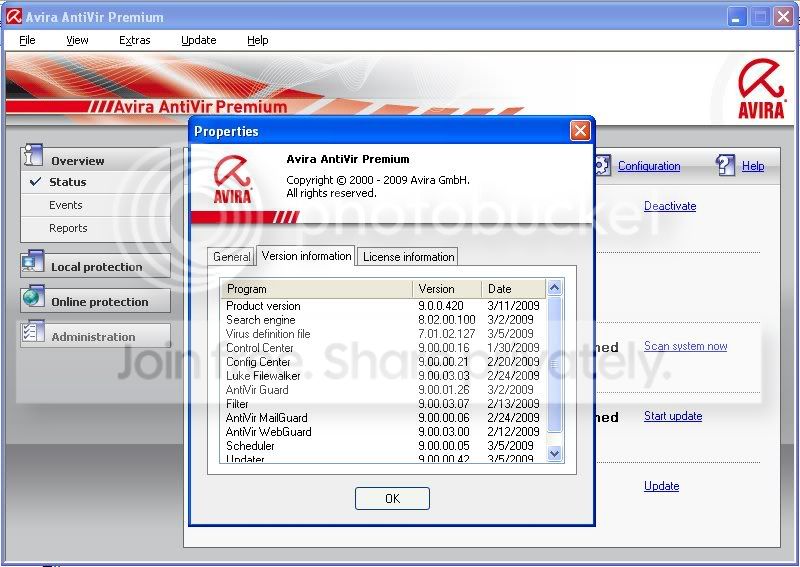
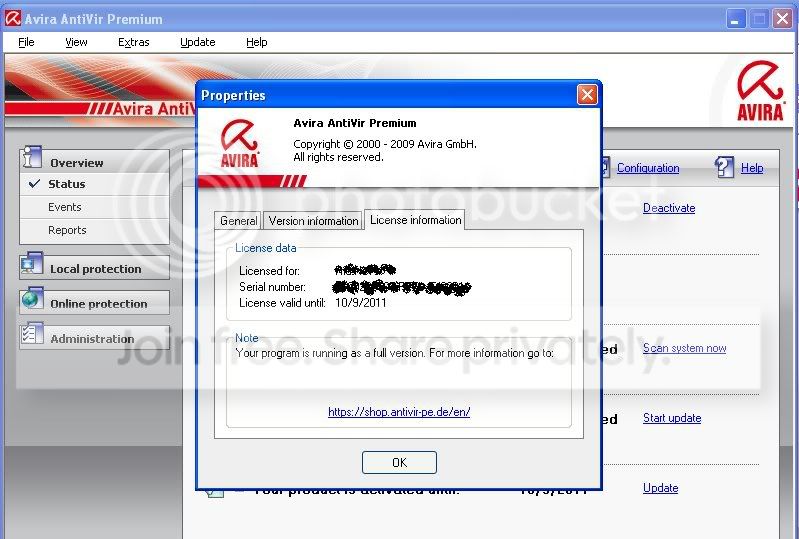
Avira AntiVir Premium reliably protects you against all threats from viruses, worms, trojans, rootkits, phishings, adware, spyware, bots, and dangerous “drive-by” downloads. Best detection rates and top-class security with several updates every day.
Quote:
AntiVir stops all types of viruses
AntiAd/Spyware eliminates ad/spyware
AntiPhishing proactive protection against phising
AntiRootkit against hidden rootkit threats
AntiDrive-by prevents against downloading viruses when surfing
EmailScanner enhanced email protection
WebGuard protection against malicious websites
RescueSystem create a bootable rescue CD
QuickRemoval eliminate viruses at the push of a button NEW!
NetbookSupport for laptops with low resolution NEW!
Quote:
Download link
Code:
http://mirrorcreator.com/files/1MTJTANK/avira9.rar_mirrors
Avira AntiVir Premium 2009 V1.00.20.00
Quote:
Avira AntiVir Premium reliably protects you against all threats from viruses, worms, trojans, rootkits, phishings, adware, spyware, bots, and dangerous “drive-by” downloads. Best detection rates and top-class security with several updates every day.
Quote:
AntiVir stops all types of viruses
AntiAd/Spyware eliminates ad/spyware
AntiPhishing proactive protection against phising
AntiRootkit against hidden rootkit threats
AntiDrive-by prevents against downloading viruses when surfing
EmailScanner enhanced email protection
WebGuard protection against malicious websites
RescueSystem create a bootable rescue CD
QuickRemoval eliminate viruses at the push of a button NEW!
NetbookSupport for laptops with low resolution NEW!
Quote:
Download link
Code:
http://mirrorcreator.com/files/1MTJTANK/avira9.rar_mirrors

Daemon Tools Pro Advanced v4.30.304.47


Code:
DAEMON Tools Pro Advanced is CD & DVD emulation software which allows users to make CD/DVD disc images, create a virtual CD / DVD drives and play CDs & DVDs without the need for the physical disc and supports virtual IDE adapters.
What are the differences between (DAEMON Tools Pro - Advanced) with other versions of DAEMON Tools Lite,DAEMON Tools Pro Basic and Pro Standard?
1. Maximum number of supported SCSI virtual devices - 32 devices
2. IDE adapter emulation
3. Maximum number of supported IDE virtual devices - 2 devices
4. CD/DVD Image converter
Features:
Graphical user interface [GUI] - to make mounting of CD/DVD images and other
operations more convenient
Capability to make CD/DVD images to back up your data
SCSI adapter emulation
IDE adapter emulation
CD/DVD Image mounting to virtual devices
CD/DVD Image compression
D/DVD Image mounting to the physical folders
CD/DVD Image password protection
CD/DVD Image collection’s management
Shell Extensions
System Tray Agent
Virtual devices’ properties monitoring
CD/DVD Image converter

Code:
http://mirrorcreator.com/files/BRNOO6VY/daemon.tools.pro.advanced.v4.30.304.47.rar_mirrors


Code:
DAEMON Tools Pro Advanced is CD & DVD emulation software which allows users to make CD/DVD disc images, create a virtual CD / DVD drives and play CDs & DVDs without the need for the physical disc and supports virtual IDE adapters.
What are the differences between (DAEMON Tools Pro - Advanced) with other versions of DAEMON Tools Lite,DAEMON Tools Pro Basic and Pro Standard?
1. Maximum number of supported SCSI virtual devices - 32 devices
2. IDE adapter emulation
3. Maximum number of supported IDE virtual devices - 2 devices
4. CD/DVD Image converter
Features:
Graphical user interface [GUI] - to make mounting of CD/DVD images and other
operations more convenient
Capability to make CD/DVD images to back up your data
SCSI adapter emulation
IDE adapter emulation
CD/DVD Image mounting to virtual devices
CD/DVD Image compression
D/DVD Image mounting to the physical folders
CD/DVD Image password protection
CD/DVD Image collection’s management
Shell Extensions
System Tray Agent
Virtual devices’ properties monitoring
CD/DVD Image converter

Code:
http://mirrorcreator.com/files/BRNOO6VY/daemon.tools.pro.advanced.v4.30.304.47.rar_mirrors
amithpeiris said:FL STUDIO ONAAAAA
try this one machanz




Rated by: Very Good (4.2/5)
1497 user(s)
License / Price:
Size / OS:
Last Updated:
Category: Image-Line Software | More programs
Demo / USD 49.00 | BUY the full version
97.5 MB / Windows All
August 27th, 2008, 10:26 GMT
C: \ Multimedia \ Audio \ Audio Editors/Recorders
Password Depot 4.0.5
Password Depot 4.0.5

Password Depot 4.0.5 | 6,8 Mb
Password Depot 4 protects your important and confidential passwords from external access while offering maximum user-friendliness! For Computer Bild 01/08, Password Depot is the password safe which “as the only software was able to make a good impression when faced with the comprehensive security test”.
* User-friendly interface for convenient management of your passwords and access details: for the Internet, online banking (TANs), online shopping etc.
* Generate uncrackable passwords using the integrated Password Generator.
* Maximum protection of your sensitive data thanks to the security algorithm Rijndael 256-Bit!
* Protection from keyloggers and spyware: Password Depot protects your passwords even if your computer is infected with spyware and keyloggers.
* The Auto-complete function enters your user name and password on websites automatically.
* Password Depot 3 runs on every Windows PC. Optionally, it also runs on USB flash drives!
* Network compatible allows shared use on a local network.
* Store password lists on FTP servers for worldwide access to your data!

Code:
http://mirrorcreator.com/files/QEWJWMAG/password_depot_v4.0.5.rar_mirrors
Similar threads


- Replies
- 0
- Views
- 207
- Replies
- 5
- Views
- 429

- Replies
- 12
- Views
- 2K

