.::AmaZing Software Collection::.

fazaal24

Member
Nov 10, 2006
33,026
18
0
Carbon Canyon Dehiwala
i thought of posting some softwares in 1 thread than jus wasting out threads...

So here I go.!


All from warez;)

Sorry Abt RS LINKS

All links r working
__________________________________


How to make screencaps
(ImageGrabberII)


This is a guide on how to easily create and add great looking screenshots to your upload.

The first thing you'll need is:
ImageGrabberII - A brilliant program:

fw_download.png

Code: http://rapidshare.com/files/52037610/Image_grabber_2_How_to_make_screencaps_by_deen4533 .rar

Step One:
Creating screenshots


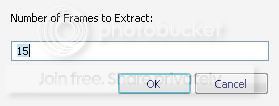
To get started open up your movie in ImageGrabber (supports wmv as well) and the movie will start playing. Click the red stop button and the movie is open and ready to go. Click this buttonand the following dialog box will appear:

ssframesju2.jpg


Enter the number of screens shots you would like to take of the movie. A good number for a movie is probably about 15 and you can play around with this and the number of columns explained in the settings below to see what you like.

When you click OK it will go through the movie taking the screen shots and add them to the timeline across the bottom. You can add individual selected screenshots by using the scrollbar to move to the picture you want and clicking this buttonto add the current image at the end of the timeline.

Once you have all the pics you want you can arrange the screenshots in the timeline.

* Right click a screenshot to delete it, delete all or change the text label.

* Left click a screenshot to drag it to where you want in the timeline.

Step Two:
ImageGrabber settings:

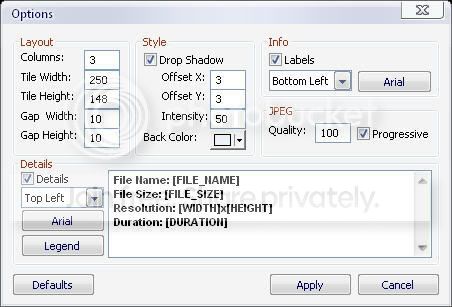
Once you have all the screens you want, on the File menu click Save File and you will see the following default settings dialog box:


sspictl5.jpg


Layout: Good idea to make the dimensions of each screen (Tile) a fraction of the original to avoid distortion.

Style: Details of the drop shadow around your screens and the background color for your image.

Info: You can include the time each sample was taken in the vid.

JPEG: You can adjust the quality down to reduce the file size say for a full movie with many screens.

Details: You can include the basic movie statistics in the image.

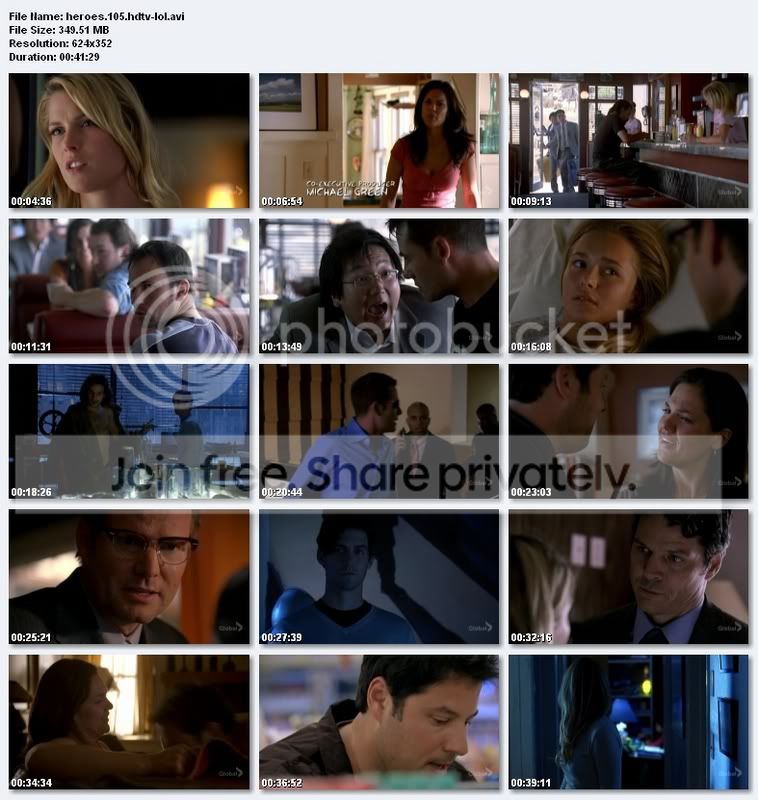
There are plenty of possible configurations, try playing around with different settings until you find a layout you like. Click the save button and using the settings shown above will produce an image with a layout similar to this screenshot:
He105S.jpg


Once you have your image you may want to resize it or modify it in some way, a nice free and easy to use image viewing/editing tool is anview:

Now you have your screenshots, the next step is hosting your cool new image.

Step Three:
Hosting screenshots:


The are a few free image hosting web sites around and most of them operate the same way.
imageshack.us
photobucket.com

Code: http://photobucket.com/


source-warez

__________________
 
Last edited:

fazaal24

Member
Nov 10, 2006
33,026
18
0
Carbon Canyon Dehiwala
Video SnapShots Genius v2.0


vs_1.png


Video Snapshots Genius, the video snapshot software for capturing movie scenes to a single image files or a thumbnail gallery. The program supports almost all popular formats, such as MPEG, AVI, WMV, DivX, RealMedia, QuickTime, DVD and can open a video without any other player for preview playback.

Video Snapshots Genius provides users with a simple point-and-click interface to take snapshots directly from a movie. Snapshots can be taken manually by browsing through a movie to snag the frames you need or you can have snapshots taken automatically at the time intervals you’ve predefined. The number of snapshots can be configured to users’ preference.

The output format is configurable. With just a few clicks, users can set width and height, choose a folder to save files, specify the name prefix for automatic naming of files and choose image format: BMP, JPEG, GIF, PNG and TIFF. Some adjustments of brightness and contrast are possible in the built-in Picture Editor, the results can be viewed in Picture Viewer. Besides, the program can create thumbnails of snapshots and add a timestamp to these snapshots.

Users can find Video Snapshots Genius useful in many ways.
Make snapshots of your home video. If you are like any digital camera owner, you have plenty of videos that you would like to preserve your family holidays, birthdays, weddings, not only as movies but also as photos. To do it, you can use Video Snapshots Genius. Digital snapshots can be shared via email or through web sites like Flickr.
Make your own DVD/VCD menus with title slides. Home movie enthusiasts can use the program to add snapshots of key scenes to their own custom DVD menu. Simply choose the scene that you think symbolizes the portion of a movie and capture it. Then make some enhancements to the snapshot and add it to a DVD menu creation editor.
Make snapshots of a video to make a compelling video web site. You could take snapshots of a video to add to a video-themed web site, to a catalog of videos or to a presentation. This will make your content immediately interesting and visually nice. Besides, a series of snapshots can be made into an animated banner.
Create your own avatar for a forum or ICQ. Users may consider using Video Snapshots Genius to make a snapshot of their favorite actor like Brad Pitt or Angelina Jolly to be used as a personal avatar on a forum or ICQ..
DOWNLOAD
http://rapidshare.com/files/47512496/Video_Snapshots_Genius_v2.0_by_deen4533.rar
 

fazaal24

Member
Nov 10, 2006
33,026
18
0
Carbon Canyon Dehiwala
SNAGIT

2ajoz5u.gif


SnagIt delivers customized screen captures with the press of a hotkey.

SnagIt is the only screen capture software that captures images, text, and video from your Windows desktop. Effortlessly produce perfect graphics and video with this complete capture solution.

Now, with SnagIt add-ins, you can put SnagIt right in your toolbar!
SnagIt's new add-in toolbars provide quick access to the most common capture features right from within Word, PowerPoint and Explorer.

Screen capture is the process of copying what you see on your screen. SnagIt captures various types of data in dozens of different ways, enabling you to capture, edit and share anything on your screen.

To help you start using SnagIt, here are five popular ways SnagIt is used to capture what is on your screen.

Here are some key features of "SnagIt":


Capture Anything
· Capture an article, image, or Web page directly from your screen. Or, capture windows, menus, icons, and regions from any application that runs on your PC.

Edit and Transform
· SnagIt Editor makes it easy to add creative and professional touches to your captures. Transform your images with a full-featured paint tools palette, a variety of edge effects, and practical options for color and size adjustment.

Share Easily
· E-mail, copy and paste, print, and IM your captures, or upload them to your Web site. SnagIt helps you communicate any way you prefer.

download.gif

http://rapidshare.com/files/52757763/Snagit_8.2.3.rar
 
Last edited:

fazaal24

Member
Nov 10, 2006
33,026
18
0
Carbon Canyon Dehiwala
NoteBurner

virtual-cd-burn.gif


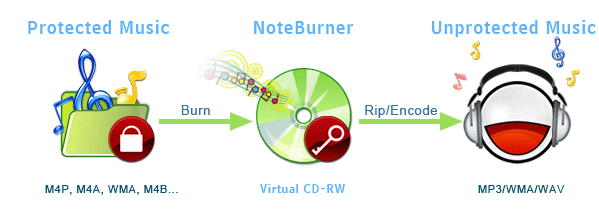
NoteBurner converts any unprotected music and DRM protected music files (such as M4P, WMA, M4B) to unprotected MP3, WAV, WMA formats with Virtual CD-RW drive. It is a protected audio and music converter tool designed for virtually burning DRM protected music or audio files to a special virtual CD-RW drive where you can easily get plain MP3, WMA or WAV files ready for use on any computers or music devices. This amazing CD burner emulator easily automates the whole workflow for converting protected music or audio files to normal music files: ripping, burning, encoding are within only ONE click. This unique All-in-One feature helps NoteBurner convert any DRM protected WMA, M4P music and M4B, AA, AAC audio books to unprotected MP3, WAV, WMA formats at fast speed and high quality.

NoteBurner installs a virtual CD-RW, it helps you burn any unprotected or DRM protected M4P, M4a, WMA music files onto the virtual CD, rips tracks on the virtual CD, encodes tracks onto MP3, WAV or WMA music files. It can repeat this audio converting procedure until your whole music collection is done.

Since the virtual CD emulates your computer RAM and hard disk as erasable CD-RW drive (Virtual CD-RW), the converting speed is faster than any other m4p to mp3 conversion programs
http://cold-warez.org/viewtopic.php?f=4&t=5758#http://lix.in/a73742
 

fazaal24

Member
Nov 10, 2006
33,026
18
0
Carbon Canyon Dehiwala
Naevius YouTube Converter

Naevius YouTube Converter is a convenient tool to download and convert your favorite videos from YouTube website into the standard AVI DivX video format. To download a video to your computer, enter the YouTube url for the video, click start button. It will be downloaded and converted in AVI format - use windows Media Player or another compatible player to view it.


Unlike other similar services, YouTube Video allows only viewing video inside client's browser (YouTube's video player is designed to be used within your browser as an Internet experience), and currently you can't download our videos to your computer. But it can be easily downloaded and converted to the common "avi" format with Naevius YouTube Converter!

http://rapidshare.com/files/51705734/YouTube_Converter_by_djjoja.zip


Password:
dms-clan.nl/forumdreamshare
 
Last edited:

fazaal24

Member
Nov 10, 2006
33,026
18
0
Carbon Canyon Dehiwala
FORMAT RECOVERY 4.0


ac1f0a1c8ef27cc05f4f71a862c4c16c_O_O_FormatRecovery.png


Description
With the new O&O FormatRecovery V4, O&O offers the ultimate supplement to the already impressive line of data recovery products and this nicely rounds off the products available in this range. O&O FormatRecovery V4, guided by an on-screen Assistant, enables the recovery of deleted or formatted partitions or hard disks to their pre-deletion form. File and directory information is likewise restored. By use of a specially developed algorithm, O&O FormatRecovery V4 can search for files through formatted or deleted disks and restore them even when the data are heavily fragmented! In contrast to O&O UnErase V4 and O&O DiskRecovery V4, O&O FormatRecovery V4 can also restore files with missing directories and configuration information.

- Recovery of files and directories
- Supports all Windows file systems on all Windows recognized storage media
- Recovery of empty directories and files
- Recovery of hidden or system data including file attributes
- Assistant-guided operation
- Specially developed search algorithm to recover entire data storage media
DOWNLOAD
http://lix.in/dc0700
 

fazaal24

Member
Nov 10, 2006
33,026
18
0
Carbon Canyon Dehiwala
Abyssmedia Audio Converter Plus

º Abyssmedia Audio Converter Plus is a powerful, professional solution º
º designed for converting the most popular audio formats and Audio CD tracks º
º directly into MP3, WMA, OGG, AMR or WAV formats. High quality 32-bit º
º converter engine allows you to convert to any sampling rate and can create º
º 24-bit and 32-bit WAV files for DVD Audio mastering. Intergration with º
º Windows Explorer enables one-click conversion for any audio file or folder.º
º º
º Main Benefits: º
º -------------- º
º * Decode MPEG Layer3 (.MP3) º
º * Decode Windows Media Audio files (.WMA) º
º * Decode OGG Vorbis (.OGG) º
º * Decode Monkey's Audio (.APE .MAC) º
º * Decode FLAC Files (.FLAC) º
º * Decode MusePack(MPEG Plus) Files (.MPC .MPP .MP+) º
º * Decode NTT VQF Files (.VQF) º
º * Decode WAV Files (.wav) º
º * Decode Portable Voice Format Files (.pvf) º
º * Decode Creative VOC Files (.voc) º
º * Decode Commodore Amiga Audio Files (.iff, .svx) º
º * Decode Sun/Next SND Files (.snd, .au) º
º * Decode AIFF Files (.aiff) º
º * Rip Audio CD Tracks (.cda) º
º * Import Audio Files from Playlists (.m3u, .pls) º
º * Encode to MP3, WMA, OGG, AMR or WAV format º
º * Transfer ID tags during conversion º
º * High precision sampling rate conversion between 8000Hz, 11025Hz, 16000Hz,º
º 22050Hz, 32000Hz, 44100Hz, 48000Hz amd 96000Hz. º
º * High quality conversion between 8 bit, 16 bit, 24 bit, 32 bit(integer) º
º and 32 bit(IEEE floating point). º
º * Allows you to create CD compatible WAV files so you can burn them on a º
º CD. º
º * Shell Integration: By simply right clicking a file, folder or a group of º
º files, you can start the conversion process from Windows Explorer. º
º * Nice skinnable Interface. º
º * Support Drag and Drop: You can convert files or folders by dragging and º
º dropping them onto the software's desktop icon or main window. º
º * Batch conversion: You can convert many files in one batch regardless of º
º their source formats. º
º * Allows you to convert entire folders and sub-folders. º
º * Retain the original file creation time. º
º * Ultimate Conversion Speed, optimized for newest Intel Pentium D and AMD º
º Athlon 64 X2 CPUs. º
º * Compatible with Windows Vista. º
º º
º Enjoy another fine release from HERiTAGE! º
ÓÄÄÄÄÄÄÄÄÄÄÄÄÄÄÄÄÄÄÄÄÄÄÀÄÄÄÄÄÄÄÄÄÄÄÄÄÄÄÄÄÄÄÄÄÄÄÄÄÄÄÄÄÄÄÄÄÄÄÄÄÄÄÄÄÄÄÄÄÄÄÄÄÄÄÄÄ·
º INSTALL NOTES: º
º ~~~~~~~~~~~~~ º
º Unpack, Install. º
º Copy and overwrite the cracked.exe into the installation dir. º

Download
http://rapidshare.com/files/53624119/AmAcP-V.3.3.5.0.rar
PAssword
DeToX