
Latest ads
-
 Peppa Pig Family Plush Toy Set – 5 Characters
- anil1961
- Updated:
-
Express VPN PC - 1 Year Rs. 600.00
- Sanathbh
- Updated:
-
Capcut Pro 7 Days Team Plan - Rs. 3️⃣0️⃣0️⃣
- Sanathbh
- Updated:
-
 Singapore V2ray VPN for Tunneling
- hu KANNA
- Updated:
-
Web hosting for your business
- avishka777
- Updated:
You are using an out of date browser. It may not display this or other websites correctly.
You should upgrade or use an alternative browser.
You should upgrade or use an alternative browser.


Machan Ram Aulak thiyenne. check ur ram machan.. nattam Virus ekak. eth virus ekak wenna boho wita adui mokada virus ekakata blue screen enne nae wadiya. oya machan memory aulak


kasuncs said:Tell me the things in blue screen, there shud be 3 details
1- Problem making file
2 - Momeory location
3 - Error code
Can u give me those.
Ya atleast tell the error code


kasuncs said:Tell me the things in blue screen, there shud be 3 details
1- Problem making file
2 - Momeory location
3 - Error code
Can u give me those.
the thing is cant read even like in 2 sec the com restarts na ban
Sudharmashrie said:bcoz of a virus it cozs a memory dump
ya they say that there is a mamory dump i saw that it says some thing like that cant read coz in 2 sec it restarts
Lich said:Machan Ram Aulak thiyenne. check ur ram machan.. nattam Virus ekak. eth virus ekak wenna boho wita adui mokada virus ekakata blue screen enne nae wadiya. oya machan memory aulak
hmm thxx bro ill check

Lich said:Machan Ram Aulak thiyenne. check ur ram machan.. nattam Virus ekak. eth virus ekak wenna boho wita adui mokada virus ekakata blue screen enne nae wadiya. oya machan memory aulak
ya machan. godak welawata Ram wala awulak wenna puluwan. Ram OK nam macho virus ekak wennath puluwan.

cant read ban so fast it restartslahirumam said:Do you get a line saying:
"Dumping Physical Memory" or "Physical Memory Dump Complete"....???

elaraac said:ya machan. godak welawata Ram wala awulak wenna puluwan. Ram OK nam macho virus ekak wennath puluwan.
Try this if Win XP.
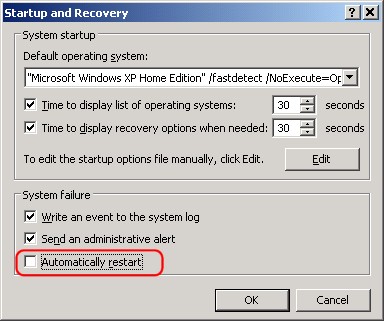
There's a setting buried in Windows XP that tells your computer to restart when a system error occurs. If you turn off that option, you may solve your automatic reboot problem.
Click Start, then open Control Panel
Click Performance and Maintenance
Click System
Click on the Advanced Tab
Click Settings in the Startup and Recovery section
Uncheck Automatically Restart in the System failure section Note that this may prevent the system from restarting, but it can also mask the true problem. As an alternative to this measure, consider what has recently changed on your system. If you have installed new hardware or software, remove it and see if the annoying restart persists. Sometimes downloading the latest driver software from the manufacturer's website will fix hardware incompatibility problems that cause restarts.
http://askbobrankin.com/computer_restarts_itself.html
There's a setting buried in Windows XP that tells your computer to restart when a system error occurs. If you turn off that option, you may solve your automatic reboot problem.
Click Start, then open Control Panel
Click Performance and Maintenance
Click System
Click on the Advanced Tab
Click Settings in the Startup and Recovery section
Uncheck Automatically Restart in the System failure section Note that this may prevent the system from restarting, but it can also mask the true problem. As an alternative to this measure, consider what has recently changed on your system. If you have installed new hardware or software, remove it and see if the annoying restart persists. Sometimes downloading the latest driver software from the manufacturer's website will fix hardware incompatibility problems that cause restarts.
http://askbobrankin.com/computer_restarts_itself.html


Similar threads

- Replies
- 0
- Views
- 214

- Replies
- 2
- Views
- 309


- Replies
- 41
- Views
- 2K


