AVS video converter 6.2.3.314 + incl. CRACK

exclusive

Member
Mar 27, 2009
1,586
10
0
47740610.jpg


23mo5f6.jpg


AVS video converter is a great tool for converting video files from any format to any format and the best part is it can also be used for RIPPING DVDs.
Rip and burn personal DVDs, convert video, create HD Video, split, join, edit, apply effects, copy to mobile devices! ALL KEY FORMATS ARE SUPPORTED!

Convert Video between Almost Any Formats:
HD Video (inc. AVCHD, MPEG-2 HD and WMV HD), TOD, MOD, M2TS, AVI (DivX, Xvid, etc.), MP4 (inc. Sony PSP and Apple iPod), WMV, 3GP, QuickTime (MOV, QT), SWF, DVD, VOB, VRO, MPEG-1, 2, 4, H.263, H.264, Real Video, DVR-MS, MKV, FLV...

33ej7ed.jpg


Convert within Minimum Time
Benefit from batch and multithreading conversion. Make the most of your multi-core processor power.

33u3b81.jpg


Create Movie DVDs
from video files of all supported formats. Use DVD menu templates. Split your movie into chapters. Watch them on your home DVD player.

Manage Videos from HD-Cameras
Key HD-Formats are supported: AVCHD, MPEG-2 HD, WMV HD, TOD, MOD, M2TS, M2T, MTS, HDV. Edit, split, trim HD-videos, add text & effects and convert them to DVD or any other supported video format. Burn a DVD-disc and watch it on your DVD-Player.

Output Videos to Various Devices:
iPod, iPhone, PSP, Zen, PS3 (HD support), XBox (HD support), Archos, phones, DVD/MPEG-4 players (with DivX/Xvid support) and portable media playes.

9rhvo8.png


Make Videos Ready for Website
Flash SWF, Real Video or WMV movies.

Straight from Disc to PC
Copy videos and home DVDs to hard drive.

Extract Soundtracks and Images from Movies
Save audio streams as audio files, save single frames as images.

Edit Fast and Precisely with a Timeline.
Delete unwanted parts. Split and join video files. Rotate, add titles and credits, apply more than 50 audio and video effects to your movies.

Batch Mode Support
Convert several video files at once. Join several video files and make one DVD.

Safe to Install, Viruses-free
We respect your privacy. So there are no spyware and adware.
Minimum System Requirements.

OS: Microsoft Windows XP, 2003, Vista* (no Mac OS/Linux support)
Processor: Intel/AMD compatible at 1500 MHz or higher
RAM: 512 MB or higher
Sound: Windows compatible sound card
DirectX: Microsoft DirectX 9.0c or later.

* Windows Vista Recommended System Requirements

Processor: Intel/AMD compatible at 3 GHz single core/1.8 GHz dual core
RAM: 1 GB or higher
Video: Windows Vista compatible video card
Sound: Windows Vista compatible sound card.

Homepage:
Code:
http://www.avsmedia.com/VideoConverter/
Language: English

2dp47n.jpg


Code:
http://hotfile.com/dl/10268659/31a5c45/AVS_VC_6.2.3.314.rar.html

PORTABLE VERSION:

Code:
http://hotfile.com/dl/10268671/82248f9/AVS_VC_6.2.3.314_Portable.exe.html

2dl14av.jpg
 

BarakOsama

Well-known member
  • May 20, 2009
    10,675
    1
    2,469
    113
    i already got this machan.
    maxxa converter

    best converter to convert about 5 movies to a single video dvd
     

    tulshi

    Member
    Aug 27, 2009
    22
    0
    0
    mekata rapid link ekak nadda?

    :nerd:
    47740610.jpg


    23mo5f6.jpg


    AVS video converter is a great tool for converting video files from any format to any format and the best part is it can also be used for RIPPING DVDs.
    Rip and burn personal DVDs, convert video, create HD Video, split, join, edit, apply effects, copy to mobile devices! ALL KEY FORMATS ARE SUPPORTED!

    Convert Video between Almost Any Formats:
    HD Video (inc. AVCHD, MPEG-2 HD and WMV HD), TOD, MOD, M2TS, AVI (DivX, Xvid, etc.), MP4 (inc. Sony PSP and Apple iPod), WMV, 3GP, QuickTime (MOV, QT), SWF, DVD, VOB, VRO, MPEG-1, 2, 4, H.263, H.264, Real Video, DVR-MS, MKV, FLV...

    33ej7ed.jpg


    Convert within Minimum Time
    Benefit from batch and multithreading conversion. Make the most of your multi-core processor power.

    33u3b81.jpg


    Create Movie DVDs
    from video files of all supported formats. Use DVD menu templates. Split your movie into chapters. Watch them on your home DVD player.

    Manage Videos from HD-Cameras
    Key HD-Formats are supported: AVCHD, MPEG-2 HD, WMV HD, TOD, MOD, M2TS, M2T, MTS, HDV. Edit, split, trim HD-videos, add text & effects and convert them to DVD or any other supported video format. Burn a DVD-disc and watch it on your DVD-Player.

    Output Videos to Various Devices:
    iPod, iPhone, PSP, Zen, PS3 (HD support), XBox (HD support), Archos, phones, DVD/MPEG-4 players (with DivX/Xvid support) and portable media playes.

    9rhvo8.png


    Make Videos Ready for Website
    Flash SWF, Real Video or WMV movies.

    Straight from Disc to PC
    Copy videos and home DVDs to hard drive.

    Extract Soundtracks and Images from Movies
    Save audio streams as audio files, save single frames as images.

    Edit Fast and Precisely with a Timeline.
    Delete unwanted parts. Split and join video files. Rotate, add titles and credits, apply more than 50 audio and video effects to your movies.

    Batch Mode Support
    Convert several video files at once. Join several video files and make one DVD.

    Safe to Install, Viruses-free
    We respect your privacy. So there are no spyware and adware.
    Minimum System Requirements.

    OS: Microsoft Windows XP, 2003, Vista* (no Mac OS/Linux support)
    Processor: Intel/AMD compatible at 1500 MHz or higher
    RAM: 512 MB or higher
    Sound: Windows compatible sound card
    DirectX: Microsoft DirectX 9.0c or later.

    * Windows Vista Recommended System Requirements

    Processor: Intel/AMD compatible at 3 GHz single core/1.8 GHz dual core
    RAM: 1 GB or higher
    Video: Windows Vista compatible video card
    Sound: Windows Vista compatible sound card.

    Homepage:
    Code:
    http://www.avsmedia.com/VideoConverter/
    Language: English

    2dp47n.jpg


    Code:
    http://hotfile.com/dl/10268659/31a5c45/AVS_VC_6.2.3.314.rar.html

    PORTABLE VERSION:

    Code:
    http://hotfile.com/dl/10268671/82248f9/AVS_VC_6.2.3.314_Portable.exe.html

    2dl14av.jpg
     

    partake06

    Banned
    Sep 4, 2009
    12
    0
    0
    As a iPhone user, I tried several video converters to iPhone, but not all of them is perfect...
    Lucily I tried Moyea Video to iPhone Converter which not only convert videos to other popular video formats with ease and high fast conversion but also edit videos with trimming, cropping, merging and effects, etc. on the other hand it offers good after-sale service.
     
    Sep 14, 2009
    3
    0
    0
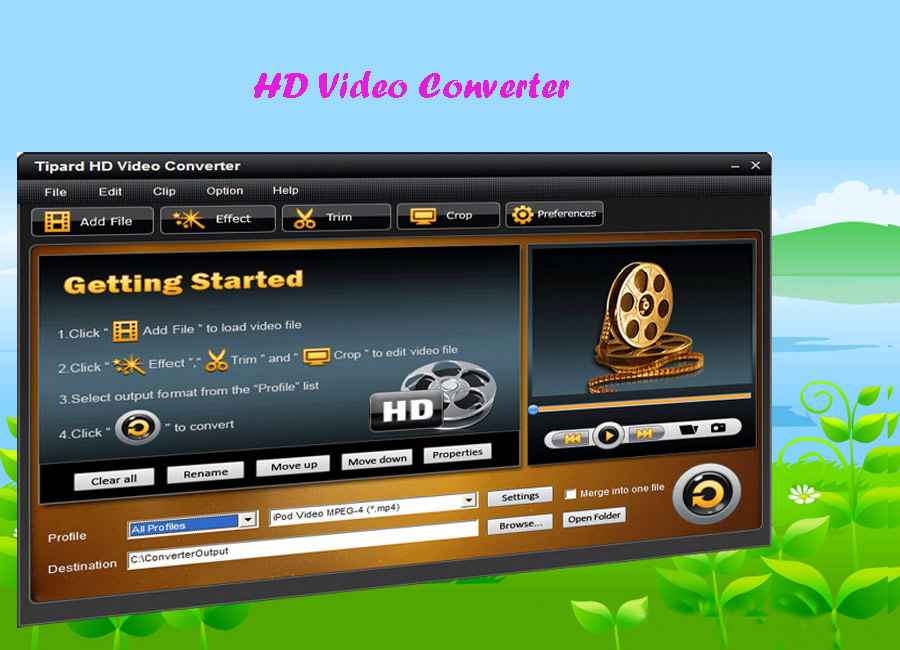
    Fully support most HD(High-Definition) video encoder and HD decoder, Tipard HD Video Converter is the fast HD Converter to convert HD video to general video, convert general video to HD video, convert among HD videos, such as HD TS, HD MTS, HD WMV, HD MPG, HD MPEG4, H.264/AVC , HD AVI, HD ASF, etc. Moreover, Tipard HD Video Converter has audio conversion and audio extraction functions to convert among audios, extract audios from general videos and HD videos to AAC, AC3, AIFF, AMR, AU, FLAC, MP3, M4A, MP2, OGG, WAV, WMA audios.
    hd-video-converter.jpg

    *Key Features*
    1. Support most HD video encoder, HD decoder and general video
    Support among HD videos conversion, such as HD TS, HD MTS, HD WMV, HD MPG, HD MPEG4, H.264/AVC , HD AVI, HD ASF, and so forth; general videos to HD video conversion, HD video to general video conversion.
    2. Set video effect
    Set the Brightness, Contrast and Saturation of the video.
    3. Provide Deinterlacing function
    Convert interlaced video to the progressive video in order to optimize the video effect.
    4. Trim video length
    Clip any segment of the video exactly.
    5. Crop the playing region
    Adjust the playing region of the video to fit for the player and user’s taste.
    6. Merge clips into one file
    Provide to join separated video files into one.
    7. Customize output settings
    Set the Video Encoder, Resolution, Frame Rate, Video Bitrate. You can also directly input your own resolution as the form of “XXX*XXX”; Set the Audio Encoder, Sample Rate, Channels, Audio Bitrate. You also can save all the output settings as your preference, which is saved in the user-defined column automatically.