


AVG Internet Security 8.5.412 Build 1664


Anti-Virus, Anti-Spyware, Anti-Spam, LinkScanner & Firewall
Comprehensive protection for your computer! This award-winning product gives you unbeatable Internet security by protecting against viruses, spyware, hackers, spam and malicious websites. AVG Internet Security is a reliable and easy-to-use solution for home and small office users which is trusted by millions of users worldwide.
Unique Internet security thanks to new technology - Only AVG gives you real-time protection against malicious websites thanks to our new LinkScanner technology.
Comprehensive protection for Windows against all online threats from the world's most trusted security company. Use the Internet with confidence in your home or small office.
• Easy to download, install and use
• Protection against viruses, spyware, adware, worms and trojans
• Real-time security while you surf and chat online
• Top-quality protection that does not slow your system down
• Free support and service around the clock and across the globe
• Compatible with Windows Vista and Windows XP
FEATURES:
All-in-one protection
• Anti-Virus: protection against viruses, worms and trojans
• Anti-Spyware: protection against spyware, adware and identity-theft
• Anti-Rootkit: protection against hidden threats (rootkits)
• Anti-Spam: filters out unwanted and fraudulent e-mails (anti-phishing)
• Web Shield & LinkScanner: protection against malicious websites
• Firewall: protection against hackers
• System Tools: for easy system management
Easy-to-use, automated protection
Real-time protection, automatic updates, low-impact background scanning for online threats, and instant quarantining or removal of infected files ensures maximum protection. Every interaction between your computer and the Internet is monitored, so nothing can get onto your system without your knowledge. AVG scans in real time:
• All files including documents, pictures and applications
• E-mails (all major email clients supported)
• Instant messaging and P2P communications
• File downloads and online transactions such as shopping and banking
• Search results and any other links you click on
Internet security with peace of mind
The new web shield checks every web page at the moment you click on the link to ensure you’re not hit by a stealthy drive-by download or any other exploits. All links on search results pages in Google, Yahoo, and MSN are analyzed and their current threat level is reported in real time before you click on the link and visit the site.
Easy system management
The new system tools let you easily configure your privacy settings, connections, and browser plug-ins all in one place.
The best Windows protection - trusted by millions of users
AVG's award-winning antivirus technology protects millions of users and is certified by major antivirus testing organizations (VB100%, ICSA, West Coast Labs Checkmark). View all AVG awards & certifications


Diskeeper 2009 Pro Premiere 13.0

Diskeeper is a fully automatic defrgmentation engine that replaces the standard Windows defragmenter which runs only manually, consumes high resoureces and rewquires full administrator privileges to operate. Diskeeper constantly monitors and maintains your systems maximum performance, using the fastest defrag engine. According to the National Software Testing Lab (NSTL) proven 300 to 500% faster and far more thorough than Windows builtin defragmenters.
The program includes a unique Set It and Forget It functionality with Smart Scheduling, that, once set, runs invisibly and fully automatic in the background. In addition, the Frag Guard feature helps prevent fragmentation in your most critical system files. Additional features include boot time defrag, priority settings as well as the ability to defrag multiple disks automatically and simultaneously while system is in use.
Diskeeper 2009 is the most advanced and most intelligent automatic disk defragmenter ever built. It can bring your computer speed and reliability to levels previously unobtainable, even when your computer was brand new. Without Diskeeper on board, relentless fragmentation will steadily corrupt system performance and generate fragmentation related problems such as slowdowns, freezes, crashes and more. Make all that a thing of the past.
Diskeeper 2009 features automatic defragmentation, which means fragmentation is now solved as it occurs, in real time. It is possible to defragment hard drives without clumsy or long maintenance processes. Scheduled defragmentation processes (robbing valuable IT hours) are a thing of the past. And, with the new InvisiTasking technology, defragmentation is done transparently. There is now zero resource conflict because Diskeeper 2009 only utilizes untapped, unused resources to defrag your volumes. PC performance and productivity are never impacted by the consolidation of free space on your drives.
Our new defrag engines handle crippling levels of file fragmentation; solving millions of fragments across multiple volume and file types. Peak performance is always maintained. Even on systems with as little as 1% free space available, Diskeeper defragments files, restores performance and renews reliability. Diskeeper gives maximum system performance, speed and reliability at all times, even if your system suffers from extreme fragmentation.
Diskeeper 2009 is the most intelligent real-time defragmenter ever built. Automatic file system performance soars once this ground-breaking automatic defragmentation software is installed.
Diskeeper Pro Premier Features:
Breakthrough Technology! InvisiTasking InvisiTasking is the foundation for Diskeeper to eliminate fragmentation in real time without affecting system resources or intruding on system demands.
Exclusive! Realtime defragmentation automatically handles fragmentation as it occurs, providing maximum system performance at all times!
NEW! Complete file and free space defragmentation defragmentation in the most extreme of conditions even if your systems have only a one or two percent of free space left available or a file in millions of fragments, Diskeeper 2008 can restore lost performance and save the applications reliant on those files from major reliability failures.
NEW! Defragmentation Intelligence enhancements Diskeepers logic controller, which detects various volume and system conditions and chooses the most effective algorithm, has been redesigned to deliver performance benefits faster and more efficiently.
NEW! Frag Shield 2.0 boosts reliability and availability by automatically preventing crash-inducing fragmentation of critical system files.
Exclusive! IFAAST 2.0 (Intelligent File Access Acceleration Sequencing Technology) automatically boosts access speeds for the most commonly used files.
Automatic online directory consolidation boosts antivirus scans and backup speed.
NEW! Volume Shadow Copy Service (VSS) Compatibility mode only Diskeeper 2008s new VSScompatible mode affords you the ability to leverage the data protection of VSS and the performance and reliability of automatic defragmentation.
Native 64 bit operating systems support.
BOOT TIME MODE safely performs Microsoft recommended defragmentation of critical system files.
Internet Download Manager 5.18 Build 3 (IDM) +Perfect Patch

Internet Download Manager has a smart download logic accelerator that features intelligent dynamic file segmentation and safe multipart downloading technology to accelerate your downloads. Unlike other download accelerators and managers that segment files before downloading starts, Internet Download Manager segments downloaded files dynamically during download process. Internet Download Manager reuses available connections without additional connect and login stages to achieve better acceleration performance.
Internet Download Manager supports proxy servers, ftp and http protocols, firewalls, redirects, cookies, authorization, MP3 audio and MPEG video content processing. IDM integrates seamlessly into Microsoft Internet Explorer, Netscape, MSN Explorer, AOL, Opera, Mozilla, Mozilla Firefox, Mozilla Firebird, Avant Browser, MyIE2, and all other popular browsers to automatically handle your downloads. You can also drag and drop files, or use Internet Download Manager from command line. Internet Download Manager can dial your modem at the set time, download the files you want, then hang up or even shut down your computer when it's done.
Other features include multilingual support, zip preview, download categories, scheduler pro, sounds on different events, HTTPS support, queue processor, html help and tutorial, enhanced virus protection on download completion, progressive downloading with quotas (useful for connections that use some kind of fair access policy or FAP like Direcway, Direct PC, Hughes, etc.), built-in download accelerator, and many others.
Main Features:
? All popular browsers and applications are supported! Internet Download Manager has been tested with the following browsers: Internet Explorer, MSN Explorer, AOL, Netscape Communicator, Netscape 6, Netscape 7, Mozilla, Mozilla Firefox, Mozilla Firebird, Opera, NetCaptor, UltraBrowser, Slim Browser, Avant Browser, MyIE2, Optimal Desktop, Ace Explorer, Advanced Browser, 27 Tools-in-1 Wichio Browser, WindowSurfer, 550 Access Browser, FineBrowser Freeware, Kopassa Browser, Fast Browser Pro, Enigma Browser, GoSuRF, K-Meleon, Smart Explorer, The Off By One Web Browser, Smartalec Voyager, CrystalPort AppCapture, The Family Browser, XANA Web Browser, Bluto, AutoSurf, 32bit Web Browser, BrowseMan, WrestlingBrowser, Eminem Browser, UltraBrowser, Cygsoft LDAP Browser, and Net M@nager. Internet Download Manager supports all versions of popular browsers, and can be integrated into any 3rd party Internet applications.
? Easy downloading with one click. When you click on a download link in a browser, IDM will take over the download and accelerate it. IDM supports HTTP, FTP, HTTPS and MMS protocols.
? Download Speed Acceleration. Internet Download Manager can accelerate downloads by up to 5 times due to its intelligent dynamic file segmentation technology. Unlike other download managers and accelerators Internet Download Manager segments downloaded files dynamically during download process and reuses available connections without additional connect and login stages to achieve best acceleration performance.
? Download Resume. Internet Download Manager will resume unfinished download from the place where they left off.
? YouTube grabber. Internet Download Manager can grab FLV videos from popular sites like YouTube, MySpaceTV, and Google Video.
? Simple installation wizard. Quick and easy installation program will make necessary settings for you, and check your connection at the end to ensure trouble free installation of Internet Download Manager
? Drag and Drop. You may simply drag and drop links to IDM, and drag and drop downloaded files out of Internet Download Manager.
? Automatic Antivirus checking. Antivirus checking makes your downloads free from viruses and trojans.
? Advanced Browser Integration. When enabled, the feature can be used to catch any download from any application. None of download managers have this feature.
? Built-in Scheduler. Internet Download Manager can connect to the Internet at a set time, download the files you want, disconnect, or shut down your computer when it's done.
? IDM includes web site spider and grabber. IDM downloads all required files that are specified with filters from web sites, for example all pictures from a web site, or subsets of web sites, or complete web sites for offline browsing. It's possible to schedule multiple grabber projects to run them once at a specified time, stop them at a specified time, or run periodically to synchronize changes.
? IDM supports many types of proxy servers. For example, IDM works with Microsoft ISA, and FTP proxy servers.
? IDM supports main authentication protocols: Basic, Negotiate, NTLM, and Keberos. Thus IDM can access many Internet and proxy servers using login name and password.
? Download All feature. IDM can add all downloads linked to the current page. It's easy to download multiple files with this feature.
? Customizable Interface. You may choose the order, and what buttons and columns appear on the main IDM window.
? Download Categories. Internet Download Manager can be used to organize downloads automatically using defined download categories.
? Quick Update Feature. Quick update may check for new versions of IDM and update IDM once per week.
? Download limits. Progressive downloading with quotas feature. The feature is useful for connections that use some kind of fair access policy (or FAP) like Direcway, Direct PC, Hughes, etc.
? IDM is multilingual. IDM is translated to Albanian, Arabic, Azerbaijan, Bosnian, Bulgarian, Chinese, Croatian, Czech, Danish, Dutch, Farsi, French, German, Greek, Hebrew, Hungarian, Italian, Japanese, Korean, Lithuanian, Macedonian, Norwegian, Polish, Portuguese, Romanian, Russian, Serbian, Slovak, Slovenian, Spanish, Thai, Turkish, and Uzbek languages.
What's new in version 5.18 build 3 (Sep 16, 2009):
* Fixed a critical security vulnerability
* Added the ability to get back using old IDM triangle icon in system tray. The icon can be returned by using "View->IDM tray icon->Classic style" menu item
Homepage -
The KMPlayer 2.9.4.1434 (Best All Format)Full


The KMPlayer Build 1434 | 12mb
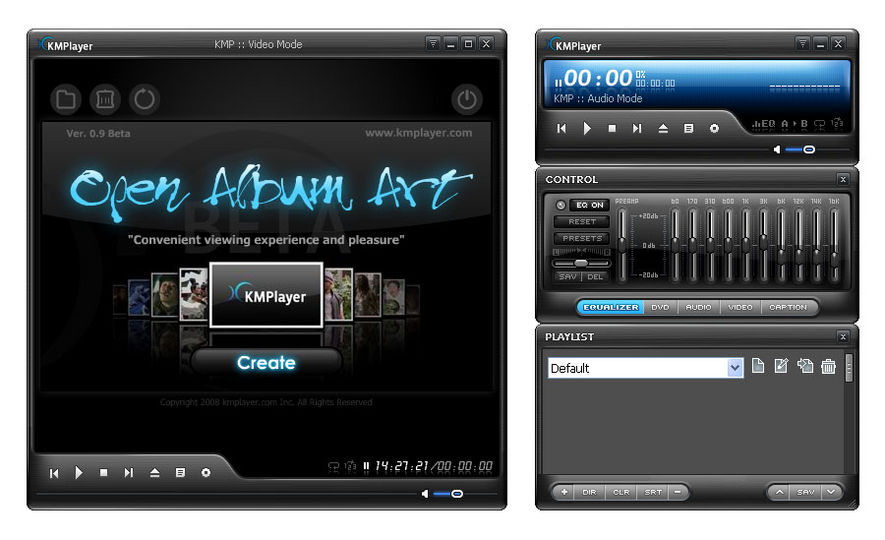
KMPlayer is a korean movie and audio player that supports a wide range of codecs and file formats. It has full VCD/DVD playback functionality. KMPlayer is a versatile media player which utilizes all kinds of video information and subtitles to bring the best video experience through software/hardware options and recognition of various display devices. The player provides a strong hybrid structure efficient for interconnecting various directshow filters, winamp input&dsp plugin, and internal filters. The most outstanding feature is that the player has the full control of filter connections to prevent a media playback from being messed.
[ The KMPlayer General ]
- New Codecs have been updated
- The two simultaneous [Default] albums created in the Playlist fixed
- Support for 5 buttons mouse (back/forward) => Preferences (F2) -> General -> Keyboard/Mouse -> Click on 1st X-button & Click on 2nd X-button
- Reduce KMPlayer.exe binary size.
- Default Preference value adjusted: Main Menu -> Options -> [Advanced Menu] Off
- Default preference value adjusted: General -> Repeat/Playlist -> [Playlist] tab -> [v] Clear default playlist items on exit. Checked.
- Incremental "Audio Volume" function added. (Preferences (F2) -> Audio Processing -> Volume -> Volume Steps
- New icon added.
- MediaInfo Library update.
[ Open Album Art upgrade ]
- Improved thumbnail extraction speed.
- Unicode Supported.
- Removal of empty folder when removing movie file. (Registry Option)
- If ThumbnailStoreType is set at a value other than 0, then improper play of videos solved
- Audio file indication option added
- Thumbnail error fixed
- Deletion of *.jpg File when deleting file from registry’s thumbnail extraction pass
- Deletion of empty folder when deleting a file
- Removal of list in BlackList.txt when removing movie file.
- Open album target pass via search engine added
- Audio file image included
- Readjust the horizontal size the album tab located at the top
- Christmas & New year Skin
* Extension on Right Mouse Click of Advanced Users
: Right mouse click > System Configuration/Others > Put a check mark upon advanced menu categories
KMPlayer “Open Album Art”
The KMPlayer “Open Album Art” provides a preview of the video thumbnail, which allows users to view videos in an easier and in a more comfortable manner.
The user previously had to look for files in where the videos were saved. However, KMPlayer “Open Album Art” now allows users to simply click on the
preview of video thumbnail, on KMP’s main page for a better appreciation of the videos. The user can now choose the display options between the album art form
and the list of thumbnail form. Moreover, once having watched the video, the user can delete the video by clicking on the [delete] button. Such a service allows
users to manage videos in an easier and in a more comfortable manner.
Last but not least, KMPlayer “Open Album Art” also provides remote control and a wireless keyboard. The new era has come for KMPlayer’s HTPC (Home Theater PC)
users or that of TV-OUT users to watch videos via “Open Album Art” with a more comfortable service in a more amicable environment.


Anti-Virus, Anti-Spyware, Anti-Spam, LinkScanner & Firewall
Comprehensive protection for your computer! This award-winning product gives you unbeatable Internet security by protecting against viruses, spyware, hackers, spam and malicious websites. AVG Internet Security is a reliable and easy-to-use solution for home and small office users which is trusted by millions of users worldwide.
Unique Internet security thanks to new technology - Only AVG gives you real-time protection against malicious websites thanks to our new LinkScanner technology.
Comprehensive protection for Windows against all online threats from the world's most trusted security company. Use the Internet with confidence in your home or small office.
• Easy to download, install and use
• Protection against viruses, spyware, adware, worms and trojans
• Real-time security while you surf and chat online
• Top-quality protection that does not slow your system down
• Free support and service around the clock and across the globe
• Compatible with Windows Vista and Windows XP
FEATURES:
All-in-one protection
• Anti-Virus: protection against viruses, worms and trojans
• Anti-Spyware: protection against spyware, adware and identity-theft
• Anti-Rootkit: protection against hidden threats (rootkits)
• Anti-Spam: filters out unwanted and fraudulent e-mails (anti-phishing)
• Web Shield & LinkScanner: protection against malicious websites
• Firewall: protection against hackers
• System Tools: for easy system management
Easy-to-use, automated protection
Real-time protection, automatic updates, low-impact background scanning for online threats, and instant quarantining or removal of infected files ensures maximum protection. Every interaction between your computer and the Internet is monitored, so nothing can get onto your system without your knowledge. AVG scans in real time:
• All files including documents, pictures and applications
• E-mails (all major email clients supported)
• Instant messaging and P2P communications
• File downloads and online transactions such as shopping and banking
• Search results and any other links you click on
Internet security with peace of mind
The new web shield checks every web page at the moment you click on the link to ensure you’re not hit by a stealthy drive-by download or any other exploits. All links on search results pages in Google, Yahoo, and MSN are analyzed and their current threat level is reported in real time before you click on the link and visit the site.
Easy system management
The new system tools let you easily configure your privacy settings, connections, and browser plug-ins all in one place.
The best Windows protection - trusted by millions of users
AVG's award-winning antivirus technology protects millions of users and is certified by major antivirus testing organizations (VB100%, ICSA, West Coast Labs Checkmark). View all AVG awards & certifications


Code:
http://rapidshare.com/files/282892577/AVG.IS.v8.5.412.Build.1664.rar
Diskeeper is a fully automatic defrgmentation engine that replaces the standard Windows defragmenter which runs only manually, consumes high resoureces and rewquires full administrator privileges to operate. Diskeeper constantly monitors and maintains your systems maximum performance, using the fastest defrag engine. According to the National Software Testing Lab (NSTL) proven 300 to 500% faster and far more thorough than Windows builtin defragmenters.
The program includes a unique Set It and Forget It functionality with Smart Scheduling, that, once set, runs invisibly and fully automatic in the background. In addition, the Frag Guard feature helps prevent fragmentation in your most critical system files. Additional features include boot time defrag, priority settings as well as the ability to defrag multiple disks automatically and simultaneously while system is in use.
Diskeeper 2009 is the most advanced and most intelligent automatic disk defragmenter ever built. It can bring your computer speed and reliability to levels previously unobtainable, even when your computer was brand new. Without Diskeeper on board, relentless fragmentation will steadily corrupt system performance and generate fragmentation related problems such as slowdowns, freezes, crashes and more. Make all that a thing of the past.
Diskeeper 2009 features automatic defragmentation, which means fragmentation is now solved as it occurs, in real time. It is possible to defragment hard drives without clumsy or long maintenance processes. Scheduled defragmentation processes (robbing valuable IT hours) are a thing of the past. And, with the new InvisiTasking technology, defragmentation is done transparently. There is now zero resource conflict because Diskeeper 2009 only utilizes untapped, unused resources to defrag your volumes. PC performance and productivity are never impacted by the consolidation of free space on your drives.
Our new defrag engines handle crippling levels of file fragmentation; solving millions of fragments across multiple volume and file types. Peak performance is always maintained. Even on systems with as little as 1% free space available, Diskeeper defragments files, restores performance and renews reliability. Diskeeper gives maximum system performance, speed and reliability at all times, even if your system suffers from extreme fragmentation.
Diskeeper 2009 is the most intelligent real-time defragmenter ever built. Automatic file system performance soars once this ground-breaking automatic defragmentation software is installed.
Diskeeper Pro Premier Features:
Breakthrough Technology! InvisiTasking InvisiTasking is the foundation for Diskeeper to eliminate fragmentation in real time without affecting system resources or intruding on system demands.
Exclusive! Realtime defragmentation automatically handles fragmentation as it occurs, providing maximum system performance at all times!
NEW! Complete file and free space defragmentation defragmentation in the most extreme of conditions even if your systems have only a one or two percent of free space left available or a file in millions of fragments, Diskeeper 2008 can restore lost performance and save the applications reliant on those files from major reliability failures.
NEW! Defragmentation Intelligence enhancements Diskeepers logic controller, which detects various volume and system conditions and chooses the most effective algorithm, has been redesigned to deliver performance benefits faster and more efficiently.
NEW! Frag Shield 2.0 boosts reliability and availability by automatically preventing crash-inducing fragmentation of critical system files.
Exclusive! IFAAST 2.0 (Intelligent File Access Acceleration Sequencing Technology) automatically boosts access speeds for the most commonly used files.
Automatic online directory consolidation boosts antivirus scans and backup speed.
NEW! Volume Shadow Copy Service (VSS) Compatibility mode only Diskeeper 2008s new VSScompatible mode affords you the ability to leverage the data protection of VSS and the performance and reliability of automatic defragmentation.
Native 64 bit operating systems support.
BOOT TIME MODE safely performs Microsoft recommended defragmentation of critical system files.
Code:
http://rapidshare.com/files/282908162/Diskeeper_2009.rar
Internet Download Manager has a smart download logic accelerator that features intelligent dynamic file segmentation and safe multipart downloading technology to accelerate your downloads. Unlike other download accelerators and managers that segment files before downloading starts, Internet Download Manager segments downloaded files dynamically during download process. Internet Download Manager reuses available connections without additional connect and login stages to achieve better acceleration performance.
Internet Download Manager supports proxy servers, ftp and http protocols, firewalls, redirects, cookies, authorization, MP3 audio and MPEG video content processing. IDM integrates seamlessly into Microsoft Internet Explorer, Netscape, MSN Explorer, AOL, Opera, Mozilla, Mozilla Firefox, Mozilla Firebird, Avant Browser, MyIE2, and all other popular browsers to automatically handle your downloads. You can also drag and drop files, or use Internet Download Manager from command line. Internet Download Manager can dial your modem at the set time, download the files you want, then hang up or even shut down your computer when it's done.
Other features include multilingual support, zip preview, download categories, scheduler pro, sounds on different events, HTTPS support, queue processor, html help and tutorial, enhanced virus protection on download completion, progressive downloading with quotas (useful for connections that use some kind of fair access policy or FAP like Direcway, Direct PC, Hughes, etc.), built-in download accelerator, and many others.
Main Features:
? All popular browsers and applications are supported! Internet Download Manager has been tested with the following browsers: Internet Explorer, MSN Explorer, AOL, Netscape Communicator, Netscape 6, Netscape 7, Mozilla, Mozilla Firefox, Mozilla Firebird, Opera, NetCaptor, UltraBrowser, Slim Browser, Avant Browser, MyIE2, Optimal Desktop, Ace Explorer, Advanced Browser, 27 Tools-in-1 Wichio Browser, WindowSurfer, 550 Access Browser, FineBrowser Freeware, Kopassa Browser, Fast Browser Pro, Enigma Browser, GoSuRF, K-Meleon, Smart Explorer, The Off By One Web Browser, Smartalec Voyager, CrystalPort AppCapture, The Family Browser, XANA Web Browser, Bluto, AutoSurf, 32bit Web Browser, BrowseMan, WrestlingBrowser, Eminem Browser, UltraBrowser, Cygsoft LDAP Browser, and Net M@nager. Internet Download Manager supports all versions of popular browsers, and can be integrated into any 3rd party Internet applications.
? Easy downloading with one click. When you click on a download link in a browser, IDM will take over the download and accelerate it. IDM supports HTTP, FTP, HTTPS and MMS protocols.
? Download Speed Acceleration. Internet Download Manager can accelerate downloads by up to 5 times due to its intelligent dynamic file segmentation technology. Unlike other download managers and accelerators Internet Download Manager segments downloaded files dynamically during download process and reuses available connections without additional connect and login stages to achieve best acceleration performance.
? Download Resume. Internet Download Manager will resume unfinished download from the place where they left off.
? YouTube grabber. Internet Download Manager can grab FLV videos from popular sites like YouTube, MySpaceTV, and Google Video.
? Simple installation wizard. Quick and easy installation program will make necessary settings for you, and check your connection at the end to ensure trouble free installation of Internet Download Manager
? Drag and Drop. You may simply drag and drop links to IDM, and drag and drop downloaded files out of Internet Download Manager.
? Automatic Antivirus checking. Antivirus checking makes your downloads free from viruses and trojans.
? Advanced Browser Integration. When enabled, the feature can be used to catch any download from any application. None of download managers have this feature.
? Built-in Scheduler. Internet Download Manager can connect to the Internet at a set time, download the files you want, disconnect, or shut down your computer when it's done.
? IDM includes web site spider and grabber. IDM downloads all required files that are specified with filters from web sites, for example all pictures from a web site, or subsets of web sites, or complete web sites for offline browsing. It's possible to schedule multiple grabber projects to run them once at a specified time, stop them at a specified time, or run periodically to synchronize changes.
? IDM supports many types of proxy servers. For example, IDM works with Microsoft ISA, and FTP proxy servers.
? IDM supports main authentication protocols: Basic, Negotiate, NTLM, and Keberos. Thus IDM can access many Internet and proxy servers using login name and password.
? Download All feature. IDM can add all downloads linked to the current page. It's easy to download multiple files with this feature.
? Customizable Interface. You may choose the order, and what buttons and columns appear on the main IDM window.
? Download Categories. Internet Download Manager can be used to organize downloads automatically using defined download categories.
? Quick Update Feature. Quick update may check for new versions of IDM and update IDM once per week.
? Download limits. Progressive downloading with quotas feature. The feature is useful for connections that use some kind of fair access policy (or FAP) like Direcway, Direct PC, Hughes, etc.
? IDM is multilingual. IDM is translated to Albanian, Arabic, Azerbaijan, Bosnian, Bulgarian, Chinese, Croatian, Czech, Danish, Dutch, Farsi, French, German, Greek, Hebrew, Hungarian, Italian, Japanese, Korean, Lithuanian, Macedonian, Norwegian, Polish, Portuguese, Romanian, Russian, Serbian, Slovak, Slovenian, Spanish, Thai, Turkish, and Uzbek languages.
What's new in version 5.18 build 3 (Sep 16, 2009):
* Fixed a critical security vulnerability
* Added the ability to get back using old IDM triangle icon in system tray. The icon can be returned by using "View->IDM tray icon->Classic style" menu item
Homepage -
Code:
http://rapidshare.com/files/282898116/IDM5.18Build3.Full.rarThe KMPlayer 2.9.4.1434 (Best All Format)Full


The KMPlayer Build 1434 | 12mb
KMPlayer is a korean movie and audio player that supports a wide range of codecs and file formats. It has full VCD/DVD playback functionality. KMPlayer is a versatile media player which utilizes all kinds of video information and subtitles to bring the best video experience through software/hardware options and recognition of various display devices. The player provides a strong hybrid structure efficient for interconnecting various directshow filters, winamp input&dsp plugin, and internal filters. The most outstanding feature is that the player has the full control of filter connections to prevent a media playback from being messed.
[ The KMPlayer General ]
- New Codecs have been updated
- The two simultaneous [Default] albums created in the Playlist fixed
- Support for 5 buttons mouse (back/forward) => Preferences (F2) -> General -> Keyboard/Mouse -> Click on 1st X-button & Click on 2nd X-button
- Reduce KMPlayer.exe binary size.
- Default Preference value adjusted: Main Menu -> Options -> [Advanced Menu] Off
- Default preference value adjusted: General -> Repeat/Playlist -> [Playlist] tab -> [v] Clear default playlist items on exit. Checked.
- Incremental "Audio Volume" function added. (Preferences (F2) -> Audio Processing -> Volume -> Volume Steps
- New icon added.
- MediaInfo Library update.
[ Open Album Art upgrade ]
- Improved thumbnail extraction speed.
- Unicode Supported.
- Removal of empty folder when removing movie file. (Registry Option)
- If ThumbnailStoreType is set at a value other than 0, then improper play of videos solved
- Audio file indication option added
- Thumbnail error fixed
- Deletion of *.jpg File when deleting file from registry’s thumbnail extraction pass
- Deletion of empty folder when deleting a file
- Removal of list in BlackList.txt when removing movie file.
- Open album target pass via search engine added
- Audio file image included
- Readjust the horizontal size the album tab located at the top
- Christmas & New year Skin
* Extension on Right Mouse Click of Advanced Users
: Right mouse click > System Configuration/Others > Put a check mark upon advanced menu categories
KMPlayer “Open Album Art”
The KMPlayer “Open Album Art” provides a preview of the video thumbnail, which allows users to view videos in an easier and in a more comfortable manner.
The user previously had to look for files in where the videos were saved. However, KMPlayer “Open Album Art” now allows users to simply click on the
preview of video thumbnail, on KMP’s main page for a better appreciation of the videos. The user can now choose the display options between the album art form
and the list of thumbnail form. Moreover, once having watched the video, the user can delete the video by clicking on the [delete] button. Such a service allows
users to manage videos in an easier and in a more comfortable manner.
Last but not least, KMPlayer “Open Album Art” also provides remote control and a wireless keyboard. The new era has come for KMPlayer’s HTPC (Home Theater PC)
users or that of TV-OUT users to watch videos via “Open Album Art” with a more comfortable service in a more amicable environment.
Code:
http://rapidshare.com/files/282891821/indogear.com.The.KMPlayer.1434.zip





 rogram FilesFolder Lock) can’t be deleted and can’t be uninstalled without the correct password.


