


http://www.glazzbook.com
Want to dazzle your friends with your technical prowess while checking out
the profitability of a vending machine route? Read on. Most Coke machines
built since the late 1990s can be "hacked" with a simple access code. Once
you enter the code, you can find out all kinds of information about the
machine's sales.
Steps
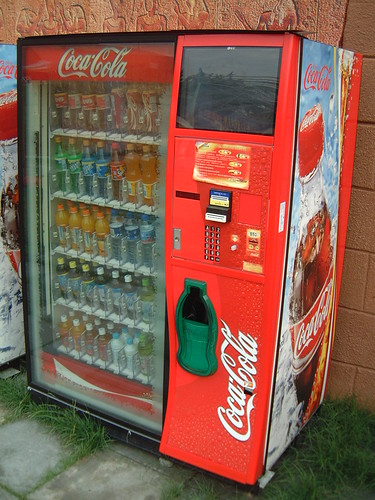
1. Find a Coke machine that has an LED screen. The small screen will
typically scroll a message such as "Ice Cold Cokes." If the machine's LED
display simply displays the price, the steps below may not work.
2. Enter the access code by using the drink selection buttons. The
default access code is 4, 2, 3, 1, but the buttons aren't numbered. They
will either say nothing or have pictures of "Coke, "Diet Coke," "Sprite,"
and other Coca Cola products on them.
* If the buttons are in a column, button 1 is the top one.
Button 2 is the second one from the top, and so on.
* If they are in a grid or other format, button 1 is the top
left one. Button 2 is the one directly to the right of that, and so on.
3. Scroll through the menu to find out information about the machine.
Once you enter the correct access code, the message on the LED screen will
change. Typically it will say "EROR," but on some machines it may simply
display a number. Use the buttons to navigate the menu.
* Press button 1 at any time to return to the previous menu or
to exit the menu to go back to normal mode.
* Press button 2 to scroll up through the selections.
* Press button 3 to scroll down through the selections.
* Press button 4 to select the displayed menu option.
Visit for more about this http://www.glazzbook.com/
Want to dazzle your friends with your technical prowess while checking out
the profitability of a vending machine route? Read on. Most Coke machines
built since the late 1990s can be "hacked" with a simple access code. Once
you enter the code, you can find out all kinds of information about the
machine's sales.
Steps
1. Find a Coke machine that has an LED screen. The small screen will
typically scroll a message such as "Ice Cold Cokes." If the machine's LED
display simply displays the price, the steps below may not work.
2. Enter the access code by using the drink selection buttons. The
default access code is 4, 2, 3, 1, but the buttons aren't numbered. They
will either say nothing or have pictures of "Coke, "Diet Coke," "Sprite,"
and other Coca Cola products on them.
* If the buttons are in a column, button 1 is the top one.
Button 2 is the second one from the top, and so on.
* If they are in a grid or other format, button 1 is the top
left one. Button 2 is the one directly to the right of that, and so on.
3. Scroll through the menu to find out information about the machine.
Once you enter the correct access code, the message on the LED screen will
change. Typically it will say "EROR," but on some machines it may simply
display a number. Use the buttons to navigate the menu.
* Press button 1 at any time to return to the previous menu or
to exit the menu to go back to normal mode.
* Press button 2 to scroll up through the selections.
* Press button 3 to scroll down through the selections.
* Press button 4 to select the displayed menu option.
Visit for more about this http://www.glazzbook.com/


