


මේකට තමයි Code කරන්න ඕනේ
Use case
A retail shop needs to maintain a product stock and purchase orders through a web
application. The customers can submit their orders via the web application. As a backend developer, you
need to develop an API to register a customer in the system.
Below, please find a sample request and response JSON data for registering a customer.
Sample Request JSON for registering a customer

Sample Response JSON for a successful registration

customerId: This should be the generated id from the database
1. Update the database.js file with the required data definition (CREATE TABLE statement) to create the
data table to store the data of customers
Table name: customer
2. Implement a new API in the server.js file to register a customer and add the data record to the table.
The method of the API should be POST
Include the proper error handling
HTTP error codes
Success: 201 Created
An Error: 400 Bad Request
Reference for HTTP error codes - Link
3. Implement validation to validate POST data to the same API as below
Email address validation
Credit card number validation (12 digits)
Resources:
To test the expected outcome, you can pull the codebase from the below repository and edit the relevant files(database.js and server.js)
.
Git repository: https://github.com/opencourse5tutor/products-api
Answer Submission Instructions
Students should submit the following files.
server.js
database.js
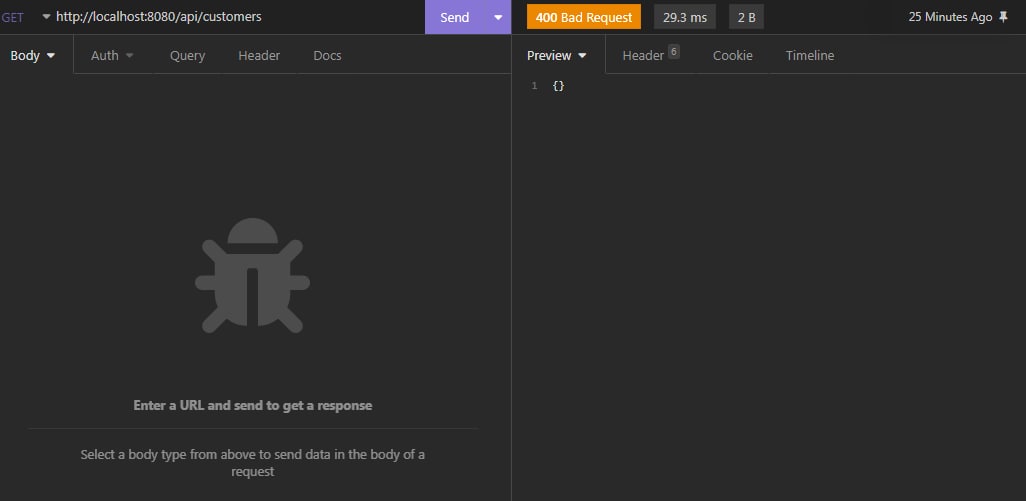
mn request damme Insomnia eken mehema error ekak enawa .
Use case
A retail shop needs to maintain a product stock and purchase orders through a web
application. The customers can submit their orders via the web application. As a backend developer, you
need to develop an API to register a customer in the system.
Below, please find a sample request and response JSON data for registering a customer.
Sample Request JSON for registering a customer

Sample Response JSON for a successful registration

customerId: This should be the generated id from the database
1. Update the database.js file with the required data definition (CREATE TABLE statement) to create the
data table to store the data of customers
Table name: customer
2. Implement a new API in the server.js file to register a customer and add the data record to the table.
The method of the API should be POST
Include the proper error handling
HTTP error codes
Success: 201 Created
An Error: 400 Bad Request
Reference for HTTP error codes - Link
3. Implement validation to validate POST data to the same API as below
Email address validation
Credit card number validation (12 digits)
Resources:
To test the expected outcome, you can pull the codebase from the below repository and edit the relevant files(database.js and server.js)
.
Git repository: https://github.com/opencourse5tutor/products-api
Answer Submission Instructions
Students should submit the following files.
- A screenshot of a successful customer registration using the Postman tool.
- database.js file
- server.js file
server.js
JavaScript:
var express = require("express");
var app = express();
var db = require("./database1.js");
var bodyParser = require("body-parser");
const { request, response } = require("express");
const res = require("express/lib/response");
app.use(bodyParser.json());

let HTTP_PORT = 8080;

app.listen(HTTP_PORT, () => {
    console.log("Server is running on %PORT%".replace("%PORT%", HTTP_PORT))
});

app.post("/api/customers/", (req, res, next) => {

    try {
        var errors = []

        if (!req.body) {
            errors.push("An invalid input");
        }

        const {
            name ,
            address,
            email ,
            dateOfBirth ,
            gender,
            age ,
            cardHolderName ,
            cardNumber,
            expiryDate,
            cvv ,
            timeStamp
        } = req.body;
        var sql = 'INSERT INTO customers (name,address,email,dateOfBirth,gender,age,cardHolderName,cardNumber,expiryDate,cvv,timeStamp) VALUES (?,?,?,?,?,?,?,?,?,?,?)'
        var params = [name,address,email,dateOfBirth,gender,age,cardHolderName,cardNumber,expiryDate,cvv,timeStamp]


          db.run(sql, params, function (err, result) {

            if (err) {
                return;
            } else {

                res.json({
                    "message": "customer " + req.body.name +" registered",
                    "customerid": this.lastID
                })
            }

        });

    }catch (E) {
            res.status(400).send(E);
    }
 });

app.get("/api/customers/:customerid", (req, res, next) => {

    try {
        var sql = "select * from customers WHERE customerid =?"
        var params = [req.params.customerid]
        db.all(sql, params, (err, rows) => {
            if (err) {
                res.status(400).json({ "error": err.message });
                return;
            }
            res.json({
                "message": "success",
                "data": rows
            })
        });
    } catch (E) {
        res.status(400).send(E);
    }
});


app.get("/api/customers", (req, res, next) => {

    try {
        var sql = "select * from customers"
        var params = []
        db.all(sql, params, (err, rows) => {
            if (err) {
                res.status(400).json({ "error": err.message });
                return;
            }
            res.json({
                "message": "success",
                "data": rows
            })
        });
    } catch (E) {
        res.status(400).send(E);
    }
});

app.patch("/api/customers/:customerid", (req, res, next) => {
    const {
            name,
            address,
            email ,
            dateOfBirth ,
            gender,
            age ,
            cardHolderName ,
            cardNumber,
            expiryDate,
            cvv ,
            timeStamp
    } = req.body;
        db.run(`UPDATE customers set name =?,address=?,email=?,dateOfBirth=?,gender=?,age=?,cardHolderName=?,cardNumber=?,expiryDate=?,cvv=?,timeStamp=? WHERE customerid = ?`,
    [name,address,email,dateOfBirth,gender,age,cardHolderName,cardNumber,expiryDate,cvv,timeStamp,req.params.customerid],
        function (err, result) {
            if (err) {
                res.status(400).json({ "error": res.message })
                return;
            }
            res.status(200).json({ "updated customerid": req.params.customerid })
        });
});

app.delete("/api/customers/:customerid", (req, res, next) => {
    try {
        db.run('DELETE FROM customers WHERE customerid = ?',
            req.params.customerid,
            function (err, result) {
                if (err) {
                    res.status(400).json({ "error": res.message })
                    return;
                }
                res.json({ "message": "deleted customer id "+ req.params.customerid})
            });
    } catch (E) {
        res.status(400).send(E)
    }

});
database.js
JavaScript:
var sqlite3 = require('sqlite3').verbose();
var md5 = require('md5');

const DBSOURCE = 'db.sqlite';

let db = new sqlite3.Database(DBSOURCE, (err) => {
  if (err) {
    // Cannot open database
    console.error(err.message);
    throw err;
  } else {
    console.log('Connected to the SQlite database.');
    db.run(
      `CREATE TABLE customers (
            id INTEGER PRIMARY KEY AUTOINCREMENT,
            customerName text,
            address text,
            email VARCHAR,
            dateofBirth VARCHAR,
            gender VARCHAR,
            age INTEGER,
            cardHolderName text,
            expirytdate VARCHAR,
            cvv INTEGER,
            timpStamp text
            )`,
      (err) => {
        if (err) {
          // Table already created
        } else {
          // Table just created, creating some rows
          var insert =
            ' INSERT INTO customers (customerName,address, email, dateofBirth, gender, age,cardHolderName,expirytdate,cvv , timpStamp )  VALUES (?,?,?,?,?,?,?,?,?,?)';
          db.run(insert, [

            'Jems Watson',
            'No 324/A ra de Mel Road , kadawataha',
            '[email protected]',
            '2002.02.25',
            'male',
            '20',
            'J.watson',
            '425678588956',
            '12/2026',
            '245',
            '2022-12-31 23:59:59',
          ]);
        }
      }
    );
  }
});
mn request damme Insomnia eken mehema error ekak enawa .
Last edited:


