Cyberlink Apps

XXsmileyXX

Member
Dec 18, 2008
974
2
0
CyberLink LabelPrint v2.00.502

21j4pwy.jpg


CyberLink LabelPrint 2
The Smart Way to Create Stylish Disc Labels
Create labels, covers and jewel-case inlays
Burn images onto LightScribe and Labelflash discs
Auto-import MP3 songs and playlist information
Choose from high-res images and built-in templates
Output to a wide range of commercial label templates
Code:
Read more here about it at the homepage 
http://www.cyberlink.com/multi/products/main_38_ENU.html 
 
Download 
http://rapidshare.com/files/121238296/CLLP.rar 
64318KB


363845015_2e280b29c3.jpg


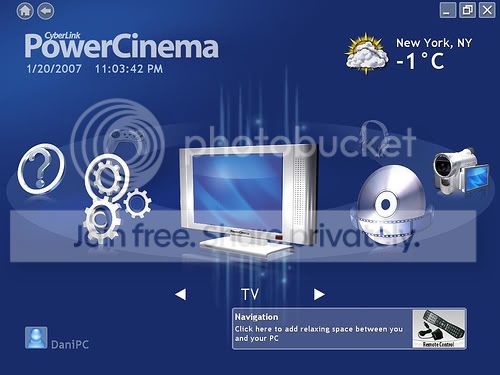
The TV Entertainment Center for the Digital Home
Watch analog and digital TV programs with time-shift playback
Record your favorite TV and radio shows with smart scheduling
Search for TV programs that match your interests via EPG
Watch two channels simultaneously using PiP mode
Play DVDs, videos, photos, and music. Get online news and weather info
TV on the PC: schedule, record, and watch your favorite shows
Search for programs by name, category, and channel
Schedule your PC to record shows while you?re out
Catch up on the action of live TV shows even after they?ve started, with time-shift recording
Record programs to DVD or hard disk
Switch between channels, language settings, and subtitles
more details
DVDs, Videos, Music, and Pictures: watch, listen, and enjoy
Play movie DVDs with Dolby Digital audio
Watch widescreen movies in their true display ratio
Sync music files with your portable media player
Remove photo red-eyes, auto fix contrast and brightness
Display photos as a slideshow with background music and transition effects
more details
News and Weather, More Options
Access live weather and news information
Change your interface colors and themes
Expand functionality with packs for video editing, disc burning, and watching sports highlights
Enrich the movie experience with the Advanced Audio Pack of home-theater technologies
Get a remote control for the ultimate digital home experience


Code:
http://rapidshare.com/files/96389108/clink_pw_cinma_kygn.part1.rar 
http://rapidshare.com/files/96409501/clink_pw_cinma_kygn.part2.rar


fxgjdg.jpg


The All-Media Disc Burning Software• Burn data onto Blu-ray Discs and HD DVDs
• Create video and photo DVDs, burn audio CDs, and rip MP3s
• Search and locate files instantly using file names or tags
• Secure discs with encryption and password protection
• Drag-and-drop files to burn via the Power2Go sidebar gadget

Drag-and-Drop burning
• Windows Sidebar Gadget — drag-and-drop then burn files directly via the Windows Sidebar.
• MP3 ripping and audio file conversion — take your favorite CDs and quickly create files for playback on a music player or your home media center PC.
• New-look interface — feel right at home with the new look of Windows Vista; easier navigation and a cleaner design.

Burn any disc, any file
• Data burning — burn a huge amount of data to disc, on CDs, DVDs, Blu-ray Discs and HD DVDs.
• Video and photo disc authoring — create discs of videos and photo slideshows that play on a home DVD player.
• Creation of Audio CDs — create compilation CDs.
• Mixed media CDs — burn data files and audio files onto the same disc, play your music on your CD player, then access data on your PC.

Search and burn
• Simplified burning process — find files in an instant, search using tags or titles.
• Drag to burn — drag complete folders or individual files in one easy step.
• Disc capacity bar — manage the number of files you can burn for your current disc media using the easy-to-read capacity bar.
• Burner settings — take control of the burning process with speed, data settings, auto-run, and other burning options.

Safeguard your data
• Secured data disc —add a password and encrypt to ensure better protection.
• Disc copying — create perfect duplicates of your discs.
• Erase disc and disc image utilities — save or burn disc images, erase and re-use re-writable discs.

Download
Code:
http://rapidshare.com/files/126073470/CyberLink_Power2Go_v6.0.rar
 

XXsmileyXX

Member
Dec 18, 2008
974
2
0
Cyberlink PowerDVD 8 (Ultra Final)(SILENT INSTALL)

Fully cracked and silent install

just click the setup.exe!!!!! thats it....


1o0x2p.jpg


CyberLink today launched the latest version of PowerDVD 8.

Key features in PowerDVD 8 include:

- Support for HD audio and video standards and formats, including AVCHD and Blu-ray Discs.
- Home Theater Audio - Offering high-definition, 7.1-channel home-entertainment system, or on the go using a notebook.
- Movie Collection - lets users collect information about movies and sync with their online MoovieLive account.
- Movie Remix - lets users create their own stories using their favorite DVD movies, rearranging scenes, adding dialog and commentary, subtitles, and on-screen effects.
- MoovieLive.com - the new online community for PowerDVD users to share comments and remixes, publish reviews, and find friends with the same movie taste.

PowerDVD 8 supports the following video disc formats:

MPEG-4 AVC/H.264
MPEG-2 HD
SMPTE VC-1
WMV-HD

Blu-ray Discs: BD-Video profile 1.1, AVCHD
DVDs: DVD-Video, DVD-Audio, DVD-VR, DVD+VR
CDs: VCD, SVCD, Audio CD


Enjoy High-Definition Movies

PowerDVD delivers award-winning playback quality for movies on the PC.Enjoy high-definition movies and interactive extras with PowerDVD

* High-definition movie content - The best video quality out there, with support for video formats like AVCHD, MPEG-4 AVC (H.264), and Blu-ray Discs*.
* Advanced video technologies - See the beauty in each shot of every scene with TrueTheater™ Technology.
* Home theater audio - Enjoy movies on the PC as if you are right at the cinema, with support for Dolby, DTS, and other home theater technologies.
* Smart DVD utilities - Save battery power on your notebook (See-it-All), move language subtitles (Read-it-Clearly), and auto loop a section of dialog (Say-it-Again), with PowerDVD's award winning DVD controls.


Remix Your DVD Movies

PowerDVD lets you create new stories based on existing movies, or simply express your creativity and opinions in unconventional ways.

* Remix your movies to create new stories with PowerDVDMovie Remix - Put your own touches to a movie by re-ordering scenes, adding subtitles, inserting animated PiPs, and recording a voice-over.
See how it works
* Watch other people's remixes - Download remixes from MoovieLive and see what other people have created.
* Share your remixes online - Upload your remixes to MoovieLive and let others share in your unique vision.


Collect Movie Information

PowerDVD helps you build a library of movie facts and figures, combining personal notes and disc information. Sync your movie collection to your MoovieLive account. Collect information about the movies you love with PowerDVD

* Your movie collection - Create a collection of movies, and keep a record of your viewing experience. Gather data and trivia about the DVDs you watch.
* Reviews & ratings - Write reviews about the movies you've seen. Give a quick 5-star rating and compare that with what others like through the global rating.
* Quick movie stats - Quickly check how many PowerDVD users enjoy the same movies as you. PowerDVD lets you see the number of viewers, remixes made, reviews written, and DVD owners.


Connect via MoovieLive

Connect with other PowerDVD users online via MoovieLive

PowerDVD gets you connected with other users via MoovieLive.com. You can see global ratings for the movies you watch, access information about the movies other people are watching too.

* Upload & download remixes - Download remixes to see different takes on a movie. Upload your own remixes to share with other PowerDVD users.
* Make friends - Find other people who are interested in the films you like, then get connected.
* Publish your thoughts - After writing a review of a movie, why not share your review with other PowerDVD users? MoovieLive lets you upload your review, and adds your ratings to the community's global rating.
* See what others have to say - Read reviews from other PowerDVD users and browse MoovieLive's database for tons of details about the movies you love (and loathe!).


DOWNLOAD:

Code:
http://rapidshare.com/files/110682594/PD8U.rar
 

XXsmileyXX

Member
Dec 18, 2008
974
2
0
CyberLink YouCam 2.0

CyberLink YouCam is a software solution for webcam users.
The dual-mode user interface design makes CyberLink YouCam easy and fun to use. In the Instant Messaging mode, you can participate in a video webcam session with your friends, while applying instant effects in real-time. The instant effects let you add frames, filters, distortions and emotion effects to your webcam video. This allows you to enhance the video with these fun and creative video effects.

When you switch from the Instant Messaging mode to the Self-capturing mode, you can apply the video effects while you are recording your own video from the webcam. You can also take single or multiple snapshots that include beautiful frames or enhance them with the inclusion of emotion effects. You can then send the captured video and photos as email attachments to your friends and family. You can even upload the captured video to YouTube® directly. Now you can be the superstar on the world’s largest video sharing web site.
CyberLink YouCam also lets you periodically expand the effects capability. You can download additional effects from the CyberLink web site, then import them
into CyberLink YouCam. Your creativity is unlimited!

Download
Code:
http://rapidshare.com/files/130686847/CyberLink.YouCam.2.0.rar

2ntz0xz.jpg
 

XXsmileyXX

Member
Dec 18, 2008
974
2
0
Cyberlink PowerDVD v6.5 HD-DVD 8ch

g.jpg


The HD-DVD version that is necessary to play HDDVD discs on your PC!

Download

Code:
http://depositfiles.com/files/566768
 

XXsmileyXX

Member
Dec 18, 2008
974
2
0
2i7qnio.gif


2e4khtj.gif
PowerDVD 7 Express — the No. 1 DVD Experience on the PC Enjoy the smoothest, brightest and most natural visuals. Experience virtual surround sound and 8-channel audio expansion. Enjoy incredible clarity of sound offered by 2-channel Dolby Play a broad range of audio and video formats. Navigate easily with shortcuts, bookmarks and other cool controls.

2wme1wo.gif
PowerDirector 5 SEP — the Magic Video Editing Tools. Capture and edit high-definition and widescreen video content. Stabilize shaky videos and sharpen picture focus with Magic Fix. Edit movies with Magic Style, auto-combining effects, transitions, and speed.Create titles from templates with the improved Title Designer.Output to the latest video formats, including HD MPEG-2 and optional MPEG-4.

44kyl5c.gif
PowerProducer 4 (DVD) — the Intelligent Way to Author Stunning DVDs. Record high-definition video content directly from camcorder to disc. Add creative touches with stylish menu features.Retouch photos and create dynamic slideshows. Achieve the highest burning quality for your disc space with Smart Fit.Burn in any DVD format including double-layer discs.

2eof8nl.gif
MediaShow 3 — Create and Share Dazzling Slideshows on DVD. Create a dynamic multimedia show featuring music, photos and PowerPoint slides.Customize slideshows with title designs, title effects, and transitions.Automatically fix photos and apply image effects with PhotoNow!.Burns slideshows onto DVDs or VCDs for convenient playback. Save slideshows as EXE formatted files, allowing playback on any computer.

2z4hdsm.gif
Power2Go 5.5 — the Media Disc Burning Software Burn data onto Blu-ray Discs, HD DVDs, DVDs and CDs.Increase data security with encryption and password protection.Drag-and-drop files on desktop express icons for super-easy data burning.Create Mixed Mode CDs featuring data and media files.Rip CDs to create MP3 or WMA files, convert between file formats.

2n7k095.gif
PowerBackup 2.5 — the Safe Way to Protect Your Valuable DataArchive files, folders and application data. Include or exclude files with advanced filtering. Schedule automatic backups of important data. Restore data using the independent restorer utility. Back up onto a Blu-ray Disc or any DVD type, split data across discs. Protect archives with password protection.

InstantBurn 5 — the Intuitive Solution for Rewritable Disc Media. Use a Blu-ray Disc, HD DVD or DVD like a super large floppy disc. Store files via a broad range of rewritable disc burners. Drag-and-drop, cut, copy, and delete files. Rename files and change file property information.

LabelPrint 2 — the Smart Way to Personalize Your DVD Labels Create labels, covers and jewel-case inlays quickly and easily. Design professional layouts with built-in high-resolution backgrounds. Personalize designs by importing photo files. Auto-import MP3 song titles and playlist information. Etch images directly onto LightScribe and Labelflash discs.

2mnna8g.gif
PowerDVD Copy — the One-Step DVD to DVD Copying Software Make high-quality 1:1 DVD movie backups. Auto-shrink content to fit 8.5 GB onto a 4.7 GB DVD. View video content via the Movie Preview window. Customize disc copies with removable disc features. Copy using a broad range of burners: DVD-R/RW and DVD+R/RW.

PowerStarter 5 — the one-stop access to all your applications Access tasks under easy-to-follow categories. Launch a product via one screen. Add often-used tasks to the favorites category for faster access.

Bonus iTunes Create iPod compatible versions of home movies. Rips music from CDs. Manage music and video files stored on your PC.

Download :
Code:
http://rapidshare.com/users/KT4C44
 

XXsmileyXX

Member
Dec 18, 2008
974
2
0
33cnryv.jpg


Research shows the MPEG-4 AVC and MPEG-4 SP formats achieve substantially superior video quality over previous compression standards even at bit rates 50% lower than other compression techniques. CyberLink PowerEncoder MPEG-4 AVC edition exemplifies by delivering exception video quality at low bit rates.

Code:
http://rapidshare.com/files/25288441/Cyberlink_PowerEncoder_MPEG4_AVC_Retail.rar
 

XXsmileyXX

Member
Dec 18, 2008
974
2
0
Cyberlink-PowerDirector-Ultra.jpg

CyberLink PowerDirector is a digital video editing program that lets you create professional-looking video movies and photo slideshows, complete with music, voice-overs, special effects, transition effects and much more. If you don't have experience making movies or creating slideshows, don't worry. CyberLink PowerDirector is an easy to use tool that, with just a little practice, will have you making movies like a Hollywood director. In no time you will be creating creative videos and stylish slideshows that you can email to friends, burn to disc to show your family, or upload to the Internet to share with the world

- Create movie masterpieces with powerful editing features
- Enhance video quality with adjustable fixing tools
- Get creative with unlimited effects and groovy templates
- Share new effects on the editing community DirectorZone
- Export to YouTube, iPods, PSPs, DVDs, Blu-ray & AVCHD discs

Create Your Own Movie Masterpieces
• From Capture to Produce - in High-Definition - Create high-definition videos with support for HD content including AVCHD, MPEG-2 HD, and WMV-HD formats.
• 6-track Picture-in-Picture Effects - Design breathtaking video effects such as image overlays, masks and chroma-key effects, with up to 6 layers of video tracks. Learn about using multiple PiPs.
• Disc Menu Designer - Featuring all-new DVD template designs available for standard and widescreen displays.
Also support burning onto Blu-ray Discs and DVDs. See our disc menu demo.
• Dolby Digital 5.1 Creator - Burn discs featuring surround sound audio that you can enjoy on your home-theater
system.
• Resizable Workspace - Adjust your workspace to make editing even easier. Drag to enlarge the timeline, preview window and effects libraries.
Enhance Videos and Photos with Magic Tools
• Powerful Video Enhancements - Intelligent fixes to video flaws and transform them into your best memories.
PowerDirector's video and photo enhancement tools let you adjust the degree of each fix then automatically create the results your are looking for.
• Automated Video Editing - Select a movie theme and let PowerDirector complete your video for you. No need to set a single edit point or add an effect. It's totally automatic!
• Professional Slideshows - Choose from 7 unique templates, including the new "3D" style and slideshows featuring beat-detection technology to automatically sync your photos to music. The "cell" style gives your complete control, letting you arrange each photo.
Acquire Online Resources Easily
• Direct Access to Photos on Flickr™ - Retrieve photos you have already uploaded to Flickr™. Search for photos created by your contacts or available under common license agreements. Import directly to your PowerDirector projects.
• Unlimited Audio on Freesound - Never get stuck for a sound effect again. Search by tags and import to your media library.
Connect with other PowerDirector Users on DirectorZone
• Your PowerDirector Community - Enjoy free access to DirectorZone, PowerDirector's dedicated online community.
• Download Effects - Access new effects created by other PowerDirector users for your projects.
• Upload Effects - Share your effects and DVD templates with other users on DirectorZone. Learn about uploading your creations to DirectorZone.
• Subscribe to Other Creators - Make sure you always get the latest designs of your favorite creators.

CyberLink PowerDirector 7.0 has many new features.
The new major features of CyberLink PowerDirector 7 include:
1. Download extra media and templates from the Internet
• Download photo clips from Flickr to use under Creative Commons licensing terms.
• Download audio clips from Freesound to use under Creative Commons licensing terms
• Download PiP, title and DVD menu templates from DirectorZone
• Share your custom designed templates with others by uploading them to DirectorZone
2. Enhanced Magic Tools
• Mix and match slideshows with beat and tempo detection assistance
• Improved lighting in the video with the new Magic Clean functions
• Detailed frame controls for picture pan and zoom in Magic Motion
• Improved chroma key results
3. More powerful and friendly editing environment
• Expandable PiP tracks for up to six multiple PiP videos
• Adjustable boundaries within editing panels
• Display time information for DV and photo clips
• Set keyframe for video filter effects
• Freeze frame to create still frames out of videos
• Improve library management functions including adding sub-folders
4. New Disc Creation Features
• All new DVD menus featuring two page design and text menu
• Display subtitle option on DVD menu
• Selectable DVD navigation mode for going back to menu or continue play to next chapter
5. Latest Video and Disc Format Support
• Blue-ray Disc (BDMV, BDAV) authoring and burning
• AVCHD capturing, editing, authoring and burning
• Edit video in the Tivo format and burn as DVD (with Tivo Desktop)
• JVC Everio TOD import and export
• Encode Dolby Digital 5.1 Surround for DVD

OS: Windows Vista or XP (Windows XP Service Pack 2 is required for HDV capture)
Format: ISO
Code:
http://rapidshare.com/files/128502309/Cyberlink_PowerDirector_Ultra_v7.00.1628_www.sparkwarez.net_.part1.rar 
http://rapidshare.com/files/128508427/Cyberlink_PowerDirector_Ultra_v7.00.1628_www.sparkwarez.net_.part2.rar 
http://rapidshare.com/files/128510424/Cyberlink_PowerDirector_Ultra_v7.00.1628_www.sparkwarez.net_.part3.rar 
http://rapidshare.com/files/128512675/Cyberlink_PowerDirector_Ultra_v7.00.1628_www.sparkwarez.net_.part4.rar 
http://rapidshare.com/files/128514822/Cyberlink_PowerDirector_Ultra_v7.00.1628_www.sparkwarez.net_.part5.rar 
http://rapidshare.com/files/128516823/Cyberlink_PowerDirector_Ultra_v7.00.1628_www.sparkwarez.net_.part6.rar 
http://rapidshare.com/files/128503605/Cyberlink_PowerDirector_Ultra_v7.00.1628_www.sparkwarez.net_.part7.rar
 

XXsmileyXX

Member
Dec 18, 2008
974
2
0
1208535296_2uf9gqx.jpg


Portable CyberLink PowerDVD Deluxe 8.0.1531.0 MultiLang

PowerDVD is the latest evolution of the world acclaimed DVD software program that offers maximum video and audio playback entertainment on the PC. It comes complete with numerous customizable video/audio controls that can deliver the highest quality viewing and listening experience. PowerDVD incorporates support for high-definition audio and video, true 8-channel home theater audio playback, virtual surround sound, as well as complete controls and extra features for DVD enthusiasts.

CyberLink enriches the high-definition movie experience with brand new PowerDVD 8, featuring support for interactive Blu-ray Disc and HD DVD features, home theater audio formats, and video file formats. New features let users extend the movie experience by building a database of movie info and trivia, writing movie reviews, rating their favorite movies, and creating movie remixes. A newly released web site dedicated to PowerDVD users allows the meeting and making of friends, and the sharing of movie information that can be synchronized with a user's own version of PowerDVD.

Features:

No. 1 DVD Experience on the PC now delivers New Dimensions in Movie Entertainment
* Indulge in the extreme quality of high-definition movies
* Explore high-definition Blu-ray Disc movies
* Remix your movies: create new stories to watch and share
* Build your own movie collection; write personal reviews
* Share a love of movies with new friends on MoovieLive.com

Enjoy High-Definition Movies
PowerDVD delivers award-winning playback quality for movies on the PC.
* High-definition movie content - The best video quality out there, with support for video formats like AVCHD and Blu-ray Discs.
* Advanced video technologies - See the beauty in each shot of every scene with TrueTheater™ Technology.
* Home theater audio - Enjoy movies on the PC as if you are right at the cinema, with support for Dolby, DTS, and other home theater technologies.
* Smart DVD utilities - Save battery power on your notebook (See-it-All), move language subtitles (Read-it-Clearly), and auto loop a section of dialog (Say-it-Again), with PowerDVD's award winning DVD controls.

CyberLink PowerDVD 8 offers complete multi-channel (4/6/7/
icon_cool.gif
, S/PDIF and HDMI sound device support, including (but not limited to) devices from Analog Devices, Aureal, Creative, Cirrus/Crystal, CMedia, ESS, Fortemedia, KCTech, Philips/VLSI, Realtek, IDT, SiS, TI, Yamaha, VIA, and any other sound device that supports the Microsoft WAVEFORMATEXTENSIBLE interface.

CyberLink PowerDVD 8 supports Microsoft DirectX Video Acceleration (DXVA) in display chips or integrated chipsets from Intel, AMD, NVIDIA, SiS, and VIA/S3. Acceleration functions include Entropy Decode, Inverse Discrete Cosine Transform, Hardware Motion Compensation and Subpicture Alpha Blending units.

CyberLink PowerDVD 8 is fully optimized for multimedia instruction sets, such as AMD 3D Now! Professional, Enhanced 3D Now!, 3DNow!, Intel Streaming SIMD Extensions 2/3/4 (SSE/2/3/4), MMX, the Hyper-Threading technology, dual-core and quar-core CPU supported.

CyberLink PowerDVD 8 is compatible with new DVD-RAM, DVD-R/RW, DVD+RW, DVD-Multi, DVD-Dual, DVD-ROM/CD-RW combo drives, BD-ROM drives with IEEE 1394, USB 2.0, ATAPI, SCSI or CardBus interface, as long as the drive conforms to the SFF8090 command set and SBP-2 (if applicable).

CyberLink PowerDVD 8 is compatible with all Centrino, Socket 478, Socket 423, Socket 370, Slot 1, Socket A and Slot A chipsets from Intel, VIA, SiS, ALi, NVIDIA, and AMD. The features for hardware deinterlace and "Read it clearly" may need updated drivers to support them. If you find problems when using these features, please update your drivers to latest version and then try again.

CyberLink PowerDVD 8 is capable of high-definition audio decoding. However, due to the industries lack of common secure audio path technology, all protected audio content (eg. DVD-Audio, Blu-ray Disc) will force audio to be down-sampled to 48Khz/16bit output resolution. This constraint will be removed once an approved secure audio path is deployed for the PC ecosystem.

What's New in CyberLink PowerDVD 8:
Audio
* New! - Dolby Digital Plus*
* New! - Dolby TrueHD*
* New! - DTS-HD*
* DTS-ES*
* DTS Neo:6 (Discrete, Matrix)*
* DTS 96/24**
* AAC 5.1 Channel support**
* DTS**
* Dolby Digital 5.1
* Dolby Digital EX**
* Dolby Pro Logic IIx**
* Dolby Headphone**
* Dolby Virtual Speaker**
* TrueTheater™ - Surround (Multi-channel Environment Impression Mode)
* TrueTheater™ - Surround (Virtual Speaker Mode)
* TrueTheater™ - Surround (Headphone Mode)
* MLP lossless**
* SRS TruSurroundXT**
* Pitch scaling technology
* Audio equalizer presets
* Audio visualizations
* Direct 96/24 output
* MP3, WAV

Video
* New! - SMPTE VC-1 High-Definition Video*
* MPEG4 AVC (H.264) High-Definition Video**
* TrueTheater™ - Lighting (Adaptive lighting for video quality enhancement)
* TrueTheater™ - Stretch (Non-linear stretch technology)
* Video smart de-interlacing

Playback Formats
* New! - BD-ROM (Blu-ray Disc) playback*
* New! - BD-RE (Blu-ray Disc) playback*
* VCPS for DVD+VR with content protection
* CPRM for DVD-VR with content protection**
* DVD-Audio**
* External subtitles
* DVD files (DVD-Video, DVD-VR, DVD+VR) from any folder in your hard drive

Advanced Features
* New! - Movie Collection Support
* New! - Movie Remix
* New! - Integration with MoovieLive Service
* UPnP Support - Access your media from a Home Network**
* Say-It-Again - Automatically repeats the last movie scene
* See-It-All - Automatically speeds playback to show as much of the movie as possible
* Read-It-Clearly - Moves subtitles from the viewing screen

* - Available in Ultra Edition (Blu-ray Disc) only
** - Available in Deluxe version and Ultra Edition (Blu-ray Disc)


Code:
http://rapidshare.com/files/121198659/Portable_CyberLink_PowerDVD_Deluxe_v8.0.1531.0_MultiLang.rar
 

XXsmileyXX

Member
Dec 18, 2008
974
2
0
2njeveq.jpg


To take MediaShow 3 into the next level ofmajestic photo albums and digital slideshows creation, CyberLink hasadded the following features that are truly untouchable. For all yourslideshow needs, there is no other application that can measure up!

Built-in PhotoNow! retouches photos and removes red-eyes
99 transition effects create cool movements between slides
54 title effects add a personal touch to each slideshow
Screensaver function turns PC monitor into portable photo album
Burn on DVDs and VCDs for sharing photos
Burn to Disc
The new version of MediaShow lets you burn your slideshows onto a DVDor VCD. What an easy and great way to share your creative works withfamily, friends, and colleagues!
Enhanced User Interface
Viewing photos are made easier with enlarged thumbnails. Choose fromthree thumbnail sizes to decide how you want to view your photos. Withthe enhanced interface, it allows you to see up to 54 pictures at onetime.
PhotoNow!
For advanced photo editing, PhotoNow! is the ideal software that letsyou adjust the image brightness, contrast, saturation, and sharpness.Crop and resize your photos according to your needs. You can alsochange the look of your picture with six new effects, including OilPainting and Pencil Sketch.
Photo Enhancer
With just one click, MediaShow will improve the quality of your photowith Auto-fix, Auto Red-Eye Removal, and Rotation. For advancedediting, MediaShow offers PhotoNow!, a fun photo editing software withcool effects.

Download Full
Code:
http://rapidshare.com/files/128505737/Cybe.MediaShow.4.0.1805.7150.VNDL.part1.rar 
http://rapidshare.com/files/128505714/Cybe.MediaShow.4.0.1805.7150.VNDL.part2.rar 
http://rapidshare.com/files/128505188/Cybe.MediaShow.4.0.1805.7150.VNDL.part3.rar
Code:
http://www.mediafire.com/?zmzjozkyynb 
http://www.mediafire.com/?e1xn9e9ting 
http://www.mediafire.com/?gi3tidllics
Code:
http://www.zshare.net/download/15021798eae04b3a/ 
http://www.zshare.net/download/1501961359dc5b2b/ 
http://www.zshare.net/download/1502175927f0ae14/
Code:
http://depositfiles.com/files/6496315 
http://depositfiles.com/files/6496312 
http://depositfiles.com/files/6496308