


CyberLink LabelPrint v2.00.502

CyberLink LabelPrint 2
The Smart Way to Create Stylish Disc Labels
Create labels, covers and jewel-case inlays
Burn images onto LightScribe and Labelflash discs
Auto-import MP3 songs and playlist information
Choose from high-res images and built-in templates
Output to a wide range of commercial label templates

The All-Media Disc Burning Software• Burn data onto Blu-ray Discs and HD DVDs
• Create video and photo DVDs, burn audio CDs, and rip MP3s
• Search and locate files instantly using file names or tags
• Secure discs with encryption and password protection
• Drag-and-drop files to burn via the Power2Go sidebar gadget
Drag-and-Drop burning
• Windows Sidebar Gadget — drag-and-drop then burn files directly via the Windows Sidebar.
• MP3 ripping and audio file conversion — take your favorite CDs and quickly create files for playback on a music player or your home media center PC.
• New-look interface — feel right at home with the new look of Windows Vista; easier navigation and a cleaner design.
Burn any disc, any file
• Data burning — burn a huge amount of data to disc, on CDs, DVDs, Blu-ray Discs and HD DVDs.
• Video and photo disc authoring — create discs of videos and photo slideshows that play on a home DVD player.
• Creation of Audio CDs — create compilation CDs.
• Mixed media CDs — burn data files and audio files onto the same disc, play your music on your CD player, then access data on your PC.
Search and burn
• Simplified burning process — find files in an instant, search using tags or titles.
• Drag to burn — drag complete folders or individual files in one easy step.
• Disc capacity bar — manage the number of files you can burn for your current disc media using the easy-to-read capacity bar.
• Burner settings — take control of the burning process with speed, data settings, auto-run, and other burning options.
Safeguard your data
• Secured data disc —add a password and encrypt to ensure better protection.
• Disc copying — create perfect duplicates of your discs.
• Erase disc and disc image utilities — save or burn disc images, erase and re-use re-writable discs.
Download

CyberLink LabelPrint 2
The Smart Way to Create Stylish Disc Labels
Create labels, covers and jewel-case inlays
Burn images onto LightScribe and Labelflash discs
Auto-import MP3 songs and playlist information
Choose from high-res images and built-in templates
Output to a wide range of commercial label templates
Code:
Read more here about it at the homepage
http://www.cyberlink.com/multi/products/main_38_ENU.html

Download
http://rapidshare.com/files/121238296/CLLP.rar
64318KB
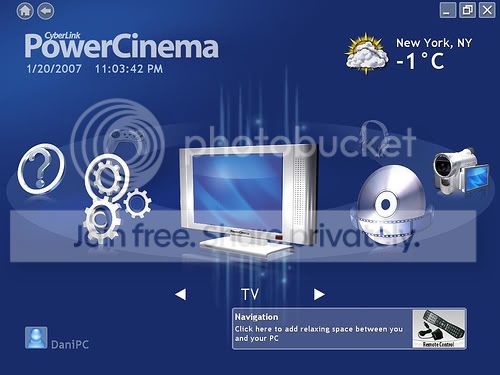
The TV Entertainment Center for the Digital Home
Watch analog and digital TV programs with time-shift playback
Record your favorite TV and radio shows with smart scheduling
Search for TV programs that match your interests via EPG
Watch two channels simultaneously using PiP mode
Play DVDs, videos, photos, and music. Get online news and weather info
TV on the PC: schedule, record, and watch your favorite shows
Search for programs by name, category, and channel
Schedule your PC to record shows while you?re out
Catch up on the action of live TV shows even after they?ve started, with time-shift recording
Record programs to DVD or hard disk
Switch between channels, language settings, and subtitles
more details
DVDs, Videos, Music, and Pictures: watch, listen, and enjoy
Play movie DVDs with Dolby Digital audio
Watch widescreen movies in their true display ratio
Sync music files with your portable media player
Remove photo red-eyes, auto fix contrast and brightness
Display photos as a slideshow with background music and transition effects
more details
News and Weather, More Options
Access live weather and news information
Change your interface colors and themes
Expand functionality with packs for video editing, disc burning, and watching sports highlights
Enrich the movie experience with the Advanced Audio Pack of home-theater technologies
Get a remote control for the ultimate digital home experience
Code:
http://rapidshare.com/files/96389108/clink_pw_cinma_kygn.part1.rar
http://rapidshare.com/files/96409501/clink_pw_cinma_kygn.part2.rar
The All-Media Disc Burning Software• Burn data onto Blu-ray Discs and HD DVDs
• Create video and photo DVDs, burn audio CDs, and rip MP3s
• Search and locate files instantly using file names or tags
• Secure discs with encryption and password protection
• Drag-and-drop files to burn via the Power2Go sidebar gadget
Drag-and-Drop burning
• Windows Sidebar Gadget — drag-and-drop then burn files directly via the Windows Sidebar.
• MP3 ripping and audio file conversion — take your favorite CDs and quickly create files for playback on a music player or your home media center PC.
• New-look interface — feel right at home with the new look of Windows Vista; easier navigation and a cleaner design.
Burn any disc, any file
• Data burning — burn a huge amount of data to disc, on CDs, DVDs, Blu-ray Discs and HD DVDs.
• Video and photo disc authoring — create discs of videos and photo slideshows that play on a home DVD player.
• Creation of Audio CDs — create compilation CDs.
• Mixed media CDs — burn data files and audio files onto the same disc, play your music on your CD player, then access data on your PC.
Search and burn
• Simplified burning process — find files in an instant, search using tags or titles.
• Drag to burn — drag complete folders or individual files in one easy step.
• Disc capacity bar — manage the number of files you can burn for your current disc media using the easy-to-read capacity bar.
• Burner settings — take control of the burning process with speed, data settings, auto-run, and other burning options.
Safeguard your data
• Secured data disc —add a password and encrypt to ensure better protection.
• Disc copying — create perfect duplicates of your discs.
• Erase disc and disc image utilities — save or burn disc images, erase and re-use re-writable discs.
Download
Code:
http://rapidshare.com/files/126073470/CyberLink_Power2Go_v6.0.rar


