


Dual-boot Tutorial
This is going to be straight to the point on how to set up for a dual-boot. The pictures underneath are used for windows vista. Windows 7, however, is almost identical. This is for anyone who is a bit nervous on dual-booting.
!!!!!!!Precautions!!!!!!!!(i never follow these rules)
1. Back up your data!
2. Always have a way to get back online. Here is torrent links to vista and windows 7
Vista:
32-bit: http://isohunt.com/torrent_details/60069...ab=summary
Windows 7(build 7100):
32-bit: http://www.mininova.org/tor/2521167
64-bit: http://www.mininova.org/tor/2521354
Partitions:
If your running any windows OS, your on a NFTS partition.
Windows=NFTS
So if we want to duel-boot two window OS's, then we need to make another NFTS.
1. Go to start
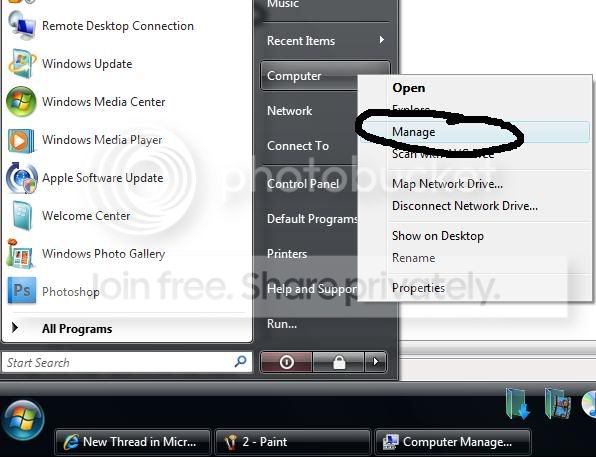
2. Now right click on Computer and go to manage
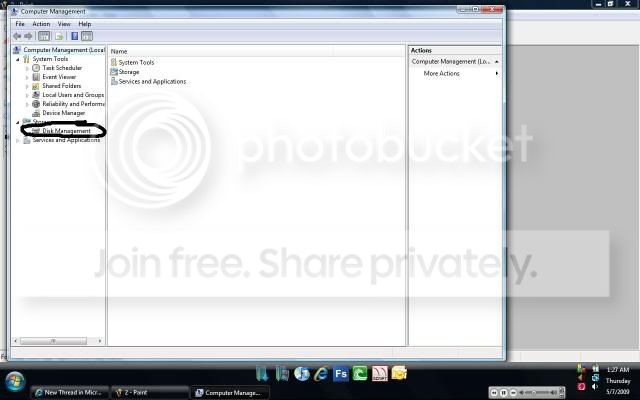
3. Go to Disk Managment
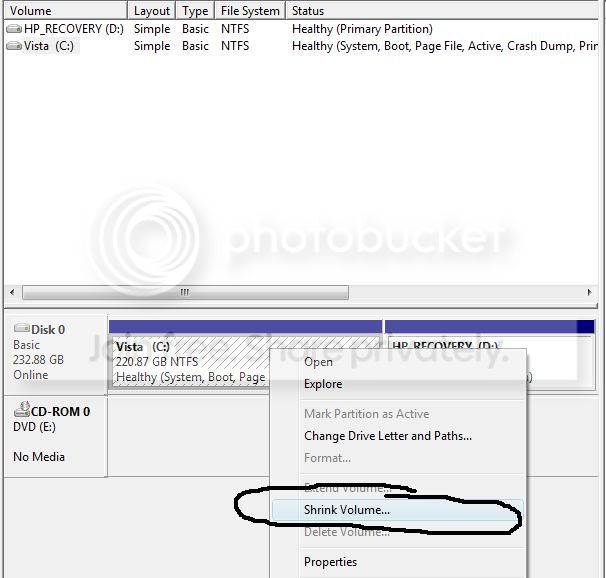
4. Take your main partition, right click, and shrink
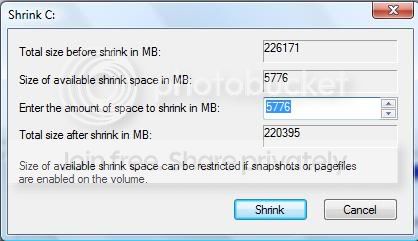
5. Choose how big you want your other Partition.
**REMEMBER**
Every 1024MB is equal to 1 Gig
6. You should now have an unallocated space. This means, nothing is on there and which can be formated into any type of format
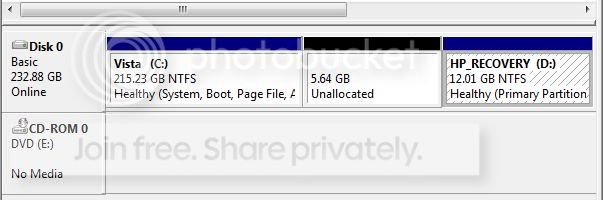
7. We want to change the Unallocated space into NFTS, so we can duel-boot another Windows OS.
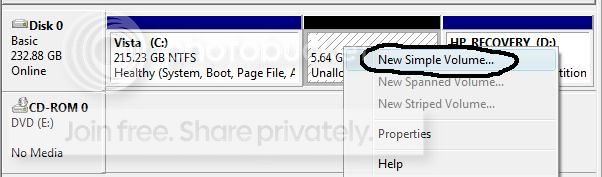
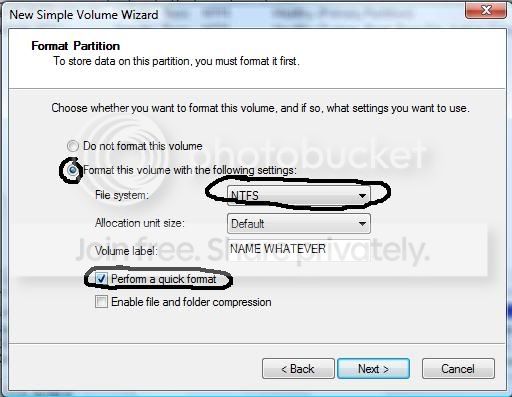
8. We just need a quick format into a NFTS. This is where you can also format different types. Such as Fat32.
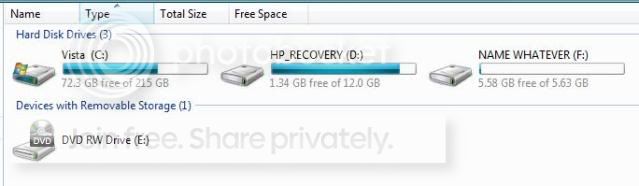
9. We have a new NFTS partiton! Whch means you can put in another windows disc and install on that drive!!
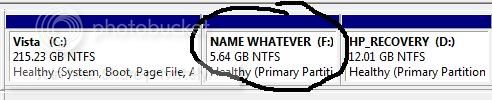
It also means you can access the other os since they are of the same format.
Fixing partiton:
1. Download easyBCD
http://www.softpedia.com/get/System/OS-E...yBCD.shtml
That fixes the bootloader. Meaning, this is what your computer chooses to load first. When you duel-boot, your computer will get two options to boot from(Thus called dual-booting)
2.Now, go to step 4 and instead of shrink, delete the partiton you no longer want.
3. It should be free space. Delete the free space.
4. Then right click on your main partition, and click expand. That combines the unallocted space into your NFTS
This might help someone, dunno. Hope everyone understood. Can someone get me out of my -1 rep. xD i hate seeing that
~cheers

This is going to be straight to the point on how to set up for a dual-boot. The pictures underneath are used for windows vista. Windows 7, however, is almost identical. This is for anyone who is a bit nervous on dual-booting.
!!!!!!!Precautions!!!!!!!!(i never follow these rules)
1. Back up your data!
2. Always have a way to get back online. Here is torrent links to vista and windows 7
Vista:
32-bit: http://isohunt.com/torrent_details/60069...ab=summary
Windows 7(build 7100):
32-bit: http://www.mininova.org/tor/2521167
64-bit: http://www.mininova.org/tor/2521354
Partitions:
If your running any windows OS, your on a NFTS partition.
Windows=NFTS
So if we want to duel-boot two window OS's, then we need to make another NFTS.
1. Go to start
2. Now right click on Computer and go to manage
3. Go to Disk Managment
4. Take your main partition, right click, and shrink
5. Choose how big you want your other Partition.
**REMEMBER**
Every 1024MB is equal to 1 Gig
6. You should now have an unallocated space. This means, nothing is on there and which can be formated into any type of format
7. We want to change the Unallocated space into NFTS, so we can duel-boot another Windows OS.
8. We just need a quick format into a NFTS. This is where you can also format different types. Such as Fat32.
9. We have a new NFTS partiton! Whch means you can put in another windows disc and install on that drive!!
It also means you can access the other os since they are of the same format.
Fixing partiton:
1. Download easyBCD
http://www.softpedia.com/get/System/OS-E...yBCD.shtml
That fixes the bootloader. Meaning, this is what your computer chooses to load first. When you duel-boot, your computer will get two options to boot from(Thus called dual-booting)
2.Now, go to step 4 and instead of shrink, delete the partiton you no longer want.
3. It should be free space. Delete the free space.
4. Then right click on your main partition, and click expand. That combines the unallocted space into your NFTS
This might help someone, dunno. Hope everyone understood. Can someone get me out of my -1 rep. xD i hate seeing that
~cheers


