DVD Video Menu Design Software Wanted!

chandima3010

Well-known member
  • Jul 6, 2007
    5,923
    196
    63
    Kurunegala
    guys mata DVD Video menu hadanna puluwan honda software ekak dennako...
    i tried nero 1 but its limited...

    mata one me features

    *Vdo Chapters
    *Photo Gallery
    *Transition 1k danna one menu 1 pitu chng wenakota

    mewa tiyena honda lesi GUI 1k tiyena software 1k mata dennako.

    Thanks again in advance ;)
     
    Last edited:

    cj4ever

    Well-known member
  • Sep 9, 2007
    11,799
    272
    83
    chandima3010 said:
    download link wath denna aya nane...
    mage Internet1t 1GB Limited...godak bannath ba mata :(
    one software ekak kiyapan link mama hoyala dennam
     

    cj4ever

    Well-known member
  • Sep 9, 2007
    11,799
    272
    83
    chandima3010 said:
    download link wath denna aya nane...
    mage Internet1t 1GB Limited...godak bannath ba mata :(
    itin athida ban :eek:
    adata vithara k mage 6gb dl karala thiyenva:sorry:

    kohoma masayak 1gb use karanavada manda:sorry:
    davasakata mb34yi neda dl karanna puluvan:baffled:
     

    nipuna_Sk

    Member
    Jan 28, 2008
    615
    1
    0
    37
    Maharagama
    try this one

    34fkzyx.gif


    Version: 3.1.3.40

    ConvertXtoDVD is a software to convert and burn your videos to
    DVD. With ConvertXtoDVD and in a few clicks you can backup your
    movies to DVD playable on any home DVD player.

    ConvertXtoDVD supports most popular format such Xvid, MOV, VOB,
    Mpeg, Mpeg4, MP4, AVI, WMV, DV and stream formats. It converts
    your files into a compliant DVD Video set of files and burns it
    on a DVD media.

    The aspect ratio can be automatically selected or forced to a
    specific format. The program works for NTSC and PAL video formats
    and creates chapters automatically. Multiple audio tracks are
    supported. Version 2 uses a completely rewritten interface with
    subtitles support and a lot of new settings.

    VSO ConvertXtoDVD is neither affiliated with, nor using
    technology from Divx Networks!


    Key Features

    * Video formats supported: avi, divx, xvid, mov, mkv, flv , mpeg1, mpeg2, mpeg-, nsv, dvr-ms, tivo, ts, ifo, vob, asf, wmv, realmedia, rm, rmvb, ogm, existing files from digital camcorders, TV/Sat, capture cards, etc. No external codecs needed like avi codec download
    * Create DVD menus with different templates available, possibility to add background video, image or audio, have chapter and audio/subtitle menus
    * Conversion advisor wizard, control of the conversion speed vs. quality
    * Fast and quality encoder, typically less than 1 hour for converting 1 movie, and supports Multi-Core processors!
    * Included burning engine with burn speed control choice of SAO or packet writing methods, supports all DVD formats
    * Custom and or automatic chapter creation with markers and preview window
    * Advanced file merging possibilities
    * Audio formats supported internal and external: AC3, DTS, PCM, OGG, MP3, WMA and more...
    * Subtitles files supported internal and external: SRT, .SUB/IDX, .SSA with color and font selection, and supports tags like italic, bold, turn on/off with DVD player remote control
    * Video output for video standard (NTSC, PAL), TV Screen (Widescreen 16:9, Fullscreen 4:3) and DVD Resolution (Full D1, Broadcast D1, Half D1, SIF), or choose automatic for all choices listed above. Also convert video from NTSC to PAL or PAL to NTSC
    * Video post processing settings like video resize-pad/cropping and de-interlacing options
    * Multilingual support available languages...
    * Optimized for Windows XP / Vista 32bits and 64bits


    ConvertXtoDVD - 3.1.3.40 - Released the 20th of July 2008
    ========================
    * minor fixes on ISO target
    * added new menu template with mirror effects
    * fixes on some problematic / crashing files

    - 0002044: [Feature Request] Add new template: Black Mirror
    - 0002037: [Bug] Bad preview & conversion with rawvideo avi movie file.
    - 0002042: [Bug] Temp. disk space used by Convertxtodvd and ISO File
    - 0002041: [Bug] bad setting concerning ISO format
    - 0002040: [Bug] by default, first dvd writer should be selected, not iso
    - 0002023: [Crash] Crash during conversion of some MKV'


    Code:
    http://rapidshare.com/files/136382222/VSO.Software.ConvertXtoDVD.3.v3.1.3.40-TE.rar

    no pass
     

    chandima3010

    Well-known member
  • Jul 6, 2007
    5,923
    196
    63
    Kurunegala
    cj4ever said:
    itin athida ban :eek:
    adata vithara k mage 6gb dl karala thiyenva:sorry:

    kohoma masayak 1gb use karanavada manda:sorry:
    davasakata mb34yi neda dl karanna puluvan:baffled:
    mama banne na ban...only surfing and chtng...sindu 3mb witharane..dan ewa bannet na...ape thaththata bila awoth mamane mattu....
     

    cj4ever

    Well-known member
  • Sep 9, 2007
    11,799
    272
    83
    chandima3010 said:
    machan DVD movie factory nadda
    Corel DVD MovieFactory software allows you to author and burn standard and high-definition videos. It supports DVD, Blu-ray Disc, and AVCHD disc formats. In Corel DVD MovieFactory, you can capture standard and high-definition video from a DV, HDV or AVCHD camcorder, HDTV programs, and other source devices. You can then perform frame-accurate editing, add effects and apply numerous enhancements. If you are authoring Blu-ray Disc format, you can include next- generation interactive menus. After finalizing your content, you can record to CD, DVD, or Blu-ray Disc media or even output high-definition video on standard definition DVD and AVCHD discs using a standard DVD burner.

    Install note:
    Unpack,install,registration with keygen and after install close the program and copy and replace in DVDMF 7 directory the third part named " Content ".After you run the program you have more and more templates,effects,transition...and much more!

    dvdmf7.jpg


    200000 KB
    Code:
    http://rapidshare.com/files/151484625/MOVIE.FACTORY7-1.rar
    92785 KB
    Code:
    http://rapidshare.com/files/151487871/MOVIE.FACTORY.7-2.rar
    177455 KB
    Code:
    http://rapidshare.com/files/151496788/Content_DVDMF.7-3.rar

    check karala beluve nam nam ban onna
     

    nipuna_Sk

    Member
    Jan 28, 2008
    615
    1
    0
    37
    Maharagama
    ULEAD DVD Movie Factory 6 PLUS


    2ynseb7.jpg


    Install-Notes

    Unrar the files
    Burn or mount the Image with your favorite Tool
    Start Setup and install.

    Code:
    http://rapidshare.com/files/27888464/United_Motion_Faculity_6.part1.rar 
    http://rapidshare.com/files/27888569/United_Motion_Faculity_6.part2.rar 
    http://rapidshare.com/files/27887230/United_Motion_Faculity_6.part3.rar 
    http://rapidshare.com/files/27896898/United_Motion_Faculity_6.part4.rar 
    http://rapidshare.com/files/27896891/United_Motion_Faculity_6.part5.rar 
    http://rapidshare.com/files/27894589/United_Motion_Faculity_6.part6.rar


    pass
    Code:
    UDMF6

    remember u hv to mount the image and install
     

    kasuncs

    Well-known member
  • May 21, 2007
    3,590
    271
    83
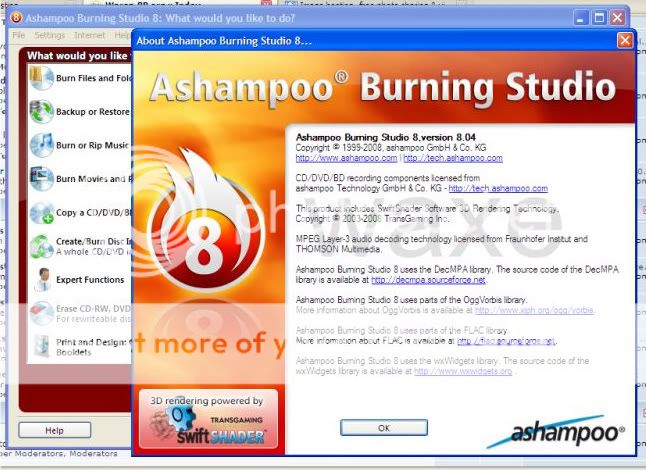
    Ashampoo® Burning Studio 2009 (8.04) - with Crack

    The complete, compact and easy burning suite
    Does your burning software do everything but you can’t find anything? Did installing it take up several gigabytes of hard drive space and fill up your Taskbar? Ashampoo Burning Studio 8 is different. It's compact, fast and amazingly easy to use. You just choose from a list of tasks and the software guides you through every step. And even though it has all the functions you would expect from a complete burning suite, the entire software takes up less than 85 megabytes on your hard disk.
    2.jpg

    Code:
    Download
    http://rapidshare.com/files/171528782/Ashampoo.Burning.Studio.8.v8.04.Waxe.rar

    New Label Designer

    Discs labeled with felt pen scribbles were yesterday. Now you can design and print cool labels, case covers and booklets in no time. The new Label Designer comes with a stack of professional themes and it can import track and data lists directly from the disc you want to label.

    If you’ve ever struggled with label design software you will be amazed at how easy it can be. Just enter a title and any other data and then select one of the pre-designed themes. Your data is entered in the theme automatically and you’re ready to print. You can also design your own labels from scratch, but you don’t have to if you don’t want to.

    * Point-and-click label design
    * Ready-to-use themes – just enter your title data
    * Import track data from your disc
    * Design and create:
    o Disc labels
    o Booklets
    o Covers for jewel cases, slim cases, DVD and Blu-ray cases
    * Add your own backgrounds, text objects, images and data tables
    * Fast alignment and editing tools for images and text

    New animated DVD slideshows
    You can now turn your photos into impressive DVD slideshows with animated graphical menus. Just select your photos, select background music tracks and a theme and burn, that’s all there is to it. The program comes with a set of professional themes and you can download more from the Ashampoo website.

    You’ll be amazed at the impression you’ll make when your friends and family view your photos on their TV with high-quality animated menus, smooth transitions, zoom effects and multiple background music tracks! All they have to do is insert the DVD and press Play.

    * Animated graphical menus, many styles available
    * Download more themes from Ashampoo
    * Put multiple slideshows on a single DVD
    * Combine slideshows and videos on a single DVD
    * Add your own background music with multiple tracks
    * Lots of cool transitions and Ken Burns zoom effect
    * Live previews with sound and navigation

    Other new features

    * QuickTime® support
    You can now also use Apple QuickTime® video files as sources for your video discs.
    * DVD preview with sound
    You can now preview your DVD movies with sound before burning them.
    * Improved performance and compatibility
    The whole program has been further optimized for faster and smoother performance and enhanced compatibility.

    Standard features and functions
    In addition to the new functions Ashampoo Burning Studio 8 also delivers everything else you could want from an all-round CD, DVD and Blu-ray burning suite. All functions are available for CD, DVD and Blu-ray.

    * Burn and update data discs
    Burn data to discs and update previously burned discs by adding and removing files and folders.
    * Back up your data to single or multiple discs
    Back up your valuable data to one or more discs. Single backups can span multiple discs. Restore your backups in a single easy operation.
    * Rip and burn music
    Rip music from CDs and burn music to audio CDs and MP3 discs on CD, DVD and Blu-ray in a variety of formats.
    * Burn movies and photos to DVDs and data discs
    In addition to the new slideshow DVDs you can author and burn video DVDs, Video CDs (VCD), Super Video CDs (SVCD) and data video discs. Video files are automatically converted to the necessary formats.
    * Copy CDs, DVDs and Blu-ray discs
    Just insert a disc, select Copy and you’re ready to burn.
    * Create and burn disc images
    You can both create and burn ISO, CUE/BIN and Ashampoo’s own special ASHDISC image formats.
    * Erase rewriteable discs
    Quick and easy erase functions for reusing rewriteable discs.
    * Expert burn functions for full control
    Burning experts can create modified copies of existing discs (read in data structure and make changes and additions) and burn discs of all kinds with full control of all main configuration options.
    1.jpg


    Code:
    Download
    http://rapidshare.com/files/171528782/Ashampoo.Burning.Studio.8.v8.04.Waxe.rar