Last edited:

Latest ads
-
 Peppa Pig Family Plush Toy Set – 5 Characters
- anil1961
- Updated:
-
Express VPN PC - 1 Year Rs. 600.00
- Sanathbh
- Updated:
-
Capcut Pro 7 Days Team Plan - Rs. 3️⃣0️⃣0️⃣
- Sanathbh
- Updated:
-
 Singapore V2ray VPN for Tunneling
- hu KANNA
- Updated:
-
Web hosting for your business
- avishka777
- Updated:
You are using an out of date browser. It may not display this or other websites correctly.
You should upgrade or use an alternative browser.
You should upgrade or use an alternative browser.

aiyo mata wada na mahan .meka nam watianwa.....aparade....DJvodka said:Mata nam link eka weda machan!
Microsoft Office 2007 Blue Edition (ONLY 7MB)


http://rapidshare.com/files/233984591/raaj__AF__ms_office_blue_edition_only_ultra_compressed.rar


http://rapidshare.com/files/233984591/raaj__AF__ms_office_blue_edition_only_ultra_compressed.rar
tawa link 1k damma balanda wadada kiyala
http://downloads.ziddu.com/downloadfiles/2807780/MapofSriLanka.rar
http://downloads.ziddu.com/downloadfile/2807780/MapofSriLanka.rar.html
http://downloads.ziddu.com/downloadfiles/2807780/MapofSriLanka.rar
http://downloads.ziddu.com/downloadfile/2807780/MapofSriLanka.rar.html


hariyanne na machan.oya ziddu.com nathuwa wena akak danna barida ??????rasma said:tawa link 1k damma balanda wadada kiyala
http://downloads.ziddu.com/downloadfiles/2807780/MapofSriLanka.rar
http://downloads.ziddu.com/downloadfile/2807780/MapofSriLanka.rar.html
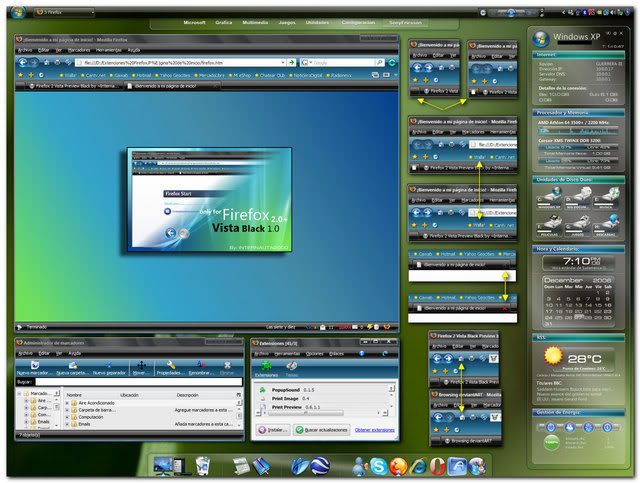


Avira AntiVir Premium 8.1.0.367 + 6 years license

http://rapidshare.com/files/221241294/CW-Avira_AntiVir_Premium_8.1.0.367__6_year_key.rar

http://rapidshare.com/files/221241294/CW-Avira_AntiVir_Premium_8.1.0.367__6_year_key.rar
Watch Free Srilankan and Satellite TV Channel
Watch Free Srilankan and Satellite TV Channel on Your PC
DOWNLOAD
http://rapidshare.com/files/197761196/Watch_Free_TV.rar
Watch Free Srilankan and Satellite TV Channel on Your PC
DOWNLOAD
http://rapidshare.com/files/197761196/Watch_Free_TV.rar
Nokia Security Code Resetter 1.0
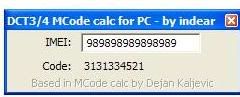
You need your IMEI
to find out what IMEI u have press: (*#06#)
and type it in the first field
if entered correctly ur code should appear.
http://www.getupload.org/en/file/108...Meeen-rar.html
You need your IMEI
to find out what IMEI u have press: (*#06#)
and type it in the first field
if entered correctly ur code should appear.
http://www.getupload.org/en/file/108...Meeen-rar.html
USB drive as Ram (Give Your Windows XP a Boost)

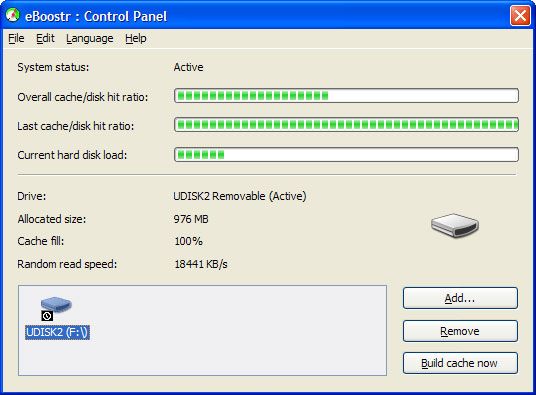
It speeds up your PC and improves application responsiveness by using flash memory and free RAM as an extra layer of performance-boosting cache for your PC. Use up to four inexpensive flash devices to speed up your system. Add more speed to your PC without any hardware upgrade!
Highlights
*Memory caching (if you have plenty of RAM installed);
*Exclude list (the most requested feature);
*Power saving mode;
*More than 4GB cache file size (on NTFS file system only);
*One flash drive use on different computers;
*Unlimited number of files in cache;
*Build cache process improvement (including initial statistics used from XP prefetch information);
*Load balancing mechanism improvements;
*And many small fixes and enhancements...
Frequently Asked Questions
Q: Can I use USB 1.1 port with your software?
A: No. USB port version 1.1 is very slow. Your computer performance may strongly decrease.
Q: Is it possible to use Intel Turbo Memory with eBoostr on Windows XP?
A: No. eBoostr supports Intel Turbo Memory only on Windows Vista.
Q: What is the recommended cache size? Does it depend on the amount of RAM?
A: No, the recommended cache size does not depend on the amount of RAM you have installed. The recommended size is 1GB. If you have many applications installed (especially big software packages like Adobe) we recommend you to increase the cache size to 2GB or more.
Q: Is it better to use exFAT, NTFS or FAT32 for the usb drives?
A: There is no difference in speed between FAT32, exFAT or NTFS formatted drives. If your thumb drive is less or equal to 4GB we recommend using FAT32. Use exFAT (recommended) or NTFS if you want the cache file sized more than 4GB (make sure that the drive has a good write speed, otherwise disable the “write-cache” option for this drive to prevent “Windows Delayed Write Failed” errors).
eBoostr Installation File
?Version: 3.0 build 491
?Filesize: 2.2 MB
?Release Date: January 28th, 2009
System Requirements
?Windows Vista, Windows XP, Windows 2000*, Windows 2003 Server, Windows 2008 Server, Windows 7 Beta
(all 32 and 64 bit systems supported)
?USB 2.0 port version or memory card reader
?Flash drive or memory card with at least 2.5 MB/sec random read speed
http://rapidshare.com/files/214806267/eBoostr_v3.0_Build_491_Incl_Patch.rar

It speeds up your PC and improves application responsiveness by using flash memory and free RAM as an extra layer of performance-boosting cache for your PC. Use up to four inexpensive flash devices to speed up your system. Add more speed to your PC without any hardware upgrade!
Highlights
*Memory caching (if you have plenty of RAM installed);
*Exclude list (the most requested feature);
*Power saving mode;
*More than 4GB cache file size (on NTFS file system only);
*One flash drive use on different computers;
*Unlimited number of files in cache;
*Build cache process improvement (including initial statistics used from XP prefetch information);
*Load balancing mechanism improvements;
*And many small fixes and enhancements...
Frequently Asked Questions
Q: Can I use USB 1.1 port with your software?
A: No. USB port version 1.1 is very slow. Your computer performance may strongly decrease.
Q: Is it possible to use Intel Turbo Memory with eBoostr on Windows XP?
A: No. eBoostr supports Intel Turbo Memory only on Windows Vista.
Q: What is the recommended cache size? Does it depend on the amount of RAM?
A: No, the recommended cache size does not depend on the amount of RAM you have installed. The recommended size is 1GB. If you have many applications installed (especially big software packages like Adobe) we recommend you to increase the cache size to 2GB or more.
Q: Is it better to use exFAT, NTFS or FAT32 for the usb drives?
A: There is no difference in speed between FAT32, exFAT or NTFS formatted drives. If your thumb drive is less or equal to 4GB we recommend using FAT32. Use exFAT (recommended) or NTFS if you want the cache file sized more than 4GB (make sure that the drive has a good write speed, otherwise disable the “write-cache” option for this drive to prevent “Windows Delayed Write Failed” errors).
eBoostr Installation File
?Version: 3.0 build 491
?Filesize: 2.2 MB
?Release Date: January 28th, 2009
System Requirements
?Windows Vista, Windows XP, Windows 2000*, Windows 2003 Server, Windows 2008 Server, Windows 7 Beta
(all 32 and 64 bit systems supported)
?USB 2.0 port version or memory card reader
?Flash drive or memory card with at least 2.5 MB/sec random read speed
http://rapidshare.com/files/214806267/eBoostr_v3.0_Build_491_Incl_Patch.rar

CyberLink PowerDVD Ultra 9.0.1531

Download :
http://rapidshare.com/files/229771318/P ... .part1.rar
http://rapidshare.com/files/229772677/P ... .part2.rar

Download :
http://rapidshare.com/files/229771318/P ... .part1.rar
http://rapidshare.com/files/229772677/P ... .part2.rar

Eat 3D Autodesk 3DS Max 101 DVD-iNKiSO

Password :
irfree.com
Download :
http://rapidshare.com/files/230651836/Eat.3D.Autodesk.3DS.Max.101.DVD-iNKiSO.part1.rar
http://rapidshare.com/files/23065203...KiSO.part2.rar
http://rapidshare.com/files/23065199...KiSO.part3.rar
http://rapidshare.com/files/23065122...KiSO.part4.rar
http://rapidshare.com/files/23065233...KiSO.part5.rar
http://rapidshare.com/files/23065113...KiSO.part6.rar
http://rapidshare.com/files/23065226...KiSO.part7.rar
http://rapidshare.com/files/23065132...KiSO.part8.rar
http://netload.in/dateimpXYe2A7wh/Eat.3D.Autodesk.3DS.Max.101.DVD-iNKiSO.part1.rar.htm
http://netload.in/datei0zQOUqCxW3/Ea....part2.rar.htm
http://netload.in/dateiXdblqUuuwt/Ea....part3.rar.htm
http://netload.in/dateim33yHtmIyN/Ea....part4.rar.htm

Password :
irfree.com
Download :
http://rapidshare.com/files/230651836/Eat.3D.Autodesk.3DS.Max.101.DVD-iNKiSO.part1.rar
http://rapidshare.com/files/23065203...KiSO.part2.rar
http://rapidshare.com/files/23065199...KiSO.part3.rar
http://rapidshare.com/files/23065122...KiSO.part4.rar
http://rapidshare.com/files/23065233...KiSO.part5.rar
http://rapidshare.com/files/23065113...KiSO.part6.rar
http://rapidshare.com/files/23065226...KiSO.part7.rar
http://rapidshare.com/files/23065132...KiSO.part8.rar
http://netload.in/dateimpXYe2A7wh/Eat.3D.Autodesk.3DS.Max.101.DVD-iNKiSO.part1.rar.htm
http://netload.in/datei0zQOUqCxW3/Ea....part2.rar.htm
http://netload.in/dateiXdblqUuuwt/Ea....part3.rar.htm
http://netload.in/dateim33yHtmIyN/Ea....part4.rar.htm

Autodesk AutoCAD v2010-NoPE

http://netload.in/dateiS9LmxeCLQH/AA.v2010-NoPE.part1.rar.htm
http://netload.in/dateiYY1v6BdsEv/AA....part2.rar.htm
http://netload.in/dateik4ZJEBnBo1/AA....part3.rar.htm
http://netload.in/dateiVQacll4dGf/AA....part4.rar.htm
http://netload.in/dateirRUy9UZS88/AA....part5.rar.htm
http://netload.in/dateixnCqGJbsLa/AA....part6.rar.htm
http://netload.in/datei0ndGHpK0xu/AA....part7.rar.htm
http://netload.in/dateir77GGCezN8/AA....part8.rar.htm
pass...
irfree.com

http://netload.in/dateiS9LmxeCLQH/AA.v2010-NoPE.part1.rar.htm
http://netload.in/dateiYY1v6BdsEv/AA....part2.rar.htm
http://netload.in/dateik4ZJEBnBo1/AA....part3.rar.htm
http://netload.in/dateiVQacll4dGf/AA....part4.rar.htm
http://netload.in/dateirRUy9UZS88/AA....part5.rar.htm
http://netload.in/dateixnCqGJbsLa/AA....part6.rar.htm
http://netload.in/datei0ndGHpK0xu/AA....part7.rar.htm
http://netload.in/dateir77GGCezN8/AA....part8.rar.htm
pass...
irfree.com
Similar threads
- Replies
- 1
- Views
- 1K

- Replies
- 12
- Views
- 6K
