Fiber ZTE F660 PeoTV over WiFi (VONETS)

Gomida

Active member
  • Dec 6, 2006
    3,609
    23
    38
    36
    World.Sri_Lanka
    Hello guys, I'm an very old member of EK and first I want to say hello to you all :yes: Earlier I was a active member but I come and go at times now due to schedules.

    I need a help to make PeoTV work over WiFi. I connected with defaults and Rupavahini works for some reason but not anything else. I've read about LLC 8-36 grouping to same VLAN at port4 and changing it to SSID but it appears to be not the case in the Fiber (ZTE F660) router.

    Currently I have the following

    • ZTE F660 Fiber router
    • Then VONETS 300Mbps Ethernet to WiFi converter
    • PeoTV setbox
    • SLT ZTE administrator password

    Currently what I did was plug the VONETS adapter to the LAN port of PeoTV and configure it to connect it to the router over a SSID (DHCP).

    If you can let me know what I've missed it would be a great help :D

    P.S: This is the vonets adaptor for people who are wondering what it is. It's pluggable to any ethernet port and you can set it up the vonets end to connect to WiFi (PC accepts it as Ethernet)
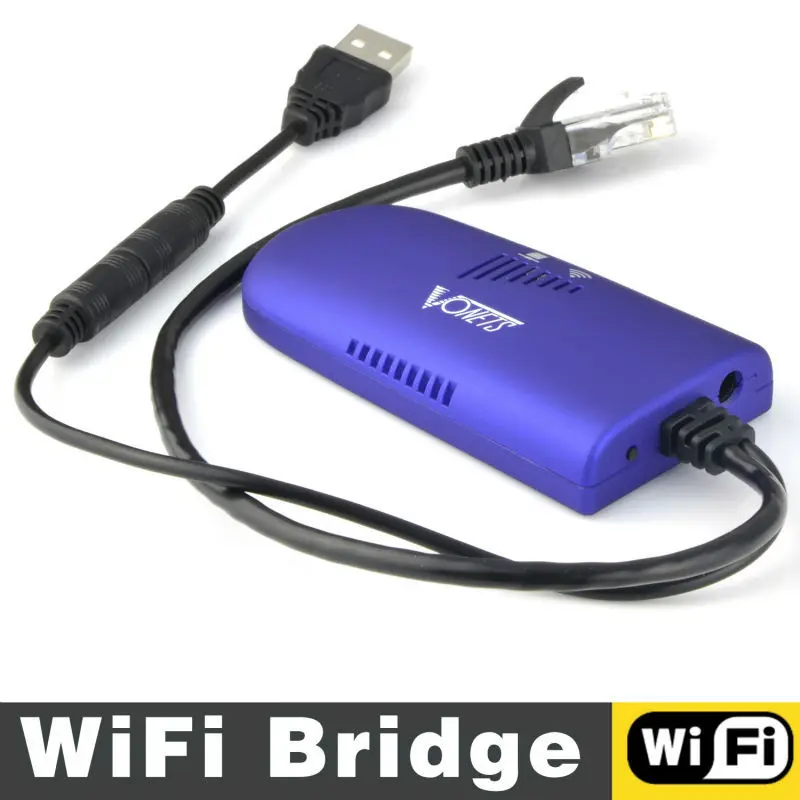
    Vonets-VAP11G-300-RJ45-Mini-Wifi-Wireless-Bridge-Wifi-Repeater-Routers-wi-fi-for-Computer-Networking.jpg
     
    • Like
    Reactions: NRTG

    kosandpol

    Well-known member
  • Jun 10, 2008
    45,329
    1,492
    113
    here's the VLAN settings for the PeoTV network:


    this is on a Huawei router.
    So what you need to do is to create a wifi SSID that has NO dhcp relaying and bind that SSID to the PeoTV VLAN.
    Then you can extend that wifi network using your wifi extender but again with no DHCP.


    I'm curious as to how you're going to plug the PeoTV STB to this network though..
     

    EVC

    Well-known member
  • Sep 15, 2008
    28,772
    21,032
    113
    yakoo dialog ekak gahaganing multi room kit eka 300 lkr only
     

    0x9

    Well-known member
  • Mar 18, 2015
    541
    836
    93
    here's the VLAN settings for the PeoTV network:


    this is on a Huawei router.
    So what you need to do is to create a wifi SSID that has NO dhcp relaying and bind that SSID to the PeoTV VLAN.
    Then you can extend that wifi network using your wifi extender but again with no DHCP.


    I'm curious as to how you're going to plug the PeoTV STB to this network though..


    මචන් ඔතන තියන setting change කරන්නනම් admin credentials SLT එකෙන් දෙනවද? මට ලැබුන credentials වලින් ලොග් උනාට ඔය setting change කරන්න බෑ... මගේ තියෙන්නේ Huawei HG8245H5 router එක (මට තියෙන්නේ PeoTV අව්ලක් නම් නෙමෙයි.. "1_TR069_INTERNET_R_VID_20" profile එකට LAN4 port එක bind කරලා නෑ.. එක bind කරගන්න තමයි ඕන)
     

    RLT4U

    Well-known member
  • Dec 12, 2006
    12,491
    1
    10,613
    113
    ගෙදර බන් !!
    VONETS 300Mbps kiyak unada machan?
    Aparade parana router ekak bridge karanna thibunane hoda wifi range ekak thiyena.

    Rupavahini wada kara kiyanne machan anith ewa wada nokara inna vidiyak na.
    Rupavanihi low frequency ekak use karana nisa da danne na wada karanne.
     

    kosandpol

    Well-known member
  • Jun 10, 2008
    45,329
    1,492
    113
    මචන් ඔතන තියන setting change කරන්නනම් admin credentials SLT එකෙන් දෙනවද? මට ලැබුන credentials වලින් ලොග් උනාට ඔය setting change කරන්න බෑ... මගේ තියෙන්නේ Huawei HG8245H5 router එක (මට තියෙන්නේ PeoTV අව්ලක් නම් නෙමෙයි.. "1_TR069_INTERNET_R_VID_20" profile එකට LAN4 port එක bind කරලා නෑ.. එක bind කරගන්න තමයි ඕන)
    Port 4 is for PeoTV. You have to remove it from the TV VLAN to add it to the Internet VLAN.
     

    Gomida

    Active member
  • Dec 6, 2006
    3,609
    23
    38
    36
    World.Sri_Lanka
    I'm very sorry for the delay,

    is internet and PeoTV working in the ZTE router without the wifi bridge ?

    Internet - Working yes very well, PeoTV - Rupavahini only. it's a simple setup - just plug and play kind of thing. Also I have some TP-Link routers to use as an alternative instead of this. I have successfully bridged to the original F660 SLT router and F660 shows the signal too. I've opened a separate SSID (SSID4) to use with this to avoid any conflicts.

    Port 4 is for PeoTV. You have to remove it from the TV VLAN to add it to the Internet VLAN.

    Only issue is I can't find this setting on the Original ZTE F660 (even under "administrator" user)

    The only settings I found in the whole modem attached to LAN4 was

    • Network->LAN -> DHCP Port Service ->LAN4 was set to WAN (I made SSID4 set to WAN too but no effect)
    • Application -> Multicast -> VLAN -> LAN4 has a setting called "50" ( I made same set to SSID 4 but no effect)

    here's the VLAN settings for the PeoTV network:


    this is on a Huawei router.
    So what you need to do is to create a wifi SSID that has NO dhcp relaying and bind that SSID to the PeoTV VLAN.
    Then you can extend that wifi network using your wifi extender but again with no DHCP.


    I'm curious as to how you're going to plug the PeoTV STB to this network though..

    Just as connecting to a normal router - ethernet is plugged to this gadget and gadget is powered by USB 5V. I can connect to a normal router too (have some extra ones lying around) but anyway the bridge works, ZTE shows packets from SSID4.

    Internet_TR069
    omci_ipv4_dhcp_2

    are the only two options I have

    I do not have a IPTV_ setting in the whole F660 router (still PeoTV works without issues when connected via ethernet)
     

    Gomida

    Active member
  • Dec 6, 2006
    3,609
    23
    38
    36
    World.Sri_Lanka
    yakoo dialog ekak gahaganing multi room kit eka 300 lkr only

    Meka wadakaranna ona bn, ADSL waladi mewa VLAN port map karala wada karawagaththa lassanata. Fiber router eke eka thamai me kachal eka. Meketh Rupavahini penawa. Mama dannaha ai kiyala. Anith ewa wada na. Mama kohomath eka device ekakin witharai access wenne.
     

    Gomida

    Active member
  • Dec 6, 2006
    3,609
    23
    38
    36
    World.Sri_Lanka
    VONETS 300Mbps kiyak unada machan?
    Aparade parana router ekak bridge karanna thibunane hoda wifi range ekak thiyena.

    Rupavahini wada kara kiyanne machan anith ewa wada nokara inna vidiyak na.
    Rupavanihi low frequency ekak use karana nisa da danne na wada karanne.

    Ow machan Rupavahini penawa eth PEOTV Diagnostics giyama "Ethernet: Connected, Internet: Failed" kiyala watenne. Channel guides ewa mukuth enne na. Rupavahininam supiriyatama wada. Wena local channel ekakwath wada na.

    It is very easy if he can bridged two routers machan.
    The SLT router bridge with another router with SLT box. It's simple and no need to catch the moon.

    Yes it's supposed to be simple machan. Mama ADSL thiyena kaale meka lassanata kara.. Me Fiber router eke hithaganna ba ne :confused:
     

    kosandpol

    Well-known member
  • Jun 10, 2008
    45,329
    1,492
    113
    I'm very sorry for the delay,


    Internet - Working yes very well, PeoTV - Rupavahini only. it's a simple setup - just plug and play kind of thing. Also I have some TP-Link routers to use as an alternative instead of this. I have successfully bridged to the original F660 SLT router and F660 shows the signal too. I've opened a separate SSID (SSID4) to use with this to avoid any conflicts.


    Only issue is I can't find this setting on the Original ZTE F660 (even under "administrator" user)

    The only settings I found in the whole modem attached to LAN4 was

    • Network->LAN -> DHCP Port Service ->LAN4 was set to WAN (I made SSID4 set to WAN too but no effect)
    • Application -> Multicast -> VLAN -> LAN4 has a setting called "50" ( I made same set to SSID 4 but no effect)


    Just as connecting to a normal router - ethernet is plugged to this gadget and gadget is powered by USB 5V. I can connect to a normal router too (have some extra ones lying around) but anyway the bridge works, ZTE shows packets from SSID4.

    Internet_TR069
    omci_ipv4_dhcp_2

    are the only two options I have

    I do not have a IPTV_ setting in the whole F660 router (still PeoTV works without issues when connected via ethernet)
    looks like that WIFI dongle is not suitable for this. Especially if it doesnt have any option to switch off DHCP.
    One thing though the, the TV stream has a lot of traffic so on wifi it will slow down. better to extend with a cable.
     

    Gomida

    Active member
  • Dec 6, 2006
    3,609
    23
    38
    36
    World.Sri_Lanka
    මචන් ඔතන තියන setting change කරන්නනම් admin credentials SLT එකෙන් දෙනවද? මට ලැබුන credentials වලින් ලොග් උනාට ඔය setting change කරන්න බෑ... මගේ තියෙන්නේ Huawei HG8245H5 router එක (මට තියෙන්නේ PeoTV අව්ලක් නම් නෙමෙයි.. "1_TR069_INTERNET_R_VID_20" profile එකට LAN4 port එක bind කරලා නෑ.. එක bind කරගන්න තමයි ඕන)

    Mage router eka SLT original ZTE F660 Fiber eka.

    Mage langa "administrator" login eka thiyenawa (SLT eken denne na eka but internet eke hama thanama thiyenawa) eth e login eka ona na apita dena "user" login ekenuth e tika penawa habai. Oya "1_TR069_INTERNET_R_VID_20" setting ekak bind wela na machan LAN4 ekata. Eth LAN4 eke PeoTV wada. SSID4 ekata dagannai ona...

    Mage router eke protocol walata pennanne

    Internet_TR069
    omci_ipv4_dhcp_2

    witharai

    IPTV ekak pennanne na (eka hiddenda dannaha eth "administrator" eken pennanna epai :baffled:
     

    kosandpol

    Well-known member
  • Jun 10, 2008
    45,329
    1,492
    113
    Mage router eka SLT original ZTE F660 Fiber eka.

    Mage langa "administrator" login eka thiyenawa (SLT eken denne na eka but internet eke hama thanama thiyenawa) eth e login eka ona na apita dena "user" login ekenuth e tika penawa habai. Oya "1_TR069_INTERNET_R_VID_20" setting ekak bind wela na machan LAN4 ekata. Eth LAN4 eke PeoTV wada. SSID4 ekata dagannai ona...

    Mage router eke protocol walata pennanne

    Internet_TR069
    omci_ipv4_dhcp_2

    witharai

    IPTV ekak pennanne na (eka hiddenda dannaha eth "administrator" eken pennanna epai :baffled:
    so create that connection.. :nerd:
     

    Gomida

    Active member
  • Dec 6, 2006
    3,609
    23
    38
    36
    World.Sri_Lanka
    looks like that WIFI dongle is not suitable for this. Especially if it doesnt have any option to switch off DHCP.
    One thing though the, the TV stream has a lot of traffic so on wifi it will slow down. better to extend with a cable.

    Dongle has the ability to switch off DHCP - PeoTVDevice is given an IP from my ZTE and it is registered in the ZTE DHCP table.

    But I will try with TPLink router with a direct bridge.

    Cable is out - two floors :sorry:

    What do you think about IPTV protocol not showing in the ZTE? I accessed from "administrator" too but still couldn't find it... Maybe it's hidden somewhere with the LAN4 port bind and I cant find it? :sorry: