FORMAT wunaa! RECOVER karanna KRAMAYAK!! PLS HELP!!

serandib_y2k

Well-known member
  • Apr 20, 2009
    3,758
    87
    48
    37
    Al Ain, U.A.E
    Mata loku prashnayak...

    Ane mata udawwwak karanna Yaluwane...

    Mage HARD DISK dekaka partitions 6k tiyenawa!

    C / E / F eka hard disk ekak.
    D / G eka hard disk ekak.


    Mang C format karala VISTA GHOST ekak danna giya.. bootable NORTAN GHOST awith mokadda scene ekak ahuwama mang obapu button ekak ebuwa... (Eka Mata Mathaka Nae)

    Mang hariyanne nati thana XP normal widiyata INSTALL kara...

    Passe install karama D / G kiyana deka "FORMAT NOW?" kiya kiya ahanawa.. e madiwata thawa E kiyala e hard disk eke partition ekakuth hadila...

    Mage D eke G eke DATA Mukuth nae.... :no::no:

    Mang Recover My Files eken recover karaaa ... okkoma recover wune na... anith eka eken recover wena ewala rename wenne..., "RECOVERED_MP3_01" widiyata... Ane mage Sindu 30000k witara thibuna... Ane mata Mage files tibba widiyatama goda ganna kramayak kiyannakooooo!! pls.. budu bawa ath wenawa... !

    Wade krame Hari nam mang porondu wennam RELOAD ekak danna e kenaata.

    PROMISS.! ELAKIRI eka PALLA.denawa kiwwoth denawa!
     

    hemalsilva

    Well-known member
  • Oct 16, 2006
    16,039
    2,687
    113
    Paraguay
    DOWNLOAD EASEUS Partition Master

    click here to download
    EASEUS Partition Master 5.0.1 Home Edition (11.2MB)

    1. Run EASEUS Partition Master, click "Wizard" > "Partition Recovery Wizard", then select Complete Recovery button on the main window of Partition Recovery Wizard.

    prw-main-complete.gif


    2. You can see the list of logical volumes found on your computer. Please select the "Ghosted" (or "imaged") error logic drive and choose the "Option" before going to the next step.

    prw-complete-recovery-1.gif


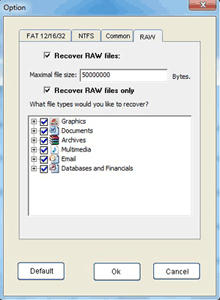
    3. Click on the "RAW" option and tick the "Recover RAW files only" box.

    prw-option-RAW-only.gif


    4. Click "Next" to begin Scanning to recover your files with RAW Data Recovery method.

    prw-complete-recovery-2.gif


    5. Select the file type directory that you want to recover and press the "NEXT" button.

    prw-complete-recovery-5-2.gif


    6. Select some directories or files and press the "NEXT" button to save the data.
     

    hemalsilva

    Well-known member
  • Oct 16, 2006
    16,039
    2,687
    113
    Paraguay
    Step-by-Step instruction on recovering file by EASEUS Partition Master Home Edition

    Step-by-Step instruction on recovering file by EASEUS Partition Master Home Edition

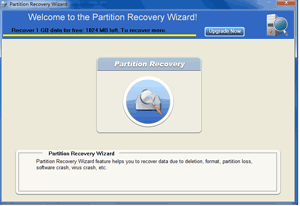
    1. Run EASEUS Partition Master Home Edition, click "Wizard" > "Partition Recovery Wizard".

    prw-partition-recovery-main-home.gif


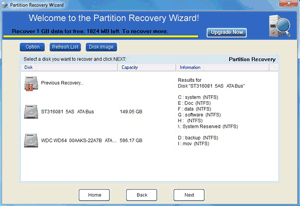
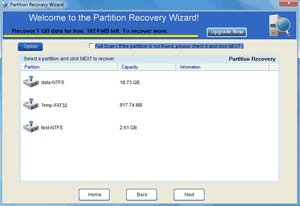
    2. Run "Partition Recovery" module, where you'll find all the hard disks and all partitions in each hard disk. Choose the disk on which the lost or resized partition are located and click "Next".

    prw-partition-recovery-1.gif


    Tips: If the volume does not have a drive letter, it will be displayed as "*".

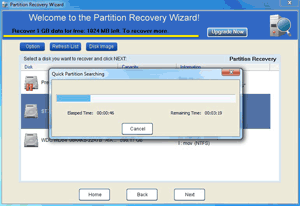
    3. EASEUS Partition Master will start Quick Partition Search to scan the hard disk and will present a list of lost partitions. If there is no lost partition, Intelligent Search starts automatically.

    prw-partition-recovery-2.gif


    4. Choose the lost partition and click "Next", if your lost partition is not found, please check the "Full scan" and click "Next" to scan the entire disk again.

    prw-partition-recovery-3.gif


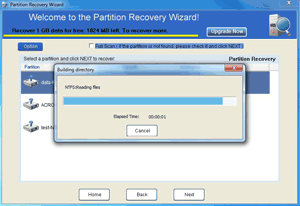
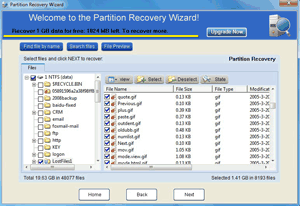
    5. After building directory, you'll find all files on the lost partition.

    prw-partition-recovery-3-1.gif


    6. Choose the files or folders to recover.

    prw-partition-recovery-5-1.gif
     

    serandib_y2k

    Well-known member
  • Apr 20, 2009
    3,758
    87
    48
    37
    Al Ain, U.A.E
    DOWNLOAD EASEUS Partition Master

    click here to download
    EASEUS Partition Master 5.0.1 Home Edition (11.2MB)

    1. Run EASEUS Partition Master, click "Wizard" > "Partition Recovery Wizard", then select Complete Recovery button on the main window of Partition Recovery Wizard.

    prw-main-complete.gif


    2. You can see the list of logical volumes found on your computer. Please select the "Ghosted" (or "imaged") error logic drive and choose the "Option" before going to the next step.

    prw-complete-recovery-1.gif


    3. Click on the "RAW" option and tick the "Recover RAW files only" box.

    prw-option-RAW-only.gif


    4. Click "Next" to begin Scanning to recover your files with RAW Data Recovery method.

    prw-complete-recovery-2.gif


    5. Select the file type directory that you want to recover and press the "NEXT" button.

    prw-complete-recovery-5-2.gif


    6. Select some directories or files and press the "NEXT" button to save the data.


    Machan im looking out this one... hold da line..! :)
     

    serandib_y2k

    Well-known member
  • Apr 20, 2009
    3,758
    87
    48
    37
    Al Ain, U.A.E
    MACHAN WADE HARI.... HEMAL SILVA kiyanne niyama porak... Mang porondu woo paridi RELOAD eka danna giyama mang msg ekak dammama me YALUWA ewapu msg eka share karanna hithune..

    HEMAL SILVA - "WEDE HARI GIYADA . . . EHENAM THRED EKATA POST EKAK DANNA HARI GIYA KIYALA E ETHI . . . . MAMA AMAK BALAGENA KATAWATH UDAWU KARANNE NEHE BROTHER.

    DANNA DEAK BEDA GATHTHAMA, HITHATA SATHUTUI . .

    RELOAD DANNA MAMA LANKAWE NEME INNE . . .

    FILE TIKA FULL RCOER UNADA . .

    WISTARA THRED EKATAMA DANNA . . .HEMOTAMA BALANNA, THAWA DANNE NETHI AYATA HODAI . HARI GIYA KENEK GE WISTARA . ."


    MACHAN UTHUM GUNAANGA thiyena minisun hari adui machan.... EK eke inna godak aya mehema nae... Magen EK ekata OLD HITS walata wena sewaya digatama karagena yanna FORMAT wechcha hard eka berala deepu HEMAL SILVA ta pin aithi wewa!!

    his profile id: http://www.elakiri.com/forum/member.php?u=7335