How to convert video files using 4Media Video Converter Ultimate?
[FONT=宋体]How to convert video files using 4Media Video Converter Ultimate?
The following will show you a step by step guide to complete the conversion task.
Step 1: Install and run the
4Media Video converter Ultimate
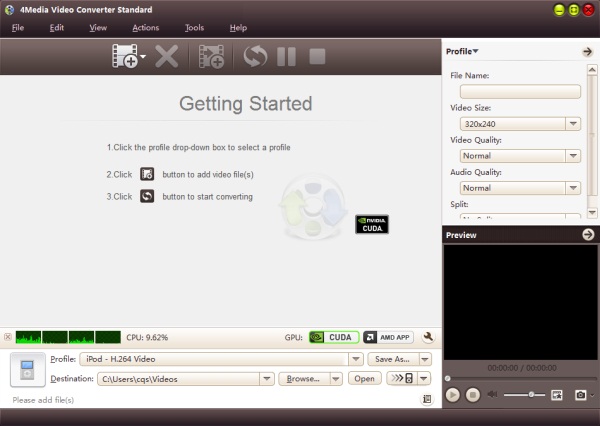
After downloading, installing and running the video converter software, you will see the main interface as below.
Step 2: Add File
Click "Add File" button on the toolbar or "File> Add File" to load files.
Step 3: Choose output format
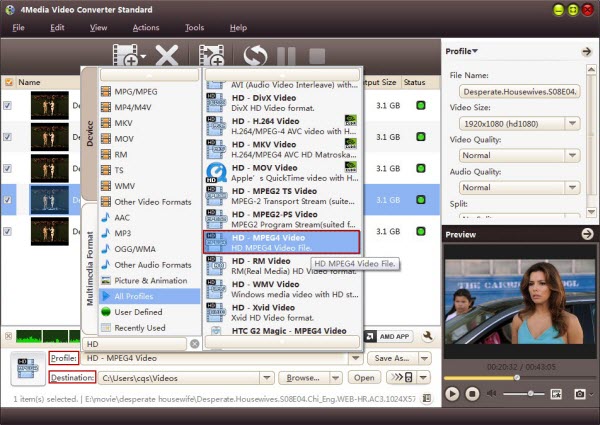
Choose the file, click "Profile" drop-down button to choose the formats you need, then click "Browse" button to choose destination folder for saving output files.
Tip1: We provide abundant profiles sorted by various popular devices, especially all-around HD video formats are supported.
Tip2: Many options for you to choose. The "Recent" option will record your recent using automatically and it is convenient to be used afterward.
Tip3: If you want to do more with your video and audio files, please refer to the "More usage skills".
Step 4: Convert
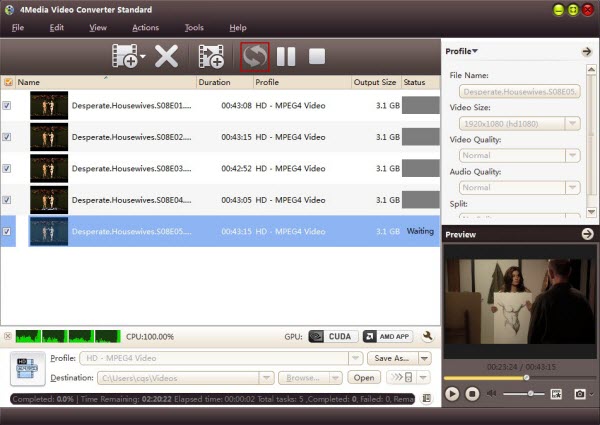
After choosing the format, you only need to click "Convert" button on the toolbar to complete the task.
Ok, the above is the simplest function for your conversion. We provide you more abundant skills below!
for more information you can stick with:
http://www.mp4converter.net/video-converter-win.html
<a href="http://www.mp4converter.net/video-converter-win.html</a>[/FONT]

 ඕනම රටකට සෙට් වෙන CV එකක්
 Hambantota 7 Acres Beachfront Land For Sell DownSouth , PerPerch Price 420 000
 Baseus PI LITE INDOOR CAMERA