


මේකට step දෙකක් තියනවා.
1. unlimited shared drive එකක් හදාගන්න එක .
2. python script එකෙන් torrent එක google drive එකට upload කරගන්න එක.
1.Shared Drive
1. මේ link එකෙන් ගිහින් I accept the terms කරන්න.
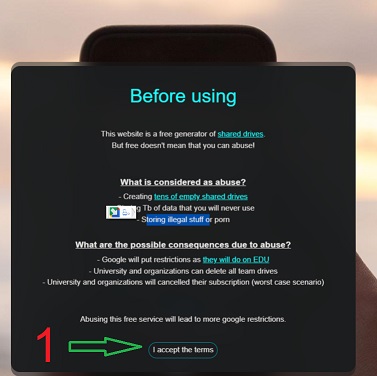
2.Shared drive name කියන එකට කැමති නමක් දාන්න
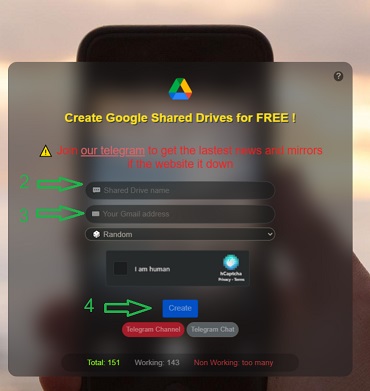
3.Your Gmail address කියන තැනට අලුතින් හදාගත්ත gmail address එකක් දෙන්න.(google drive එකට access දෙන්න වෙන නිසා)
4.ඊට පස්සේ captcha එක complete කරලා create කරන්න.
5. හරි දන් ඔයාගේ google drive එකට ලොග් වෙලා බලන්න shared drives වල ඔයා දැන් හදාගත්ත shared drive එක පෙන්නවද කියල.
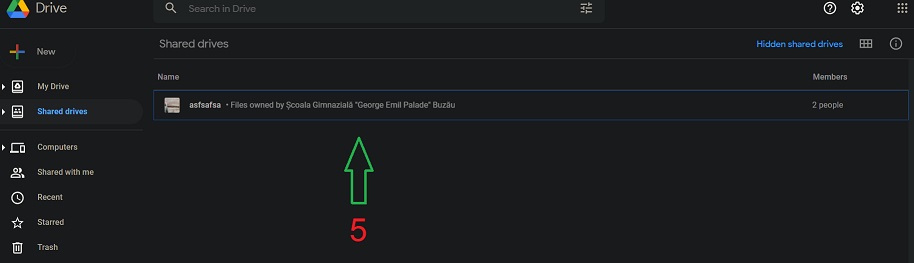
6. ඒ shared drive එක ඇතුලේ torrent කියල folder එකක් හදාගන්න. (Right Click --> New Folder)

7.ඊට පස්සේ torrent folder එක උඩ right click කරලා add shortcut to Drive clickකරන්න. එකේ මෙනු එකෙන් my drive තෝරලා add shortcut කරන්න.
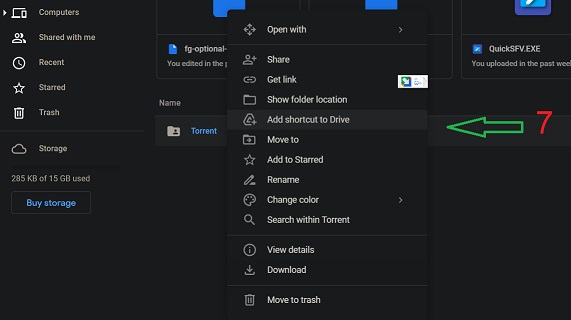
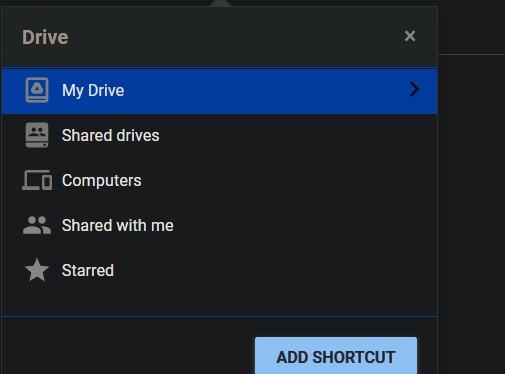
8. හරියට ඔක්කොම කරානම් මේ විදියට පෙන්නන්න ඕනේ.

2.Torrent to google drive
1.මේ link එකෙන් ගිහින් Sign in වෙන්න.

2.connect click කරන්න.

3. ඊට පස්සේ මේ line දෙක copy කරල paste කරන්න . ( !apt install මේ පේලියට කලින්)
!python -m pip install --upgrade pip setuptools wheel
!python -m pip install lbry-libtorrent

4. දැන් මේ cell එක (Install libtorrent and Initialize Session) run කරන්න.

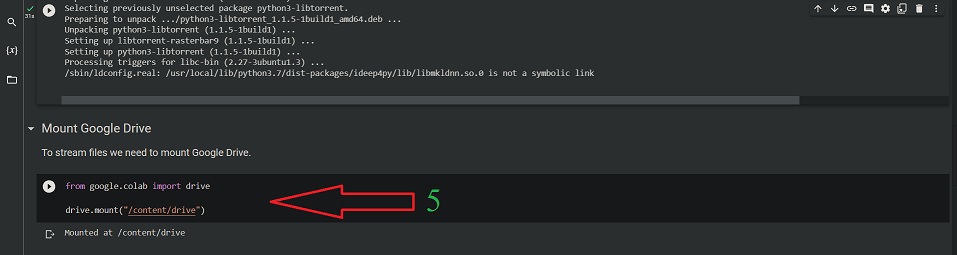
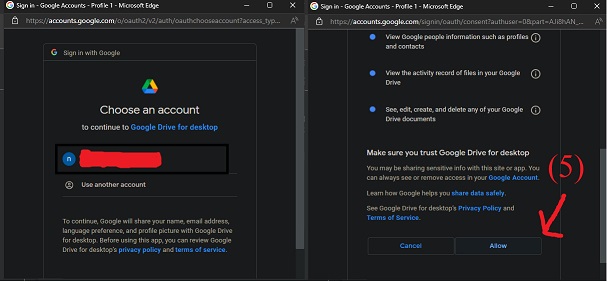
5.Mount Google Drive cell එක run කරන්න. එතකොට අලුත් window එකක් pop up වෙනව. එකට කලින් shared drive එක හදාගත්ත එක Gmail දීල next කරන්න. ඊට පස්සේ අපේ drive access ඉල්ලනව. ඒක allow කරන්න.
6. අපිට ඕනේ torrent එක google drive එකට add කරන්න ක්රම දෙකක් තියෙනව.
( 1. (.torrent) file එකෙන් , 2. magnet link එකෙන් )

(මේ දෙකෙන් ඕනේ cell එක විතරක් run කරන්න )
6.1 - Add From Torrent File cell එක run කරන්න. ඊට පස්සේ Choose files click කරල download කරන්න ඕනේ torrent එකේ .torrent file එක select කරන්න.

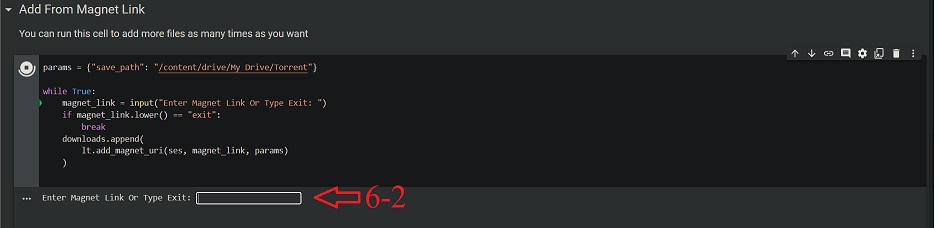
6.2 - Add From Magnet Link cell එක run කරන්න. ඊට පස්සේ download කරන්න ඕනේ torrent එකේ torrent file එකේ magnet link එක paste කරල enterකරන්න . ඊට පස්සේ exit කියල type කරල enterකරන්න
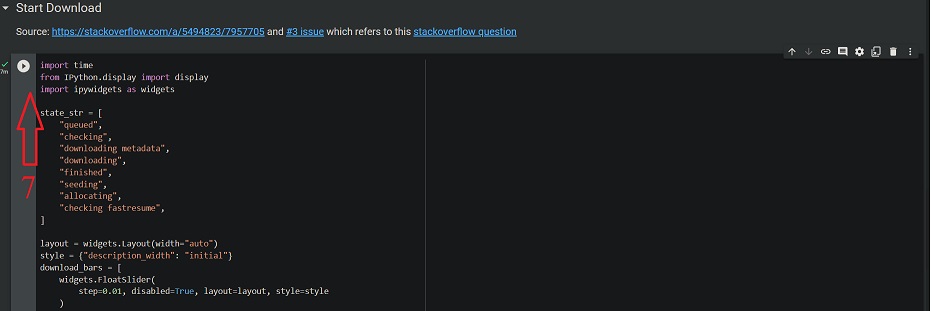
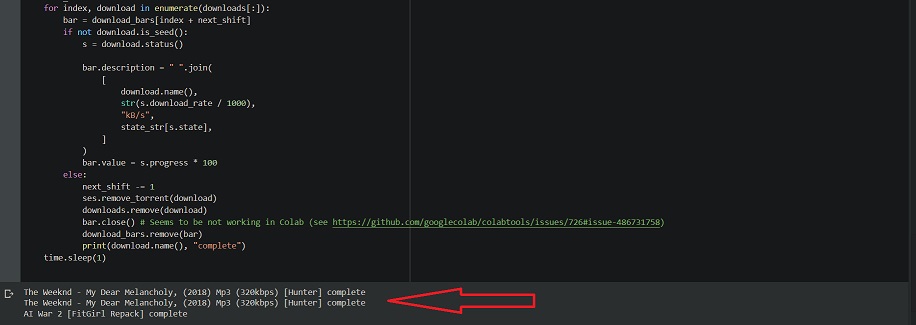
7. දැන් start download cell එක run කරල ෆයිල් එක download වෙලා ඉවර වෙනකන් ඉන්න ( window එක close කරන්න එපා download එක complete වෙනකන් )
**ලොකු file එකක් download කරනකොට notebook එක disconnect වෙනවානම් මේක web browser එකේ console එකේ enter කරන්න.**
function ConnectButton(){
console.log("Connect pushed");
document.querySelector("#top-toolbar > colab-connectbutton").shadowRoot.querySelector("#connect").click()
}
setInterval(ConnectButton,60000);
* download කරල ඉවර උනාම shared drive එකෙන් torrent එක delete කරන්න . (illegal stuff store කරන්න එපා කියලා තියෙනව )
* බොරුවට shared folders හදල abuse කරන්න එපා. හැමෝටම නැති වෙයි මේක.
*important files shared folder එකට දාන්න එපා . ( drive එකේ owner ට බලන්න පුළුවන් අනික අපිට කොයි වෙලේ හරි access නැති වෙන්න පුළුවන් shared drive එකට)
1. unlimited shared drive එකක් හදාගන්න එක .
2. python script එකෙන් torrent එක google drive එකට upload කරගන්න එක.
1.Shared Drive
1. මේ link එකෙන් ගිහින් I accept the terms කරන්න.
2.Shared drive name කියන එකට කැමති නමක් දාන්න
3.Your Gmail address කියන තැනට අලුතින් හදාගත්ත gmail address එකක් දෙන්න.(google drive එකට access දෙන්න වෙන නිසා)
4.ඊට පස්සේ captcha එක complete කරලා create කරන්න.
5. හරි දන් ඔයාගේ google drive එකට ලොග් වෙලා බලන්න shared drives වල ඔයා දැන් හදාගත්ත shared drive එක පෙන්නවද කියල.
6. ඒ shared drive එක ඇතුලේ torrent කියල folder එකක් හදාගන්න. (Right Click --> New Folder)
7.ඊට පස්සේ torrent folder එක උඩ right click කරලා add shortcut to Drive clickකරන්න. එකේ මෙනු එකෙන් my drive තෝරලා add shortcut කරන්න.
8. හරියට ඔක්කොම කරානම් මේ විදියට පෙන්නන්න ඕනේ.

2.Torrent to google drive
1.මේ link එකෙන් ගිහින් Sign in වෙන්න.

2.connect click කරන්න.
3. ඊට පස්සේ මේ line දෙක copy කරල paste කරන්න . ( !apt install මේ පේලියට කලින්)
!python -m pip install --upgrade pip setuptools wheel
!python -m pip install lbry-libtorrent
4. දැන් මේ cell එක (Install libtorrent and Initialize Session) run කරන්න.

5.Mount Google Drive cell එක run කරන්න. එතකොට අලුත් window එකක් pop up වෙනව. එකට කලින් shared drive එක හදාගත්ත එක Gmail දීල next කරන්න. ඊට පස්සේ අපේ drive access ඉල්ලනව. ඒක allow කරන්න.
6. අපිට ඕනේ torrent එක google drive එකට add කරන්න ක්රම දෙකක් තියෙනව.
( 1. (.torrent) file එකෙන් , 2. magnet link එකෙන් )

(මේ දෙකෙන් ඕනේ cell එක විතරක් run කරන්න )
6.1 - Add From Torrent File cell එක run කරන්න. ඊට පස්සේ Choose files click කරල download කරන්න ඕනේ torrent එකේ .torrent file එක select කරන්න.
6.2 - Add From Magnet Link cell එක run කරන්න. ඊට පස්සේ download කරන්න ඕනේ torrent එකේ torrent file එකේ magnet link එක paste කරල enterකරන්න . ඊට පස්සේ exit කියල type කරල enterකරන්න
7. දැන් start download cell එක run කරල ෆයිල් එක download වෙලා ඉවර වෙනකන් ඉන්න ( window එක close කරන්න එපා download එක complete වෙනකන් )
**ලොකු file එකක් download කරනකොට notebook එක disconnect වෙනවානම් මේක web browser එකේ console එකේ enter කරන්න.**
function ConnectButton(){
console.log("Connect pushed");
document.querySelector("#top-toolbar > colab-connectbutton").shadowRoot.querySelector("#connect").click()
}
setInterval(ConnectButton,60000);
* download කරල ඉවර උනාම shared drive එකෙන් torrent එක delete කරන්න . (illegal stuff store කරන්න එපා කියලා තියෙනව )
* බොරුවට shared folders හදල abuse කරන්න එපා. හැමෝටම නැති වෙයි මේක.
*important files shared folder එකට දාන්න එපා . ( drive එකේ owner ට බලන්න පුළුවන් අනික අපිට කොයි වෙලේ හරි access නැති වෙන්න පුළුවන් shared drive එකට)


 Badu weda


