HELP..HELP..HELP..HELP

VASSA

Well-known member
  • Jun 4, 2007
    6,223
    142
    63
    Red Cow Factory
    kauru hari mata me upakaraya karathva:nerd:

    menna mekai mage prashnaya
    :nerd:
    mama gava HD music vedio tikak tiyenava...mata a tika avi valata convert karaganna one...HD vedios tika tiyenne .mkv kiyana format eken...mama dan mokakda karanne...kohomada avi valata convert karanne...

    habai mama gava tiyena converter ekak tibba eken convert karanna yaddi menne me vage error ekakuth ava"cannot open the file.you need install appropriate decoders.Or the file is curropted." ane ehema enneth ai..mata meva visada denu mana :dull: :dull: :dull: :dull: :dull:
     

    Clerk_Kent

    Well-known member
  • Jan 17, 2008
    25,206
    65
    48
    Jetaudio plusvx kiyana eken convert karanna puluwan wei...
    sure ekatama kiyanna be..
    man gawa MKV file ne ne
     

    TΞΞNSTAR™

    Member
    Mar 19, 2008
    15,866
    42
    0
    StuCk In My AnGelZ HeArT!!!
    How to play MKV files


    matroska_logo.gif
    An MKV file is a Matroska file. Matroska is an open source container format. It is an alternative to the popular AVI and MP4 formats and it also surpasses them in many areas. This article exists to help you understand what an MKV file is and how you can play it back perfectly on your PC.


    Containers, Codecs and Players


    Many people who download a file with the extension MKV will often try to play it back with video player software they have installed on their systems. Most of the time this doesn't work (hence, the reason you are here). While a great selection of players support the playback of Matroska files, often the proper decoders for the streams contained in the files are missing. It is important to understand exactly what Matroska files are.

    MKV files contain video and audio streams (may also contain subtitles). The streams are likely compressed and have been produced with an encoder. In order to play these streams a codec is required. Codec, as a word is an abbreviation of Coder / Decoder. The video stream located in the MKV file has been "coded" by the source and now it must be "decoded" by the end user who wishes to play it.

    So to summarize, Matroska is a container format file that stores multiple streams (video, audio and subtitles). These streams may require you to install decoding software and filters to playback depending on what player you use. For most MKV files you find, there is a player not based on DirectShow (so you probably won't have to install any extra decoding software or filters) that has support for Matroska files, VideoLan Client (VLC).


    The Easiest Method (VLC)
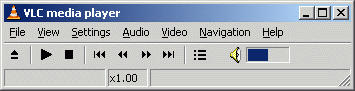

    With the VLC player you are actually getting two things; a fine player with support for Matroska, and support for most video and audio streams you will find in an MKV file. This means that you most likely will not have to install any extra codecs or filters, depending on what your streams are.

    You can get VLC for Windows from this URL.
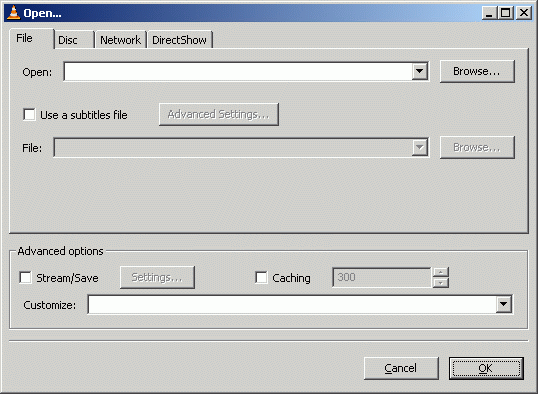
    Click File and click the Open File option.

    Now, click the Browse button next to the first white line at the top of the window with title "Open.." and navigate through your harddrive for the video you wish to watch and select it. After you have selected the video, click OK and VLC will start playing the video you chose.
     

    VASSA

    Well-known member
  • Jun 4, 2007
    6,223
    142
    63
    Red Cow Factory
    Thanx machanla okkotama..mage vade goda obalage pihiten..VLC + CODEC PACK....a 2 hinda goda...thanx again

    dilrasan said:
    use JetAudio to Play
    Clerk_Kent said:
    Jetaudio plusvx kiyana eken convert karanna puluwan wei...
    sure ekatama kiyanna be..
    man gawa MKV file ne ne
    TΞΞNSTAR™ said:
    How to play MKV files

    matroska_logo.gif
    An MKV file is a Matroska file. Matroska is an open source container format. It is an alternative to the popular AVI and MP4 formats and it also surpasses them in many areas. This article exists to help you understand what an MKV file is and how you can play it back perfectly on your PC.


    Containers, Codecs and Players


    Many people who download a file with the extension MKV will often try to play it back with video player software they have installed on their systems. Most of the time this doesn't work (hence, the reason you are here). While a great selection of players support the playback of Matroska files, often the proper decoders for the streams contained in the files are missing. It is important to understand exactly what Matroska files are.

    MKV files contain video and audio streams (may also contain subtitles). The streams are likely compressed and have been produced with an encoder. In order to play these streams a codec is required. Codec, as a word is an abbreviation of Coder / Decoder. The video stream located in the MKV file has been "coded" by the source and now it must be "decoded" by the end user who wishes to play it.

    So to summarize, Matroska is a container format file that stores multiple streams (video, audio and subtitles). These streams may require you to install decoding software and filters to playback depending on what player you use. For most MKV files you find, there is a player not based on DirectShow (so you probably won't have to install any extra decoding software or filters) that has support for Matroska files, VideoLan Client (VLC).


    The Easiest Method (VLC)


    With the VLC player you are actually getting two things; a fine player with support for Matroska, and support for most video and audio streams you will find in an MKV file. This means that you most likely will not have to install any extra codecs or filters, depending on what your streams are.

    You can get VLC for Windows from this URL.

    Click File and click the Open File option.

    Now, click the Browse button next to the first white line at the top of the window with title "Open.." and navigate through your harddrive for the video you wish to watch and select it. After you have selected the video, click OK and VLC will start playing the video you chose.
    nismok said:
    Install KLM first then Use Video Converter
    icreations said:
    K- Lite Codek Pack.. eka daapan.. Oona P** wada karanawa banZ...

    http://www.codecguide.com/download_kl.htm
    zed said:
    machan ube com 1k te codak pack 1kk dalade thiyenne

    install K-lite media codak pack and try it
    Thilinacba said:
    machan vlc player try karahan