
Latest ads
-
 Gemini AI PRO 18 months Offer
- Hawaka
- Updated:
-
koko account
- DasunEranga
- Updated:
-
koko account
- DasunEranga
- Updated:

You are using an out of date browser. It may not display this or other websites correctly.
You should upgrade or use an alternative browser.
You should upgrade or use an alternative browser.

සමහර image විදියට write කරපු files වෙනත් device එකකට move or copy කරන්න බෑ. එහෙම වෙන්නේ ඇයි? එහෙම image ලෙස write කරපුව කොහොමද අපි වෙනත් device එකකට copy or move කරන්නේ?
oya kiyanne CD/DVD image da ??


image eke GB ganna kiyada .... ??? anith eka DVD image ekak da CD Image ekek da ... Copy karanna yana device eke Format eka mokakda FAT32 or NTFS
image eke GB ganna kiyada .... ??? anith eka DVD image ekak da CD Image ekek da ... Copy karanna yana device eke Format eka mokakda FAT32 or NTFS
hmmmmmm math hithuwe ekamayi sure ekata FAT32 case eka wenna athi
ow machan fat32 valata loku files copy karanna bari seen ekak thiyenavahmmmmmm math hithuwe ekamayi sure ekata FAT32 case eka wenna athi

ow machan fat32 valata loku files copy karanna bari seen ekak thiyenava
yap FAT32 max file size eka 4GB

ow machan FAT 32 thamai, its my portable hard. even for a pen cant put, yes its over 4 GB
oya oka danna hadanne FAT32 partision ekakatanam oka 4GB walata wadinam oka copy karanna ba....Fat32 support karana max sixe eka 4GB .....a partision eka NTFS karanna nathuwa karanna deyak na

ethakota eka 8GB pen ekakata daannath berida? pen eka NTFS walata convert karanna berida?oya oka danna hadanne FAT32 partision ekakatanam oka 4GB walata wadinam oka copy karanna ba....Fat32 support karana max sixe eka 4GB .....a partision eka NTFS karanna nathuwa karanna deyak na

ethakota eka 8GB pen ekakata daannath berida? pen eka NTFS walata convert karanna berida?
Format karanna puluwan NTFS walata


ethakota eka 8GB pen ekakata daannath berida? pen eka NTFS walata convert karanna berida?
dana partision eka 200GB unath format eka FAT32 nam danna puluwan 4GB walata adu file vitharayi........ara "vidura99" kiyala thiyana vidhihata FAT32 eka NTFS walata convert karanna ethakota hariyayi......format karanna kalin a partision eke one file tika backup karaganna
Thank you all guys, I have another small question, I have a portable Hard drive, its file system is FAT32, so how can i change it to NTFS? I know its easy to 4mat, but i have some dats in there, noway to back up those. partion majic wage ekakin puluwanda? i havent use it before...can somebody suggest me a solution?
Thank you all guys, I have another small question, I have a portable Hard drive, its file system is FAT32, so how can i change it to NTFS? I know its easy to 4mat, but i have some dats in there, noway to back up those. partion majic wage ekakin puluwanda? i havent use it before...can somebody suggest me a solution?
How can you convert FAT32 to NTFS file system in an easier and safer way than using Convert.ext? You might need a third-party partition management tool, such as EASEUS Partition Master.
The latest version of EASEUS Partition Master adds two new features, one of which is to convert file system from FAT to NTFS. With this function, you can convert FAT12/FAT16/FAT32 to NTFS easily and quickly without any data loss.
To convert FAT32 file system to NTFS (as we mainly talk about FAT32 in this article), please follow these simple steps:
1. Select a FAT32 partition.
2. Click Partitions -> Advanced -> Convert.
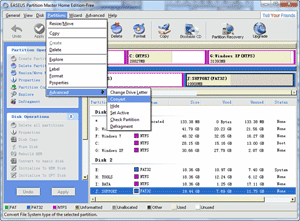
3. The pop-up dialog box will show the source and destination file system, click "OK" to continue.
පර්ටිශන් මැජික් (7.01) වලිනුත් පුලුවනි ඇති
Converting a partition from FAT32 to NTFS can be done by an inbuilt utility in the Windows XP operating system — but it is important to realise that it is a one-way process. You cannot convert back, except possibly by use of Partition Magic 7.01, and that is not always successful. Windows XP has no tool for converting from NTFS to FAT32.
Last edited:
How can you convert FAT32 to NTFS file system in an easier and safer way than using Convert.ext? You might need a third-party partition management tool, such as EASEUS Partition Master.
The latest version of EASEUS Partition Master adds two new features, one of which is to convert file system from FAT to NTFS. With this function, you can convert FAT12/FAT16/FAT32 to NTFS easily and quickly without any data loss.
To convert FAT32 file system to NTFS (as we mainly talk about FAT32 in this article), please follow these simple steps:
1. Select a FAT32 partition.
2. Click Partitions -> Advanced -> Convert.
3. The pop-up dialog box will show the source and destination file system, click "OK" to continue.
පර්ටිශන් මැජික් (7.01) වලිනුත් පුලුවනි ඇති
Converting a partition from FAT32 to NTFS can be done by an inbuilt utility in the Windows XP operating system — but it is important to realise that it is a one-way process. You cannot convert back, except possibly by use of Partition Magic 7.01, and that is not always successful. Windows XP has no tool for converting from NTFS to FAT32.
oken partition karaddi thiyana data lost wenne nedda hard eke?
if you have the software links please share with me..

Similar threads

- Replies
- 2
- Views
- 123


- Replies
- 12
- Views
- 277


- Replies
- 74
- Views
- 3K


- Replies
- 19
- Views
- 575
