help needed about XP registration

TDM

Well-known member
  • Jan 7, 2007
    2,347
    25
    48
    36
    Kandy
    2 days ago i installed XP on ma system.and after i run the patch file it give a message like this
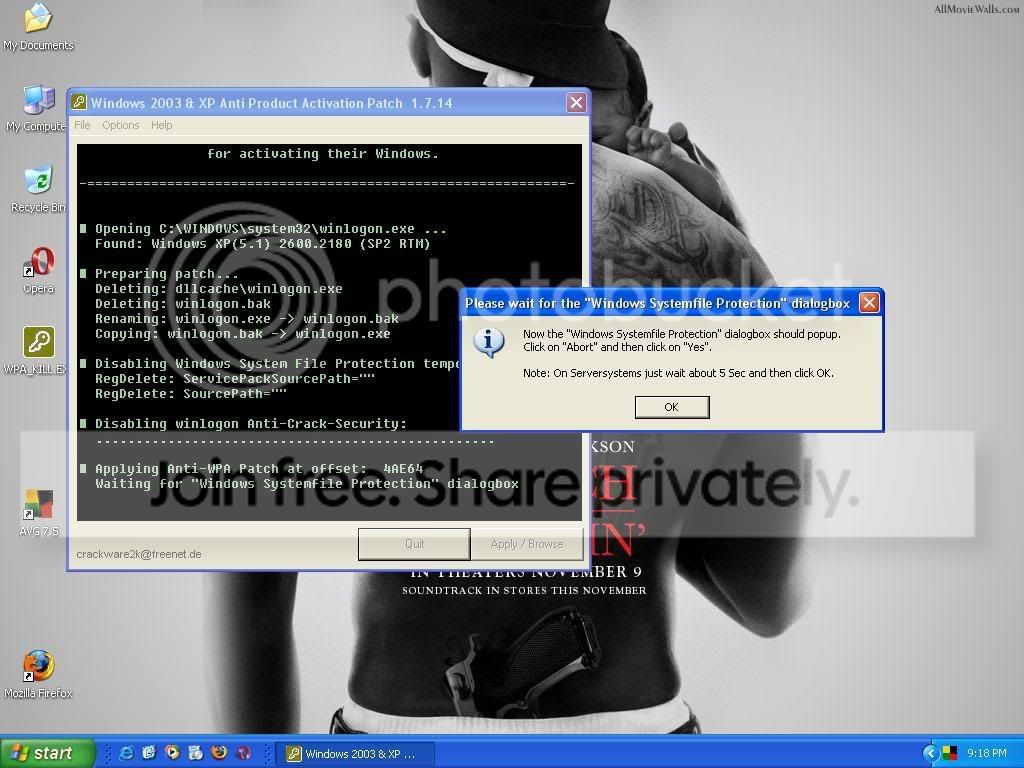
    1-2.jpg

    but there are no dialog boxes popuped,,every time i restart after pathing XP it's no been activated,,,,,i have done this serveral b4 with da same CD same file and it has been worked,but nw it's not.... i don't know wht to do to solve this,,don't say meto format again,,,,

    please anyone can give me a help please:) :) :)
     

    Malinga

    Well-known member
  • Jul 20, 2006
    61,301
    1,013
    113
    TDM said:
    dennam connect wela iddi thama karanna giye,,
    kalinnam mathaka nehe

    update ehema vuna da dammata passe xp? issara vadakaranavanum dan vada nokaranna vidiyak nahane. ekko time eke prashanayak nisa vada nathuva athi. ehema naththum ithin file corrupt venna oonane. naththum ithin hardware vala venasak venna oona. ehema naththum ithin prashane internet thamai :D
     

    sutherland.g.m

    Active member
  • Oct 24, 2006
    3,299
    7
    38
    ආදරේ ළග....
    macahan xp walata oney tharam crack thioyena naath nam mewa try karala balapan


    Basically we are going to change the product key of windows in a LEGAL WAY
    certified by Microsoft itself.

    This is 101% Genuine CD key For Windows Xp Sp2 Prof. which never expires...!
    V2C47-MK7JD-3R89F-D2KXW-VPK3J

    This above key can be used while installation of any windows xp prof. Sp2 to get it validated after installation.
    --------------------------------------------------
    Follow These Steps---:
    1. Click Start, and then click Run.
    Copy Paste this below command to check the activation status of your
    windows in Run and hit Enter.
    Command-: %systemroot%\system32\oobe\msoobe.exe /a

    This would say Windows Is already activated. if not then jump to step 8.

    2. Now again click Start and then click Run. In the Open box, type regedit, and then click OK.

    3. In the left pane, locate and then click the following registry key:
    HKEY_LOCAL_MACHINE\Software\Microsoft\WindowsNT\Cu rrent Version\WPAEvents

    4. In the right pane, right-click OOBETimer, and then click Modify.

    5. Change at least one digit of this value to deactivate Windows.(eg -: change any value lets say 93 to 67 etc)

    6. Click Start, and then click Run.

    7. In the Open box, type the following command, and then click OK.
    %systemroot%\system32\oobe\msoobe.exe /a

    8. Click Yes, I want to telephone a customer service representative to activate Windows, and then click Next.

    9. Click Change Product key.

    10. Type the new product key-: " V2C47-MK7JD-3R89F-D2KXW-VPK3J " in the New key boxes, and then click Update.
    If you are returned to the previous window, click Remind me later, and then restart the computer.

    11. Repeat steps 6 and 7 to verify that Windows is activated. You receive the following message:
    Windows is already activated. Click OK to exit.

    12. Click OK.

    13. Now Click Here to validate your windows xp.

    maaath meka ek ekenam thami gaththe meka mulinma post karapu kenata pin siidda wenna oney
     

    krizta

    Well-known member
  • Nov 9, 2007
    17,906
    3,879
    113
    56
    400 : Bad Request
    XP

    sutherland.g.m said:
    macahan xp walata oney tharam crack thioyena naath nam mewa try karala balapan


    Basically we are going to change the product key of windows in a LEGAL WAY
    certified by Microsoft itself.

    This is 101% Genuine CD key For Windows Xp Sp2 Prof. which never expires...!
    V2C47-MK7JD-3R89F-D2KXW-VPK3J

    This above key can be used while installation of any windows xp prof. Sp2 to get it validated after installation.
    --------------------------------------------------
    Follow These Steps---:
    1. Click Start, and then click Run.
    Copy Paste this below command to check the activation status of your
    windows in Run and hit Enter.
    Command-: %systemroot%\system32\oobe\msoobe.exe /a

    This would say Windows Is already activated. if not then jump to step 8.

    2. Now again click Start and then click Run. In the Open box, type regedit, and then click OK.

    3. In the left pane, locate and then click the following registry key:
    HKEY_LOCAL_MACHINE\Software\Microsoft\WindowsNT\Cu rrent Version\WPAEvents

    4. In the right pane, right-click OOBETimer, and then click Modify.

    5. Change at least one digit of this value to deactivate Windows.(eg -: change any value lets say 93 to 67 etc)

    6. Click Start, and then click Run.

    7. In the Open box, type the following command, and then click OK.
    %systemroot%\system32\oobe\msoobe.exe /a

    8. Click Yes, I want to telephone a customer service representative to activate Windows, and then click Next.

    9. Click Change Product key.

    10. Type the new product key-: " V2C47-MK7JD-3R89F-D2KXW-VPK3J " in the New key boxes, and then click Update.
    If you are returned to the previous window, click Remind me later, and then restart the computer.

    11. Repeat steps 6 and 7 to verify that Windows is activated. You receive the following message:
    Windows is already activated. Click OK to exit.

    12. Click OK.

    13. Now Click Here to validate your windows xp.

    maaath meka ek ekenam thami gaththe meka mulinma post karapu kenata pin siidda wenna oney
    :yes::yes::yes::yes::yes::yes:
     

    TDM

    Well-known member
  • Jan 7, 2007
    2,347
    25
    48
    36
    Kandy
    sutherland.g.m said:
    macahan xp walata oney tharam crack thioyena naath nam mewa try karala balapan


    Basically we are going to change the product key of windows in a LEGAL WAY
    certified by Microsoft itself.

    This is 101% Genuine CD key For Windows Xp Sp2 Prof. which never expires...!
    V2C47-MK7JD-3R89F-D2KXW-VPK3J

    This above key can be used while installation of any windows xp prof. Sp2 to get it validated after installation.
    --------------------------------------------------
    Follow These Steps---:
    1. Click Start, and then click Run.
    Copy Paste this below command to check the activation status of your
    windows in Run and hit Enter.
    Command-: %systemroot%\system32\oobe\msoobe.exe /a

    This would say Windows Is already activated. if not then jump to step 8.

    2. Now again click Start and then click Run. In the Open box, type regedit, and then click OK.

    3. In the left pane, locate and then click the following registry key:
    HKEY_LOCAL_MACHINE\Software\Microsoft\WindowsNT\Cu rrent Version\WPAEvents

    4. In the right pane, right-click OOBETimer, and then click Modify.

    5. Change at least one digit of this value to deactivate Windows.(eg -: change any value lets say 93 to 67 etc)

    6. Click Start, and then click Run.

    7. In the Open box, type the following command, and then click OK.
    %systemroot%\system32\oobe\msoobe.exe /a

    8. Click Yes, I want to telephone a customer service representative to activate Windows, and then click Next.

    9. Click Change Product key.

    10. Type the new product key-: " V2C47-MK7JD-3R89F-D2KXW-VPK3J " in the New key boxes, and then click Update.
    If you are returned to the previous window, click Remind me later, and then restart the computer.

    11. Repeat steps 6 and 7 to verify that Windows is activated. You receive the following message:
    Windows is already activated. Click OK to exit.

    12. Click OK.

    13. Now Click Here to validate your windows xp.

    maaath meka ek ekenam thami gaththe meka mulinma post karapu kenata pin siidda wenna oney


    thanX brother this helped:yes: :yes: :yes: