


Eye catching:
Aiseesoft DVD Converter Suite for Mac is a suite pack with Aiseesoft DVD Ripper for Mac and Aiseesoft Video Converter for Mac combined. It is especially designed for the Mac users with high output quallity and a worthy price. If you are a Mac user and want to convert DVD/video, this is what you need.
Aiseesoft DVD Converter Suiteis the perfect combination of Aiseesoft DVD Ripper, Aiseesoft Total Video Converter and Aiseesoft iPod to Computer Transfer. Like Aiseesoft DVD Converter Suite for Mac, it has high output quality and converting speed but a much lower price.This suite is aimed to meet the Windows users’ need.
With those two suites you can enjoy your DVDs, videos and ipod more easily.The fowlloing details will show you how to use them. It includes five parts:
With Aiseesoft DVD Converter Suite for Mac:
Part 1: How to convert DVD on Mac
Part 2: How to convert video on Mac
With Aiseesoft DVD Converter Suite
Part 3: How to convert DVD
Part 4: How to convert video
Part 5: How to tansfer iPod to computer
With Aiseesoft DVD Converter Suite for Mac:
Preparation:Download and install Aiseesoft DVD Converter Suite for Mac(Intel Version or Power PC Version)
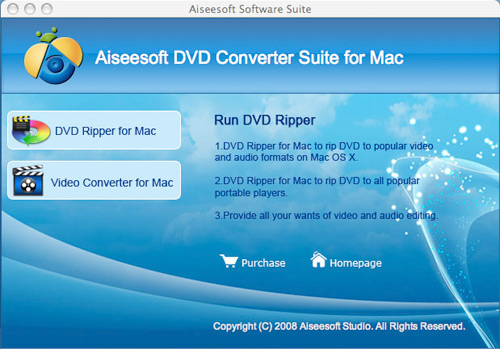
Part 1: How to convert DVD on Mac
Step 1:Select "Aiseesoft DVD Ripper for Mac" after you installed Aiseesoft DVD Converter Suite for Mac .
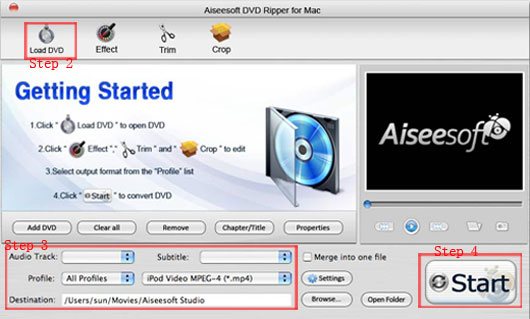
Step 2: Load DVD
Click the "Load DVD" button, select the DVD folder of the movie you want to convert from your DVD-ROM, and Click "Open".
Step 3:Choose output settings.
Selecting output format is really easy, you can choose your output format according to your devices players and the default setting works great.
For a veteran of digital player, you could customize your own settings by clicking "Settings" button to choose your own video resolution, frame rate, bit rate, encoder, etc.
Step 4:Click "Start"button to begin your cnversion.
More functons such as "trim", "crop", "effect", "merge into one file/audio track/subtitles" are also very easy to use.Just follow the instructons on it, you can make your DVD movie more enjoyable with a few clicks.
Part 2: How to convert video on Mac
Step 1:Select "Aiseesoft Video Converter for Mac" after you installed Aiseesoft DVD Converter Suite for Mac.
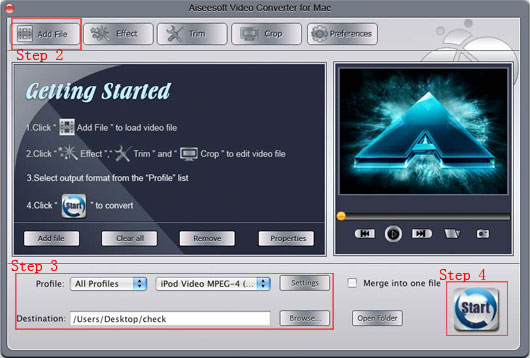
Step 2:Add files.
Click "Add File" to choose the video you want to cnvert.
Step 3Output setting.
Click "Profile", you can set the output fomat.
Click "Settings" button, you can choose your own video resolution, frame rate, bit rate, encoder, etc.
You can also choose the destinaton by click "Destinaton" button.
During the conversion, you can crop, trim, effect your video and merge your files into one.
Step 4:Click "Start"button" to begin your conversion.
You can also follow the instructons on it to convert your videos.
With Aiseesoft DVD Converter Suite
Preparation:Download and install Aiseesoft DVD Converter Suite
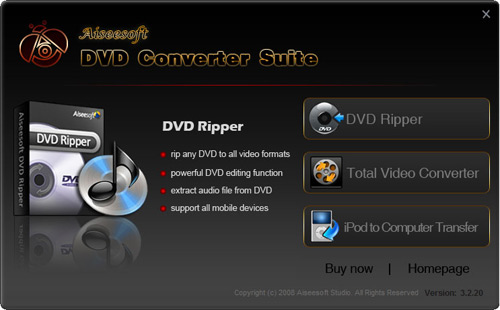
Part 3:How to convert DVD
Step 1:Select "Aiseesoft DVD Ripper" after you installed Aiseesoft DVD Converter Suite.
step 2: Click "Load DVD" button to load your DVD
This professional DVD Ripper can load three DVD source, you can load your DVD from DVD drive, DVD folder in your PC and also IFO file.
Step 3:Output setting
From the "Profile" drop list,you can set your output format.
Click "Setting"button, you can choose your own video resolution, frame rate, bit rate, encoder, etc.
You can aslo choose your output destination by clicking "Destinaton".
Step 4:Click "Start" button to begin your conversion.
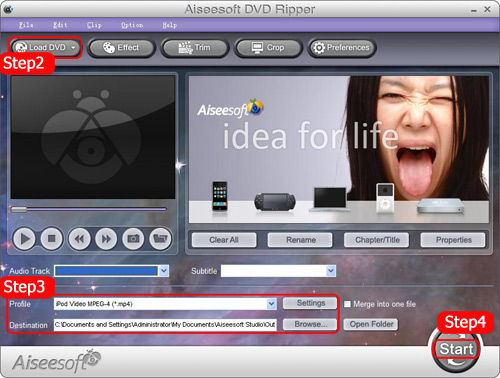
More functons such as crop, trim, effect, capture your favorite picture, merge into one file are aslo available for you to edit your video.
Part 4: How to convert video
Step 1:Select "Aiseesoft Total Video Converter" after you installed Aiseesoft DVD Converter Suite.
Step 2: Click "Add File" button to add your video.
Step 3. Output format and Settings
From the "Profile" drop-down list you can find one format that meets your requirement.
To have your own video settings you can click "Settings" button.
Step 4:Click "Start" button to begin your conversion.
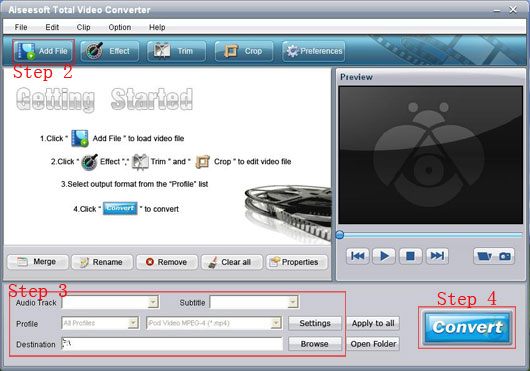
You can use the functons such as "Snapshot and merge into one file, Trim, Crop" to edit your videos. Just follow the instructions on it you can easily edit your videos.
Part 5: How to tansfer iPod to computer
Step 1:Select "Aiseesoft iPod to Computer Transfer" after you installed Aiseesoft DVD Converter Suite.
Step 2:Connect your iPod player to computer by USB cable.
When you connect your iPod to the computer via USB cable and run the program, the program will detect and recognise your device automatically.
Then from the file list, you can choose the audio or video files that you want to transfer and a detailed list will be displayed at the right for your to choose.
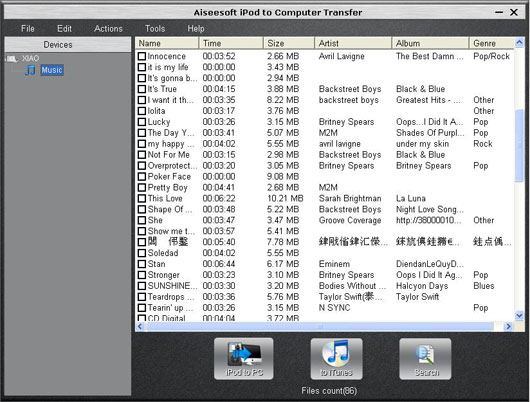
Step 3:Choose the songs you want to transfer and then click the "Start Transfer " button below the list to begin transferring files from iPod to computer.
Step 4: In a short while your conversion will be finished
More:For your convinience you can click the button next to "Start Transfer " and a dialogue pops up and you can select the detailed category of your songs or videos.
Want to know more information about this,please go to Aiseesoft iPod to Computer Transfer.
Now get a wonderful experience with these two suites!
Best DVD Ripper
Mac Video Converter
Aiseesoft DVD Converter Suite for Mac is a suite pack with Aiseesoft DVD Ripper for Mac and Aiseesoft Video Converter for Mac combined. It is especially designed for the Mac users with high output quallity and a worthy price. If you are a Mac user and want to convert DVD/video, this is what you need.
Aiseesoft DVD Converter Suiteis the perfect combination of Aiseesoft DVD Ripper, Aiseesoft Total Video Converter and Aiseesoft iPod to Computer Transfer. Like Aiseesoft DVD Converter Suite for Mac, it has high output quality and converting speed but a much lower price.This suite is aimed to meet the Windows users’ need.
With those two suites you can enjoy your DVDs, videos and ipod more easily.The fowlloing details will show you how to use them. It includes five parts:
With Aiseesoft DVD Converter Suite for Mac:
Part 1: How to convert DVD on Mac
Part 2: How to convert video on Mac
With Aiseesoft DVD Converter Suite
Part 3: How to convert DVD
Part 4: How to convert video
Part 5: How to tansfer iPod to computer
With Aiseesoft DVD Converter Suite for Mac:
Preparation:Download and install Aiseesoft DVD Converter Suite for Mac(Intel Version or Power PC Version)
Part 1: How to convert DVD on Mac
Step 1:Select "Aiseesoft DVD Ripper for Mac" after you installed Aiseesoft DVD Converter Suite for Mac .
Step 2: Load DVD
Click the "Load DVD" button, select the DVD folder of the movie you want to convert from your DVD-ROM, and Click "Open".
Step 3:Choose output settings.
Selecting output format is really easy, you can choose your output format according to your devices players and the default setting works great.
For a veteran of digital player, you could customize your own settings by clicking "Settings" button to choose your own video resolution, frame rate, bit rate, encoder, etc.
Step 4:Click "Start"button to begin your cnversion.
More functons such as "trim", "crop", "effect", "merge into one file/audio track/subtitles" are also very easy to use.Just follow the instructons on it, you can make your DVD movie more enjoyable with a few clicks.
Part 2: How to convert video on Mac
Step 1:Select "Aiseesoft Video Converter for Mac" after you installed Aiseesoft DVD Converter Suite for Mac.
Step 2:Add files.
Click "Add File" to choose the video you want to cnvert.
Step 3Output setting.
Click "Profile", you can set the output fomat.
Click "Settings" button, you can choose your own video resolution, frame rate, bit rate, encoder, etc.
You can also choose the destinaton by click "Destinaton" button.
During the conversion, you can crop, trim, effect your video and merge your files into one.
Step 4:Click "Start"button" to begin your conversion.
You can also follow the instructons on it to convert your videos.
With Aiseesoft DVD Converter Suite
Preparation:Download and install Aiseesoft DVD Converter Suite
Part 3:How to convert DVD
Step 1:Select "Aiseesoft DVD Ripper" after you installed Aiseesoft DVD Converter Suite.
step 2: Click "Load DVD" button to load your DVD
This professional DVD Ripper can load three DVD source, you can load your DVD from DVD drive, DVD folder in your PC and also IFO file.
Step 3:Output setting
From the "Profile" drop list,you can set your output format.
Click "Setting"button, you can choose your own video resolution, frame rate, bit rate, encoder, etc.
You can aslo choose your output destination by clicking "Destinaton".
Step 4:Click "Start" button to begin your conversion.
More functons such as crop, trim, effect, capture your favorite picture, merge into one file are aslo available for you to edit your video.
Part 4: How to convert video
Step 1:Select "Aiseesoft Total Video Converter" after you installed Aiseesoft DVD Converter Suite.
Step 2: Click "Add File" button to add your video.
Step 3. Output format and Settings
From the "Profile" drop-down list you can find one format that meets your requirement.
To have your own video settings you can click "Settings" button.
Step 4:Click "Start" button to begin your conversion.
You can use the functons such as "Snapshot and merge into one file, Trim, Crop" to edit your videos. Just follow the instructions on it you can easily edit your videos.
Part 5: How to tansfer iPod to computer
Step 1:Select "Aiseesoft iPod to Computer Transfer" after you installed Aiseesoft DVD Converter Suite.
Step 2:Connect your iPod player to computer by USB cable.
When you connect your iPod to the computer via USB cable and run the program, the program will detect and recognise your device automatically.
Then from the file list, you can choose the audio or video files that you want to transfer and a detailed list will be displayed at the right for your to choose.
Step 3:Choose the songs you want to transfer and then click the "Start Transfer " button below the list to begin transferring files from iPod to computer.
Step 4: In a short while your conversion will be finished
More:For your convinience you can click the button next to "Start Transfer " and a dialogue pops up and you can select the detailed category of your songs or videos.
Want to know more information about this,please go to Aiseesoft iPod to Computer Transfer.
Now get a wonderful experience with these two suites!
Best DVD Ripper
Mac Video Converter


