:::::::How To Hack::::::::::

Chooty malli

Well-known member
  • Mar 17, 2010
    11,438
    854
    113
    ඉන්න තැනක් හොයනව
    Hello Friends I am back again with my new Hacking article " How to stop virus or Trojan attacks" from infecting your system. After previous three hacking classes about "Introduction to virus, Trojan, backdoor" and "Different types of Viruses" most of the users asked How to prevent our systems from infecting from viruses. There are several ways to protect your system from being infected. I will try to share almost all tricks. And the most important thing is that after reading this article your system will be 100% secured from all types of Virus attacks but Trojan attacks can happen because of your negligence but i will try to tell all things so that this can also does not happen. So Guys read on and stop wasting time in removing viruses or Trojans from your computer because from now a single virus cannot enter into your system Its my Guarantee and challenge to all hackers.

    virus.jpg


    If you want to know that your system is either infected by viruses and trojans then these are certain techniques to know that:

    1. Your Computer might be running slow usual than normal.
    2. Some programs might open without your permission.
    3. System start up takes too much time to start.
    4. Various Error messages appear on Screen when you open something or without opening also.
    5. System registry has been disabled or folder options is missing.
    6. The most important antivirus shows messages of detecting viruses time to time.
    7. While scanning your system from any antivirus or anti spyware tool its showing viruses and you noticed that viruses are not deleting.
    and much more...

    Have you ever think about the reason why your system is got infected. What has infected your system and if its done by any of your friend How he has done it. Surely No, or in some cases you have tried to find the answer but you are not able to get proper answer. But story is different here , I will tell all the ways How your system can be Get infected and How you can protect it if its already infected How you can resolve the problem. So here are few things How your System got Infected , some might be knowing this but by some reason they have ignored them.


    Chooty malli

    Well-known member
  • Mar 17, 2010
    11,438
    854
    113
    ඉන්න තැනක් හොයනව
    How a System is got Infected because to Negligence?


    1. Using Cracked Versions of software specially security ones like antivirus, anti-spyware etc.
    Why I have said this is the first and major cause of infection because of the following simple reason that All hackers know that general internet user public always searches for cracked versions of software's and wishes to use them for free and Hacker take benefit of them. You all now be thinking how it help hackers. We know that almost all antivirus show each and every keygen as virus or some trojan depending upon its type. Now if we all know that then how come hackers will forget this fact so what they do they attaches trojans and viruses to these files and at the time When your antivirus shows it as virus you ignores the alert and keep the keygen means trojan running.
    NOTE: And Guys an important note for you all, If your antivirus doesn't show any keygen or crack as a virus then don't ever think that its not a virus but its a most dangerous thing. Why dangerous because now Hacker has used some more brain to fool you that is he has made the virus undetectable simply edit the hex code of original virus. So what is the moral of story Please don't use cracked versions.
    Now you all be thinking that if we don't use the cracked versions then how we will able to get full versions of the software's. Don't worry when I am there no fear drink beer and enjoy everything for free. Its solution will be in solutions step just read article.

    http://creativecommons.org/licenses/by/3.0
     

    Chooty malli

    Well-known member
  • Mar 17, 2010
    11,438
    854
    113
    ඉන්න තැනක් හොයනව

    2. Pen drive or USB drive :


    The biggest cause of infection of your system is usb drives and external hard disks.
    Now how a virus enters into your system using USB drives. You have connected your USB drive to your friends computer and by chance (sorry its for sure i.e 100%) your friends system is infected by virus or Trojans and its the property of Virus that it replicates itself using memory. So when you connect your USB to your friends computer your USB is now infected by virus and now when you connect this USB to your PC using the property of your Windows that it searches the files in Newly connected device and autorun the device and for doing this it loads the index of your USB's file system into Memory and now if USB has virus its the property of virus its replicates itself using system memory. Now if you are using good antivirus , your antivirus will pop warning and alert messages and some times you ignores them means your system is also infected. For USB drive virus solution keep reading article.
    http://creativecommons.org/licenses/by/3.0
     

    Chooty malli

    Well-known member
  • Mar 17, 2010
    11,438
    854
    113
    ඉන්න තැනක් හොයනව
    3. Downloading things from Unknown Sites:

    Most of the users searches for thing over the internet and where ever they find their desired result means file that they want they start downloading that from that site only. Now how it affects your system suppose you want to download any wallpaper say Katrina Kaif. Now hackers know the fact that Katrina has a huge fan following and user will surely going to download it. Then what they do they simply bind their malicious codes with some of files and when users download it his system is infected and he can never imagine that the virus has come from wallpaper that he has downloaded from unknown site. For its solution read on article.

    http://creativecommons.org/licenses/by/3.0
     

    Chooty malli

    Well-known member
  • Mar 17, 2010
    11,438
    854
    113
    ඉන්න තැනක් හොයනව
    4. The most important one Becoming a Hacker like Me (ROFL but its truth).

    Why I have mentioned this you might be clear from the above discussion. Most of the internet users always curious to know ways how can i hack my friends email account or his system for these they download all type of shit from the internet and believe me 99.9% of this shit contains viruses and Trojans that sends your information to the providers. Now I don't say that stop hacking but try to follow some basic steps to learn hacking and first of all you must know how to protect yourself from such type of fake software's. For its solution read on article.


    Now after discussing the things How you system is got infected by your simple negligence. Its time You should Know How to fix them and protect your system from all types of viruses and trojans.
     

    Chooty malli

    Well-known member
  • Mar 17, 2010
    11,438
    854
    113
    ඉන්න තැනක් හොයනව
    HOW TO STOP VIRUS OR TROJANS ??

    1. Using Good Antivirus:
    There is a nice misconception between the internet users that full antivirus provides better security. Ya its 100% truth but full antiviruses paid ones not the cracked ones.
    There are several other solutions to them that you will get for absolutely Free and I guarantee that it will protect your system 100% just doing some little configurations.

    Best Free Antivirus :
    Avira Personal Antivirus i.e Antivir.
    You can download avira for free from :
    http://www.filehippo.com/download_antivir/


    Now after downloading the antivirus what you have to do to make it as good as paid antiviruses.

    a. Install the antivirus and update it. Note updating antivirus regularly is compulsory. Don't worry its not your work it will update itself automatically whenever update is available.
    b. After Installing at the right hand top corner you will see a "CONFIGURATION" button. Just click on it now a new window will pop up.
    c. Now There at left hand top you will see a click box in front of Expert is written . Click on that now you will see several things in it. Now do the following setting one by one.
    1. Click on "Scanner" click on all files and set the "Scanner Priority" to high and click on apply.
    2. Click on "Guard" and click on all files and click on "Scan while reading and writing" and then click apply.
    3. Click on "General" Now click on select all and click on apply. In general tab only go to WMI section and click on advanced process protection and then click on apply.
    4. After doing that restart your PC.
    Now you have made your free antivirus an equivalent to the paid one..

    http://creativecommons.org/licenses/by/3.0
     

    Chooty malli

    Well-known member
  • Mar 17, 2010
    11,438
    854
    113
    ඉන්න තැනක් හොයනව

    Chooty malli

    Well-known member
  • Mar 17, 2010
    11,438
    854
    113
    ඉන්න තැනක් හොයනව

    2. Solution for Cracked version Software's:

    As I have mentioned earlier never download cracks and keygens directly to you system but several other methods are there while you are searching for Crack or Keygen first try to search for Serial Key if you found it then its awesome and if not what to do.
    Before downloading any Crack and Keygen . Go to the Website:

    http://www.virustotal.com/


    Now copy the download link of the Keygen or crack in the URL box provided on website this website contains all the world famous antiviruses and it will scan file for you if it contains any virus just ignore that otherwise have fun with crack or Keygen.


    http://creativecommons.org/licenses/by/3.0
     

    Chooty malli

    Well-known member
  • Mar 17, 2010
    11,438
    854
    113
    ඉන්න තැනක් හොයනව

    3. Pen drive or USB drive solution:


    How you can protect your system from being infected from the pen drive. Just do the following three things rest is being cared by your antivirus.
    1. Turn off Auto Play Devices:
    To do it Go to Start Menu--> RUN-->type gpedit.msc and press enter-->User Configuration-->Administrative templates-->System-->Turn off Autoplay--> click on enable and then select all drives.
    2. Turn of Computer Browser service:
    To do it Go to Start Menu--> RUN-->type services.msc and press enter-->then Find Computer Browser service and disable it and restart your system.
    3. Most important one Always scan the Pen drive or External hard drives after connecting them.

    4.Downloading things from Unknown Sites Solution:


    The solution of this problem is already provided Web browser Security toolbar will help you in surfing only secured and genuine websites and if you want to visit and download Virus Total will help you to identify the file whether its infected or not.
    http://creativecommons.org/licenses/by/3.0
     

    Chooty malli

    Well-known member
  • Mar 17, 2010
    11,438
    854
    113
    ඉන්න තැනක් හොයනව
    5. Now for Hacker like me i.e Method to use or test Hack tools.


    Why I have mentioned this is simply because Hackers always take benefit of these noobish tricks that they attach viruses with files and name them as hack tools . So avoid them if you are too curious like me. Then there are several ways to Handle it.
    1. Use Deep Freeze on C drive: For testing Hack tools always use deep freeze as after the next restart your system will be at same position as it was previous.
    2. Install Virtual Box and over virtual box install another Windows and test all hack tools using virtual windows. This will protect your system from being infected. Also It will give you more knowledge about handling the viruses and other situations like when something wrong is done what i have to do.
    3. Create two to three fake email ID's and use them for testing Keyloggers and other fake email hacking software's.

    http://creativecommons.org/licenses/by/3.0
     

    Chooty malli

    Well-known member
  • Mar 17, 2010
    11,438
    854
    113
    ඉන්න තැනක් හොයනව
    Disabling recent Document History


    If you need to disable your system to save your recently performed atasks from saving
    you can follow this

    1. Open the Registry Editor by select Start/Run, type regedit, and click OK.

    2. Navigate to HKEY_CURRENT_USER\Software\Mcft\Windows\ CurrentVersion\Policies\Explorer.
    3. Create a NoRecentDocsHistory D_WORD key. Double-click the value to open it
    once it is created.
    4. Set the Data Value to 1 to enable the restriction.
    5. Click OK and close the Registry Editor. You'll need to restart the computer for the
    change to take effect.
     
    • Like
    Reactions: PuNk X

    rukmalranaweera

    Well-known member
  • Jan 1, 2007
    2,703
    1,507
    113

    Chooty malli

    Well-known member
  • Mar 17, 2010
    11,438
    854
    113
    ඉන්න තැනක් හොයනව
    How to Find Who is Invisible or blocked you on Google chat/Gtalk


    today i am going to share with you another mind boggling tutorial that is "How to find who is invisible or blocked you on Google chat/Gtalk". So guys are you ready to know that which of your friend has blocked you on google talk.

    who-blocked-me-gtalk.png


    Whenever you noticed a contact in your Gtalk/Google Talk has not been online for some time, have it ever crossed your mind you’ve been blocked? If you are curious in finding out who actually blocked you in Gtalk, here’s a workaround you can try.
    This following method we attempt to show make use of a chat client call Pidgin.


    STEPS TO FIND WHO IS INVISIBLE OR BLOCKED YOU ON GOOGLE CHAT:

    1. Download, Install Pidgin

    Click here to download Pidgin chat client. If you already have Pidgin installed, you may skip this step.
    2. Configure Pidgin for Gtalk

    You’ll probably start with the below screen. Click the Add button. "Accounts -> Manage Account" will also bring you to the same screen. Let’s add Gtalk to Pidgin.


    pdigin-welcome-screen.png


    Configure Pidgin Welcome Screen

    Clicking Add will allow you to add new Gtalk account. The following two screenshots show what you need to fill up for Basic and Advance tab, pay attention to those highlighted.


    basic-tab.png


    Add Account Basic Tab


    advance-tab.png


    Add Account Advanced Tab
    With all the settings properly entered, you should be able to connect to Gtalk and load your contacts successfully. Now let’s go find out who blocked you.
    3. Who’s Blocking You?

    When someone blocked you in Gtalk (and other IMs), they appear offline just like your other contacts who are really offline. Right click, click on Get Info, and we’ll see how to differentiate them.

    get-info.png


    Get Info that who has blocked you or simply hiding Himself


    The following image is a comparison of 2 different contacts: Actual offline (left) and Blocked offline (right). If you are blocked, nothing will be display under Buddy Information.


    comparison.png


    Comparision of Person who is offline and person who is invisible.

    Thats all Now you can easily find out who is really offline and who is blocking you from google chat. So guys I hope you all have enjoyed it.


    :sorry::sorry::sorry::sorry::sorry::sorry::sorry::sorry::sorry::sorry::sorry::sorry::sorry::sorry::sorry:


    Chooty malli

    Well-known member
  • Mar 17, 2010
    11,438
    854
    113
    ඉන්න තැනක් හොයනව
    How To Restrict Access To Drives In My Computer In Windows


    If you have a shared or public computer that several people use, you might want to restrict access to it’s drives to prevent users from deleting important data. Today we look at restricting access to some or all drives on the machine using Local Group Policy.

    Note: This method uses Local Group Policy Editor which is not available on home versions of Windows 7 or Vista
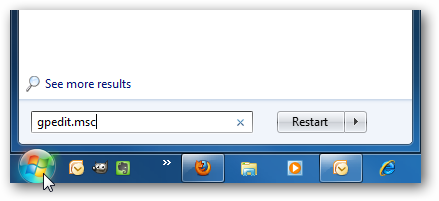
    First type gpedit.msc in the search box of the Start Menu and hit Enter.
    gpedit_start2.png

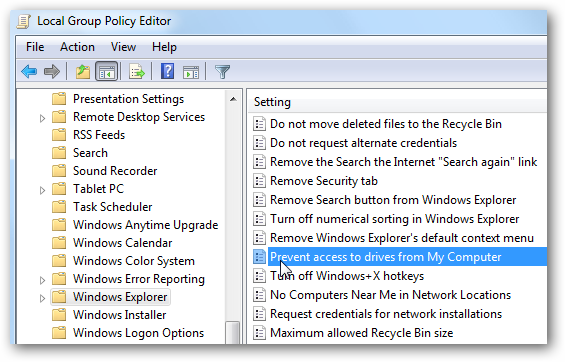
    Now navigate to User Configuration \ Administrative Templates \ Windows Components \ Windows Explorer. Then on the right side under Setting, double click on Prevent access to drives from My Computer.
    2drive.png

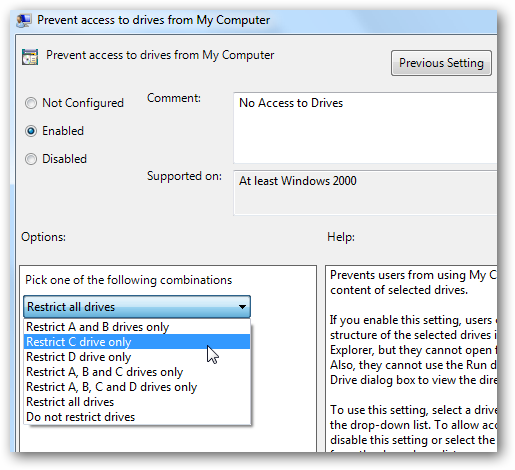
    Select Enable then under Options from the drop down menu you can restrict a certain drive, a combination of drives, or restrict them all. The main drive you would probably want to restrict is the C:\ drive or which ever lettered drive Windows is installed on. Restricting all drives means they can’t access the CD or DVD drive, and cannot use a flash drive if they need to get files from it.
    Note: This setting won’t prevent users from using programs that access the local drives.
    drive.png

    The restrictions take effect immediately, no restart is required. When a user opens up My Computer they’ll be able to see which drives are listed, but when they try to access a restricted drive, they’ll get the following error message.
    1drive.png

    For the screenshots in this tutorial we used Windows 7 Ultimate, but this process also works with XP Professional and Vista (not in Home versions) the screens just look different.
    22drive.png

    Local Group Policy allows you to customize several settings for how you want to administer your machine. Restricting access to certain drives in addition to other security and access measures, can help keep a shared computer stable and secure.
    http://creativecommons.org/licenses/by/3.0