How to rip bluray movies with Blu-ray Ripper
Wanna a newborn for your old DVD? Just don't wait and come to your Blu-ray Disc age!The Blu-ray Disc system uses the standard 12 cm and 8 cm disc sizes to support backward compatibility with your existing Cds and DVDs.That means you don't have to throw away your current collections and start from scratch-they can still be enjoyed on a wide range of Blu-ray Disc playback products.
And now there are more and more blu ray movies on the market.Won't the blu ray disc will replace the DVD, we can't make a decision now, but in order to enjoy more movies as we can, it is necessary to know some guides about how to rip blu ray movies with best blu-ray ripper
So I want to share with you some experience for using the best blu-ray ripper software.
Ok when we begin to operate, first you should free download Blu-Ray Ripper software,then install it on your computer.So here we go.
1:Load BD/DVD Folder
Click BD/DVD Folder to load your Blu ray disc or blu ray folder, then click stream folder to open .m2ts files.
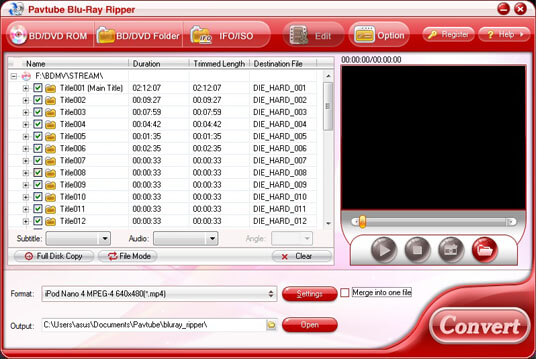
2:Click edit button to edit the movie.
There are many functions for you to choose,you can edit it as you want.such as crop,trim,text watermark or add effect for movie.Now let me introduce the editing features of Blu-ray Ripper.
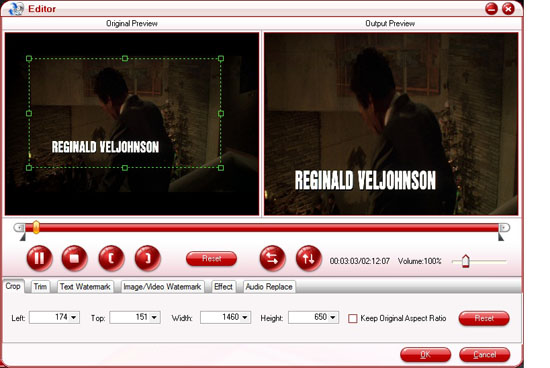
①.Crop
Crop the movie by adjusting the crop frame (drag the green dotted green square frame to circle the part you want to retain) or setting values (Left, Top, Width and Height) of crop area.
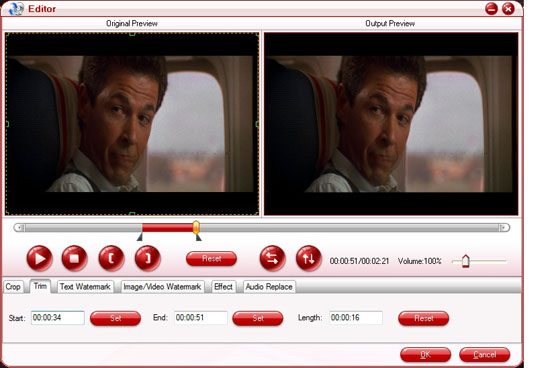
②.Trim
When previewing movie,you can trim the want part by setting the desire time value,or click left square bracket and right square bracket to set start and end time.
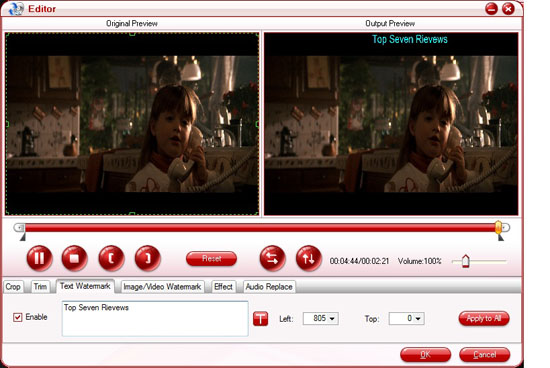
③.Text watermark
Check "Enable",then you can input anything you want.click"T"button,you can set font,size,color etc.through changing the values(left,top),you can put the text where want to.Also can add image or video watermark.
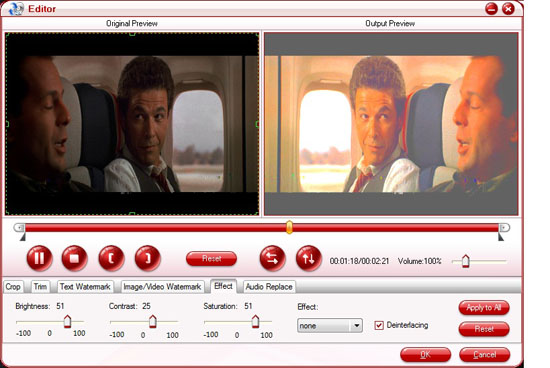
④.Effect
Adjust the values (brightness,contrast,saturation) can change the effect.In case that interlacing lines (strips) appears, check the 'Deinterlacing' box to eliminate the lines.
⑤.Audio replace
Check ‘Enable’ option, then click the browse button to select the audio file you wan to add. If the replaced audio is not long enough, you can loop the audio by tick the Loop option.
3:Merge into one file
If want to put more than two files into one,you can check them,than check merge into one file,click
“convert” to rip.
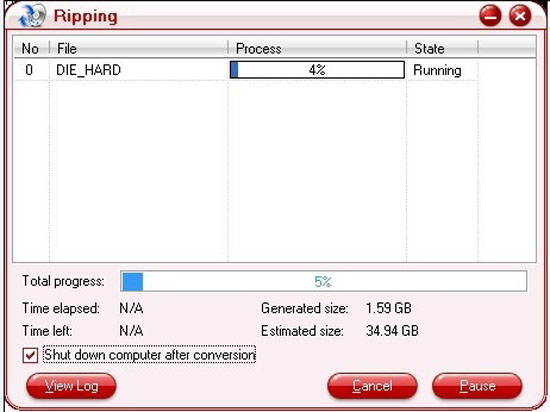
4.Set output file
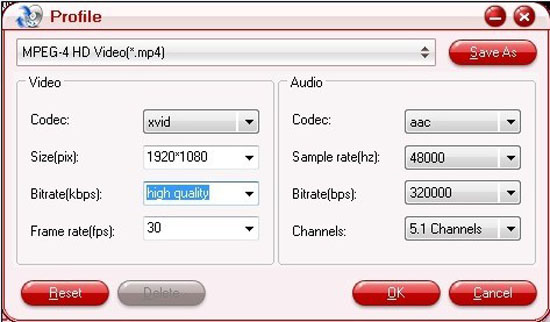
Click the up arrow and down arrow to view the formats,choose the format.For example:when you rip Blu-ray to mpeg-4, you can follow common video->mpeg-4 movie,then click “Settings” and customize advanced audio and video parameters.
Update:Added support to the blu-ray Avatar of region A.
Added searching option and customer review box in Profile Manager.
Aiseesoft Blu Ray Ripper
Best DVD Ripper
DVD Software
Wanna a newborn for your old DVD? Just don't wait and come to your Blu-ray Disc age!The Blu-ray Disc system uses the standard 12 cm and 8 cm disc sizes to support backward compatibility with your existing Cds and DVDs.That means you don't have to throw away your current collections and start from scratch-they can still be enjoyed on a wide range of Blu-ray Disc playback products.
And now there are more and more blu ray movies on the market.Won't the blu ray disc will replace the DVD, we can't make a decision now, but in order to enjoy more movies as we can, it is necessary to know some guides about how to rip blu ray movies with best blu-ray ripper
So I want to share with you some experience for using the best blu-ray ripper software.
Ok when we begin to operate, first you should free download Blu-Ray Ripper software,then install it on your computer.So here we go.
1:Load BD/DVD Folder
Click BD/DVD Folder to load your Blu ray disc or blu ray folder, then click stream folder to open .m2ts files.
2:Click edit button to edit the movie.
There are many functions for you to choose,you can edit it as you want.such as crop,trim,text watermark or add effect for movie.Now let me introduce the editing features of Blu-ray Ripper.
①.Crop
Crop the movie by adjusting the crop frame (drag the green dotted green square frame to circle the part you want to retain) or setting values (Left, Top, Width and Height) of crop area.
②.Trim
When previewing movie,you can trim the want part by setting the desire time value,or click left square bracket and right square bracket to set start and end time.
③.Text watermark
Check "Enable",then you can input anything you want.click"T"button,you can set font,size,color etc.through changing the values(left,top),you can put the text where want to.Also can add image or video watermark.
④.Effect
Adjust the values (brightness,contrast,saturation) can change the effect.In case that interlacing lines (strips) appears, check the 'Deinterlacing' box to eliminate the lines.
⑤.Audio replace
Check ‘Enable’ option, then click the browse button to select the audio file you wan to add. If the replaced audio is not long enough, you can loop the audio by tick the Loop option.
3:Merge into one file
If want to put more than two files into one,you can check them,than check merge into one file,click
“convert” to rip.
4.Set output file
Click the up arrow and down arrow to view the formats,choose the format.For example:when you rip Blu-ray to mpeg-4, you can follow common video->mpeg-4 movie,then click “Settings” and customize advanced audio and video parameters.
Update:Added support to the blu-ray Avatar of region A.
Added searching option and customer review box in Profile Manager.
Aiseesoft Blu Ray Ripper
Best DVD Ripper
DVD Software