


For both Mac and Windows users, this guide will show you how to rip and edit your DVD to all other video and audio formats for all the portable players. The output formats mainly include: AVI, MP4, MOV, FLV, WMV, MKV, 3GP, 3G2, MPG, MP3, AAC, M4A, OGG, RA, RAM, RMVB, etc.
Note:
Determine that you, in fact, have the rights to copy the DVD for your own personal use. It is not legal to copy DVD's for any and all purposes.
Part 1:How to rip and edit DVD with a powerful DVD rip software (Upgraded).
Firstly: Download and install Tipard DVD Ripper.
Step 1: Click “Load DVD” button to load your DVD.
This professional DVD Ripper can load three DVD source, you can load your DVD from DVD drive, DVD folder in your PC and also IFO file.
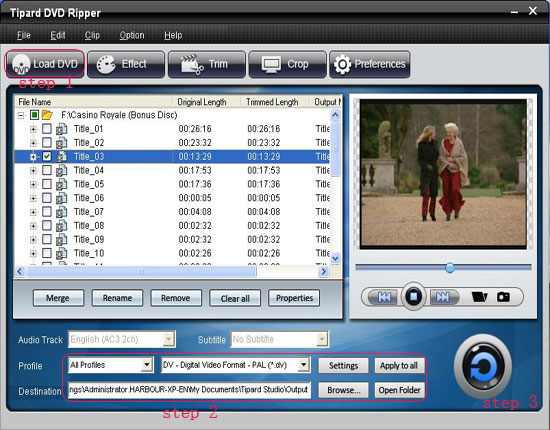
Step 2:Select the output video format you want from the “Profile” drop-down list.
Step 3:Click the “Start” button to begin your conversion.
You can have a coffee or have a walk now ! In a short while the conversion will be finished.
Tips:
Some powerful editing functions are available as followings.
1: Capture your favorite picture.
If you like the current image of the video you can use the “Snapshot” opinion. Just click the “Snapshot” button the image will be saved.
2: Merge videos into one file.
Just check the “merge into one file” option if you want to merge the some chapters or titles into one file. As default the merged file is named after the first selected file (either a title or a chapter).
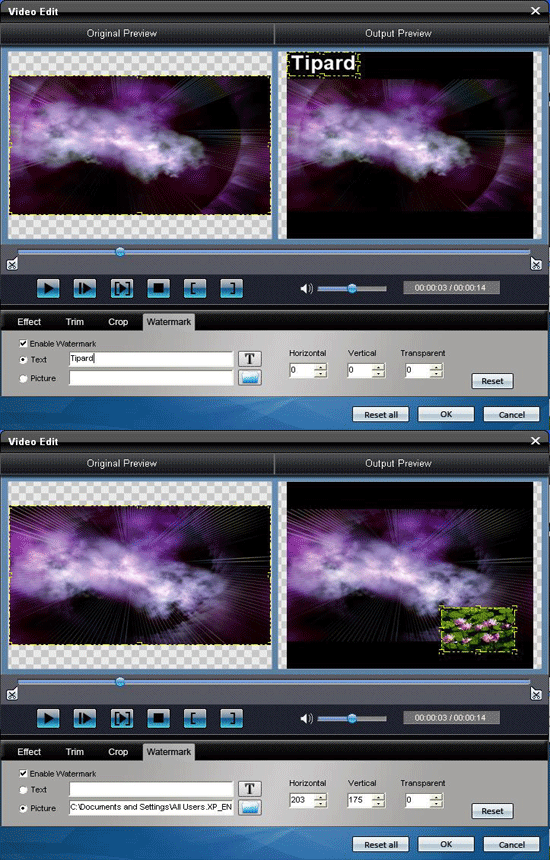
3: Add text or picture watermark.
If you would like add text or picture on your video, you could do it by watermark function. Just like the pictuer below:
4: Set video effect.
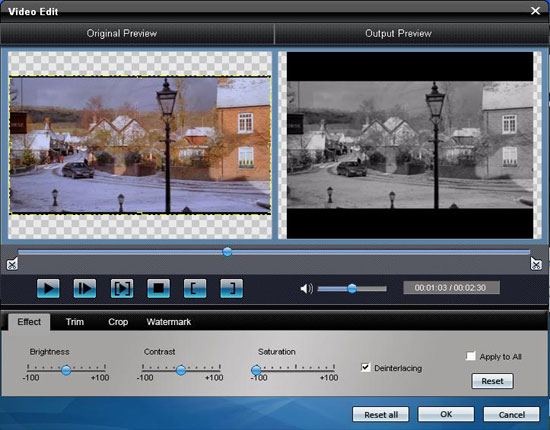
Click “Effect” to adjust the video Brightness, Contrast, Saturation and Volume for you to get the perfect playing effect.
5: Trim any clip of your video.
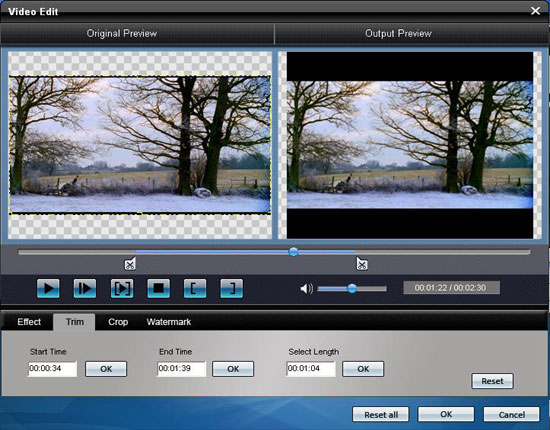
You can get any clip of your video by just using the “Trim” function. You can click the “Trim” button and a dialogue pops up. You can set the Start Time and End Time or just drag the slide bar to the position you want and start conversion then you can get the clip.
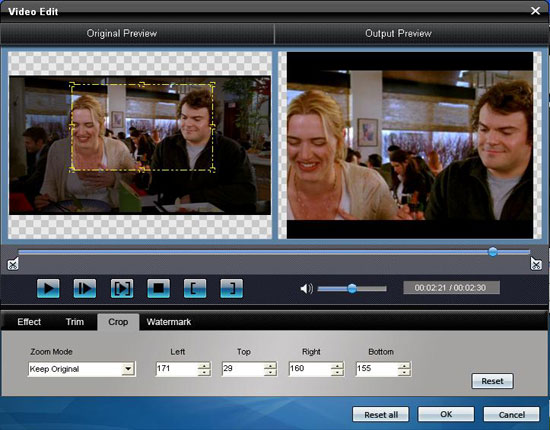
6: Crop video
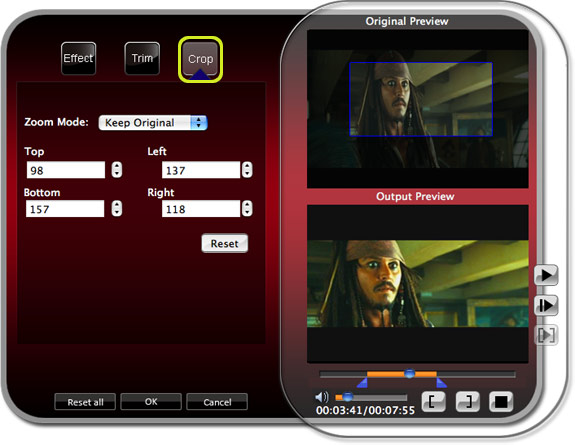
a. To crop your movie video, you can just drag your mouse cursor from four sides and four angles.
Crop by setting the crop values
b. There are four crop values on the lower right part of the crop window: Top, Bottom, Left and Right. You can set each value to crop your movie video, and the crop frame will move accordingly.
Note:
With this DVD Ripper, you can convert DVD into different video/audio formats simultaneously.
Part 2: How to rip and edit DVD with a professional Mac DVD Ripper.
Firstly: Download and install Tipard DVD Ripper for Mac(Intel Version) or (Power PC Version)
Step 1: Load your DVD.
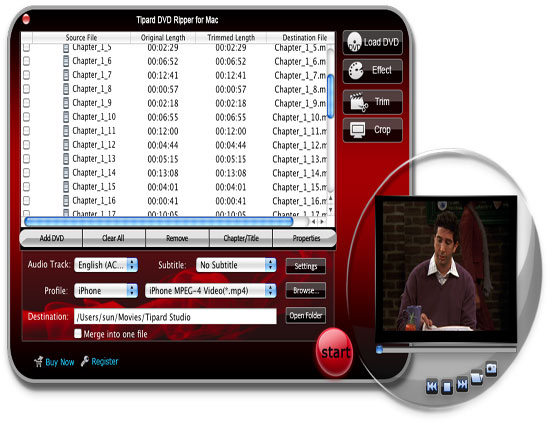
Step 2: Choose the output format and set the exact parameters
Click “Profile” drop down arrow to choose the output format you want.
Click “Settings” to set the exact video and audio parameters to fit for your player.
Step 3: Click “Start” button to begin the conversion
Wait a short moment, the conversion will be finished soon.
More editing functions:
1: Set audio track and subtitles for your converted video
“Audio Track” and “Subtitle” are under the preview window.
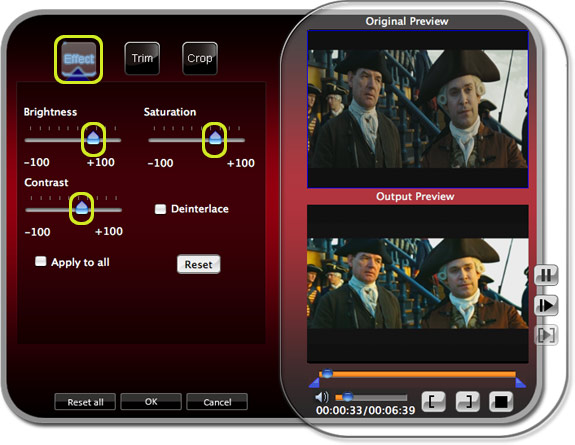
2: Set the video effect
Click “Effect” to adjust the video Brightness, Contrast, Saturation and Volume for you to get the perfect playing effect.
3: Get any time-length video clips
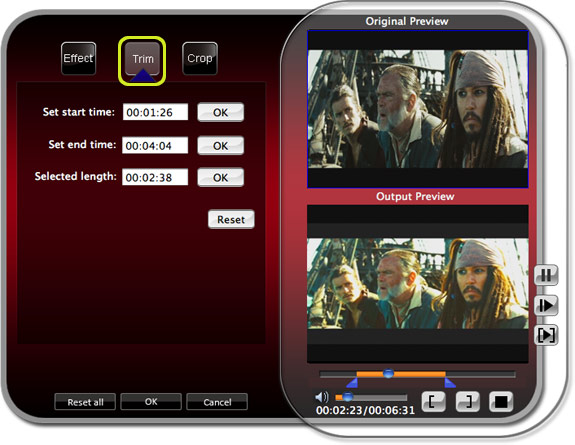
Click “Trim” button to open the trim window, you can set the exact begin and end time for your clips or just drag the slider bar.
4: Adjust the video play region
Click “Crop” to open the crop window to crop off the black edges around your video or adjust any video play region. You can also set the video play ratio when playing on player: keep original, full screen, 16:9, 4:3.
5: Join several chapters of your DVD into one file
Select the chapters that you want to join, and then pick “Merge into one file”. After conversion, these chapters will be saved into one file.
Your problem has been solved as long as you click your mouse following the guide above. It is very easy.
Tipard DVD Ripper Pack is an integrated program with DVD Ripper, Video Converter and iPod to PC Transfer.
Merry Christmas here
Note:
Determine that you, in fact, have the rights to copy the DVD for your own personal use. It is not legal to copy DVD's for any and all purposes.
Part 1:How to rip and edit DVD with a powerful DVD rip software (Upgraded).
Firstly: Download and install Tipard DVD Ripper.
Step 1: Click “Load DVD” button to load your DVD.
This professional DVD Ripper can load three DVD source, you can load your DVD from DVD drive, DVD folder in your PC and also IFO file.
Step 2:Select the output video format you want from the “Profile” drop-down list.
Step 3:Click the “Start” button to begin your conversion.
You can have a coffee or have a walk now ! In a short while the conversion will be finished.
Tips:
Some powerful editing functions are available as followings.
1: Capture your favorite picture.
If you like the current image of the video you can use the “Snapshot” opinion. Just click the “Snapshot” button the image will be saved.
2: Merge videos into one file.
Just check the “merge into one file” option if you want to merge the some chapters or titles into one file. As default the merged file is named after the first selected file (either a title or a chapter).
3: Add text or picture watermark.
If you would like add text or picture on your video, you could do it by watermark function. Just like the pictuer below:
4: Set video effect.
Click “Effect” to adjust the video Brightness, Contrast, Saturation and Volume for you to get the perfect playing effect.
5: Trim any clip of your video.
You can get any clip of your video by just using the “Trim” function. You can click the “Trim” button and a dialogue pops up. You can set the Start Time and End Time or just drag the slide bar to the position you want and start conversion then you can get the clip.
6: Crop video
a. To crop your movie video, you can just drag your mouse cursor from four sides and four angles.
Crop by setting the crop values
b. There are four crop values on the lower right part of the crop window: Top, Bottom, Left and Right. You can set each value to crop your movie video, and the crop frame will move accordingly.
Note:
With this DVD Ripper, you can convert DVD into different video/audio formats simultaneously.
Part 2: How to rip and edit DVD with a professional Mac DVD Ripper.
Firstly: Download and install Tipard DVD Ripper for Mac(Intel Version) or (Power PC Version)
Step 1: Load your DVD.
Step 2: Choose the output format and set the exact parameters
Click “Profile” drop down arrow to choose the output format you want.
Click “Settings” to set the exact video and audio parameters to fit for your player.
Step 3: Click “Start” button to begin the conversion
Wait a short moment, the conversion will be finished soon.
More editing functions:
1: Set audio track and subtitles for your converted video
“Audio Track” and “Subtitle” are under the preview window.
2: Set the video effect
Click “Effect” to adjust the video Brightness, Contrast, Saturation and Volume for you to get the perfect playing effect.
3: Get any time-length video clips
Click “Trim” button to open the trim window, you can set the exact begin and end time for your clips or just drag the slider bar.
4: Adjust the video play region
Click “Crop” to open the crop window to crop off the black edges around your video or adjust any video play region. You can also set the video play ratio when playing on player: keep original, full screen, 16:9, 4:3.
5: Join several chapters of your DVD into one file
Select the chapters that you want to join, and then pick “Merge into one file”. After conversion, these chapters will be saved into one file.
Your problem has been solved as long as you click your mouse following the guide above. It is very easy.
Tipard DVD Ripper Pack is an integrated program with DVD Ripper, Video Converter and iPod to PC Transfer.
Merry Christmas here


