
Latest ads
-
port.lk Domain for sale
- Lankan-Tech
- Updated:
-
 Colombo Kaduwela - Two Storey House for Sale
- dilrasan
- Updated:
-
Wechat qr verification
- Pawan2005
- Updated:
-
 🚀 GOOGLE AI PRO 18 MONTHS ACTIVATION 🚀
- sayuru bandara
- Updated:
-
 Pure VPN - Up to 27 Months
- vgp
- Updated:
Is there a player better than VLC?
- Thread starter madurax86
- Start date
You are using an out of date browser. It may not display this or other websites correctly.
You should upgrade or use an alternative browser.
You should upgrade or use an alternative browser.

well media player luks cooler, but VLC has a lot of codecs n features like being able to play while downloading, in it..


Maybe the newer JetAudio version does well where the previous versions failed.madurax86 said:umm i dont think soo, JetAudio fails on corrupted files VLC drops the corrupted frames and continues the same thing is used in PowerDVD bt PowerDVD doesnt support much formats ..VLC evn supports FLV1 and mp4 and alot of new formats
BTW, PowerDVD sux.
However, for music, I prefer Windows Media Player over everything else. If iTunes was fast and less of a resource hog, it would have been the choice.
Last edited:
u talkin abt media player classic?snoop_ug said:aiyo use K-lite itsda best da
den just gotta try VLC www.videolan.org

He's talking about the codec pack. Codec Packs are bad news.madurax86 said:u talkin abt media player classic?
den just gotta try VLC www.videolan.org
Anusha said:He's talking about the codec pack. Codec Packs are bad news.
i dont think codec packs r dat bad; i use FFDshow too its better dan dose borin ms codecs
They can easily cause havoc, usually if the person who installs doesn't know anything about what he is doing. Several codecs that does the the same thing might cause interferences.madurax86 said:i dont think codec packs r dat bad; i use FFDshow too its better dan dose borin ms codecs

Anusha said:They can easily cause havoc, usually if the person who installs doesn't know anything about what he is doing. Several codecs that does the the same thing might cause interferences.
ahh yes codec packs do cause probs if u r nt a guy knws abt wht u r doin; it dusnt interfear wit winamp tho[winamp hadala thiyenne video walata wena codec use koranna neee]
I have some bad news for VLC Player. Wait while I upload the results.madurax86 said:ahh yes codec packs do cause probs if u r nt a guy knws abt wht u r doin; it dusnt interfear wit winamp tho[winamp hadala thiyenne video walata wena codec use koranna neee]


I played a 1080p High Definition video (WMVHD, Terminator III video from Microsoft) in both VLC player (default settings) and JetAudio (some audio enhancements used).
VLC Player CPU usage
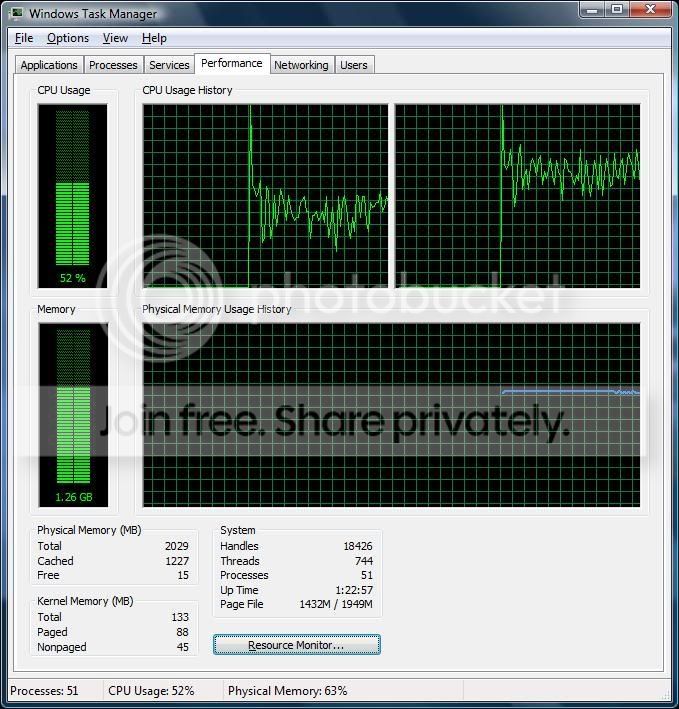
And also, audio didn't play in VLC Player!!! I thought this was the strong point of it - everything played! Not to be, in this case.
JetAudio CPU usage
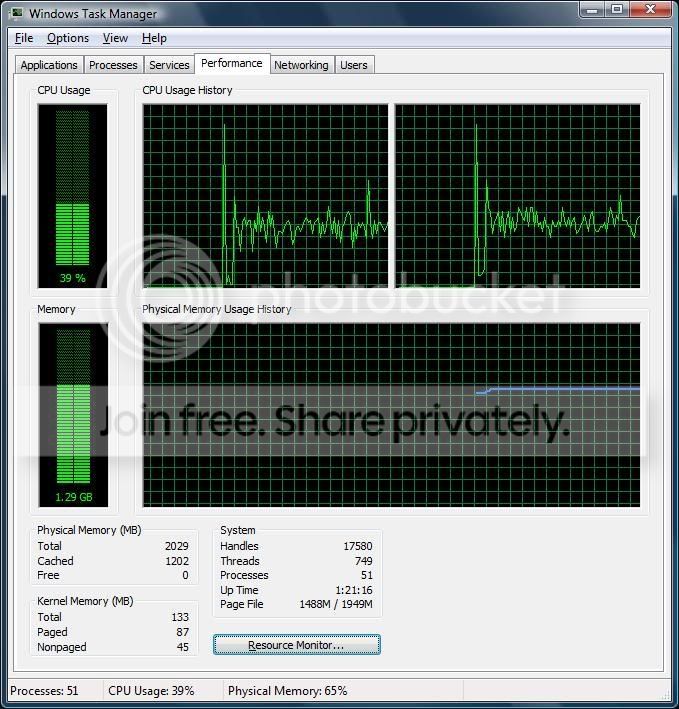
Conclusion:
VLC Player is not good for HD video playback, at least in the current form
VLC Player CPU usage
And also, audio didn't play in VLC Player!!!
I thought this was the strong point of it - everything played! Not to be, in this case.JetAudio CPU usage
Conclusion:
VLC Player is not good for HD video playback, at least in the current form
Last edited:
macjooo ubanam ela porak .....he he
mama mechchara dawasak ,,,oya katta kawa he he
oka open wenna tikak wela yanawa wena ewa wage newey he he
thnax machoo
mama mechchara dawasak ,,,oya katta kawa he he
oka open wenna tikak wela yanawa wena ewa wage newey he he
thnax machoo
ru usin da newest version? dose new codecs take time to be implemented on VLC === bt mann da video gets stuk in VLC wen playin WMV files dats bcoz ms is not givin out the actual decoder system ...da fault is at ms's hand dey dont want othrs to develop decoders for their formats ...so wht othr programmers do is to take chances on developin a gud enuf decoder to play those files...i think dats wht has happend here ....try dat with free codecs like xvid ...
yea it takes too much time to load ...it has a very gud reason for dat ..VLC ist a pure windows program its compiled usin the GNU mingw32 compiler; the code dusnt use ms c++ runtime lib so dats wht slows it down; and they use this huge amount of dlls as their plugins[see plugins folder] loading those take time too
yea it takes too much time to load ...it has a very gud reason for dat ..VLC ist a pure windows program its compiled usin the GNU mingw32 compiler; the code dusnt use ms c++ runtime lib so dats wht slows it down; and they use this huge amount of dlls as their plugins[see plugins folder] loading those take time too
Last edited:

Similar threads


- Replies
- 85
- Views
- 3K