


JDownloader Auto reCAPTCHA දාගන්න හැටි.
JDownloader [FONT="]කියන්නේ[/FONT] [FONT="]මොකද්ද[/FONT] [FONT="]කියලා[/FONT] [FONT="]දන්නවා[/FONT] [FONT="]ඇති[/FONT] [FONT="]නේ[/FONT]. [FONT="]දන්නේ[/FONT] [FONT="]නැත්නම්[/FONT] [FONT="]මේ[/FONT] thread [FONT="]එකේ[/FONT] [FONT="]ඒ[/FONT] [FONT="]ගැන[/FONT] [FONT="]හොද[/FONT] [FONT="]විස්තරයක්[/FONT] [FONT="]තියනව[/FONT].
http://www.elakiri.com/forum/showthread.php?t=1120594&highlight=jdownloader
JDownloader [FONT="]හරහා [/FONT]Fileserve, Filesonic, Hotfile [FONT="]වගේ[/FONT] [FONT="]එවායින් free user කෙනෙක් විදියට download කරද්දි තියන් ලොකුම කරදරය තමයි Captcha ගැහිම. ෆිල්ම් එකක් වගේ parts ගොඩකට කඩපු එකක් download කරන්න ගියාම තමා මේක වදේ තියෙන්නේ. Download වෙන්න දාලා නිදාගන්න වත් බැ නේ. කට්ටිය premium account හොයන්නෙත් මේක හින්දා වෙන්න ඇති.[/FONT]
[FONT="]මෙකට හේතුව, ReCaptcha භාවිතා කරන one-click hosters ලා ගේ captcha හදුනාගැනිමේ හැකියාවක් JDownloader ට නොමැති වීම.[/FONT]
[FONT="]ReCaptcha ගැන වැඩි විස්තර මේ thread එකෙන් බලාගන්න පුලුවන්.[/FONT]
[FONT="]http://www.elakiri.com/forum/showthread.php?t=1026647&highlight=recaptcha[/FONT]
[FONT="]JDownloader වල මේ කරදරයෙන් ගැලවෙන්න පොඩි වැඩක් කරන්න ඔනේ. ඒ තමයි ReCaptcha plugin එකක් දා ගැනීම.[/FONT]
[FONT="]මේකට plugin 2 ක් තියනවා. හොදයි කියලා හිතෙන එක දා ගන්න.
[/FONT]
[FONT="]
[/FONT]
[FONT="]ANTI reCAPTCHA ST [/FONT]
[FONT="]මුලින්ම මෙකේ setup එක බාගන්න. [/FONT]v2.06 ([FONT="]අලුත්ම[/FONT] [FONT="]එක)[/FONT]
http://www.megaupload.com/?d=2G893VX7
[FONT="]මේක[/FONT] [FONT="]වැඩ[/FONT] [FONT="]කරන්න[/FONT] [FONT="]මේවත්[/FONT] [FONT="]ඕනේ[/FONT]...
[FONT="]VB6[/FONT]
http://www.megaupload.com/?d=TB8AV2DZ
[FONT="]VC + +2008[/FONT]
http://www.megaupload.com/?d=5I3YSAKA
[FONT="]
[/FONT]
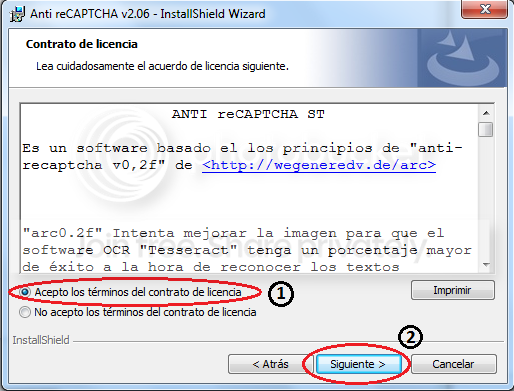
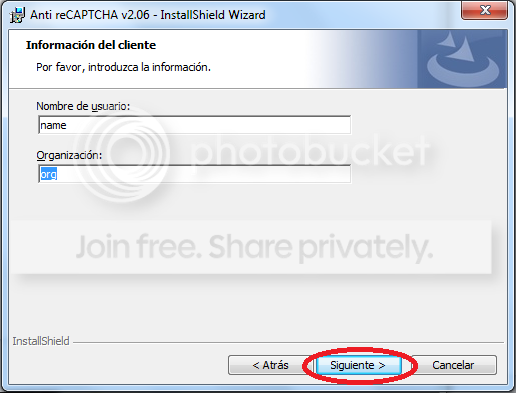
[FONT="]දැන් මේක install කරගන්න ඕනේ. Setup එක තියෙන්නේ වෙන භාෂාවකින් උනාට බයවෙන්න ඕනේ නැ.[/FONT]
[FONT="]
[/FONT]
[FONT="]
 [/FONT]
[FONT="]
[/FONT]
[FONT="]
 [/FONT]
[FONT="]
[/FONT]
[FONT="]
 [/FONT]
[FONT="]
[/FONT]
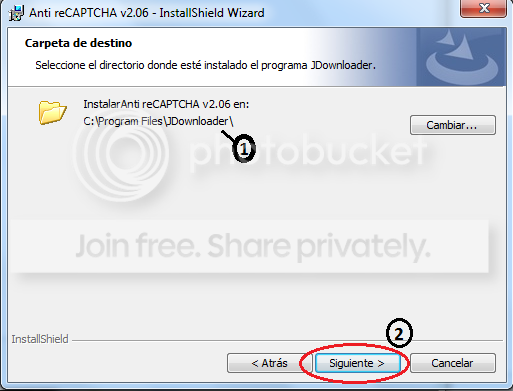
[FONT="]මෙතන තමයි පොඩ්ඩක් සැලකිලිමත් වෙන්න ඕන.[/FONT]
[FONT="]
[/FONT]
[FONT="]
 [/FONT]
[FONT="]
[/FONT]
[FONT="]මේක install වෙන්න ඕනේ ඔයාලාගේ computer එකේ JDownloader install කරලා තියන folder එකට. “1” කියලා දාලා තියන තැන හරියට path එක ඇවිල්ලා තියනවා නම් 2nd step එකට යන්න. එහෙම නැත්නම් “Cambiar…” click කරලා හරියට path එක හදාගන්න.[/FONT]
[FONT="]
[/FONT]
[FONT="]
[/FONT]
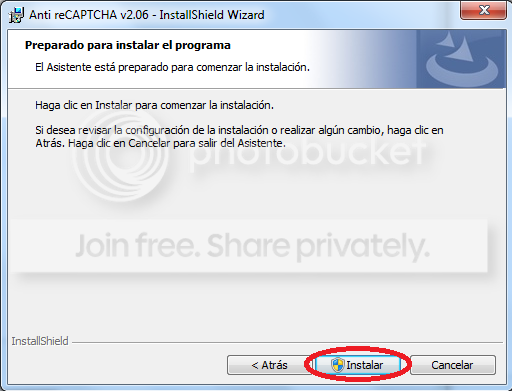
[FONT="]දැන් මේක install වෙලා ඉවර උනාට පස්සේ JDownloader open කරගන්න. (JDownloader open කරලා තිබුනොත් restart කරන්න)[/FONT]
[FONT="]
[/FONT]
[FONT="]මේ Filesonic link එක JDownloader දීලා බලන්න.Captcha pop up එකක් එන්නේ නැතුව තියනවා නම් හරි.[/FONT]
http://www.filesonic.com/file/1152559334/Anit_Recaptcha_ST_jacinfo.zip
[FONT="]
[/FONT]
[FONT="]මේකට එකපාරටම හරියටම captcha එක ගහන්න බැ. කිහිප වතාවක් (ඇතම් විට 10+ පාරක් ) captcha ගහල තමයි හරියන්නේ.
[/FONT]
[FONT="]
[/FONT]
[FONT="]Captcha Auto ගන්නවා නම් ඊලගට මේ වැඩේ කරන්න ඕනේ. නැත්නම් මේක Fileserve වලට වැඩ කරන්නේ නැ.[/FONT]
[FONT="]
[/FONT]
[FONT="]මුලින් මෙතනට යන්න.[/FONT]
[FONT="]C:\Program Files\JDownloader\jd\captcha\methods\anti-r-c_ST[/FONT]
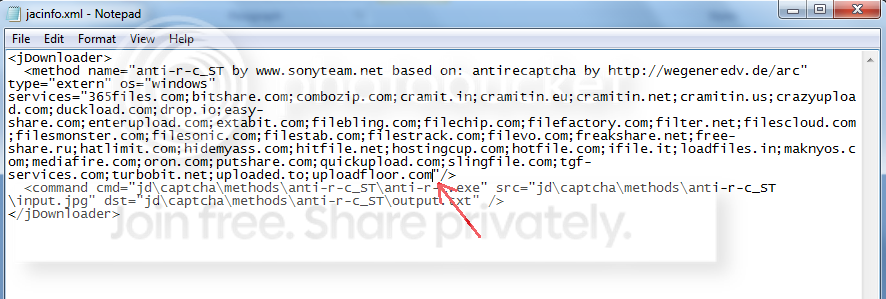
[FONT="]මේ එක ඇතුලේ තියනවා “jacinfo.xml”කියලා file එකක්. එක Notepad වලින් open කරගන්න.[/FONT]
[FONT="]
[/FONT]
[FONT="]
 [/FONT]
[FONT="]
[/FONT]
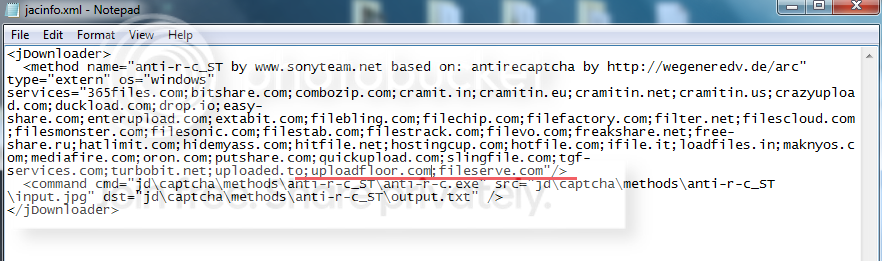
[FONT="]මේකේ තියන hosters ලා ට fileserve එකතු කරන්න.[/FONT]
[FONT="]
[/FONT]
[FONT="]......;uploadfloor.com[/FONT][FONT="] කියන එක ඉවර වෙන තැනින් ම පටන් අරන්[/FONT][FONT="];fileserve.com [/FONT][FONT="]ටයිප් කරන්න. ඊට පස්සේ මේ වගේ තියෙන්න ඕනේ.[/FONT]
[FONT="]
[/FONT]
[FONT="]
[/FONT]
[FONT="]
[/FONT]
[FONT="]“jacinfo.xml” file එක කියවලා තමයි JDownloader දැනගන්නේ මොන hosters ලා ට ද plugin පාවිච්චි කරන්න ඕනෙ කියල. මේ විදියට අපිට මේකේ නැති hosters ලා එකතු කරලා පාවිච්චි කරන්න පුලුවන්.[/FONT]
[FONT="]
[/FONT]
[FONT="]දැන් fileserve link එකක් දිලා බලන්න. Captcha Auto ගන්නවා නම් වැඩේ හරි.[/FONT]
[FONT="]මේක කරන හැටි තේරුනේ නැත්නම් හරි මේක කරන්න කම්මැලි නම් මේ file එක download කරලා ඒකේ තියන jacinfo.xml file එක C:\Program Files\JDownloader\jd\captcha\methods\anti-r-c_ST[/FONT] [FONT="]කියන folder එකට copy (Replace) කරන්න. එක දැම්මාට පස්සේ fileserve, wupload, uploadstation තුනට ම වැඩ කරනවා.[/FONT]
http://www.filesonic.com/file/1152559334/Anit_Recaptcha_ST_jacinfo.zip
[FONT="]
[/FONT]
[FONT="]මේ Plugin එකේ accuracy එක 23% විතර තමයි. කලාතුරකින් captcha බොහෝ වාර ගනනක් වැරදිම නිසා download fail වෙන්නත් පුලුවන්. [/FONT]
[FONT="]
[/FONT]
http://translate.google.es/translate?u=http://www.antirecaptcha.com&sl=es&tl=en&hl=es&ie=UTF-8
[FONT="]
[/FONT]
[FONT="]මේක[/FONT] [FONT="]තමා official website[/FONT] [FONT="]එක[/FONT]. [FONT="]මේගොල්ලෝ[/FONT] [FONT="]නිතර[/FONT] plugin [FONT="]එකේ bugs හදලා accuracy වැඩි කරනවා.[/FONT] [FONT="]අලුත්[/FONT] version [FONT="]එකක්[/FONT] [FONT="]ආවාම[/FONT] [FONT="]පරන[/FONT] [FONT="]එක[/FONT] [FONT="]අයින්[/FONT] [FONT="]කරලා[/FONT] [FONT="]අලුත්[/FONT] [FONT="]එක[/FONT] [FONT="]දාගන්න[/FONT].
[FONT="]
[/FONT]
[FONT="]
[/FONT]
[FONT="]
[/FONT]
[FONT="]Captcha.trader[/FONT]
[FONT="]
[/FONT]
[FONT="]මේකේ accuracy[/FONT] [FONT="]එක[/FONT] 95% [FONT="]විතර. මේක පාවිච්චි කරනවා නම් පොඩ්ඩක් මහන්සි වෙන්න වෙනවා. මොකද, මේකේ OCR එකක් නැ. JDownloader එකට එන captcha එක captcha.trader එකට යවන එකයි, captcha.trader එකෙන් ලැබෙන විසදුම ගන්න එකයි කරන්නේ.[/FONT]
[FONT="]මේකෙදි[/FONT] [FONT="]අපි[/FONT] [FONT="]මුලින්ම[/FONT] account [FONT="]එකක්[/FONT] [FONT="]හදාගන්න[/FONT] [FONT="]ඕනේ[/FONT].
http://captchatrader.com
[FONT="]Account එක හදාගෙන[/FONT] [FONT="]ඉවර[/FONT] [FONT="]වෙලා plugin[/FONT] [FONT="]එක download[/FONT] [FONT="]කරගන්න[/FONT].
http://captchatrader.com/content/plugins/jdownloader/captchatrader4jdownloader_win.zip
[FONT="]මේකෙ[/FONT] [FONT="]තියන “captchtrader” folder එක C:\Program Files\JDownloader\jd\captcha\methods\ වලට copy කරන්න.[/FONT]
[FONT="]දැන්[/FONT], [FONT="]C:\Program Files\JDownloader\jd\captcha\methods\captchatrader folder එක ඇතුලේ තියන “captchatrader.properties” file එක notepad වලින් open කරලා හදාගත්තු account එකේ username, password දාලා save කරන්න. (README.txt තුල මේ විස්තරය ඇත.)[/FONT]
[FONT="]දැන්[/FONT], captcha.trader account [FONT="]එකට[/FONT] log [FONT="]වෙන්න[/FONT].
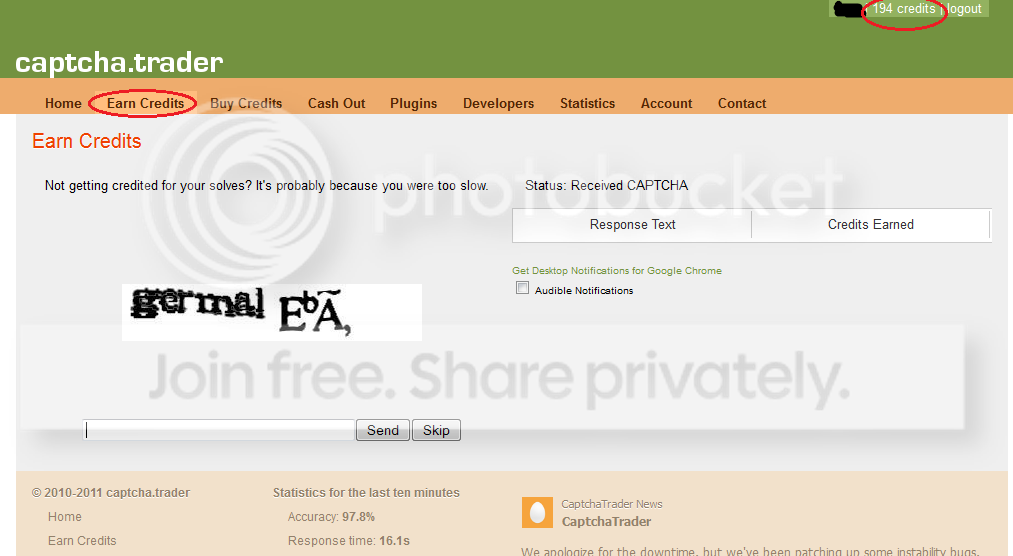
[FONT="]උඩින්ම[/FONT] [FONT="]පෙන්නනවා[/FONT] [FONT="]අපිට[/FONT] [FONT="]දැනට[/FONT] [FONT="]තියන[/FONT] credits [FONT="]ප්[/FONT][FONT="]රමාණය[/FONT]. [FONT="]අපි[/FONT] credits [FONT="]එකතු[/FONT] [FONT="]කරගන්න[/FONT] [FONT="]ඕනේ[/FONT]. Earn credits [FONT="]එකට[/FONT] [FONT="]එකට[/FONT] [FONT="]ගියාම[/FONT] [FONT="]ඔගොල්ලන්ට[/FONT] [FONT="]මේ[/FONT] [FONT="]වගේ[/FONT] [FONT="]එකක්[/FONT] [FONT="]පෙනෙයි[/FONT].
[FONT="]
[/FONT]
[FONT="]Register[/FONT] [FONT="]උනාට පස්සේ credit 100 ක් මුලින්ම[/FONT] [FONT="]නිකන්[/FONT] [FONT="]හම්බවෙනවා[/FONT].
[FONT="]මෙතන[/FONT] [FONT="]අපි[/FONT] [FONT="]නිවැරදිව[/FONT] [FONT="]විසදන[/FONT] captcha 1 [FONT="]කට[/FONT] credit 7 [FONT="]ක් ලැබෙනවා[/FONT]. JDownloader [FONT="]එකේ captcha 1 ක් විසදනවාට [/FONT]credit 10 [FONT="]ක් වැය වෙනවා. එක හින්දා JDownloader එක්ක පාවිච්චි කරන්න ඉස්සෙල්ලා අපේ account එකේ තියෙන්න ඕනේ.[/FONT]
[FONT="]හැබයි credit ඉවර උනම plugin එක වැඩ කරන්නේ නැතුව යනවා. JDownloader වල පෙන්නනේ නැ account එකේ credit ඉවරයි කියලා. එක හින්දා මේක පාවිච්චි කරනවා නම් account එකේ credit ගැන සැලකිලිමත් වෙනවා වගේම අලුතින් credit එකතු කරගන්න වෙනවා. තමුන්ට පහසු වෙලාවක credit එකතු කරගන්න පුලුවන්.[/FONT]
[FONT="]දැන් (fileserve, filesonic වගේ) link එකක් දිලා බලන්න. Captcha Auto ගන්නවා නම් වැඩේ හරි.[/FONT]
[FONT="]මේක අර කලින් එක වගේ වරද්දලා ගැහිල්ලක් නැ. එකපාරින්ම වගේ ගන්නවා.[/FONT]
[FONT="]අලුත් hosters ලා ට plugin එක වැඩ කරව ගන්න උඩ කියලා දුන්න විදියට C:\Program Files\JDownloader\jd\captcha\methods\captchatrader folder එක ඇතුලේ තියන “jacinfo.xml” file එක edit කරගන්න.[/FONT]
[FONT="]
[/FONT]
[FONT="]“jacinfo.xml” file එක edit කරගන්න නොතේරෙන අයට කලින් මම[/FONT][FONT="] ANTI reCAPTCHA ST [/FONT][FONT="]වලට දිපු file එක captcha.trader වලට වැඩ කරන්නේ නැත. captcha.trader සදහා පහත file එක භාවිතා කරන්න.[/FONT]
http://www.filesonic.com/file/1152559344/captcha_trader_jacinfo.zip
[FONT="]මෙයට[/FONT][FONT="] duckload.com[/FONT] [FONT="]හා wupload.com[/FONT][FONT="]ඇතුලත්[/FONT][FONT="]කර[/FONT][FONT="]ඇත[/FONT][FONT="].[/FONT]
Plugin [FONT="]දෙකම[/FONT] install [FONT="]කරගැනිමෙන් [/FONT][FONT="]වලකින්න[/FONT]. [FONT="]එසේ [/FONT][FONT="]කලහොත්[/FONT][FONT="] ANTI reCAPTCHA ST [/FONT][FONT="]පමනක්[/FONT][FONT="] ක්[/FONT][FONT="][/FONT][FONT="]රියත්මක[/FONT][FONT="]වනු[/FONT][FONT="] ඇත[/FONT][FONT="].[/FONT]
[FONT="]දැන්[/FONT] Auto reCAPTCHA [FONT="]එකයි[/FONT] JDownloader Auto IP reset[FONT="] එකයි[/FONT][FONT="] දාගත්තාම Premium account [/FONT][FONT="]තියනවා [/FONT][FONT="]වගේ [/FONT][FONT="]තමයි[/FONT].
JDownloader [FONT="]කියන්නේ[/FONT] [FONT="]මොකද්ද[/FONT] [FONT="]කියලා[/FONT] [FONT="]දන්නවා[/FONT] [FONT="]ඇති[/FONT] [FONT="]නේ[/FONT]. [FONT="]දන්නේ[/FONT] [FONT="]නැත්නම්[/FONT] [FONT="]මේ[/FONT] thread [FONT="]එකේ[/FONT] [FONT="]ඒ[/FONT] [FONT="]ගැන[/FONT] [FONT="]හොද[/FONT] [FONT="]විස්තරයක්[/FONT] [FONT="]තියනව[/FONT].
http://www.elakiri.com/forum/showthread.php?t=1120594&highlight=jdownloader
JDownloader [FONT="]හරහා [/FONT]Fileserve, Filesonic, Hotfile [FONT="]වගේ[/FONT] [FONT="]එවායින් free user කෙනෙක් විදියට download කරද්දි තියන් ලොකුම කරදරය තමයි Captcha ගැහිම. ෆිල්ම් එකක් වගේ parts ගොඩකට කඩපු එකක් download කරන්න ගියාම තමා මේක වදේ තියෙන්නේ. Download වෙන්න දාලා නිදාගන්න වත් බැ නේ. කට්ටිය premium account හොයන්නෙත් මේක හින්දා වෙන්න ඇති.[/FONT]
[FONT="]මෙකට හේතුව, ReCaptcha භාවිතා කරන one-click hosters ලා ගේ captcha හදුනාගැනිමේ හැකියාවක් JDownloader ට නොමැති වීම.[/FONT]
[FONT="]ReCaptcha ගැන වැඩි විස්තර මේ thread එකෙන් බලාගන්න පුලුවන්.[/FONT]
[FONT="]http://www.elakiri.com/forum/showthread.php?t=1026647&highlight=recaptcha[/FONT]
[FONT="]JDownloader වල මේ කරදරයෙන් ගැලවෙන්න පොඩි වැඩක් කරන්න ඔනේ. ඒ තමයි ReCaptcha plugin එකක් දා ගැනීම.[/FONT]
[FONT="]මේකට plugin 2 ක් තියනවා. හොදයි කියලා හිතෙන එක දා ගන්න.
[/FONT]
[FONT="]
[/FONT]
[FONT="]ANTI reCAPTCHA ST [/FONT]
[FONT="]මුලින්ම මෙකේ setup එක බාගන්න. [/FONT]v2.06 ([FONT="]අලුත්ම[/FONT] [FONT="]එක)[/FONT]
http://www.megaupload.com/?d=2G893VX7
[FONT="]මේක[/FONT] [FONT="]වැඩ[/FONT] [FONT="]කරන්න[/FONT] [FONT="]මේවත්[/FONT] [FONT="]ඕනේ[/FONT]...
[FONT="]VB6[/FONT]
http://www.megaupload.com/?d=TB8AV2DZ
[FONT="]VC + +2008[/FONT]
http://www.megaupload.com/?d=5I3YSAKA
[FONT="]
[/FONT]
[FONT="]දැන් මේක install කරගන්න ඕනේ. Setup එක තියෙන්නේ වෙන භාෂාවකින් උනාට බයවෙන්න ඕනේ නැ.[/FONT]
[FONT="]
[/FONT]
[FONT="]

[FONT="]
[/FONT]
[FONT="]
[FONT="]
[/FONT]
[FONT="]
[FONT="]
[/FONT]
[FONT="]මෙතන තමයි පොඩ්ඩක් සැලකිලිමත් වෙන්න ඕන.[/FONT]
[FONT="]
[/FONT]
[FONT="]
[FONT="]
[/FONT]
[FONT="]මේක install වෙන්න ඕනේ ඔයාලාගේ computer එකේ JDownloader install කරලා තියන folder එකට. “1” කියලා දාලා තියන තැන හරියට path එක ඇවිල්ලා තියනවා නම් 2nd step එකට යන්න. එහෙම නැත්නම් “Cambiar…” click කරලා හරියට path එක හදාගන්න.[/FONT]
[FONT="]
[/FONT]
[FONT="]
[/FONT]
[FONT="]දැන් මේක install වෙලා ඉවර උනාට පස්සේ JDownloader open කරගන්න. (JDownloader open කරලා තිබුනොත් restart කරන්න)[/FONT]
[FONT="]
[/FONT]
[FONT="]මේ Filesonic link එක JDownloader දීලා බලන්න.Captcha pop up එකක් එන්නේ නැතුව තියනවා නම් හරි.[/FONT]
http://www.filesonic.com/file/1152559334/Anit_Recaptcha_ST_jacinfo.zip
[FONT="]
[/FONT]
[FONT="]මේකට එකපාරටම හරියටම captcha එක ගහන්න බැ. කිහිප වතාවක් (ඇතම් විට 10+ පාරක් ) captcha ගහල තමයි හරියන්නේ.
[/FONT]
[FONT="]
[/FONT]
[FONT="]Captcha Auto ගන්නවා නම් ඊලගට මේ වැඩේ කරන්න ඕනේ. නැත්නම් මේක Fileserve වලට වැඩ කරන්නේ නැ.[/FONT]
[FONT="]
[/FONT]
[FONT="]මුලින් මෙතනට යන්න.[/FONT]
[FONT="]C:\Program Files\JDownloader\jd\captcha\methods\anti-r-c_ST[/FONT]
[FONT="]මේ එක ඇතුලේ තියනවා “jacinfo.xml”කියලා file එකක්. එක Notepad වලින් open කරගන්න.[/FONT]
[FONT="]
[/FONT]
[FONT="]
[FONT="]
[/FONT]
[FONT="]මේකේ තියන hosters ලා ට fileserve එකතු කරන්න.[/FONT]
[FONT="]
[/FONT]
[FONT="]......;uploadfloor.com[/FONT][FONT="] කියන එක ඉවර වෙන තැනින් ම පටන් අරන්[/FONT][FONT="];fileserve.com [/FONT][FONT="]ටයිප් කරන්න. ඊට පස්සේ මේ වගේ තියෙන්න ඕනේ.[/FONT]
[FONT="]
[/FONT]
[FONT="]
[/FONT]
[FONT="]
[/FONT]
[FONT="]“jacinfo.xml” file එක කියවලා තමයි JDownloader දැනගන්නේ මොන hosters ලා ට ද plugin පාවිච්චි කරන්න ඕනෙ කියල. මේ විදියට අපිට මේකේ නැති hosters ලා එකතු කරලා පාවිච්චි කරන්න පුලුවන්.[/FONT]
[FONT="]
[/FONT]
[FONT="]දැන් fileserve link එකක් දිලා බලන්න. Captcha Auto ගන්නවා නම් වැඩේ හරි.[/FONT]
[FONT="]මේක කරන හැටි තේරුනේ නැත්නම් හරි මේක කරන්න කම්මැලි නම්
මේ file එක download කරලා ඒකේ තියන jacinfo.xml file එක C:\Program Files\JDownloader\jd\captcha\methods\anti-r-c_ST[/FONT] [FONT="]කියන folder එකට copy (Replace) කරන්න. එක දැම්මාට පස්සේ fileserve, wupload, uploadstation තුනට ම වැඩ කරනවා.[/FONT]http://www.filesonic.com/file/1152559334/Anit_Recaptcha_ST_jacinfo.zip
[FONT="]
[/FONT]
[FONT="]මේ Plugin එකේ accuracy එක 23% විතර තමයි. කලාතුරකින් captcha බොහෝ වාර ගනනක් වැරදිම නිසා download fail වෙන්නත් පුලුවන්. [/FONT]
[FONT="]
[/FONT]
http://translate.google.es/translate?u=http://www.antirecaptcha.com&sl=es&tl=en&hl=es&ie=UTF-8
[FONT="]
[/FONT]
[FONT="]මේක[/FONT] [FONT="]තමා official website[/FONT] [FONT="]එක[/FONT]. [FONT="]මේගොල්ලෝ[/FONT] [FONT="]නිතර[/FONT] plugin [FONT="]එකේ bugs හදලා accuracy වැඩි කරනවා.[/FONT] [FONT="]අලුත්[/FONT] version [FONT="]එකක්[/FONT] [FONT="]ආවාම[/FONT] [FONT="]පරන[/FONT] [FONT="]එක[/FONT] [FONT="]අයින්[/FONT] [FONT="]කරලා[/FONT] [FONT="]අලුත්[/FONT] [FONT="]එක[/FONT] [FONT="]දාගන්න[/FONT].
[FONT="]
[/FONT]
[FONT="]
[/FONT]
[FONT="]
[/FONT]
[FONT="]Captcha.trader[/FONT]
[FONT="]
[/FONT]
[FONT="]මේකේ accuracy[/FONT] [FONT="]එක[/FONT] 95% [FONT="]විතර. මේක පාවිච්චි කරනවා නම් පොඩ්ඩක් මහන්සි වෙන්න වෙනවා. මොකද, මේකේ OCR එකක් නැ. JDownloader එකට එන captcha එක captcha.trader එකට යවන එකයි, captcha.trader එකෙන් ලැබෙන විසදුම ගන්න එකයි කරන්නේ.[/FONT]
[FONT="]මේකෙදි[/FONT] [FONT="]අපි[/FONT] [FONT="]මුලින්ම[/FONT] account [FONT="]එකක්[/FONT] [FONT="]හදාගන්න[/FONT] [FONT="]ඕනේ[/FONT].
http://captchatrader.com
[FONT="]Account එක හදාගෙන[/FONT] [FONT="]ඉවර[/FONT] [FONT="]වෙලා plugin[/FONT] [FONT="]එක download[/FONT] [FONT="]කරගන්න[/FONT].
http://captchatrader.com/content/plugins/jdownloader/captchatrader4jdownloader_win.zip
[FONT="]මේකෙ[/FONT] [FONT="]තියන “captchtrader” folder එක C:\Program Files\JDownloader\jd\captcha\methods\ වලට copy කරන්න.[/FONT]
[FONT="]දැන්[/FONT], [FONT="]C:\Program Files\JDownloader\jd\captcha\methods\captchatrader folder එක ඇතුලේ තියන “captchatrader.properties” file එක notepad වලින් open කරලා හදාගත්තු account එකේ username, password දාලා save කරන්න. (README.txt තුල මේ විස්තරය ඇත.)[/FONT]
[FONT="]දැන්[/FONT], captcha.trader account [FONT="]එකට[/FONT] log [FONT="]වෙන්න[/FONT].
[FONT="]උඩින්ම[/FONT] [FONT="]පෙන්නනවා[/FONT] [FONT="]අපිට[/FONT] [FONT="]දැනට[/FONT] [FONT="]තියන[/FONT] credits [FONT="]ප්[/FONT][FONT="]රමාණය[/FONT]. [FONT="]අපි[/FONT] credits [FONT="]එකතු[/FONT] [FONT="]කරගන්න[/FONT] [FONT="]ඕනේ[/FONT]. Earn credits [FONT="]එකට[/FONT] [FONT="]එකට[/FONT] [FONT="]ගියාම[/FONT] [FONT="]ඔගොල්ලන්ට[/FONT] [FONT="]මේ[/FONT] [FONT="]වගේ[/FONT] [FONT="]එකක්[/FONT] [FONT="]පෙනෙයි[/FONT].
[FONT="]
[/FONT]
[FONT="]Register[/FONT] [FONT="]උනාට පස්සේ credit 100 ක් මුලින්ම[/FONT] [FONT="]නිකන්[/FONT] [FONT="]හම්බවෙනවා[/FONT].
[FONT="]මෙතන[/FONT] [FONT="]අපි[/FONT] [FONT="]නිවැරදිව[/FONT] [FONT="]විසදන[/FONT] captcha 1 [FONT="]කට[/FONT] credit 7 [FONT="]ක් ලැබෙනවා[/FONT]. JDownloader [FONT="]එකේ captcha 1 ක් විසදනවාට [/FONT]credit 10 [FONT="]ක් වැය වෙනවා. එක හින්දා JDownloader එක්ක පාවිච්චි කරන්න ඉස්සෙල්ලා අපේ account එකේ තියෙන්න ඕනේ.[/FONT]
[FONT="]හැබයි credit ඉවර උනම plugin එක වැඩ කරන්නේ නැතුව යනවා. JDownloader වල පෙන්නනේ නැ account එකේ credit ඉවරයි කියලා. එක හින්දා මේක පාවිච්චි කරනවා නම් account එකේ credit ගැන සැලකිලිමත් වෙනවා වගේම අලුතින් credit එකතු කරගන්න වෙනවා. තමුන්ට පහසු වෙලාවක credit එකතු කරගන්න පුලුවන්.[/FONT]
[FONT="]දැන් (fileserve, filesonic වගේ) link එකක් දිලා බලන්න. Captcha Auto ගන්නවා නම් වැඩේ හරි.[/FONT]
[FONT="]මේක අර කලින් එක වගේ වරද්දලා ගැහිල්ලක් නැ. එකපාරින්ම වගේ ගන්නවා.[/FONT]
[FONT="]අලුත් hosters ලා ට plugin එක වැඩ කරව ගන්න උඩ කියලා දුන්න විදියට C:\Program Files\JDownloader\jd\captcha\methods\captchatrader folder එක ඇතුලේ තියන “jacinfo.xml” file එක edit කරගන්න.[/FONT]
[FONT="]
[/FONT]
[FONT="]“jacinfo.xml” file එක edit කරගන්න නොතේරෙන අයට කලින් මම[/FONT][FONT="] ANTI reCAPTCHA ST [/FONT][FONT="]වලට දිපු file එක captcha.trader වලට වැඩ කරන්නේ නැත. captcha.trader සදහා පහත file එක භාවිතා කරන්න.[/FONT]
http://www.filesonic.com/file/1152559344/captcha_trader_jacinfo.zip
[FONT="]මෙයට[/FONT][FONT="] duckload.com[/FONT] [FONT="]හා wupload.com[/FONT][FONT="]ඇතුලත්[/FONT][FONT="]කර[/FONT][FONT="]ඇත[/FONT][FONT="].[/FONT]
Plugin [FONT="]දෙකම[/FONT] install [FONT="]කරගැනිමෙන් [/FONT][FONT="]වලකින්න[/FONT]. [FONT="]එසේ [/FONT][FONT="]කලහොත්[/FONT][FONT="] ANTI reCAPTCHA ST [/FONT][FONT="]පමනක්[/FONT][FONT="] ක්[/FONT][FONT="][/FONT][FONT="]රියත්මක[/FONT][FONT="]වනු[/FONT][FONT="] ඇත[/FONT][FONT="].[/FONT]
[FONT="]දැන්[/FONT] Auto reCAPTCHA [FONT="]එකයි[/FONT] JDownloader Auto IP reset[FONT="] එකයි[/FONT][FONT="] දාගත්තාම Premium account [/FONT][FONT="]තියනවා [/FONT][FONT="]වගේ [/FONT][FONT="]තමයි[/FONT].
Last edited:


 )
)


