
Latest ads
-
 Gemini AI PRO 18 months Offer
- Hawaka
- Updated:
-
koko account
- DasunEranga
- Updated:
-
koko account
- DasunEranga
- Updated:

You are using an out of date browser. It may not display this or other websites correctly.
You should upgrade or use an alternative browser.
You should upgrade or use an alternative browser.


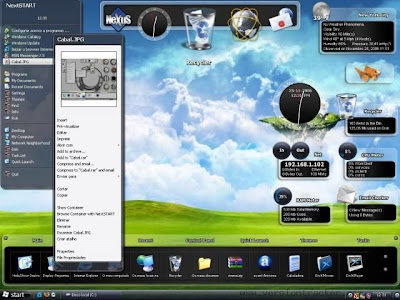
Windows XP SP3 2008 Windows Blind Edition Custom | ISO | 652MB
Windows XP SP3 2008 with Windows Blind Edition Custom and special themes
SPECIAL FEATURES:
================
WINDOWBLINDS v.6.1 ENHANCED PRE-crackED (Added Xp Transparent Skin) - (just save license)
ICONPACKAGER v.3.2 (REGISTERED)
CUSTOM GLASS CURSERS AND VISTA SOUNDS BY DEFAULT
WMP11 VISTA CUSTOMIZED SKIN BY DEFAULT
LCLOCK CUSTOMIZED SETTINGS/CUSTOMIZED CALENDAR BY DEFAULT
VISTA CUSTOMIZED ROCKET DOCK
VISTA SIDEBAR CUSTOMIZED GADGETS
CUSTOMIZED PROPERTY BOXES
CUSTOMIZED INSTALLATION/BOOT/LOGON/LOGOFF SCREENS
GOLD THEME (WITH DEFAULT SETTINGS)
BLACK THEME (WITH DEFAULT SETTINGS)
============================
TWEAKS FOR LOOKS AND SPEED:
============================
Explorer-Add 'Command Prompt' to folder context menu
Explorer-Disable shortcut arrow
Explorer-Recycle Bin: allow to rename and delete
Explorer-Show Drive Letters in front of Drive Names
Internet Explorer-Set Homepage-www.google.com
Internet Explorer-Set Internet Explorer to accept 10 connects at a time
Performance-Disable Warn on low disk space
Start Menu-Reduce popup delay
Start Menu-Remove Windows Catalog shortcut
Start Menu-Remove Windows Update shortcut
Taskbar-Disable Balloon Tips
Taskbar-Disable Language-Bar
Taskbar-Hide Volume Control Icon in System Tray
Visual Effects-Animate windows when minimizing and maximizing-Disable
Visual Effects-Combo box animation-Disable
Visual Effects-Cursor shadow-Disable
Visual Effects-Display mouse pointer trails-Disable
Visual Effects-Fade out selection-Disable
Visual Effects-Gradient captions in windows-Disable
Visual Effects-Menu animation-Disable
Visual Effects-Menu shadows-Disable
Visual Effects-Show translucent selection rectangle-Enable
Visual Effects-Show window contents while dragging-Enable
Visual Effects-Slide taskbar buttons-Disable
Visual Effects-Smooth edges of screen fonts-ClearType
Visual Effects-Smooth-scroll list boxes-Enable
Visual Effects-Tooltip animation-Disable
Visual Effects-Use a background image for each folder type-Disable
Visual Effects-Use drop shadows for icon labels on the desktop-Enable
======
ADDED:
======
Netframe 2 Sp1
Vis.C Redis.2005 Sp1
Vis.C Redis.2008
DirectX 9.0c End-User Runtime
ImageResizer v1.2
WMP11 Vista Customized
BurnCDCC
CabTool v1.8
ClearType v1.1
CPL Bonus v.8.2.2
7-Zip 4.57
7zSplit 0.2.0.740
DAMN NFO Viewer v2.10.0032
CursorsCGlass v1.2
Firefox 2.0.0.14
HashTab v.2
Hunt Virus Utilities (Including HijackThis)
Image Format Cnvtr Shell v.2.0
IZArc 3.81 Build 1550
LClock v.1.62b custom
PowerCmd v.1.9 (registered)
Sysinternals Tools 25.07.2007
AIOVistaAeroCursors v7.07.03
CCleaner2.07.575
Standalone Flash Player (Macromedia)
StylerTB1401
VistaRTMFonts v1.1
VistaSceenSavers v1.1
VistaSoundsReplacement
WindowsSidebarSP3 AlkyXP1.0 (Customized)
WindowBlinds v.6.1 enhanced plus, Xp Transparent Skin (pre-*****ed - just save license)
IconPackager.v.3.2 (registered)
Klite Codecs v.3.9.0
RocketDock v.1.3.5 (customized)
Unlocker v.1.8.7
uTorrent 1.7.7 (8179) (BLUE) + SBG
WinRAR.v.3.71 (registered)
VistaLoud
SP3UpdPk1.0.9 RepacK
Black Theme (Customized)
Gold Theme (Customized)
IE7
Links
http://rapidshare.com/files/13751431...om.e.part1.rar
http://rapidshare.com/files/13751523...om.e.part2.rar
http://rapidshare.com/files/13751648...om.e.part3.rar
http://rapidshare.com/files/13751730...om.e.part4.rar
http://rapidshare.com/files/13751830...om.e.part5.rar
http://rapidshare.com/files/13751922...om.e.part6.rar
http://rapidshare.com/files/13752008...om.e.part7.rar
http://rapidshare.com/files/13752040...om.e.part8.rar

Window Blinds 6.3 Final / Windows at it's BEST


WindowBlinds is a program that allows you to completely change the look and feel of Windows to however you want it to look like. WindowBlinds allows you to completely customize your desktop look by changing the style of title buttons, bars and toolbars. You can change the look of buttons and check boxes by assigning them skins, or personalities, and you can assign buttons that will launch programs to toolbars.
You can create your own skins, choose from the four that are included in the program, or download additional ones. You can also choose to exclude certain programs from WindowBlinds if you don`t want to change their appearances.
Applying visual styles : In addition to the shortcut to the WindowBlinds Advanced Config window in your Start menu, you can change WB visual styles and settings from either the Skins or Appearance tab in Display Properties.
Set the skin to Windows Classic to not use a WB skin on startup (or use the options on the Skins tab or in the Advanced Config window).
Be sure to check out www.WinCustomize.com to select from over 3200 free visual styles.
WindowBlinds has been designed and tested to be as compatible with with thousands of applications and pieces of hardware available. Its memory load is quite low (unless you are using complex skins with lots of animation) and any oddities with specific apps can generally be worked around quickly (see the Troubleshooting section of the online help file for more information).
Here are some key features of "WindowBlinds":
· Applies visual styles that can change the title bars, Start bar, push buttons, radio buttons, and nearly every other element of the Windows UI.
· Takes advantage of hardware acceleration on Windows XP and Windows Vista increasing window drawing performance over Windows by default
· Skins virtually every part of Windows XP
· Supports on-the-fly blurring of title bars and Start menus on Windows XP!
· Skins virtually every part of Windows Vista
· New, easy to use configuration
· Supports on-the-fly blurring of window frames, start menus, and menus on Windows Vista
· Users can change the color and brightness of individual skins (screenshot)
· Users can change fonts and font colors of their skins
· Supports animation overlays for integrated, high-quality animation (screenshot)
· Designed exclusively for Microsoft Windows as a native solution. Does not disable any system file protections, does not patch any system files on disk or in memory to bypass OS protections, does not break with new service packs or updates.
· Users can modify their skins within the easy to use configuration program and then save them as a new sub-style for later use
· Can change the Windows Vista Sidebar skin
· Allows users to re-define the right-mouse button behavior on the title bar.
· Supports the addition of roll-up buttons, website link buttons, always-on top buttons, and more on the title bar or border
· Even skins applications that are not "theme ware".
· Changes toolbar icons in Internet Explorer and Explorer (screenshot)
· Can change the background of Explorer windows
· Uses no additional memory over the default Windows XP or Windows Vista display system.
· Users can customize the color of individual pieces of their skins
· Users can customize the amount of transparency and blur on individual skins
· Includes a wallpaper manager
· Supports different skins for different programs
· Includes full Internet Explorer 7 skinning
· Supports user customization of Aero on Windows Vista without making a new skin
· Includes several exclusive new skins created by top skinners in the community
Requirements:
· 1GHz or faster processor recommended
· 60MB free drive space
· 256MB RAM
· A 16MB DirectX 8 or later compatible video card with appropriate driver support is required for per-pixel alpha-blended skins. Some integrated graphics solutions and lower-end cards from before 2004 may not be able to use per-pixel skins.
OS: Windows XP/Vista
Code:
http://rapidshare.com/files/165564264/Stardock_WindowBlinds_v6.3.rar
Code:
http://rapidshare.com/files/143220897/theblackrose.us_Presents_19_Themes_For_Windows_XP_2008.rar
70 Cool Xp Themes With Installation - 60,15 MB
Here are some amazing Windows Vista themes for your Windows XP
http://rapidshare.com/files/15525706...tallation_.rar
Here are some amazing Windows Vista themes for your Windows XP
http://rapidshare.com/files/15525706...tallation_.rar
Window Blinds MASTER(PREMIUM) Themes collection Set of 10 MASTER Themes..
http://rapidshare.com/files/147074673/WB_Master-1.zip
http://rapidshare.com/files/147077478/WB_Master-2.zip
http://rapidshare.com/files/147080766/WB_Master-3.zip
http://rapidshare.com/files/147084311/WB_Master-4.zip
PASS
www.dl4all.com
http://rapidshare.com/files/147074673/WB_Master-1.zip
http://rapidshare.com/files/147077478/WB_Master-2.zip
http://rapidshare.com/files/147080766/WB_Master-3.zip
http://rapidshare.com/files/147084311/WB_Master-4.zip
PASS
www.dl4all.com
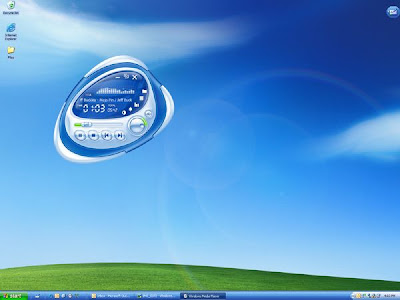
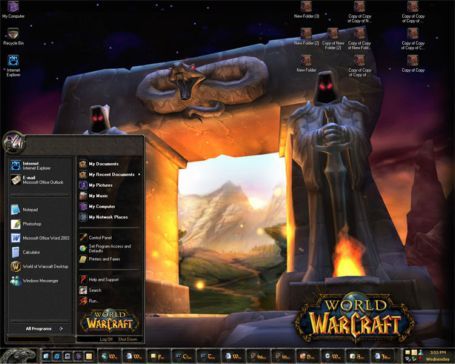
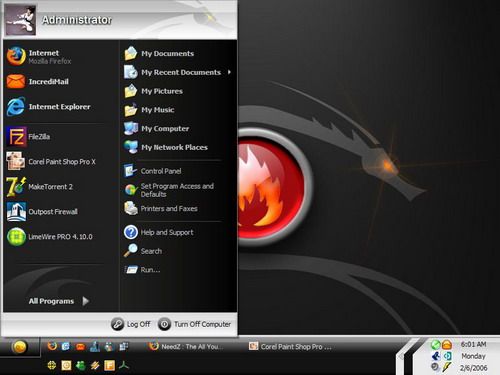
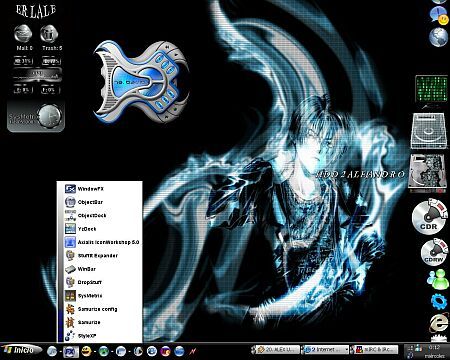
Windows XP Best 37 Themes
Code:
Code:
Best 19 Themes of 2008 for Windows XP

Best 19 windows XP themes of 2008
Code:
http://rapidshare.com/files/14322089..._XP_ 2008.rar
__________________

Best 19 windows XP themes of 2008
Code:
http://rapidshare.com/files/14322089..._XP_ 2008.rar
__________________


Rockey_ssr said:w0w mcn tnks wewa sw 7x tath tnks mehema request akak dammata
sira sira.. sw7x tai.. cool tai dennatama tx wewa


