


Make Home VCDs Which You Can Watch On TV
Software you will or may need:
1. Advanced X Video Converter (
 download)
2. VcdWizard (free CD burner software,
download ) or Nero. (
http://www.ahead.de)Step1: Convert your video file to VCD format with Advanced X Video Converter
- Launch Advanced X Video Converter. Click the Add Task button on the main window.
- Select All to VCD/SVCD/DVD in the Task window. Click the Next button.
- Click the "Add File" button to add source files that you want to convert to MPEG format. The source file could be AVI (DivX, Xvid, MPEG-4...), WMV/ASF and MPEG.
- Select VCD-PAL or VCD-NTSC in the Video Type list.

Launch Nero and then click theWizard button.
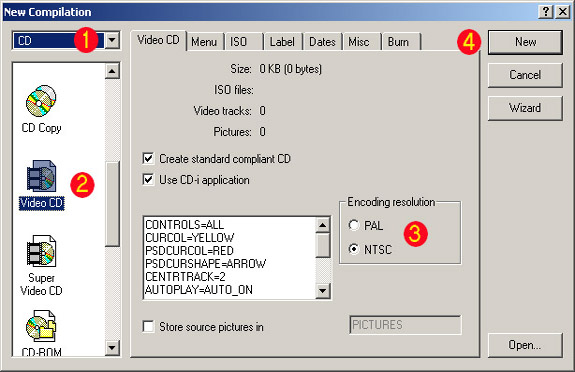
- Select CD in the list. 1
- Select the Video CD icon or the Video CD tab. (2)
- Select radio button PAL or NTSC depending on what format your output VCD file, which is generated by X Video Converter.(3
- Click the New button.(4)
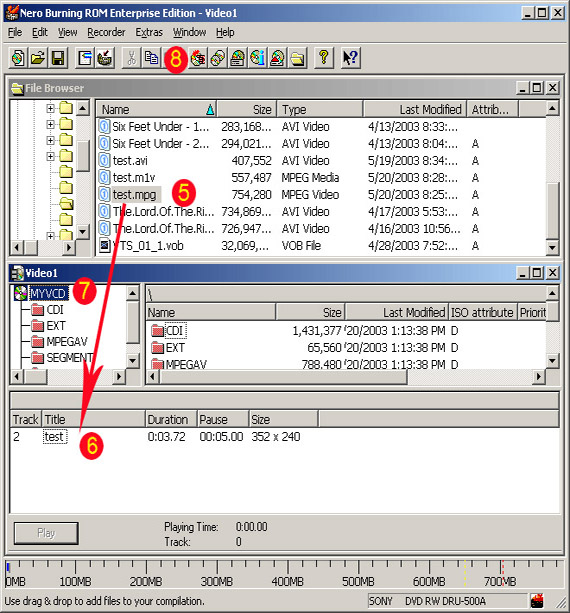
- Locate your .mpg and drag it to the region 6 . You can add multiple mpg files at one time. 5
- Rename the CD by pressing F2 on NEW. 7
- Select File->Write CD or click Open the write cd dialog... button. 8
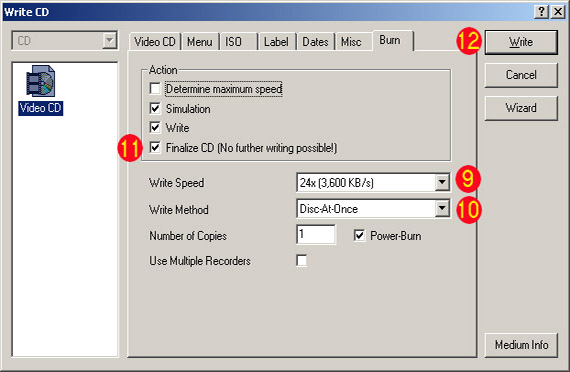
- Select a Write speed, lower speed would work better. 9
- Select Disc-At-Once in the Write Method. 10
- Check the Finalize CD box in Action. 11
- Click Write button. 12
VCD specification
NTSC:
Horizontal width: 352
Vertical height: 240
Frames per second: 29.97
Color depth: 24 or 32 bits
PAL:
Horizontal width: 352
Vertical height: 288
Frames per second: 25
Color depth: 24 or 32 bits
Horizontal width: 352
Vertical height: 240
Frames per second: 29.97
Color depth: 24 or 32 bits
PAL:
Horizontal width: 352
Vertical height: 288
Frames per second: 25
Color depth: 24 or 32 bits


