WINDOWS BLINDS 6
WindowBlinds is a one-of-a-kind utility that allows Windows users to completely change the look and feel of the Windows interface by applying a new skin. There are thousands of different skins to choose from that are freely downloadable from the WindowBlinds website.
A WindowBlinds skin can make Windows look like an alternative operating system, like their favorite sports or car brand, or something completely new. Because WindowBlinds uses the latest hardware acceleration features of modern video cards, WindowBlinds won't slow down your computer and uses very little memory.
WindowBlinds is safe and easy to use. It doesn't alter any system files and users can switch between the default Windows look and feel and a custom WindowBlinds skin with the click of a button. In addition, WindowBlinds has been tested to ensure it works with Windows Vista, so you know it is compatible, reliable,, and more secure.
Customize the look & feel of Windows
Tired of your computer having the same old look as every other computer? Want to give your Windows PC its own unique style? Stardock WindowBlinds will let you apply thousands of different skins (visual styles) to change the look and feel of your entire desktop. WindowBlinds is so flexible that users can create skins that mimic the look and feel of other operating systems.
Not Just Eye Candy
WindowBlinds doesn't just make Windows look better, it can make it more functional. You can create your own skins that add additional buttons to the title bar that provide additional functionality such as roll-up buttons, link buttons, program short cuts, even media player controls. Moreover, because WindowBlinds uses the latest features of your graphics card, it can make Windows even faster than the default Windows XP or "Aero" style.
You are in control
Even with thousands of different visual styles to choose from, you can customize those visual styles as well. WindowBlinds gives you total control over your graphical user interface. WindowBlinds will let you change the color of your Windows GUI, change your wallpaper, give different windows their own specific look, choose a new Windows taskbar and Start button.
Improve your productivity
WindowBlinds has features that significantly enhance a user's productivity when it comes to interacting with windows. For example, you set WindowBlinds to minimize windows just by right-clicking on the title bar, a great feature for minimizing several windows quickly without having to resort to "minimize all".
Features:
* New start menu animation support
* Category filtering on skins in wbconfig
* Tag filtering on wallpapers in wbconfig
* Random skin support
* The ability to save a re-coloring of a skin as a preset
* Advanced HSL re-coloring where you pick a single color and a range in a skin and you can just change that color instead of the entire skin
* Ability to edit the system colors from wbconfig
* Ability to change skin fonts from wbconfig
* Ability to control transparency and blur on start menu, menus, taskbar & window frames.
* Ability to save such changes as a preset
* Vista-Ize me function which sets some defaults to have a more vista like look
* Ability to skin the sidebar
* Ability to edit a sidebar skin from within wbconfig
* Improved WB skin install when handling upgrades of skins
* Ability to alter the mouse over animation speed
* Ability to alter the default button pulsing speed
* Support for explorer background bitmaps
* Ability to use the Aero frames with the rest of the skin
* Blur support in title bars (and menus on vista)
* Lots of new sections for new Vista specific parts
* Including IE navigation arrows, IE tabs, start menu shutdown/lock buttons
* Skins virtually every aspect of the Windows GUI
* Clean and easy configuration dialog.
* Tons of configuration options for users
* Animation supported on titlebars, buttons, and many other elements.
* Change the color of any visual style on the fly
* Per-application visual styles
* Doesn't alter any system files
* Safe, reliable way to change the look and feel of Windows


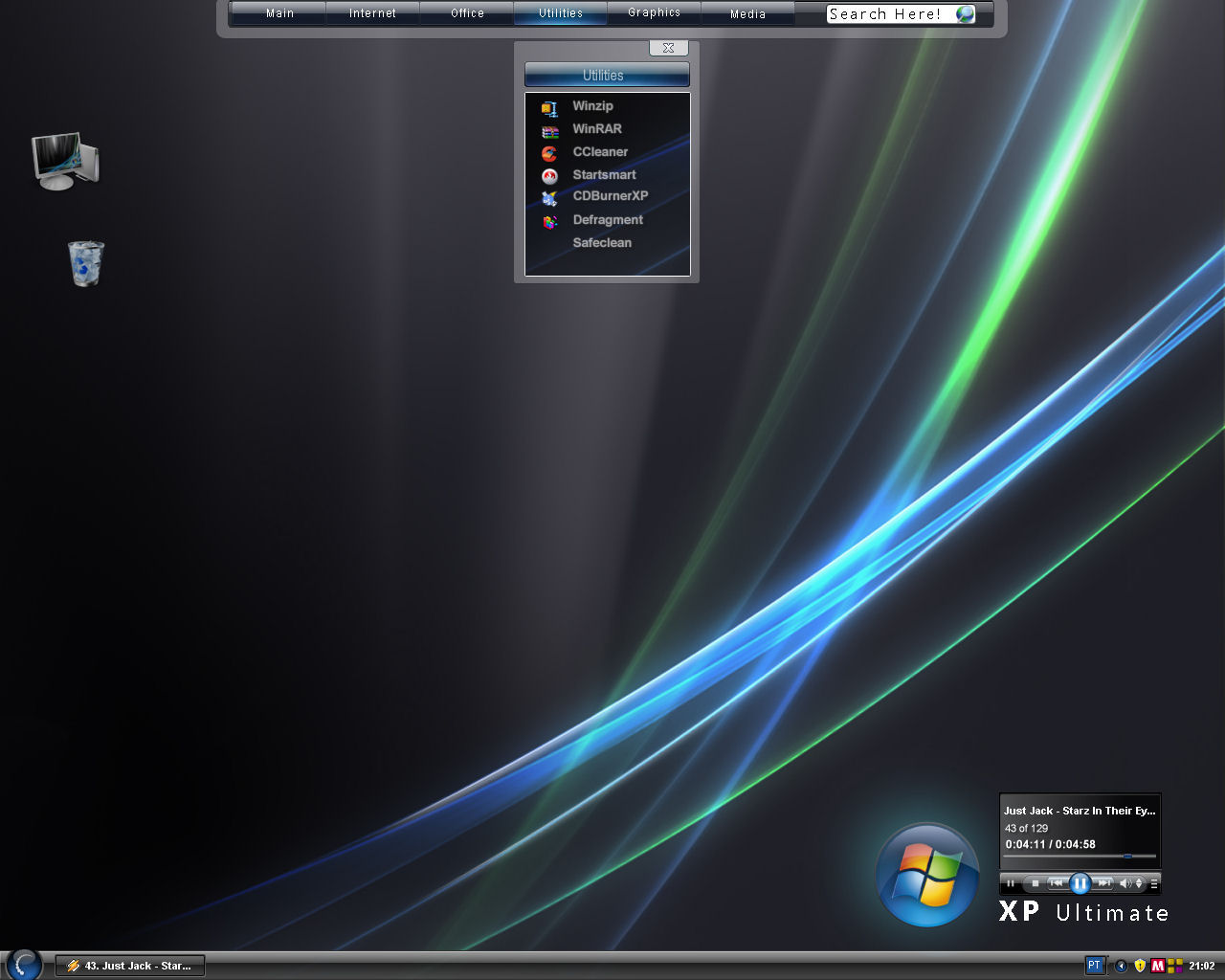
This File contains Windows Blinds 6 and 20 cool Themes for u to Customize Your Computer!!
Take a look at the images!!!
Size = 42.4 mb!
STARDOCK OBJECT DOCK PLUS 1.9
ObjectDock™ is a program that enables users to organize their shortcuts, programs and running
tasks into an attractive and fun animated Dock. By allowing users to have more control over
how they organize their desktop, users can take control of their desktop icons and shortcuts
to have them be available when where and how they need them. This, all with the unique style
and top-rate performance that ObjectDock is known to deliver! In constant development,
ObjectDock and ObjectDock Plus are enhanced often to provide the most unique features of
any stylized shortcut organizer / launcher available.
ObjectDock is a desktop toolbar, that acts as an application launcher, as well as a task
manger to access currently running programs. It offers cool mouseover animation effects
and displays thumbnails of open window to easily switch between applications. You can also
drag and drop your favorite folders or programs onto the toolbar to add a shortcut for easy access.
ObjectDock also includes a weather feature that displays current conditions for your US zip code,
as well as access to My Computer, and analog clock display and more.
ObjectDock Plus features include:
· Standard Dock
· Docklet Support
· Taskbar Support
· Skinning Support
· Mouse-Over Zoom effect
· Notification Animations
· Minimized Programs displayed as thumbnail
· Image short-cuts displayed as a thumbnail
· Custom Graphics Engine
· GDI+ Graphics Engine
· Replace icons with other images
· Can hide Windows Start Bar
· Start menu support
· Multiple Docks
· Task grouping
· System Tray Support
· Tabbed Docks
· Multiple Monitor Support
· Fly-Out Menus
· Tabs docked to screen edges
· Control of Tab Sizes
· Hot-Spot activation
· Multi-Dock Manager
===============================================================================================
I N S T A L A T I O N :
1.Instal objectdockplus_190
2.run keygen
2a. run patch
2b. run save license
3. run ObjectDock Plus

Size = 12.9 mb

WindowBlinds is a one-of-a-kind utility that allows Windows users to completely change the look and feel of the Windows interface by applying a new skin. There are thousands of different skins to choose from that are freely downloadable from the WindowBlinds website.
A WindowBlinds skin can make Windows look like an alternative operating system, like their favorite sports or car brand, or something completely new. Because WindowBlinds uses the latest hardware acceleration features of modern video cards, WindowBlinds won't slow down your computer and uses very little memory.
WindowBlinds is safe and easy to use. It doesn't alter any system files and users can switch between the default Windows look and feel and a custom WindowBlinds skin with the click of a button. In addition, WindowBlinds has been tested to ensure it works with Windows Vista, so you know it is compatible, reliable,, and more secure.
Customize the look & feel of Windows
Tired of your computer having the same old look as every other computer? Want to give your Windows PC its own unique style? Stardock WindowBlinds will let you apply thousands of different skins (visual styles) to change the look and feel of your entire desktop. WindowBlinds is so flexible that users can create skins that mimic the look and feel of other operating systems.
Not Just Eye Candy
WindowBlinds doesn't just make Windows look better, it can make it more functional. You can create your own skins that add additional buttons to the title bar that provide additional functionality such as roll-up buttons, link buttons, program short cuts, even media player controls. Moreover, because WindowBlinds uses the latest features of your graphics card, it can make Windows even faster than the default Windows XP or "Aero" style.
You are in control
Even with thousands of different visual styles to choose from, you can customize those visual styles as well. WindowBlinds gives you total control over your graphical user interface. WindowBlinds will let you change the color of your Windows GUI, change your wallpaper, give different windows their own specific look, choose a new Windows taskbar and Start button.
Improve your productivity
WindowBlinds has features that significantly enhance a user's productivity when it comes to interacting with windows. For example, you set WindowBlinds to minimize windows just by right-clicking on the title bar, a great feature for minimizing several windows quickly without having to resort to "minimize all".
Features:
* New start menu animation support
* Category filtering on skins in wbconfig
* Tag filtering on wallpapers in wbconfig
* Random skin support
* The ability to save a re-coloring of a skin as a preset
* Advanced HSL re-coloring where you pick a single color and a range in a skin and you can just change that color instead of the entire skin
* Ability to edit the system colors from wbconfig
* Ability to change skin fonts from wbconfig
* Ability to control transparency and blur on start menu, menus, taskbar & window frames.
* Ability to save such changes as a preset
* Vista-Ize me function which sets some defaults to have a more vista like look
* Ability to skin the sidebar
* Ability to edit a sidebar skin from within wbconfig
* Improved WB skin install when handling upgrades of skins
* Ability to alter the mouse over animation speed
* Ability to alter the default button pulsing speed
* Support for explorer background bitmaps
* Ability to use the Aero frames with the rest of the skin
* Blur support in title bars (and menus on vista)
* Lots of new sections for new Vista specific parts
* Including IE navigation arrows, IE tabs, start menu shutdown/lock buttons
* Skins virtually every aspect of the Windows GUI
* Clean and easy configuration dialog.
* Tons of configuration options for users
* Animation supported on titlebars, buttons, and many other elements.
* Change the color of any visual style on the fly
* Per-application visual styles
* Doesn't alter any system files
* Safe, reliable way to change the look and feel of Windows


This File contains Windows Blinds 6 and 20 cool Themes for u to Customize Your Computer!!
Take a look at the images!!!
Code:
http://rapidshare.com/files/93314987/Window_Blinds_v6.0.rarSTARDOCK OBJECT DOCK PLUS 1.9
ObjectDock™ is a program that enables users to organize their shortcuts, programs and running
tasks into an attractive and fun animated Dock. By allowing users to have more control over
how they organize their desktop, users can take control of their desktop icons and shortcuts
to have them be available when where and how they need them. This, all with the unique style
and top-rate performance that ObjectDock is known to deliver! In constant development,
ObjectDock and ObjectDock Plus are enhanced often to provide the most unique features of
any stylized shortcut organizer / launcher available.
ObjectDock is a desktop toolbar, that acts as an application launcher, as well as a task
manger to access currently running programs. It offers cool mouseover animation effects
and displays thumbnails of open window to easily switch between applications. You can also
drag and drop your favorite folders or programs onto the toolbar to add a shortcut for easy access.
ObjectDock also includes a weather feature that displays current conditions for your US zip code,
as well as access to My Computer, and analog clock display and more.
ObjectDock Plus features include:
· Standard Dock
· Docklet Support
· Taskbar Support
· Skinning Support
· Mouse-Over Zoom effect
· Notification Animations
· Minimized Programs displayed as thumbnail
· Image short-cuts displayed as a thumbnail
· Custom Graphics Engine
· GDI+ Graphics Engine
· Replace icons with other images
· Can hide Windows Start Bar
· Start menu support
· Multiple Docks
· Task grouping
· System Tray Support
· Tabbed Docks
· Multiple Monitor Support
· Fly-Out Menus
· Tabs docked to screen edges
· Control of Tab Sizes
· Hot-Spot activation
· Multi-Dock Manager
===============================================================================================
I N S T A L A T I O N :
1.Instal objectdockplus_190
2.run keygen
2a. run patch
2b. run save license
3. run ObjectDock Plus

Code:
http://rapidshare.com/files/95772675/Stardock_ObjectDock_Plus_1.90.exeSize = 12.9 mb