ekata wena ekak thiyenawa bn...ita wada ela ekak
mata mathaka namaxavdo desktop eke play karanna puluwan
Mala.................Normal 1ka Win 7 1kata Set Wenne nadda?


ekata wena ekak thiyenawa bn...ita wada ela ekak
mata mathaka na
kolla mata mathaka nane
google karapanko desktop video play kiyala ..

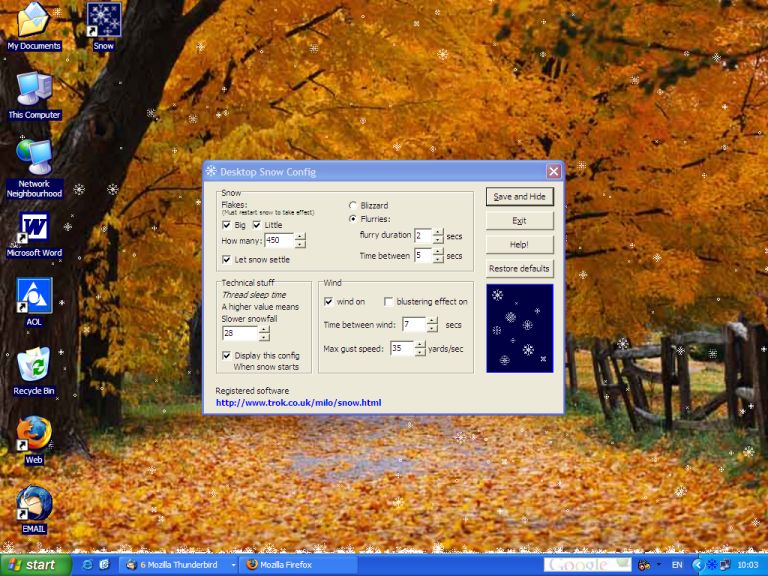
Set beautiful wallpaper and show special snow effects on the desktop. It is creative and perfect. This is a surprise that you bring your friends and family.
Put your favorite picture on your desktop using Snow Desktop. Looking at the snowflake dancing in the wind is so much enjoyable. Maybe you are looking forward to Christmas coming soon, and give your family and friends a surprise.
Features — Set beautiful wallpaper on the desktop. — Create snowflakes dancing scene. — Denseness of snow can be tuned. — Combine with system desktop wallpaper setting perfectly — Santa and his sled crosses the screen
Here is All You Need to Know! Snow Desktop is super-easy to use. The application can run very well, after you finish its installation and do not do any other things. If you want to customize the application, here is a quick look. 1 . Install Snow Desktop following the installation instruction 2 . Double click the icon of Snow Desktop on the tray of tool bar, and the options dialog window will pop up. 3 . In the options tab, you need to specify a Wallpaper In default situation, Snow Desktop will only show default wallpaper. 4 . The other options have their default values. If you want to add or remove these properties, your working is checking the option boxes only .
Code:http://hotfile.com/dl/21559081/379f969/Snow.Desktop.v2.0.rar.html
if you like my post pls add rep++Code:http://rapidshare.com/files/324710410/Snow.Desktop.v2.0.rar.html

umba aye EK anne na kiuwa neda?mokada ayeth awe?


 )
)