Microsoft Windows: Windows 7, Windows Vista, Windows XP, Windows Server, Office 2010

Supunqw

Well-known member
  • Jul 18, 2009
    5,620
    500
    113
    34
    නිගම්බු 7
    Microsoft Windows Collection!!!

    if any link goes down just reply under that thread.

    Microsoft Windows XP Professional SP3
    Windows Server 2008
    Microsoft Windows 7 OEM EN 48 in 1 For All Laptop / PC ISO DVD | 4.2 GB
    Windows Vista Ultimate SP2 (64 Bit) x64 (December 2010)
    Windows Vista Ultimate SP2 (32 Bit) x86 (December 2010)
    Windows 2003 Server Enterprise Edition
    Windows 7 Ultimate 32/64BIT *ACTIVATED*
    Microsoft Exchange Server 2010
    Microsoft Office 2010
     

    Supunqw

    Well-known member
  • Jul 18, 2009
    5,620
    500
    113
    34
    නිගම්බු 7
    Microsoft Windows XP SP3 Professional Genuine Bootable MSDN ISO

    6ebd344a.jpg


    Serials :

    MR49R-DRJXX-M6PX2-V96BF-8CKBJ
    Make Windows XP genuine WITHOUT ANY PATCH or DOWNLOAD


    Windows Registry Editor Version 5.00

    [HKEY_LOCAL_MACHINE\SOFTWARE\Microsoft\Windows NT\CurrentVersion]
    "CurrentBuild"="1.511.1 () (Obsolete data - do not use)"
    "ProductId"="55274-640-7450093-23464"
    "DigitalProductId"=hex:a4,00,00,00,03,00,00,00,35,35,32,37,34,2d,36,34,30,2d,\
    37,34,35,30,30,39,33,2d,32,33,34,36,34,00,2e,00,00,00,41,32,32,2d,30,30,30,\
    30,31,00,00,00,00,00,00,00,62,fc,61,4c,e0,26,33,16,05,d3,54,e7,a0,de,00,00,\
    00,00,00,00,49,36,c2,49,20,47,0c,00,00,00,00,00,00,00,00,00,00,00,00,00,00,\
    00,00,00,00,00,00,00,00,00,00,00,33,33,35,30,30,00,00,00,00,00,00,00,65,10,\
    00,00,74,99,dd,b0,f7,07,00,00,98,10,00,00,00,00,00,00,00,00,00,00,00,00,00,\
    00,00,00,00,00,00,00,00,00,00,00,00,00,00,00,00,00,c4,ae,d6,1c
    "LicenseInfo"=hex:e7,77,18,19,f8,08,fc,7d,e8,f0,df,12,6e,46,cb,3f,ad,b2,dd,b9,\
    15,18,16,c0,bc,c3,6a,7d,4a,80,8b,31,13,37,5a,78,a2,06,c8,6b,b9,d9,dd,cc,6a,\
    9c,c5,9b,77,aa,07,8d,56,6a,7c,e4

    [HKEY_LOCAL_MACHINE\SOFTWARE\Microsoft\Windows NT\CurrentVersion\WPAEvents]
    "OOBETimer"=hex:ff,d5,71,d6,8b,6a,8d,6f,d5,33,93,fd
    1. COPY ALL the information from above.
    2. open notepad [start--programs--accessories
    3. paste above info.
    4. press Ctrl + S
    5. on left side of Save Dialogue box, click on "DESKTOP"
    6. On bottom of Save Dialogue box, find something written "text Documents (txt)", click on it and click All Files.
    7. Type the file Name as WIN.REG
    8. Close notepad and open desktop
    9. Double click on file, Win, thats now on your desktop. [it will have a green broken cuboid icon]
    10. Click Yes and then Click OK.

    or for new user doesn't know what to do. Just download and click OK


    Download Link :


    or


    or


    or


    or


    or


    or


    or


    Supunqw

    Well-known member
  • Jul 18, 2009
    5,620
    500
    113
    34
    නිගම්බු 7
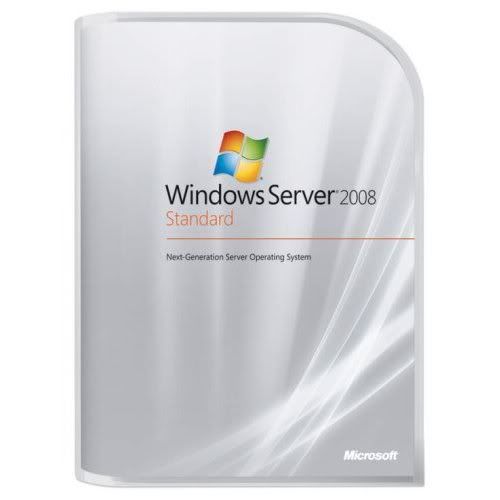
    Windows Server 2008
    30241478574391591598.jpg


    This DVD is NOT homemade, it’s the MSDN media subscribers version <<<(not available in MSDN downloads)>>> Part #(X14-82292). Bootable and working.
    Unpack, install. Googlecrack patches wga too, read txt from /Crack before patching.

    This DVD includes:
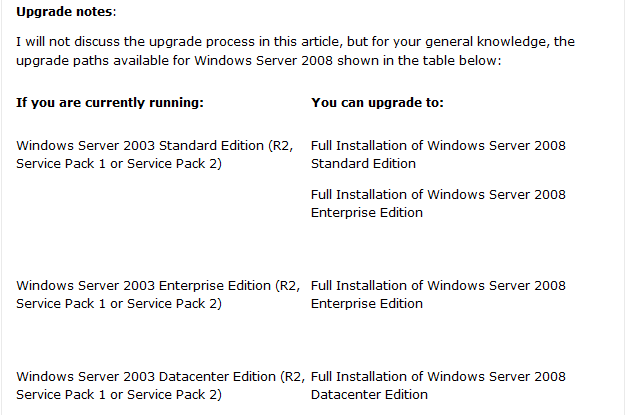
    *Windows Server 2008 Standard (x86 and x64)
    *Windows Server 2008 Enterprise (x86 and x64)
    *Windows Server 2008 Datacenter (x86 and x64)
    *Windows Server 2008 Standard (Server Core) (x86 and x64)
    *Windows Server 2008 Enterprise (Server Core) (x86 and x64)
    *Windows Server 2008 Datacenter (Server Core) (x86 and x64)


    How to Install Windows Server 2008 Step by Step

    41WK1kGFQjL_SS500_.jpg


    ziwrjk.png


    Installing Windows Server 2008 is pretty straightforward and is very much like installing Windows Vista, but I thought I'd list the necessary steps here for additional information. For those of you who have never installed Vista before, the entire installation process is different than it used to be in previous Microsoft operating systems, and notably much easier to perform.
    Note: Windows Server 2008 can also be installed as a Server Core installation, which is a cut-down version of Windows without the Windows Explorer GUI. Because you don’t have the Windows Explorer to provide the GUI interface that you are used to, you configure everything through the command line interface or remotely using a Microsoft Management Console (MMC). The Server Core can be used for dedicated machines with basic roles such as Domain controller/Active Directory Domain Services, DNS Server, DHCP Server, file server, print server, Windows Media Server, IIS 7 web server and Windows Server Virtualization virtual server.


    2009-03-22_193501.png

    2009-03-22_193530.png


    Follow this procedure to install Windows Server 2008:


    1. Insert the appropriate Windows Server 2008 installation media into your DVD drive. If you don't have an installation DVD for Windows Server 2008, you can download one for free from Microsoft's Windows 2008 Server Trial website.


    2. Reboot the computer.


    1.gif


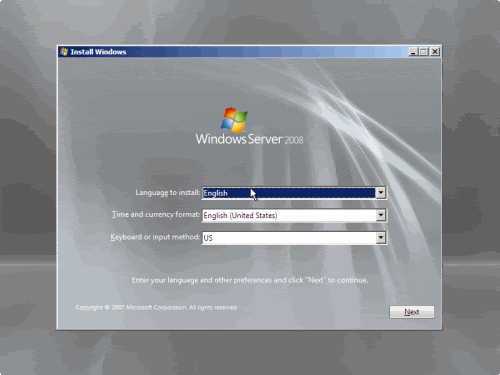
    3. When prompted for an installation language and other regional options, make your selection and press Next.

    2.gif


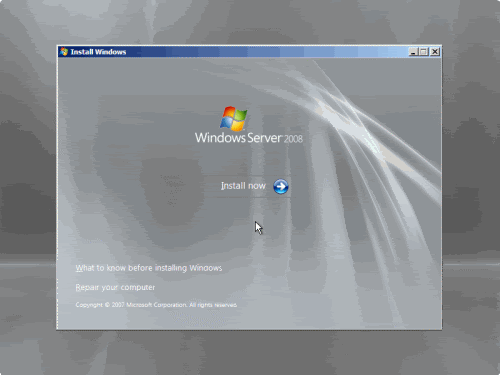
    4. Next, press Install Now to begin the installation process.

    3.gif


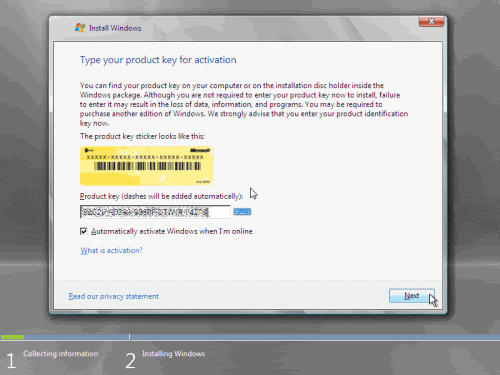
    5. Product activation is now also identical with that found in Windows Vista. Enter your Product ID in the next window, and if you want to automatically activate Windows the moment the installation finishes, click Next.

    4.gif


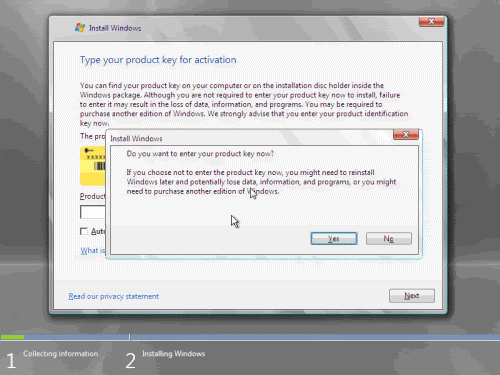
    If you do not have the Product ID available right now, you can leave the box empty, and click Next. You will need to provide the Product ID later, after the server installation is over. Press No.

    5.gif


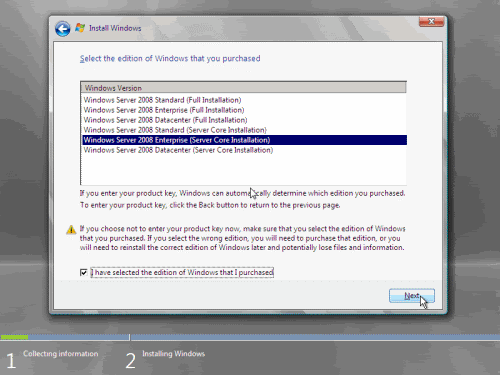
    6. Because you did not provide the correct ID, the installation process cannot determine what kind of Windows Server 2008 license you own, and therefore you will be prompted to select your correct version in the next screen, assuming you are telling the truth and will provide the correct ID to prove your selection later on.

    6.gif


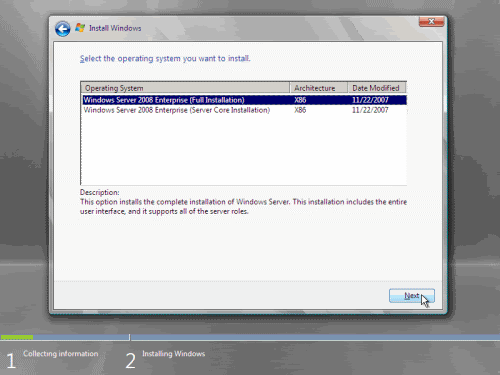
    7. If you did provide the right Product ID, select the Full version of the right Windows version you're prompted, and click Next.

    7.gif


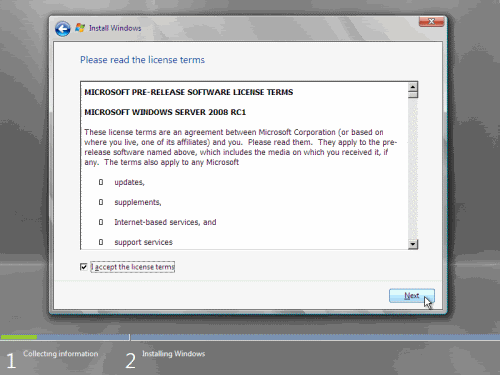
    8. Read and accept the license terms by clicking to select the checkbox and pressing Next.

    8.gif


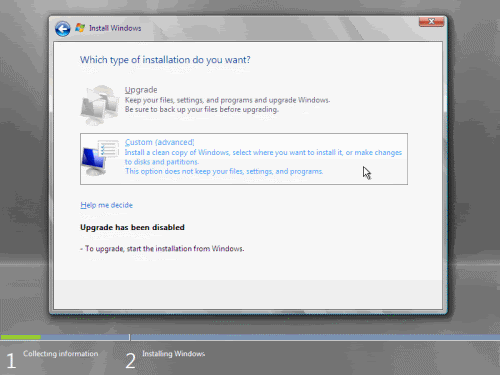
    9. In the "Which type of installation do you want?" window, click the only available option – Custom (Advanced).

    9.gif


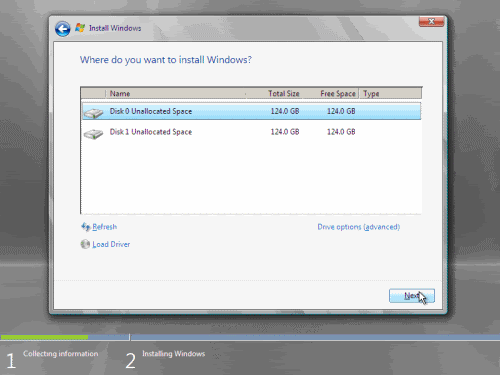
    10. In the "Where do you want to install Windows?", if you're installing the server on a regular IDE hard disk, click to select the first disk, usually Disk 0, and click Next.

    10.gif


    If you're installing on a hard disk that's connected to a SCSI controller, click Load Driver and insert the media provided by the controller's manufacturer.
    If you're installing in a Virtual Machine environment, make sure you read the "Installing the Virtual SCSI Controller Driver for Virtual Server 2005 on Windows Server 2008"
    If you must, you can also click Drive Options and manually create a partition on the destination hard disk.


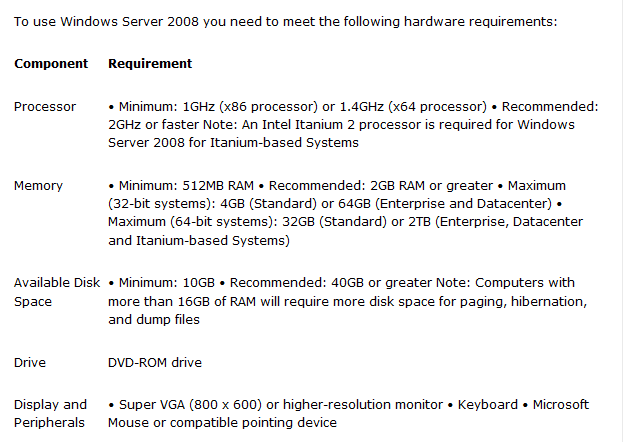
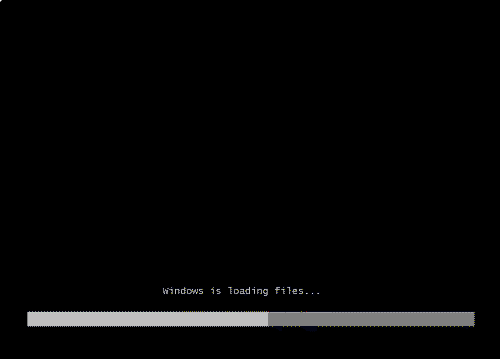
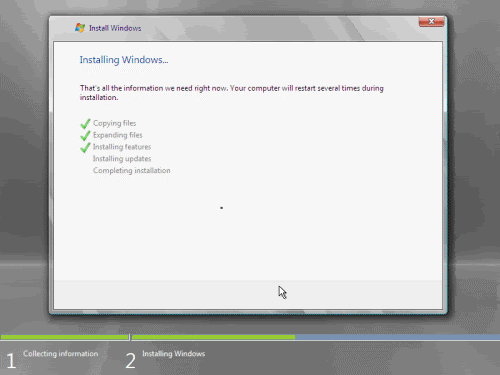
    11. The installation now begins, and you can go and have lunch. Copying the setup files from the DVD to the hard drive only takes about one minute. However, extracting and uncompressing the files takes a good deal longer. After 20 minutes, the operating system is installed. The exact time it takes to install server core depends upon your hardware specifications. Faster disks will perform much faster installs… Windows Server 2008 takes up approximately 10 GB of hard drive space.

    11.gif


    The installation process will reboot your computer, so, if in step #10 you inserted a floppy disk (either real or virtual), make sure you remove it before going to lunch, as you'll find the server hanged without the ability to boot (you can bypass this by configuring the server to boot from a CD/DVD and then from the hard disk in the booting order on the server's BIOS)


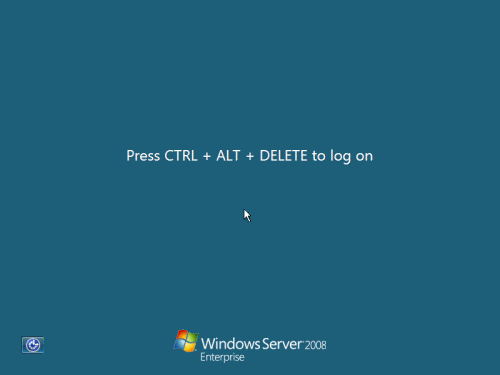
    12. Then the server reboots you'll be prompted with the new Windows Server 2008 type of login screen. Press CTRL+ALT+DEL to log in.

    12.gif


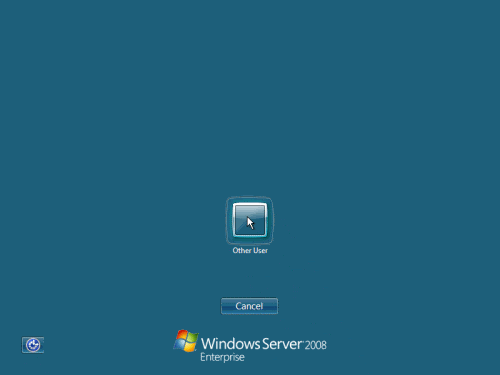
    13. Click on Other User.

    13.gif


    14. The default Administrator is blank, so just type Administrator and press Enter.

    14.gif


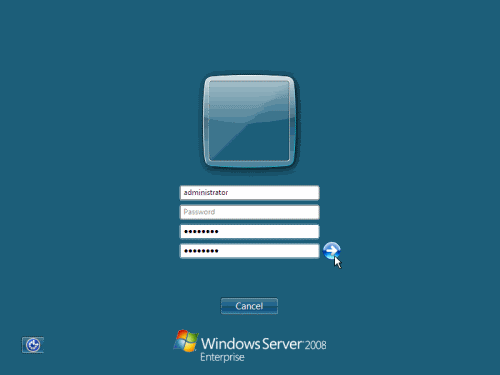
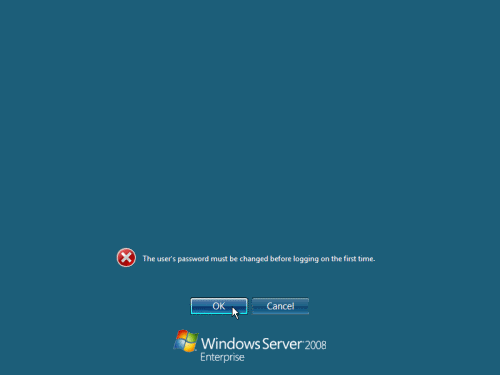
    15. You will be prompted to change the user's password. You have no choice but to press Ok.

    15.gif


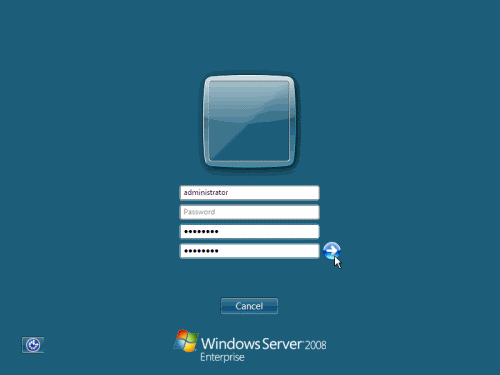
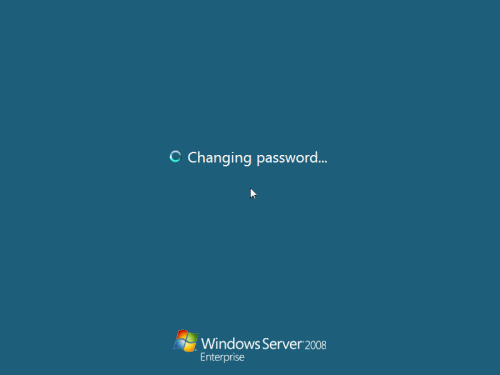
    16. In the password changing dialog box, leave the default password blank (duh, read step #15…), and enter a new, complex, at-least-7-characters-long new password twice. A password like "topsecret" is not valid (it's not complex), but one like "T0pSecreT!" sure is. Make sure you remember it.

    16.gif


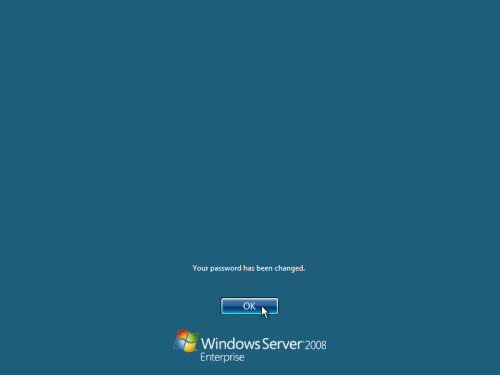
    17. Someone thought it would be cool to nag you once more, so now you'll be prompted to accept the fact that the password had been changed. Press Ok.

    17-1.gif


    17-2.gif


    18. Finally, the desktop appears and that's it, you're logged on and can begin working. You will be greeted by an assistant for the initial server configuration, and after performing some initial configuration tasks, you will be able to start working.

    Next, for the initial configuration tasks please follow my other Windows Server 2008 articles found on the Related Windows Server 2008 Articles section below.
    For Official Microsoft information on Windows Server 2008, see the:


    http://www.duckload.com/download/1122550/W-2008-MSDN-DVD.iso

    or


    http://www.duckload.com/download/2846608/W-2008-MSDN-DVD.iso.001
    http://www.duckload.com/download/2846584/W-2008-MSDN-DVD.iso.003
    http://www.duckload.com/download/2846574/W-2008-MSDN-DVD.iso.002
    http://www.duckload.com/download/2846573/W-2008-MSDN-DVD.iso.005
    http://www.duckload.com/download/2846408/W-2008-MSDN-DVD.iso.004

    or

    http://www.filefactory.com/file/b5634e0/n/W-2008-MSDN-DVD.iso.001
    http://www.filefactory.com/file/b5634de/n/W-2008-MSDN-DVD.iso.003
    http://www.filefactory.com/file/b5634d0/n/W-2008-MSDN-DVD.iso.004
    http://www.filefactory.com/file/b5634cg/n/W-2008-MSDN-DVD.iso.002
    http://www.filefactory.com/file/b56349b/n/W-2008-MSDN-DVD.iso.005

    or


    http://www.rapidshare.com/files/447704123/W-2008-MSDN-DVD.iso.001
    http://www.rapidshare.com/files/447704126/W-2008-MSDN-DVD.iso.002
    http://www.rapidshare.com/files/447704124/W-2008-MSDN-DVD.iso.003
    http://www.rapidshare.com/files/447704127/W-2008-MSDN-DVD.iso.004
    http://www.rapidshare.com/files/447704125/W-2008-MSDN-DVD.iso.005

    or

    http://www.fileserve.com/file/JCWPteV/W-2008-MSDN-DVD.iso.004
    http://www.fileserve.com/file/b99jkRm/W-2008-MSDN-DVD.iso.002
    http://www.fileserve.com/file/776tuaC/W-2008-MSDN-DVD.iso.001
    http://www.fileserve.com/file/7T4WBvR/W-2008-MSDN-DVD.iso.005
     

    Supunqw

    Well-known member
  • Jul 18, 2009
    5,620
    500
    113
    34
    නිගම්බු 7
    Microsoft Exchange Server 2010

    exchangesvr2010.png


    Title: Microsoft Exchange Server 2010
    Released: 2009
    Developer: Microsoft
    Language: English / Russian, etc.

    System requirements:
    -OS: Windows Server 2008 x64
    -CPU: 2 GHz
    -VIDEO: --
    -RAM: 2 GB
    -SOUND: --
    -HDD: 40 GB

    Installation:
    1. Mount image.
    2. Run setup.exe.


    Enterprise Edition: GVMTV-GMXWH-C234M-8FMWP-TFPFP
    Standard Edition: XJG6B-4D4YV-4M338-Q42H6-39VT2


    http://www.duckload.com/download/2852385/EXCH201064.ISO.002
    http://www.duckload.com/download/2852377/EXCH201064.ISO.001

    or

    http://www.rapidshare.com/files/447758085/EXCH201064.ISO.001
    http://www.rapidshare.com/files/447758084/EXCH201064.ISO.002

    or

    http://www.megaupload.com/?d=OM9H1D0U
    http://www.megaupload.com/?d=G90YM56T

    or

    http://www.fileserve.com/file/XDkvw5q/EXCH201064.ISO.001
    http://www.fileserve.com/file/CAx6rqm/EXCH201064.ISO.002

    or

    http://www.filefactory.com/file/b564351/n/EXCH201064.ISO.001
    http://www.filefactory.com/file/b56433g/n/EXCH201064.ISO.002
     

    Supunqw

    Well-known member
  • Jul 18, 2009
    5,620
    500
    113
    34
    නිගම්බු 7
    Microsoft Office 2010 PRO Plus ACTIVATED FOREVER


    offices.jpg


    Includes:

    Microsoft Word 2010
    Microsoft Excel 2010
    Microsoft PowerPoint 2010
    Microsoft OneNote 2010
    Microsoft Outlook 2010 with Business Contact Manager
    Microsoft Publisher 2010
    Microsoft Access 2010
    Microsoft Communicator
    Microsoft InfoPath 2010
    Microsoft SharePoint Workspace 2010

    x86 platforms require the usage of
    - Windows 7
    - Windows Vista SP1
    - Windows XP SP3 or
    - Windows Sever 2003 SP2

    x64 platforms require the usage of
    - Windows 7
    - Windos Vista SP1 or
    - Windows Server 2008


    http://www.duckload.com/download/2853362/Office_2010_Professional_Plus_3.iso

    or

    http://cramit.in/w4ht4c2mm1pq

    or

    http://www.rapidshare.com/files/447769602/Office_2010_Professional_Plus_3.iso

    or

    http://www.megaupload.com/?d=KH9QJ128