

Latest ads
-
 🛡️ Kaspersky Antivirus – 1 Year / 1 Device | Rs. 2,300 | Only 9 Left
- KSPathirana
- Updated:
-
Professional CCTV Installation Service
- Techguy231
- Updated:
-
I'll research & write an article - Rs. 2000 onwards
- Blogerwiki
- Updated:
-
 House Plan
- lenura
- Updated:
-
 iphone x used
- AssassiN1
- Updated:
You are using an out of date browser. It may not display this or other websites correctly.
You should upgrade or use an alternative browser.
You should upgrade or use an alternative browser.


Your Uninstaller! 2008 PRO v6.1.1229

Having trouble uninstalling a program?
Is your computer getting slower and slower? Get the best uninstaller software - Your Uninstaller! 2008 now to Make Your Computer Fast and Clean!
Your Uninstaller! 2008
uninstaller software is the industry's leading uninstaller. It comes with SmartUninstall™ which helps you completely remove applications.
Overview
Your Uninstaller! uninstaller software is the industry's leading uninstaller software. It's the world's 1st smart Drag&Uninstall™ uninstaller software under the Windows platform, works on all Windows versions including Windows Vista/XP/2000/ME/98/95/2003. It's as easy as using the recycle bin. Imagine! Just a drag-drop and the program you don't want will disappear from your computer-- as well as everything the unwanted program brings! Your Uninstaller! is a user-friendly way of removing unneeded applications on your computer. It can even remove some annoying spywares!
Key features
* "[PRO]" means this feature is only available in Pro version of Your Uninstaller!.
* Completely remove any application installed.
* Deep scan of registry and entire disk for unused registry entries and files. [PRO]
* Remove programs that could not be removed by Add/Remove Program. [PRO]
* Uninstall screen savers. [PRO]
* Remove internet surfing traces. [PRO]
* Backup and restore registry.
* Registration key management.
* Built-in Disk Cleaner helps you find and remove unnecessary files on your disk to save space and make computer faster! [PRO]
* Built-in IE Context Menu Cleaner, cleans the context menu of Internet Explorer. [PRO]
* Built-in Startup Manager, take full control of Window startups. [PRO]
* Fix invalid desktop shortcuts and start menu shortcuts.
* Get the applications detail info even if it hide itself in deep directory, especially useful for finding out "Spy" applications. [PRO]
* Backup/restore installed-applications information.
* Uninstall with SINGLE drag-drop! Just drop a file on Your Uninstaller! icon on the desktop to see what happens! [PRO]
* List installed applications with appropriate icons(same as you see in the Start Menu), you can easily find the application you want to uninstall.
* Powerful search feature allows you quickly find the program you are about to uninstall.
* Automatic detection of invalid installations and removing them with one click.
* Force removal of uninstall related entries in the registry(care to use!). [PRO]
* Lighting speed at startup, 5-10 times faster than Add/Remove Program of Windows XP!
* Export programs list to file or printer.
* More ...
How does it work?
Perhaps you are wondering how Your Uninstaller! uninstaller software completely removes applications so quickly. As you know, there are many installers in the world, such as InstallShield, Wise Installer, Microsoft Installer and many others. Most applications are built using these installers. Each installer has a unique install database, which makes it difficult to find all the changes programs' make to your computer. That's why other uninstallers can only uninstall part of an application-leaving some files and registry keys. To solve this problem, Your Uninstaller! uses it's unique technique: SmartUninstall™. SmartUninstall™ has a database containing information about all installers on the market; so when it uninstalls a program, it automatically detects which installer the application used, then it simply uninstalls the application properly. That's the reason Your Uninstaller! can detect and completely remove all the programs and icons on your computer.
Sounds complex? It's not! All the steps used by Your Uninstaller! are done with simple clicks. You won't even notice the analysis process.
Completely Uninstall
Your Uninstaller! uninstaller software completely takes the place of Windows Add/Remove program, while offering you many more features. Your Uninstaller can list "hidden" programs that you can't view using the Windows Add/Remove program. The standard Add/Remove program often can't uninstall applications completely-leaving broken registry keys and unused files on the hard disk. Big registries and large numbers of unnecessary files make system slow. Your Uninstaller! clears broken keys and files in seconds using SmartUninstall™!
Fast and User-Friendly
Your Uninstaller! uninstaller software starts 500-1000% times faster than Windows Add/Remove program. It also appropriately loads all applications and icons, so you can easily find the programs you wish to uninstall. Your Uninstaller! also contains a handy search function.
Easy to use
Your Uninstaller! automatically detects broken registry keys from you Add/Remove list, and clears them entirely with your permission. Your Uninstaller! can also detect unused files left by previous uninstalls - it will prompt you before it completely the deletes these files. Even a single drag-drop performs an uninstall process! All Your Uninstaller! processes come with step-by-step instructions and can be performed with a few simple clicks or drag-drops.
Find the spies..
Your Uninstaller! also contains an internal Startup Organizer that safely removes or hides unwanted auto-run applications. This program is very useful for finding spy programs. The Startup Organizer can also search all possible startup locations; it then lists these applications and their details for you. You can even add your own auto-runners into startup folders, your registry, etc.
Remember to use Your Uninstaller! weekly to Make your PC Fast and Clean !!
DOWNLOAD
PWD-- www.gigawarez.com

Having trouble uninstalling a program?
Is your computer getting slower and slower? Get the best uninstaller software - Your Uninstaller! 2008 now to Make Your Computer Fast and Clean!
Your Uninstaller! 2008
uninstaller software is the industry's leading uninstaller. It comes with SmartUninstall™ which helps you completely remove applications.
Overview
Your Uninstaller! uninstaller software is the industry's leading uninstaller software. It's the world's 1st smart Drag&Uninstall™ uninstaller software under the Windows platform, works on all Windows versions including Windows Vista/XP/2000/ME/98/95/2003. It's as easy as using the recycle bin. Imagine! Just a drag-drop and the program you don't want will disappear from your computer-- as well as everything the unwanted program brings! Your Uninstaller! is a user-friendly way of removing unneeded applications on your computer. It can even remove some annoying spywares!
Key features
* "[PRO]" means this feature is only available in Pro version of Your Uninstaller!.
* Completely remove any application installed.
* Deep scan of registry and entire disk for unused registry entries and files. [PRO]
* Remove programs that could not be removed by Add/Remove Program. [PRO]
* Uninstall screen savers. [PRO]
* Remove internet surfing traces. [PRO]
* Backup and restore registry.
* Registration key management.
* Built-in Disk Cleaner helps you find and remove unnecessary files on your disk to save space and make computer faster! [PRO]
* Built-in IE Context Menu Cleaner, cleans the context menu of Internet Explorer. [PRO]
* Built-in Startup Manager, take full control of Window startups. [PRO]
* Fix invalid desktop shortcuts and start menu shortcuts.
* Get the applications detail info even if it hide itself in deep directory, especially useful for finding out "Spy" applications. [PRO]
* Backup/restore installed-applications information.
* Uninstall with SINGLE drag-drop! Just drop a file on Your Uninstaller! icon on the desktop to see what happens! [PRO]
* List installed applications with appropriate icons(same as you see in the Start Menu), you can easily find the application you want to uninstall.
* Powerful search feature allows you quickly find the program you are about to uninstall.
* Automatic detection of invalid installations and removing them with one click.
* Force removal of uninstall related entries in the registry(care to use!). [PRO]
* Lighting speed at startup, 5-10 times faster than Add/Remove Program of Windows XP!
* Export programs list to file or printer.
* More ...
How does it work?
Perhaps you are wondering how Your Uninstaller! uninstaller software completely removes applications so quickly. As you know, there are many installers in the world, such as InstallShield, Wise Installer, Microsoft Installer and many others. Most applications are built using these installers. Each installer has a unique install database, which makes it difficult to find all the changes programs' make to your computer. That's why other uninstallers can only uninstall part of an application-leaving some files and registry keys. To solve this problem, Your Uninstaller! uses it's unique technique: SmartUninstall™. SmartUninstall™ has a database containing information about all installers on the market; so when it uninstalls a program, it automatically detects which installer the application used, then it simply uninstalls the application properly. That's the reason Your Uninstaller! can detect and completely remove all the programs and icons on your computer.
Sounds complex? It's not! All the steps used by Your Uninstaller! are done with simple clicks. You won't even notice the analysis process.
Completely Uninstall
Your Uninstaller! uninstaller software completely takes the place of Windows Add/Remove program, while offering you many more features. Your Uninstaller can list "hidden" programs that you can't view using the Windows Add/Remove program. The standard Add/Remove program often can't uninstall applications completely-leaving broken registry keys and unused files on the hard disk. Big registries and large numbers of unnecessary files make system slow. Your Uninstaller! clears broken keys and files in seconds using SmartUninstall™!
Fast and User-Friendly
Your Uninstaller! uninstaller software starts 500-1000% times faster than Windows Add/Remove program. It also appropriately loads all applications and icons, so you can easily find the programs you wish to uninstall. Your Uninstaller! also contains a handy search function.
Easy to use
Your Uninstaller! automatically detects broken registry keys from you Add/Remove list, and clears them entirely with your permission. Your Uninstaller! can also detect unused files left by previous uninstalls - it will prompt you before it completely the deletes these files. Even a single drag-drop performs an uninstall process! All Your Uninstaller! processes come with step-by-step instructions and can be performed with a few simple clicks or drag-drops.
Find the spies..
Your Uninstaller! also contains an internal Startup Organizer that safely removes or hides unwanted auto-run applications. This program is very useful for finding spy programs. The Startup Organizer can also search all possible startup locations; it then lists these applications and their details for you. You can even add your own auto-runners into startup folders, your registry, etc.
Remember to use Your Uninstaller! weekly to Make your PC Fast and Clean !!
DOWNLOAD
PWD-- www.gigawarez.com
Ahead NeroLinux v3.0.2.1 Linux

Nero Linux 3 is the definitive burning application for the Linux operating system. Based on the award-winning current Nero Burning ROM platform, Nero Linux 3 is the most powerful and versatile burning application available for Linux, and the only application to offer Blu-ray Disc and HD DVD data burning support.
Experience the most comprehensive burning application for the Linux OS
* Enjoy the same functionalities as in the newest version of Nero Burning ROM
* Burn data using any optical disc format, including CD, DVD, Blu-ray Disc, and HD DVD
* Ensure a quick and easy setup using SmartDetect automatic drive support
* Manage your music collection with integrated audio capabilities such as high speed digital audio extraction and FreeDB, which automatically searches for disc information over the Internet.
Go and say to your mom what onlce accatone brought to you for Christmas. You see even after you chose to make your life with a Linux, we still love you.
DOWNLOAD
PWD--www.gigawarez.com

Nero Linux 3 is the definitive burning application for the Linux operating system. Based on the award-winning current Nero Burning ROM platform, Nero Linux 3 is the most powerful and versatile burning application available for Linux, and the only application to offer Blu-ray Disc and HD DVD data burning support.
Experience the most comprehensive burning application for the Linux OS
* Enjoy the same functionalities as in the newest version of Nero Burning ROM
* Burn data using any optical disc format, including CD, DVD, Blu-ray Disc, and HD DVD
* Ensure a quick and easy setup using SmartDetect automatic drive support
* Manage your music collection with integrated audio capabilities such as high speed digital audio extraction and FreeDB, which automatically searches for disc information over the Internet.
Go and say to your mom what onlce accatone brought to you for Christmas. You see even after you chose to make your life with a Linux, we still love you.
DOWNLOAD
PWD--www.gigawarez.com


USB Key Locker v1.2.2

ID USB Lock is a security program meant to protect your computer from unauthorized users. It denies access, by providing a security block-screen which can be unblocked with the USB stick where you have the generated by the program. Main features includes: generating protection- for each USB stick, blocking PC by simply pressing CTR+L, activating a block-screen after locking the PC, denies access to unauthorized users.
DOWNLOAD

ID USB Lock is a security program meant to protect your computer from unauthorized users. It denies access, by providing a security block-screen which can be unblocked with the USB stick where you have the generated by the program. Main features includes: generating protection- for each USB stick, blocking PC by simply pressing CTR+L, activating a block-screen after locking the PC, denies access to unauthorized users.
DOWNLOAD
Arc DVD Copy 1.5.19

Arc DVD COPY provides a fast and easy way to backup your precious DVDs to DVD-R/RW, DVD+R/RW or hard drive. With just a few clicks you get completely the same as the DVD movie you bought that can be playback on both PC & Home DVD player in 30 minutes. Arc DVD Copy is a software that can make copies of DVDs for backup. Featuring a user-friendly interface that requires no learning process, Arc DVD COPY appeals not only to novices, but also to advanced users You get completely the same as the DVD movie you bought .

Arc DVD COPY provides a fast and easy way to backup your precious DVDs to DVD-R/RW, DVD+R/RW or hard drive. With just a few clicks you get completely the same as the DVD movie you bought that can be playback on both PC & Home DVD player in 30 minutes. Arc DVD Copy is a software that can make copies of DVDs for backup. Featuring a user-friendly interface that requires no learning process, Arc DVD COPY appeals not only to novices, but also to advanced users You get completely the same as the DVD movie you bought .
Here are some key features of "Arc DVD Copy":
· Copy a DVD Movie In 20-40 Minutes!
· Shrink a dual-layer (D9) movie onto one D5 with all the Special Features, Menus, Subtitles & Languages.
· 1:1 D9 to D9 and D5 to D5 copy without distortion.
· Copy main movie only,remove unwanted Subtitles/Audios to increase quality.
· Split DVD-9 into two blanks with all the Special Features,Menus, Subtitles & Languages.
· Copy DVD to hard drive and burn DVD disc from hard drive.
· Copy episode DVDs(TV shows on DVD).
· Remove region protection(Region-free) and Macrovision Protection.
· Copy CSS(Content Scrambling System) protected DVD movies.
DOWNLOAD
MIRROR
· Copy a DVD Movie In 20-40 Minutes!
· Shrink a dual-layer (D9) movie onto one D5 with all the Special Features, Menus, Subtitles & Languages.
· 1:1 D9 to D9 and D5 to D5 copy without distortion.
· Copy main movie only,remove unwanted Subtitles/Audios to increase quality.
· Split DVD-9 into two blanks with all the Special Features,Menus, Subtitles & Languages.
· Copy DVD to hard drive and burn DVD disc from hard drive.
· Copy episode DVDs(TV shows on DVD).
· Remove region protection(Region-free) and Macrovision Protection.
· Copy CSS(Content Scrambling System) protected DVD movies.
DOWNLOAD
MIRROR
Microsoft Windows Vista Activator 2007

Windows Vista Activator 2007
Microsoft Windows Vista Activator 2007
Release Date : 6 March, 2007 , Supplier : Rajpreet Singh
Description : Activate Windows Vista Completely
Computing : x86 Only
Windows Version to Activate :
1. Microsoft Windows Vista Ultimate Edition
2. Microsoft Windows Vista Business Edition
3. Microsoft Windows Vista Starter Edition
4. Microsoft Windows Vista Enterprises Edition
5. Microsoft Windows Vista Home Basic Edition
6. Microsoft Windows Vista Home Premium Edition
How to Activate Windows Vista :
1. Extract the archive
2. Run "windows vista 2007.exe"
3. Enter "User Account" Name and "Computer Name"
4. Enter the CD-KEY you used while installing your vista.
5. This will take a minute to activate windows vista.
NOTE : In instruction (4). Leave the box blank if you have installed vista without cd-key.
DOWNLOAD
PWD--www.gigawarez.com

Windows Vista Activator 2007
Microsoft Windows Vista Activator 2007
Release Date : 6 March, 2007 , Supplier : Rajpreet Singh
Description : Activate Windows Vista Completely
Computing : x86 Only
Windows Version to Activate :
1. Microsoft Windows Vista Ultimate Edition
2. Microsoft Windows Vista Business Edition
3. Microsoft Windows Vista Starter Edition
4. Microsoft Windows Vista Enterprises Edition
5. Microsoft Windows Vista Home Basic Edition
6. Microsoft Windows Vista Home Premium Edition
How to Activate Windows Vista :
1. Extract the archive
2. Run "windows vista 2007.exe"
3. Enter "User Account" Name and "Computer Name"
4. Enter the CD-KEY you used while installing your vista.
5. This will take a minute to activate windows vista.
NOTE : In instruction (4). Leave the box blank if you have installed vista without cd-key.
DOWNLOAD
PWD--www.gigawarez.com
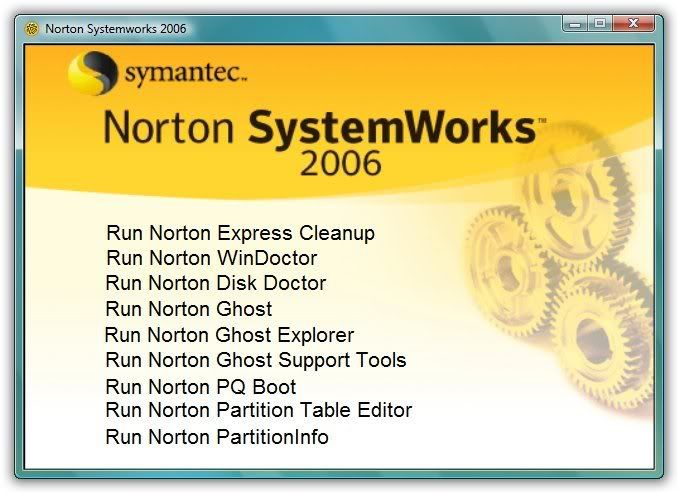
Norton SystemWorks 2006 Portable (2007 Hoyala danakan meken sanasenna !!)

Diskeeper 2008 12.0 Pro Premier
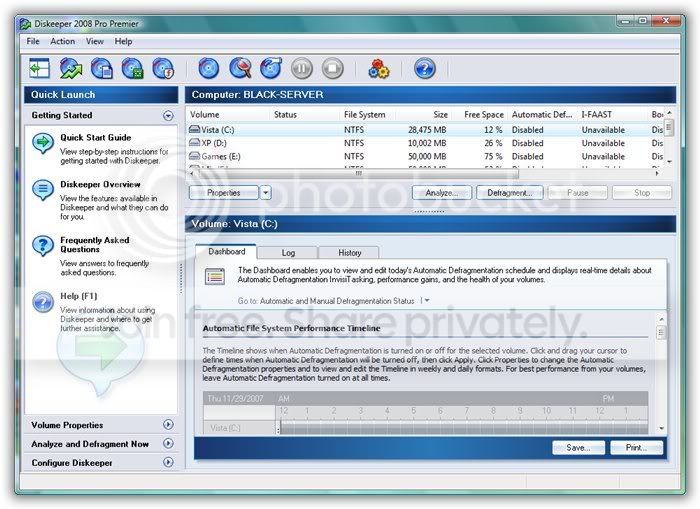
Diskeeper is a fully automatic defrgmentation engine that replaces the standard Windows defragmenter which runs only manually, consumes high resources and requires full administrator privileges to operate. Diskeeper constantly monitors and maintains your systems maximum performance, using the fastest defrag engine. According to the National Software Testing Lab (NSTL) proven 300-500% faster and far more thorough than Windows built-in defragmenters. The program includes a unique `Set It and Forget It` functionality with Smart Scheduling, that, once set, runs invisibly and fully automatic in the background. In addition, the Frag Guard feature helps prevent fragmentation in your most critical system files. Additional features include boot-time defrag, priority settings as well as the ability to defrag multiple disks automatically and simultaneously while system is in use.
DOWNLOAD
PWD--www.egydown.com
Diskeeper is a fully automatic defrgmentation engine that replaces the standard Windows defragmenter which runs only manually, consumes high resources and requires full administrator privileges to operate. Diskeeper constantly monitors and maintains your systems maximum performance, using the fastest defrag engine. According to the National Software Testing Lab (NSTL) proven 300-500% faster and far more thorough than Windows built-in defragmenters. The program includes a unique `Set It and Forget It` functionality with Smart Scheduling, that, once set, runs invisibly and fully automatic in the background. In addition, the Frag Guard feature helps prevent fragmentation in your most critical system files. Additional features include boot-time defrag, priority settings as well as the ability to defrag multiple disks automatically and simultaneously while system is in use.
DOWNLOAD
PWD--www.egydown.com

Easy Drive Lock 4.0
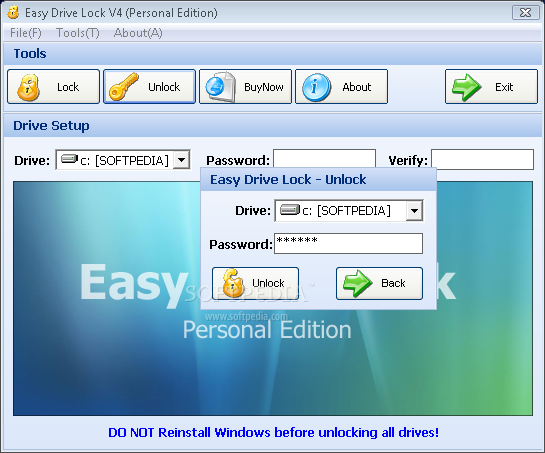
Easy Drive Lock is a fast drive lock & green software that can lock any Harddisk drives in seconds. Without your password,nobody can access files on locked drive. All of your data will be protected even if on windows safe mode. This guarantees the program will never lose your data. Download and try it to make sure your files is secure.
DOWNLOAD
PWD--www.egydown.com
Easy Drive Lock is a fast drive lock & green software that can lock any Harddisk drives in seconds. Without your password,nobody can access files on locked drive. All of your data will be protected even if on windows safe mode. This guarantees the program will never lose your data. Download and try it to make sure your files is secure.
DOWNLOAD
PWD--www.egydown.com
Lock My PC v4.5.1.671

Lock My PC is an easy in use, powerful and compact tool to lock your computer from unauthorized use. When you leave your computer unattended, the program disables the hot keys (including Ctrl+Alt+Del), mouse, locks CD/DVD ROM doors and displays a lock screen. Nobody can access your system without providing the correct unlock password.
Features and benefits:
- Quick and safe computer lock by hot key, or mouse click
- Autolock when computer is idle
- Correct Ctrl+Alt+Del lock
- Bulletproof startup lock (couldn't be bypassed in safe mode)
- Different installation mode - setup for home or corporate use
- CD/DVD-ROM doors lock
- Multi-user support
- Multimonitor support
- Auto turnoff when computer is locked for a long time
- Blind password option
- Stealth mode
- Windows XP x64 compatibility
- Custom lock screens
- Cycling lock screen images
- Screen saving effects
- Lock screen transparency - you can view movies under the locked screen
- Password protected settings, quit and uninstall
- Command line options
- and many more
Another benefits of Lock My PC in comare with Windows lock feature:
- Custom lock screens and transparent lock screen options - your computer can be used as a presentation machine - the screen displays pictures or video, but nobody can touch your computer;
- Secure Lock before Windows welcome/logon screen;
- Displaying unsuccesfull unlock attempts - you will be notified if anyone tried to unlock your computer;
- If Lock My PC is used in muilti-user mode, a supervisor can unlock the computer without closing user session;
- You can lock CD/DVD ROM doors along with the desktop, keyboard and mouse - this can prevent CD media from being stolen while you are out;
- Command line support allows you to use Lock My PC in Internet kiosks.
DOWNLOAD
PWD--www.egydown.com

Lock My PC is an easy in use, powerful and compact tool to lock your computer from unauthorized use. When you leave your computer unattended, the program disables the hot keys (including Ctrl+Alt+Del), mouse, locks CD/DVD ROM doors and displays a lock screen. Nobody can access your system without providing the correct unlock password.
Features and benefits:
- Quick and safe computer lock by hot key, or mouse click
- Autolock when computer is idle
- Correct Ctrl+Alt+Del lock
- Bulletproof startup lock (couldn't be bypassed in safe mode)
- Different installation mode - setup for home or corporate use
- CD/DVD-ROM doors lock
- Multi-user support
- Multimonitor support
- Auto turnoff when computer is locked for a long time
- Blind password option
- Stealth mode
- Windows XP x64 compatibility
- Custom lock screens
- Cycling lock screen images
- Screen saving effects
- Lock screen transparency - you can view movies under the locked screen
- Password protected settings, quit and uninstall
- Command line options
- and many more
Another benefits of Lock My PC in comare with Windows lock feature:
- Custom lock screens and transparent lock screen options - your computer can be used as a presentation machine - the screen displays pictures or video, but nobody can touch your computer;
- Secure Lock before Windows welcome/logon screen;
- Displaying unsuccesfull unlock attempts - you will be notified if anyone tried to unlock your computer;
- If Lock My PC is used in muilti-user mode, a supervisor can unlock the computer without closing user session;
- You can lock CD/DVD ROM doors along with the desktop, keyboard and mouse - this can prevent CD media from being stolen while you are out;
- Command line support allows you to use Lock My PC in Internet kiosks.
DOWNLOAD
PWD--www.egydown.com
WinZip PRO 11.0
WinZip Pro v11.0.7313
WinZip, the original and most popular compression utility for Windows, is a powerful and easy-to-use tool that quickly zips and unzips your files to conserve disk space and greatly reduce e-mail transmission time. WinZip 11.0 is available as Standard or Pro.
The new WinZip 11.0 offers a thumbnail image view and automatic compression selection, plus improved compression for audio files (WAV) and the ability to open .BZ2 and .RAR files.
WinZip 11.0 Pro adds expanded data backup functionality and includes a new internal image viewer that allows you to browse through multiple images within the Zip file.
Features:
* Burn New and Existing Zip Files Directly to CD or DVD
* FTP Upload New and Existing Zip Files
* Email Zip File and Logs on WinZip Job Completion
* Run WinZip Jobs From a History List of Recent Jobs
* View Full-Size Compressed Images Directly From Your Zip File
* Predefined Data Backup Jobs
* Create Custom, Automated Zipping Tasks (WinZip Jobs)
* Scheduling Capabilities for Running Zip Jobs
* Command Line Support (Separate Download)
* Display Thumbnails in WinZip's Explorer Style View
* Best Compression Chooses Compression Method Based on File Type
* Improved Compression for Audio Files (WAV)
* Extract from .BZ2 and .RAR Files
* Attachment Management Support
* Quick File Selection
* Automatic Update Checking
* Flexible Interface; Wizard and Classic
* Tight Integration with Windows
* Large Zip File Support
* 128- and 256-Bit AES Encryption
* E-mail Support (including one click Zip & E-mail)
* Split Zip File Capability
* Create Self-Extracting Archives
DOWNLOAD
PWD--www.egydown.com
WinZip Pro v11.0.7313
WinZip, the original and most popular compression utility for Windows, is a powerful and easy-to-use tool that quickly zips and unzips your files to conserve disk space and greatly reduce e-mail transmission time. WinZip 11.0 is available as Standard or Pro.
The new WinZip 11.0 offers a thumbnail image view and automatic compression selection, plus improved compression for audio files (WAV) and the ability to open .BZ2 and .RAR files.
WinZip 11.0 Pro adds expanded data backup functionality and includes a new internal image viewer that allows you to browse through multiple images within the Zip file.
Features:
* Burn New and Existing Zip Files Directly to CD or DVD
* FTP Upload New and Existing Zip Files
* Email Zip File and Logs on WinZip Job Completion
* Run WinZip Jobs From a History List of Recent Jobs
* View Full-Size Compressed Images Directly From Your Zip File
* Predefined Data Backup Jobs
* Create Custom, Automated Zipping Tasks (WinZip Jobs)
* Scheduling Capabilities for Running Zip Jobs
* Command Line Support (Separate Download)
* Display Thumbnails in WinZip's Explorer Style View
* Best Compression Chooses Compression Method Based on File Type
* Improved Compression for Audio Files (WAV)
* Extract from .BZ2 and .RAR Files
* Attachment Management Support
* Quick File Selection
* Automatic Update Checking
* Flexible Interface; Wizard and Classic
* Tight Integration with Windows
* Large Zip File Support
* 128- and 256-Bit AES Encryption
* E-mail Support (including one click Zip & E-mail)
* Split Zip File Capability
* Create Self-Extracting Archives
DOWNLOAD
PWD--www.egydown.com
Similar threads


- Replies
- 19
- Views
- 835


- Replies
- 6
- Views
- 177

- Replies
- 28
- Views
- 1K