New Software Collection 2008-2009

hekrock

Well-known member
  • Nov 23, 2006
    1,499
    31
    48
    Colombo
    GetData - Recover My Photos v 3.7.2.720

    recover-deleted-photos-1.jpg

    recover-deleted-photos-3.jpg

    Most digital cameras do not wipe digital pictures from your storage media when you delete images or use the format command. If your digital camera storage media is corrupt and you get the message "Media is not formatted would you like to format now?", lost picture recovery may still be possible. Recover My Photos searches your media at a low level to recover photos and display the deleted pictures.

    Recover My Photos works with many types of direct camera connections where your media card appears as a drive letter on your PC. If your camera is not displayed as a drive letter when connected to your PC you can use a digital camera card reader.

    Recover My Photos is fast and easy. No technical skill is required to recover deleted photos. It works for compact flash data recovery, smart media data recovery, Memory Stick data recovery, or other storage media including your PC hard drive.

    Program Features

    Recover deleted, JPEG, TIFF, BMP, CRW, NEF, RAW and more.

    Recover from SmartMedia, Compact Flash, Memory Stick, USB, hard drive and more.

    Recovers photo deletions and formatted media cards.

    Will also recover movie and sound files such as AVI, MPEG, MOV and WAV.

    Preview recovered digital photograph.

    Recovery is fast and simple 4 step process.

    Secure process: Does not write data to your storage media.

    System Requirements

    Operating System: Windows 9X/ME/200X/XP/2003
    RAM: 64 MB recommended
    Hard Disk: At least 6 MB of free disk space

    GetData - Recover My Photos v 3.7.2.720 -- 8.8mb


    http://rapidshare.com/files/162262502/Recover.My.Photos.v3.72.720.WinAll..rar
     

    hekrock

    Well-known member
  • Nov 23, 2006
    1,499
    31
    48
    Colombo
    GetData - Recover My iPod v1.6.4.349

    recover-my-ipod-screenshot1.jpg

    recover-my-ipod-screenshot2.jpg


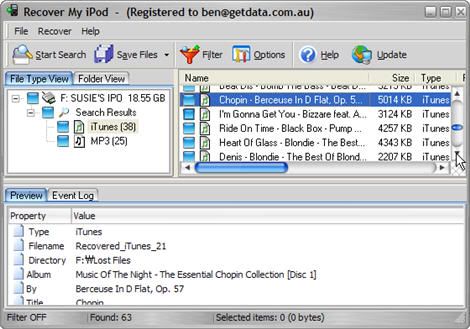
    Recover My iPod is iPod recovery software to recover deleted or lost iPod files. Simple to use, it can quickly recover your valuable lost iPod files.

    With Recover My iPod you can:

    Recover music, video and photos: .m4a, .mp3, .mov, quicktime and jpeg file types from your iPod.
    Supports all iPods including: iPod, shuffle, iPod Mini, Nano and other iPod devices.
    Recovers data after an iPod Reset or Restore.
    Recover from iPod "Drive Not Formatted" message or when your iPod is not recognized by your computer.
    Recover My iPod is risk free and will NOT change the contents of the iPod drive being searched.

    System Requirements

    Operating System: Windows 9X/ME/200X/XP/2003
    RAM: 64 MB recommended
    Hard Disk: At least 6 MB of free disk space
    The iPod Touch can not currently be recognized as a drive by Windows. This software does not support the iPod Touch.

    GetData - Recover My iPod v1.6.4.349 --11.4mb

    http://rapidshare.com/files/162261792/Recover.My.iPod.v1.6.4.349.WinAll.rar
     

    hekrock

    Well-known member
  • Nov 23, 2006
    1,499
    31
    48
    Colombo
    Identity Finder Professional v3.4.10.5

    IdentityFinderProfessionalEditio-1.jpg


    Right now, social security numbers, credit cards, bank accounts, passwords, and other highly sensitive personal information are sitting idly on your computer leaving you and your family exposed to identity theft.

    You may not be able to find all the places it's hidden, but hackers and thieves know where to look. They have developed viruses, spyware, back doors and other malicious code to steal this information.

    Anti-virus, anti-spyware, and anti-spam don't offer in-depth searching to protect you and your family.

    Identity Finder goes deep, searching the computer to locate and secure potentially dangerous data - even when you don't know it exists.

    File size:24725 KB
    Pc requirements: Windows 2000/XP/Vista


    http://rapidshare.com/files/160926589/Identity.Finder.Pro.3.4.10.5.rar

    PW
    http://xenu.ws
     

    hekrock

    Well-known member
  • Nov 23, 2006
    1,499
    31
    48
    Colombo
    Avira AntiVir Premium 8.1.0.367 (+key)! BEST Antivirus ever!

    24wcb3t.jpg


    Premium Protection:

    * AntiVir
    * AntiAd/Spyware
    * AntiPhishing
    * AntiRootkit
    * AntiDrive-by
    * AntiBot
    * EmailScanner
    * WebGuard
    * RescueSystem

    Premium functions:

    • Protection against viruses, worms and Trojans
    • Protection against expensive dialers
    • Detects and deletes rootkits
    • NEW: Raised scan speed
    • NEW: Redesigned visual appearance
    • Protection against phishing
    • Protection against spyware
    • Special protection against email viruses (POP 3)
    • Fast updates through Premium Server
    • 5 Euro donation to Auerbach Foundation
    • Protection against annoying adware
    • NEW: System to create a Rescue-CD

    System requirements:
    * Computer: Pentium or higher, at least 133 MHz
    * Operating system: Windows 2000 / Windows XP/ Windows XP x64 edition / Windows Vista 32 Bit
    * RAM: 128 MB RAM for Windows 2000 / 196 MB RAM for Windows XP
    * 40 MB free memory on the hard disk (more if quarantine is used)
    * 100 MB temporary memory on the hard disk
    * 40 MB of free main memory
    * Administrator rights are required for the installation

    New: Windows Vista support (32bit only).

    This is probably the best antivirus out there because it is light on ressources and is effective


    http://rapidshare.com/files/155345540/Avira_AntiVir_Premium_8.1.0.367.rar
     

    hekrock

    Well-known member
  • Nov 23, 2006
    1,499
    31
    48
    Colombo
    Download Accelerator Plus 8.6 Premium

    95kz8rbl3wl29nbjjn1a.jpg


    Download Accelerator Plus enables you to pause and resume downloads, and to recover from a dropped Internet connection.

    In addition, DAP searches for mirrors and implements the downloads from the best or most responsive mirrors. It is configured by default to automatically Integrate into your Explorer or Netscape browser when it is installed, and to self-activate each time a download is performed.

    No further configuration or action is required on your part - simply use your browser to access the desired site, click on the download file, and respond to the self-explanatory DAP dialogs that appear.

    Advanced options enable you to tailor the operation and responses of the application to your needs. You can choose to trigger specific responses such as messages, queue update, closing the application, and disconnecting after the download is completed or is not available.

    DAP is fully integrated into the browser, providing the best possible performance from ANY Internet connection, broadband and narrowband (cable, DSL / ADSL, T1, dial-up etc.).

    DAP will allow you to benefit from a faster and more reliable download experience, optimize your download performance, and help you to recover interrupted downloads. DAP is available in two versions: a Free version (ads. supported) and a Premium version (with a richer set of features and no ads.).
    This download is marked as adware because it displays advertisement banners or other type of commercials while running.

    Download DAP & get SpeedBit Video Accelerator.
    More speed per connection.
    Resume broken downloads
    Preview files while you download
    Security checks by Webroot for every site and application you download!


    http://rapidshare.com/files/156296724/Download_Accelerator_Plus_8.6.7.1_Full.rar
     

    hekrock

    Well-known member
  • Nov 23, 2006
    1,499
    31
    48
    Colombo
    Trillian Pro 3.1.11.0 DateCode 100208

    TrillianPro.jpg


    6u8p1z7.png


    Trillian™ is a fully featured, stand-alone, skinnable chat client that supports AIM, ICQ, MSN, Yahoo Messenger, and IRC. It provides capabilities not possible with original network clients, while supporting standard features such as audio chat, file transfers, group chats, chat rooms, buddy icons, multiple simultaneous connections to the same network, server-side contact importing, typing notification, direct connection (AIM), proxy support, encrypted messaging (AIM/ICQ), SMS support, and privacy settings.

    Trillian provides unique functionality such as contact message history, a powerful skinning language, tabbed messaging, global status changes (set all networks away at once), Instant Lookup (automatic Wikipedia integration), contact alerts, an advanced automation system to trigger events based on anything happening in the client, docking, hundreds of emoticons, emotisounds, shell extensions for file transfers, and systray notifications.

    Features of Trillian Pro:

    * Unification
    * Basic Messaging
    * SecureIM
    * Privacy Settings
    * File Transfers
    * Direct Connections
    * Group Conferences
    * Display Pictures

    Video Chat

    * Real-time Video Chat
    * Video Filter Effects
    * Image Capture
    * Video Capture
    * Emotiblips™
    * Picture In Picture
    * Side By Side
    * Full Screen Video


    Audio Chat

    * Real-time Audio Chat
    * Quick Access To Input And Output Controls
    * Audio Muting
    * Emotiblips™


    TimeTravel

    * Pause Live Video And Audio
    * Rewind
    * Fast Forward
    * "Seek" Slider Bar
    * Record Live Video And Audio Clips
    * Capture Video Into Image Files


    Activity History

    * Timeline View
    * Summary View
    * Bookmarks
    * History Search
    * Assets


    Instant Lookup

    * Integrated Web Searching
    * Instant Lookup™


    Contact List

    * Status Panel
    * Notification Windows
    * Add Extra Information To Contact Tooltip
    * Rename Contacts
    * Explorer Integration (Drag Files To Contacts)
    * Icon View
    * Meta Contacts
    * Floating Contacts

    Message Window

    * Panels
    * Tabbed Chat Windows
    * Emoticons
    * Emotisounds
    * Timestamping
    * Transparent Windows
    * Smart Tabs


    Serverless IM

    * Basic Messaging
    * File Transfers
    * Display Pictures
    * Audio Chat
    * Video Chat
    * iChat AV Compatible


    Operating System Requirements:

    This product is designed to run on the following operating systems:

    * Windows Vista
    * Windows XP
    * Windows 2003
    * Windows 2000
    * Windows NT
    * Windows 98
    * Windows 95

    Additional Requirements:
    None


    Download RS:

    http://rapidshare.com/files/156136432/Trillian_Pro_v3.1.11.0_DateCode_100208.rar
     

    hekrock

    Well-known member
  • Nov 23, 2006
    1,499
    31
    48
    Colombo
    Ahead Nero 9.0.9.4 MULTiLANGUAGE-iND

    ipy69t.jpg


    iND presents:

    NERO 9 with plugins

    Simply Create, Rip, Burn, Copy, Share, Backup, Play, and Enjoy!
    Nero 9, the easy-to-use yet powerful multimedia suite, gives you
    the freedom to create, rip, copy, burn, edit, share, and upload
    online. Whatever you want – music, video, photo, and data – share
    and enjoy with family and friends anytime, anywhere.

    Nero 9 is the next generation of the world’s most trusted integrated
    digital media and home entertainment software suite. It features new
    cutting-edge functionality that makes enjoying digital media content
    simple. This easy-to-use yet powerful multimedia suite, gives you the
    freedom to create, rip, copy, burn, edit, share, and upload online. Whatever
    you want – music, video, photo, and data – enjoy and share with family and
    friends anytime, anywhere. With easy-to-use Nero StartSmart command center,
    your digital life has never been more flexible, feasible, and fun.

    Nero 9 Highlights:
    * Fast and easy rip, burn, Autobackup, and copy functions
    * Backup files to CDs, DVDs, and Blu-ray Discs*
    * Create professional-looking DVD movies with integrated 3D menus
    * Copy, burn, share, upload, and create music mixes like a DJ
    * Convert music, photos, and DVDs to play on your iPod® and other mobile devices
    * Quick photo and video upload to My Nero, YouTube™, and MySpace
    * Watch, record, pause, and customize your live TV experience
    * Play AVCHD and other HD formats

    Creative Projects Are Easier than Ever
    * Using the intuitive Nero StartSmart command center of Nero 9, your digital
    life has never been more flexible, feasible, and fun. You directly access features
    and perform one-click functions such as Audio Ripping, Burning, Copying, and
    AutoBackup, with optimized performance for Windows Vista® with Nero DiscCopy
    Gadget and Nero Live (TV) for Windows Vista Sidebar.

    Fully Enjoy Your Content at Home, Online and On-the-go
    * Whether it’s video, photo, or music, you can convert and share everything your
    imagination creates in your digital world. Convert & share multimedia files to play
    on iPod®, PSP®, and upload online your coolest photos and videos to share with online
    communities like My Nero, YouTube™, and MySpace.

    Make Your PC a Dynamic Home-Entertainment Device
    * Experience TV from the comfort of your sofa with state-of-the-art TV technology, even
    for HDTV and DVB Radio. Pause, record, schedule, manage, and playback your TV shows.

    Best in the Business Software Gets Better
    * The ripping and burning capabilities of Nero 9 are the most reliable in the industry.
    Burn and copy to CD, DVD, Blu-ray Disc – even copy movies*. With DVD-R Dual Layer and
    DVD+R Double Layer support, you’ll get more data on a disc than ever before!*

    Trusted and Reliable – Backup, Restore, and Secure
    * Don’t lose your valuable memories and important files to life’s potential hazards, system
    crash, or risky hardware. Backing up, securing, and managing files and data is a point-and-click away.

    Nero 9 is available in the following languages: Chinese (Simplified), Chinese (Traditional),
    Japanese, Korean, Czech, Norwegian, Danish, Polish, Dutch, Portuguese (Brazil), English,
    Russian, Finnish, Spanish, French, Spanish (Latin America), German, Swedish, Greek, Thai,
    Hungarian, Turkish, Italian

    This Software requires the Microsoft .NET Framework 3.0 to run on Windows XP.

    SERIALS PROVIDED IN NFO.


    Have Fun ...

    http://rapidshare.com/files/151690894/Ahead.Nero.9.0.9.4.MULTiLANGUAGE-iND.part1.rar
    http://rapidshare.com/files/151819894/Ahead.Nero.9.0.9.4.MULTiLANGUAGE-iND.part2.rar
    http://rapidshare.com/files/151825863/Ahead.Nero.9.0.9.4.MULTiLANGUAGE-iND.part3.rar
    http://rapidshare.com/files/151830696/Ahead.Nero.9.0.9.4.MULTiLANGUAGE-iND.part4.rar

    Password : www.ultimate-caffe.org
     

    hekrock

    Well-known member
  • Nov 23, 2006
    1,499
    31
    48
    Colombo
    Cyber Cafe Pro v5.250

    30213738pw9.gif


    CyberCafePro Internet Cafe and Gaming Center Software manages, times, secures, inventories and administers your business. CyberCafePro is designed to manage any Internet Cafe, Gaming Center, Hostel, Library, LAN House or any timed computer environment. Up to 320 item point of sale system (Printer, Cash Drawer, and Touch Screen ready).

    CyberCaféPro Control Station monitors the actions of up to 100+ Client Computers while controlling important aspects of any cafe. Version 5 has a new look and a powerful array of new features that will allow you to run your cafe / gaming center at it's highest potential.

    Features:
    -Skinnable Client Interface
    Customize the look of your client computers. Create a client skin, or choose one of the available skins to match the look and feel of your establishment.
    -Enterprise Enabled (link multiple cafes)
    Multi-Location Account/Timecode Usage. CyberCafePro can be setup to allow Accounts or Timecodes to be used in multiple cafes. This will allow a cafe to sell a code and then give the option to the customer to use it at any of the company's locations.
    -Employee Management
    Unique Employee Logins. Each employee can be issued their own unique Username and Password. This will allow CCP to track each employee.
    -Employee Restrictions
    Using CyberCafePro you can choose on a point-by-point basis what your employees can access. Each employee can be given different rights on CCP and these rights can only be changed by an admin.
    -Reporting by Employee
    CCP allows the admin to run reports using an employee filter. This allows the admin to view the action of each employee separately.
    -Point of Sale w/ Cash Drawer Functions
    -Product Sales
    Sell Coffee, Food, or anything your cafe offers. The POS features 4 groups with a total of 160 product button for easy use (touch screen & Barcode scanner friendly).
    -Sales Reports
    CCP allows the admin to track sales and report using many filters.
    -Bandwidth Monitoring
    Charge your customers for the bandwidth they use or the amount they use over a certain amount.
    -Receipts
    CCP allows the owners to print out a professional looking receipt that contains a detailed summary of the sale. The receipt can also be customized with the cafe's logo and by the use of a watermark.
    -Cash Drawer Setup
    Setup a cash drawer easily using CCP.
    -Print Monitoring
    CCP can monitor and charge for print jobs in your cafe. Multiple printers can be tracked with different pricing for each.
    -Discount Plans
    Automatically add a preset discount to a sale. (Example: Student Discount)
    -Tax Setup
    Automatically charge up to 3 taxes. Taxes can be set on an item by item basis.
    -Inventory System
    CCP can keep track of the inventory of each item and warn you when your stock gets below a level you choose. This is a valuable loss prevention tool. Barcode scanner friendly.
    -Order System
    Your customers can order food, drinks, or other services from the comfort of their own chair.
    -CCP Client Security
    -Block Drive Access
    Choose to block any drive letter between A: and Z:
    -Block Internet Explorer Functions
    Block any Microsoft Internet Explorer 6 feature including: Save, Save As..., Open, etc.
    -Disable File Downloading
    Block the customers ability to download files.
    -Window Killer
    Enter an exact Windows title or use a wildcard to block any window.
    -Disable Hotkeys
    Block the use of Windows Hotkeys
    -Disable Control Panel
    Block access to the Windows Control Panel
    -MSN Messenger Security
    Disable file transfer or disable auto-update
    -ESRB Ratings System (Electronic Ratings System Board)
    CyberCafePro has created a system to allow ESRB guidelines to be followed in the cafe. CyberCafePro is the only system to be approved by the ESRB to allow owner to enforce their guidelines (although others may claim to be).
    -And a lot more!

    http://www.ziddu.com/download/1552227/Cyber_Cafe_Pro_v5.250.rar.html
     

    hekrock

    Well-known member
  • Nov 23, 2006
    1,499
    31
    48
    Colombo
    Internet Explorer 8

    ie7splashjh6.png

    ie8installfp0.jpg


    Internet Explorer 8 is designed to work in standard mode out of this box. However, MS provides a way for users to browse the web in a way similar to Internet Explorer 7 by using the emulate Internet Explorer 7 button on the chrome.

    Internet Explorer 8 will take the web experience beyond the page. Internet Explorer 8 introduces a new way to seamlessly experience the best of the web whether you are a web developer writing to standards or a user discovering a new online service. Be one of the first developers to take advantage of improvements in Internet Explorer 8 for your websites and applications.

    System Requirements:
    *Computer/Processor: Computer with a 233MHz processor or higher (Pentium processor recommended)
    *Operating System: Windows XP (SP2/SP3), XP Pro x64, or Server 2003 (SP1)
    *Memory:
    - Windows XP Service Pack 2 (SP2) - 64 MB
    - Windows XP Service Pack 3 (SP3) - 64 MB
    - Windows XP Professional x64 Edition - 128 MB
    - Windows Server 2003 Service Pack 1 (SP1) - 64 MB
    - Windows Server 2003 Service Pack 1 ia64 - 128 MB
    *Drive: CD-ROM drive (if installation is done from a CD-ROM)
    *Display: Super VGA (800 x 600) or higher-resolution monitor with 256 colors
    *Peripherals: Modem or Internet connection, mouse, keyboard.

    For Vista users:
    http://www.ziddu.com/download/1566001/IE8-WindowsVista-x86-ENU.zip.html

    For XP users:
    http://www.ziddu.com/download/1519368/IE8-WindowsXP-x86-ENU.zip.html
     

    hekrock

    Well-known member
  • Nov 23, 2006
    1,499
    31
    48
    Colombo
    KeyClone

    keyclone_v1.3d_001.jpg

    keyclone_v1.3d_002.jpg

    keyclone_v1.3d_003.jpg

    keyclone_v1.3d_004.jpg

    keyclone_v1.3d_005.jpg


    Essentially, keyclone is a p2p, unicasting keyboard emulator.

    keyclone links applications together...enabling you to hit 'F1' within one application, and having that key simultaneously sent to each of the other applications keyclone is managing. it will also send those same keys to any other keyclones you may have linked in, which in turn will distribute the keys to the applications they are managing.


    System Requirements:

    A computer....
    Windows 98 or higher
    There are no real requirements


    http://rapidshare.com/files/161077425/keyclone.rar
    File Size: 1.11MB (1,143KB)

    Password: Zipile.com
     

    hekrock

    Well-known member
  • Nov 23, 2006
    1,499
    31
    48
    Colombo
    Fake Voice ver. 1.0.8

    fakevoice17130keygenmy3.jpg

    fakevoicevy7.jpg


    Fake Voice is a software that allows you to change your voice and turn it into a voice of male, female, old, young, adolescent, tough child drone, and so on.

    Fake Voice transforms your voice in someone completely new. You can embed the false voice messaging with your favorite program and spend jokes or play with friends.

    The Pro version includes BSplayer equalizer, video capture, editor subtitles, technical support and support for VMR9.

    Requirements:
    OS: Windows XP/2003/Vista
    Size: 4MB
    Peripherals: Microphone, speakers, headset

    http://www.ziddu.com/download/1674732/Fake-Voice-1.0.8.rar.html
    http://w17.easy-share.com/1700933590.html
     

    hekrock

    Well-known member
  • Nov 23, 2006
    1,499
    31
    48
    Colombo
    FTP Explorer 8.8.23.001

    zjvfivjwddeepaq7uekm.jpg


    Info:

    Welcome to one of the most versatile, and powerful, yet easy to use FTP programs available today!

    FTP Explorer is a 32-bit FTP application that is extremely simple to operate, and makes moving files between the Internet and your computer as simple as local file manipulation. Several features of FTP Explorer make it stand head and shoulders above most other FTP programs that are currently available.

    Take a look at the Screen Shots!

    At a glance, some of these advanced features are:

    * New! Connection Wizard walks you through the process of creating a connection profile.
    * New! Automatic update checks for updated versions at startup and installs them if you choose.
    * Download or upload files to one or more servers while browsing and selecting files to transfer on another. That's right!, FTP Explorer handles all file transfer requests in the background, so you don't have to wait while files copy to continue browsing the current server. You can even connect to a different server, and the program will automatically log off of the original server once the requested transfer has completed.
    * Can't connect? Not to worry. FTP Explorer will automatically retry if the connection attempt fails. You can configure the number of times it should try to connect, and the time delay between connection attempts.
    * Support for resuming interrupted file transfers. FTP Explorer attempts to resume a file transfer if it detects a file with the same name in the current download directory. This can save you time and connection costs for those troublesome connections. (Note: not all ftp servers support this option.)
    * No more searching through that index file for the entry you're looking for. FTP Explorer can automatically download and display the proper description of each file with the file that it describes. As an option, the program will automatically download the index file on the server and display the file descriptions next to the appropriate files while you browse. Several standard index file formats are currently supported.
    * The new Transfer Manager allows you to ascertain the details of download or upload requests at a glance. The source, destination, and status of each request is detailed in the Transfer Manager window to keep you apprised of multiple connections, and make it easy to see which files have been transferred.
    * Create file or directory FTP shortcuts on your desktop to launch FTP Explorer and automatically connect to your most commonly visited FTP sites.
    * Like icons? Like descriptions? No problem. FTP Explorer uses the Windows 95 style list boxes for displaying the contents of remote servers. Toggle between large icons, small icons, lists, or full descriptions of the files you are browsing. Its intelligent tree view learns the directory structure as it goes.
    * Windows 95 style right-click menus keep options at your fingertips. The most commonly used options are only a mouse click away. Menu options change based on the type of file or directory that is highlighted.
    * Intelligent Command Queue enables background completion of each command, so you don't have to wait on directory listings!. Once connected to a server, FTP Explorer maintains a list of commands to carry out which makes listing files and searching the server much faster. Select the directories that you want to browse as soon as you connect, and FTP Explorer will go to work downloading the directory information and listing its contents in the background while you continue to browse. As each directory listing is completed, its color changes to let you know you can view it without any delay.
    * The Quick Connect option lets you immediately connect to a site without having to go through the usual song-and-dance of adding a site to the profile list.
    * Full Drag and Drop support. Simply drag one or more files or complete directory structures -- onto the FTP Explorer's file view area to transfer them to the location of the server that is currently connected. Receiving files is also as simple as dragging one or more files (or directories) onto your desktop, or any other folder.


    No specific system requirement

    Size:

    1MB

    Download:


    http://rapidshare.com/files/150809928/FTP_Explorer_8.8.23.001.rar

    Password : www.ultimate-caffe.org
     

    hekrock

    Well-known member
  • Nov 23, 2006
    1,499
    31
    48
    Colombo
    f_1m_48795af.jpg


    Nero 8 is a software solution that brings the digital world to your PC with features that make it fun and easy to create multimedia projects with high-quality, professional results. Create MP3 mixes and edit vacation videos in High Definition format. Share content around the world with simple Internet upload functions. Burn a disc with just one click, and then enjoy it in any room in your house with versatile streaming features. Rest easy knowing your data is safe in the event of a system crash or a damaged disc. Nero 8 lets you live the digital life with cutting-edge technology and world-class features.


    New and Improved Features in Nero 8 :

    * Direct access to all features from the project launcher
    * High Definition format support
    * Xbox 360™ and PlayStation® 3 streaming features
    * Blu-ray Disc and HD DVD burning support
    * SecurDisc data protection support
    * Copy a disc with just one click
    * Graphics optimized for Windows Vista™
    * Continual free updates

    Nero StartSmart makes creating projects fun and simple
    Nero StartSmart, the project launcher for Nero 8, lets you directly access features and perform one-click functions. The intuitive interface makes creating and managing digital projects easy and enjoyable. Optimized for use with Windows Vista™, Nero StartSmart even has an integrated newsfeed system.

    Nero 8 is the solution for your multimedia projects
    Nero 8 has the tools to help you handle all your multimedia projects. Whether you plan to create a music mix with MP3 files, edit vacation videos, touch up digital photos, make a slide show, or convert content to play on a mobile device, your results will be professional and dynamic.

    Nero 8 takes home entertainment around the house
    Organize and manage all your multimedia files with Nero’s home media center. Nero 8 lets you use your Xbox 360™ or PlayStation® 3 to stream High Definition video content and surround sound audio files to enjoy in the comfort of any room in your house.

    Nero 8 offers increased data security
    No more worries over losing data! Nero 8 has back up features that let you rest easy knowing your data is safe in case of a complete system crash or a damaged disc. Recover your data quickly and easily and create discs that are password protected. SecurDisc technology gives you peace of mind.

    The following applications are included in Nero 8:

    • Nero Mobile – Media Center for Mobile Devices (Included in the Retail version of Nero 8 only)
    • Nero Home 3 – Media Management System
    • Nero Scout – Database Technology
    • Nero StartSmart 8 – One-Click Project Launcher
    • Nero Burning ROM 8 – Expert CD and DVD Burning
    • Nero Express 8 – Easy Interface CD and DVD Burning
    • Nero WaveEditor 4 – Audio Editing and Recording
    • Nero SoundTrax 3 – Professional Audio Mixing
    • Nero Vision 5 – Video Editing and Authoring
    • Nero Recode 2 – The World’s Fastest Video Converter
    • Nero ShowTime 4 – DVD and Multimedia Player
    • Nero MediaHome 3 – UPnPTM Streaming Solution
    • Nero ControlCenter – Simplified Customization and Configuration
    • Nero PhotoSnap – Photo Editing
    • Nero PhotoSnap Viewer – Photo Viewing
    • Nero CoverDesigner 3 – CD and DVD Label Design
    • Nero BackItUp 3 – Complete Backup Solution
    • Nero ImageDrive 3 – Virtual Drive Setup
    • Nero DiscSpeed 4 – Improve Optical Drive Performance
    • Nero DriveSpeed 3 – Complete Optical Drive Control
    • Nero RescueAgent – Improved File Recovery
    • Nero BurnRights – Easily Deployable Burning Rights
    • Nero InfoTool 5 – Drive and Disc Analysis
    • InCD 5 – Packet Writing Solution
    • SecurDisc Viewer – View SecurDisc protected files


    http://turbo-share.com/ir75sgfs8z4v/Nero_8_Ultra_Edition_8.3.6.0.part1.rar.html
    http://turbo-share.com/c5rc95hfzyo6/Nero_8_Ultra_Edition_8.3.6.0.part2.rar.html
     

    hekrock

    Well-known member
  • Nov 23, 2006
    1,499
    31
    48
    Colombo
    Ahead Nero 9.0.9.4 MULTiLANGUAGE-iND

    ipy69t.jpg


    iND presents:

    NERO 9 with plugins

    Simply Create, Rip, Burn, Copy, Share, Backup, Play, and Enjoy!
    Nero 9, the easy-to-use yet powerful multimedia suite, gives you
    the freedom to create, rip, copy, burn, edit, share, and upload
    online. Whatever you want – music, video, photo, and data – share
    and enjoy with family and friends anytime, anywhere.

    Nero 9 is the next generation of the world’s most trusted integrated
    digital media and home entertainment software suite. It features new
    cutting-edge functionality that makes enjoying digital media content
    simple. This easy-to-use yet powerful multimedia suite, gives you the
    freedom to create, rip, copy, burn, edit, share, and upload online. Whatever
    you want – music, video, photo, and data – enjoy and share with family and
    friends anytime, anywhere. With easy-to-use Nero StartSmart command center,
    your digital life has never been more flexible, feasible, and fun.

    Nero 9 Highlights:
    * Fast and easy rip, burn, Autobackup, and copy functions
    * Backup files to CDs, DVDs, and Blu-ray Discs*
    * Create professional-looking DVD movies with integrated 3D menus
    * Copy, burn, share, upload, and create music mixes like a DJ
    * Convert music, photos, and DVDs to play on your iPod® and other mobile devices
    * Quick photo and video upload to My Nero, YouTube™, and MySpace
    * Watch, record, pause, and customize your live TV experience
    * Play AVCHD and other HD formats

    Creative Projects Are Easier than Ever
    * Using the intuitive Nero StartSmart command center of Nero 9, your digital
    life has never been more flexible, feasible, and fun. You directly access features
    and perform one-click functions such as Audio Ripping, Burning, Copying, and
    AutoBackup, with optimized performance for Windows Vista® with Nero DiscCopy
    Gadget and Nero Live (TV) for Windows Vista Sidebar.

    Fully Enjoy Your Content at Home, Online and On-the-go
    * Whether it’s video, photo, or music, you can convert and share everything your
    imagination creates in your digital world. Convert & share multimedia files to play
    on iPod®, PSP®, and upload online your coolest photos and videos to share with online
    communities like My Nero, YouTube™, and MySpace.

    Make Your PC a Dynamic Home-Entertainment Device
    * Experience TV from the comfort of your sofa with state-of-the-art TV technology, even
    for HDTV and DVB Radio. Pause, record, schedule, manage, and playback your TV shows.

    Best in the Business Software Gets Better
    * The ripping and burning capabilities of Nero 9 are the most reliable in the industry.
    Burn and copy to CD, DVD, Blu-ray Disc – even copy movies*. With DVD-R Dual Layer and
    DVD+R Double Layer support, you’ll get more data on a disc than ever before!*

    Trusted and Reliable – Backup, Restore, and Secure
    * Don’t lose your valuable memories and important files to life’s potential hazards, system
    crash, or risky hardware. Backing up, securing, and managing files and data is a point-and-click away.

    Nero 9 is available in the following languages: Chinese (Simplified), Chinese (Traditional),
    Japanese, Korean, Czech, Norwegian, Danish, Polish, Dutch, Portuguese (Brazil), English,
    Russian, Finnish, Spanish, French, Spanish (Latin America), German, Swedish, Greek, Thai,
    Hungarian, Turkish, Italian

    This Software requires the Microsoft .NET Framework 3.0 to run on Windows XP.

    SERIALS PROVIDED IN NFO.


    Have Fun ...

    http://rapidshare.com/files/151690894/Ahead.Nero.9.0.9.4.MULTiLANGUAGE-iND.part1.rar
    http://rapidshare.com/files/151819894/Ahead.Nero.9.0.9.4.MULTiLANGUAGE-iND.part2.rar
    http://rapidshare.com/files/151825863/Ahead.Nero.9.0.9.4.MULTiLANGUAGE-iND.part3.rar
    http://rapidshare.com/files/151830696/Ahead.Nero.9.0.9.4.MULTiLANGUAGE-iND.part4.rar

    Password : www.ultimate-caffe.org
     

    hekrock

    Well-known member
  • Nov 23, 2006
    1,499
    31
    48
    Colombo
    105eiae.jpg


    # Alcohlo 120% 1.9.5.3105 : Alcohol 120%, is a powerful Windows application that makes it easy to create backups of DVDs* and CDs. In addition, the program lets you store your most used CDs as images on your computer, so you can call them up at the click of a button.

    # MagicISO Maker 5.0 : MagicISO is a powerful and easy CD/DVD image file edit tool. It can create / edit /extract CD/DVD image files, and convert bin to iso and back.It can also convert BIN or any other format file created by CD burning software. You can directly add/delete/rename files or folder in CD image file(s) with MagicISO.

    # Nero 9 Lite : PRECRACKED > No serial or activation is needed!

    ** Only 57.78 MB!

    ** TESTED > 100% Working!
    *Nero Burning ROM
    *Nero Express
    *Nero DiscSpeed
    *Nero DriveSpeed
    *Nero InfoTool
    *ControlCenter

    # PowerISO : Create, edit, extract, convert, compress, encrypt, mount CD image file!!!
    PowerISO is a powerful image processing and file compression tool, which allows you to create, extract, compress, edit and convert ISO/BIN image files, and mount these files with internal virtual drive. And most of all, the compressed files can be used directly without decompressing.

    # SlySoft AnyDVD : AnyDVD HD comes with same functionality as AnyDVD, but with full HD-DVD and Blu-Ray support and many more additional features.

    # SlySoft Clone CD : CloneCD backs up your music, data or navigation CDs, regardless of copy protection

    # SlySoft Clone DVD : CloneDVD2 makes perfect backup copies of your unprotected movie DVDs with only 3 mouse-clicks and in less than 20 minutes

    # SlySoft Virtual CloneDrive : Virtual CloneDrive works and behaves just like a physical CD/DVD drive, however it exists only virtually. Image files generated with CloneDVD or CloneCD can be mounted onto a virtual drive from your hard-disk or from a network drive and used in the same manner as inserting them into a normal CD/DVD drive.

    # UltraISO Media Edition : Ultra Iso Media Edition can extract, create, edit, and convert CD/DVD image files. It can directly edit an ISO image, make ISO images from CD/DVD-ROMs, create a new ISO from files and folders on your computer, or make a bootable CD and DVD.
    In addition, UltraISO can convert nearly all known CD and DVD image formats to ISO, BIN/CUE, Nero (NRG), Alcohol 120% (MDS/MDF), and CloneCD (CCD/IMG/SUB) formats, as well as burn CD/DVD images directly through Nero Burning ROM or Microsoft cdburn/dvdburn utility.
    Ultra ISO can be used as an ISO and BIN extractor, creator, editor, and converter with most CD/DVD-burning software and virtual CD/DVD drive software. UltraISO can handle Apple DMG images and open Windows/Mac hybrid CD/DVD with HFS volume directly.

    # WinISO : WinISO is a CD-ROM image file utility that can convert BIN to ISO,
    extract/edit/create ISO files directly, make bootable CDs and as a BIN/ISO
    converter/extractor/editor. It can process almost all CD-ROM image file(s) including ISO and BIN. With
    WinISO, you can add/delete/rename/extract file(s) within image files. You can
    convert image files to the standard ISO format and you have the ability to create ISO
    image file(s) from a CD-ROM.

    # ASPI Driver

    http://rapidshare.com/files/160826665/BurninSoftwaresTools_AiO.exe