


මේක ඇවිල්ලා පොඩි සීන් කෝන් එකක් මේකෙන් කරන්නේ symbian OS තියෙන phone එකකට android මූණක් දාන එක.හැබයි OS එක දැම්මා වගේ තමයි පේන්නේ.
මේක දැම්මහම අපිට පුලුවන් android වල වගේ multy screen වාගේ පහසුකම් ලබා ගන්න......
අප්සට් වගේ නම් remove කරන්නත් පුලුවන් ........
නේට් එකේ රවුම් ගහන කොට තමයි හම්බ වුනේ ...........
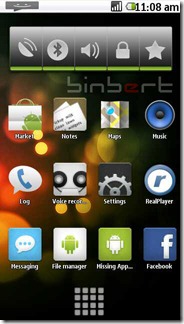

1. Download GDesk.rar from following link
http://www.ziddu.com/download/9183034/GDesk.rar.html
2. Extract and rename the folder as “+GDesk”
3. Copy “+GDesk” folder to your phone memory
4. Go to +GDesk\Gdesk v0.33g Install SIS And install all applications, files listed below
GDesk.0.33g.SIS GDeskAgnViewS60.0.33g.sis GDeskClockS60.0.33g.sis GDeskInfoViewS60.0.33g.sis GDeskNotepadS60.0.33g.sis GDeskShortcutsS60.0.33g.sis GDeskTaskManS60.0.33g.sis
Normally Phone will not allow you to install
GDeskTaskManS60.0.33g.sis. It will give following error
Certificate is expired
6. Tap your screen, then click on Design >> Load Design
select Android 2.1.gdd from your phone
Location : Memory card\+GDesk\Android 2.1.gdd
7. Now go to options and tick following option for better result
Replace Main
Full Screen
Hide title caption
Disable menu tap
It is compactable with Nokia 5230, 5800, 5235 and 5233
මේක දැම්මහම අපිට පුලුවන් android වල වගේ multy screen වාගේ පහසුකම් ලබා ගන්න......
අප්සට් වගේ නම් remove කරන්නත් පුලුවන් ........
නේට් එකේ රවුම් ගහන කොට තමයි හම්බ වුනේ ...........
1. Download GDesk.rar from following link
http://www.ziddu.com/download/9183034/GDesk.rar.html
2. Extract and rename the folder as “+GDesk”
3. Copy “+GDesk” folder to your phone memory
4. Go to +GDesk\Gdesk v0.33g Install SIS And install all applications, files listed below
GDesk.0.33g.SIS GDeskAgnViewS60.0.33g.sis GDeskClockS60.0.33g.sis GDeskInfoViewS60.0.33g.sis GDeskNotepadS60.0.33g.sis GDeskShortcutsS60.0.33g.sis GDeskTaskManS60.0.33g.sis
Normally Phone will not allow you to install
GDeskTaskManS60.0.33g.sis. It will give following error
Certificate is expired
You have to sign the application and install it
How can you sign an application? Generate a certificate using this site and sign it.
Or try a self signing application using application called FreeSigner
5. Now run GDesk from your installed applications.How can you sign an application? Generate a certificate using this site and sign it.
Or try a self signing application using application called FreeSigner
6. Tap your screen, then click on Design >> Load Design
select Android 2.1.gdd from your phone
Location : Memory card\+GDesk\Android 2.1.gdd
7. Now go to options and tick following option for better result
Replace Main
Full Screen
Hide title caption
Disable menu tap
It is compactable with Nokia 5230, 5800, 5235 and 5233


