mage laga tiyanawa pdf book ekak eeke pictures tiyenne... eeka mata open with eka paint walin denna ona kohomada meeka karaganne pls..help me yaluwane ?

meeka podi ayage colouring book ekak.. ...itin mata meeka meeka pc eke open with eka pain walin denna ona.. pls kohomada meeka karanne ...danna kenek innawanam help karanna
machan meka try karala balanna.PDF aka JPEG kalata passe paint aken open karanna puluwanne....... How to Convert PDF to JPEG
Universal Document Converter is the most complete solution for the conversion of documents into JPEG, TIFF or other graphical files. The underlying basis of Universal Document Converter is the technology of virtual printing. As a result, converting documents from PDF to JPEG format is not any more complicated than printing on a desktop printer.
Please follow this manual to start converting of PDF documents.
1. Download and install Universal Document Converter software onto your computer.
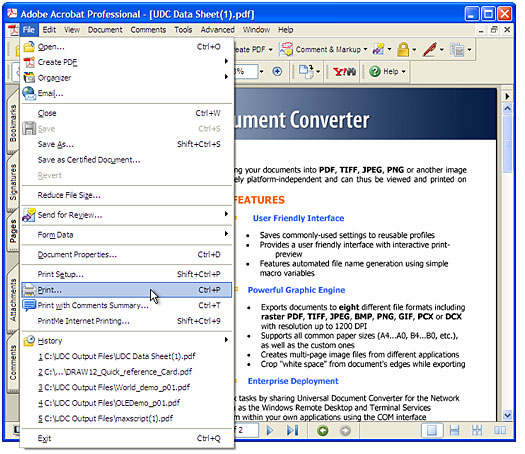
2. Open the PDF file in Adobe Acrobat or Adobe Reader and press
File->Print... in the application main menu:
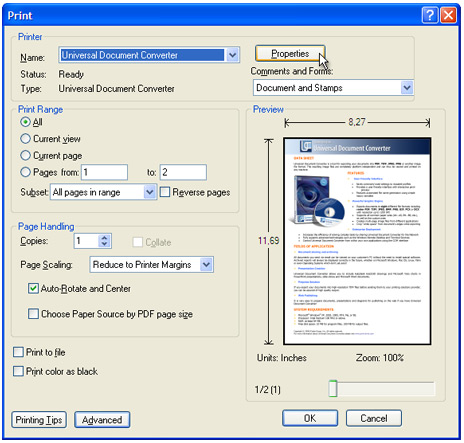
3. Select
Universal Document Converter from the printers list and press
Properties button.
4. Select the
Document to JPEG, Color profile in the
Universal Document Converter Properties window and press
OK:
5. Press
OK in
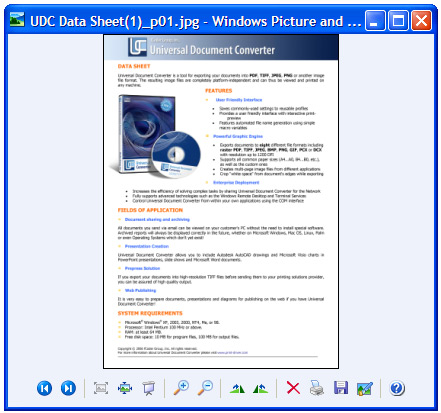
Acrobat's Print dialog to start converting. When the JPEG file is ready, it will be saved to the
C:\UDC Output Files folder by default.
6. The converted document will then be opened in Windows Picture and Fax Viewer software or another viewer associated with JPEG files on your computer.