


DO THIS
Srart->RUN->--Type[gpedit.msc]& Click Ok
Group Policy Window Open.....
Go To
Local Computer Policy-> Computer Configaration-> Administrative Templates->System
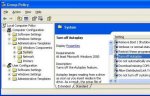
& Open "Turn Off Autoplay"
"Enabled" It & Select "All Drives"
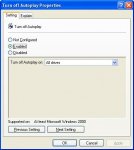
-----------------------------------
Dont Double Click Pen Drive
USE Windows Explorer
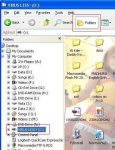
You Can Change Pen Drive ICON, If Virus Change Autorun.inf, ICON not shown In Other Computer
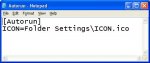
-----------------------------------
Goto -Tools-> Folder Optiions -> "View" Tab
Find "Hidden Files and Folders"
Select "Show Hidden Files and Folders"
And Remove Tick On "Hide Protected Operating System Files"
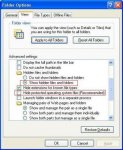
Some Tines U Can See File"Autorun.INF"
Open It (Baya Wenna Apa Virus Eka Nove)
In Aurorun.inf
This Command
"open=ANYNAME,.exe,.bat,.vbs"
Open= Valata Passe Thiyena Nama Thiyena File 1 Hoya Ganna.
It Is Virus
Delete It And Autorun.inf
(Your PC Attack By Folder Options Removal Virus This Will Not Working.)
This Is Not REPOST
I Changed My Own Infomation.
Srart->RUN->--Type[gpedit.msc]& Click Ok
Group Policy Window Open.....
Go To
Local Computer Policy-> Computer Configaration-> Administrative Templates->System
& Open "Turn Off Autoplay"
"Enabled" It & Select "All Drives"
-----------------------------------
Dont Double Click Pen Drive
USE Windows Explorer
You Can Change Pen Drive ICON, If Virus Change Autorun.inf, ICON not shown In Other Computer
-----------------------------------
Goto -Tools-> Folder Optiions -> "View" Tab
Find "Hidden Files and Folders"
Select "Show Hidden Files and Folders"
And Remove Tick On "Hide Protected Operating System Files"
Some Tines U Can See File"Autorun.INF"
Open It (Baya Wenna Apa Virus Eka Nove)
In Aurorun.inf
This Command
"open=ANYNAME,.exe,.bat,.vbs"
Open= Valata Passe Thiyena Nama Thiyena File 1 Hoya Ganna.
It Is Virus
Delete It And Autorun.inf
(Your PC Attack By Folder Options Removal Virus This Will Not Working.)
This Is Not REPOST
I Changed My Own Infomation.
Last edited:


 Do
Do


