plz help a.s.a.p.

bonji

Well-known member
  • Jan 4, 2008
    3,449
    181
    63
    40
    E=382959.743, N=2844423.290
    machanz la mama office 1 router 1 log una mata password 1 ganna onna
    but eka meewidihata enne
    kohomada decrypt karaganne
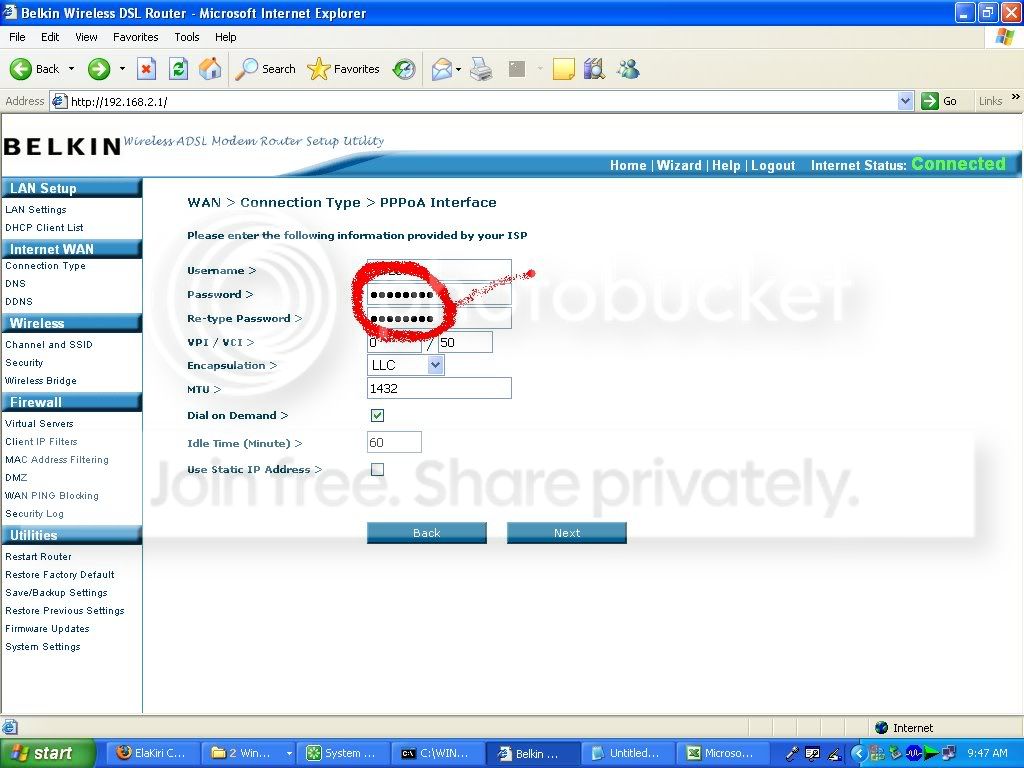
    pas.jpg


    *danushka*

    Well-known member
  • Oct 15, 2007
    13,922
    1,098
    113
    Hali-ela
    machan niyamai ne.matath kiyapan ko kohomada oka kale kiyala,math office ake router akata ringanna bariwa mara duken ban inne,,,,,,,
     

    *danushka*

    Well-known member
  • Oct 15, 2007
    13,922
    1,098
    113
    Hali-ela
    mekath karanna puluwanda kiyala poddak balapan machan......

    If you have a Netgear, Linksys, DLink, or any other type of router and you’re trying to figure out how to login into router in order to configure settings, then here’s what you need to do.
    If you have never logged into the router and no one has ever set up a password, then your router will have the default username and password. If you don’t have the documentation on you, you can check out a web site called RouterPasswords.com, which has an exhaustive list of all the major routers, plus a ton more. It had the right username and password for my Netgear router, so it should work for you. If it doesn’t, you can usually find the default user name and password on the under side of the router itself, so check there if the web site does not have the correct info.
    If there is already a password on your router and you need to reset the wireless router back to the default settings, you can press the “Reset” button that is located on the back of the router. It’s usually a very small hole and you’ll have to use a pin or paper clip to push the button inside. This will now reset your router to the default settings! Here’s a picture of a DLink router, for example:
     

    bonji

    Well-known member
  • Jan 4, 2008
    3,449
    181
    63
    40
    E=382959.743, N=2844423.290
    *danushka* said:
    mekath karanna puluwanda kiyala poddak balapan machan......

    If you have a Netgear, Linksys, DLink, or any other type of router and you’re trying to figure out how to login into router in order to configure settings, then here’s what you need to do.
    If you have never logged into the router and no one has ever set up a password, then your router will have the default username and password. If you don’t have the documentation on you, you can check out a web site called RouterPasswords.com, which has an exhaustive list of all the major routers, plus a ton more. It had the right username and password for my Netgear router, so it should work for you. If it doesn’t, you can usually find the default user name and password on the under side of the router itself, so check there if the web site does not have the correct info.
    If there is already a password on your router and you need to reset the wireless router back to the default settings, you can press the “Reset” button that is located on the back of the router. It’s usually a very small hole and you’ll have to use a pin or paper clip to push the button inside. This will now reset your router to the default settings! Here’s a picture of a DLink router, for example:
    [/qu


    ote]


    machan adminta mattuwenawane ban meeka karanna giyyoth
     

    Malinga

    Well-known member
  • Jul 20, 2006
    61,301
    1,013
    113
    bonji said:
    Password Revealer not working with that

    oyaa mona software eka da pavichchi kale? password revealer software godak thiyanava. habai oyaata oya pw eka dunna pc ekata yanna puluvannum vade hari. eeth eeka server eka vennathine. wireless hacking software try karala balathahaki eeth vadee thiyenne oyaava ahuvenna ida thiyanava. dan oyaa password revealer eka pavichchi kala kiyala hitan samaharavita dannava athi admin.