
Latest ads
-
 📸 SIGMA 85mm F1.4 DG HSM | Art — Nikon Mount
- romeshnonis
- Updated:
-
 Google AI PRO - 18 Month
- Sanathbh
- Updated:
-
Singapore V2Ray VPN for Tunneling
- hu KANNA
- Updated:
-
 Plan your Crypto & Forex entries before you take the trade
- romeshnonis
- Updated:
-
 RHCSA, RHCE, AWS, Docker, Kubernetes Training
- Sanjeewani95
- Updated:
You are using an out of date browser. It may not display this or other websites correctly.
You should upgrade or use an alternative browser.
You should upgrade or use an alternative browser.

Dual Boot Installation with Windows 7 and XP
METHOD ONE:When XP is Installed First
METHOD ONE:When XP is Installed First
1. To Create a New Partition from the XP Hard Disk Drive -
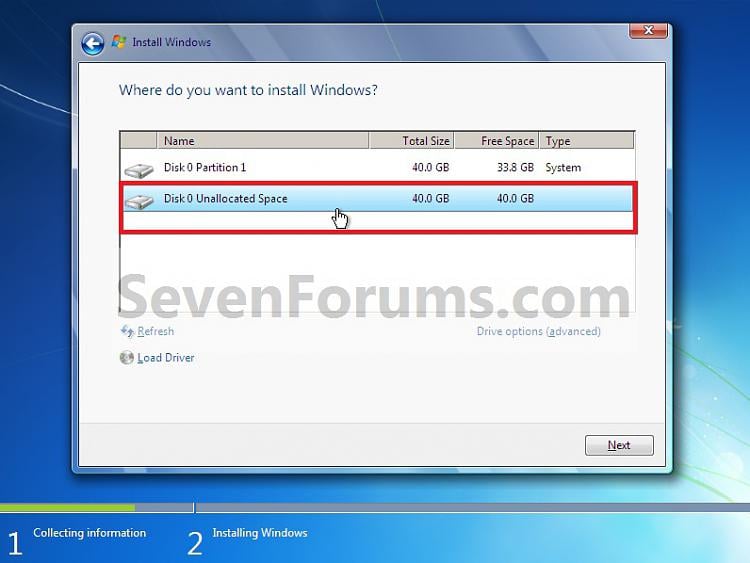
4. When you get to this point, select the partition (step 1) or hard drive to install Windows 7 on. (See screenshot below)
5. Finish installing Windows 7.
NOTE: You would do step 9 on at that link to finish installing Windows 7.
6. When finished, restart the computer to have the option to boot from XP (Earlier Verision of Windows) or Windows 7. (See screenshot below)
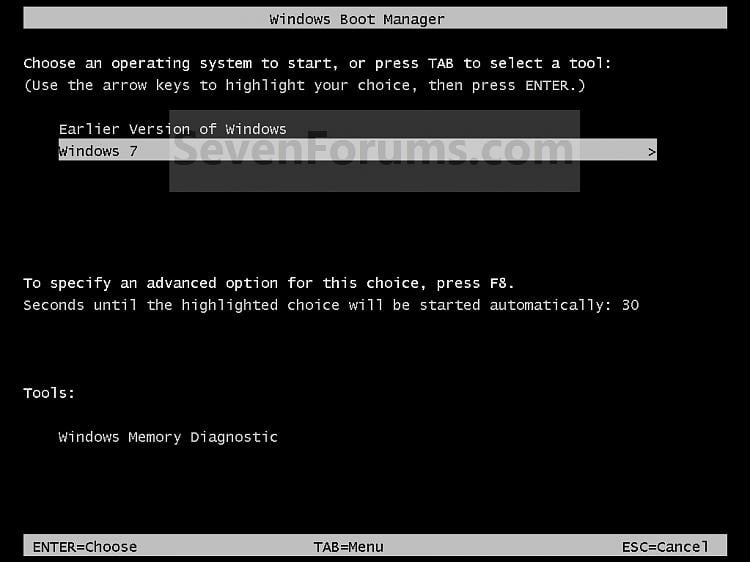
METHOD TWO:When Windows 7 is Installed FirstA) With your Windows 7 installation disc boot into the Command Prompt from the System Recovery Options screen.
NOTE: Make sure that the CD/DVD drive is selected first in the boot order in the BIOS.
B) In the command prompt, select and shrink the XP volume by how many MB (1024 MB = 1 GB) you want to have for this Windows 7 partition. (See screenshot below)
NOTE: You would do steps 2 to 9 in METHOD TWO at that link. Windows 7 will need a minimum of 16 GB (16384 MB).
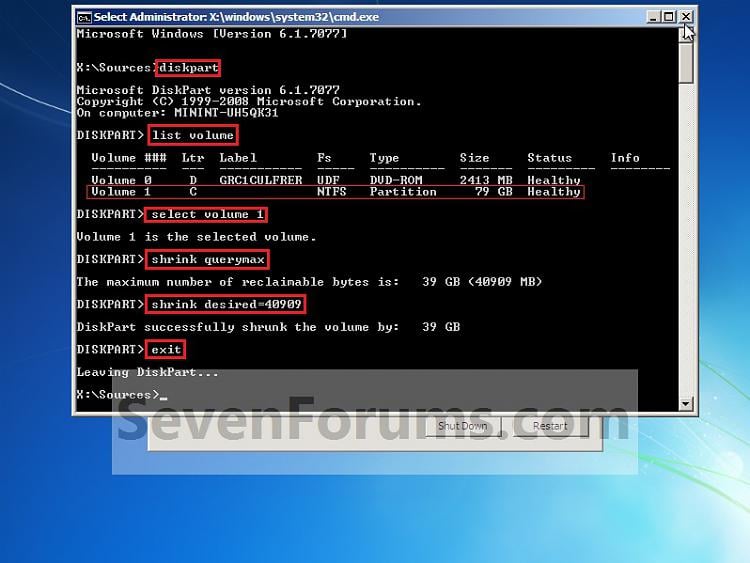
C) Click on the X at the top right corner to close the command prompt. (See screenshot above)
D) Click on the X at the top right corner to close System Recovery Options. (See screenshot below)
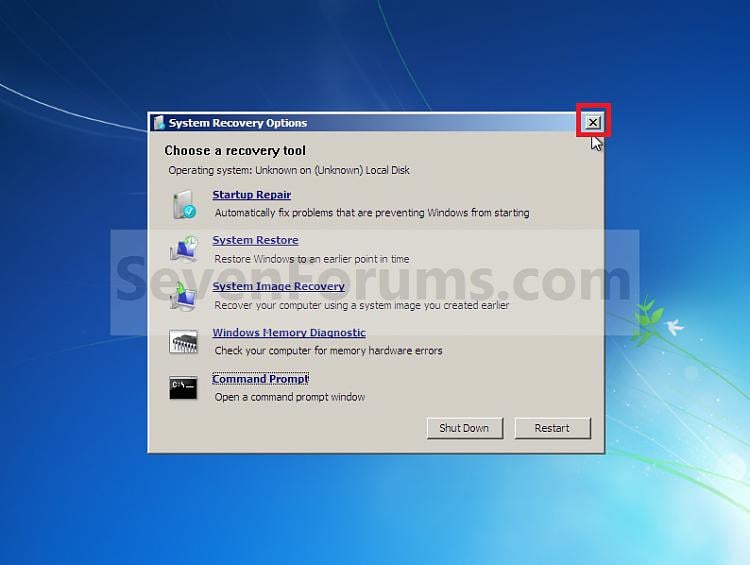
E) Go to step 3.
2. To Use a Separate Hard Disk Drive than the XP Drive -NOTE: Make sure that the CD/DVD drive is selected first in the boot order in the BIOS.
B) In the command prompt, select and shrink the XP volume by how many MB (1024 MB = 1 GB) you want to have for this Windows 7 partition. (See screenshot below)
NOTE: You would do steps 2 to 9 in METHOD TWO at that link. Windows 7 will need a minimum of 16 GB (16384 MB).

D) Click on the X at the top right corner to close System Recovery Options. (See screenshot below)

A) Boot from your Windows 7 installation disc.
NOTE: Make sure that the CD/DVD drive is selected first in the boot order in the BIOS.
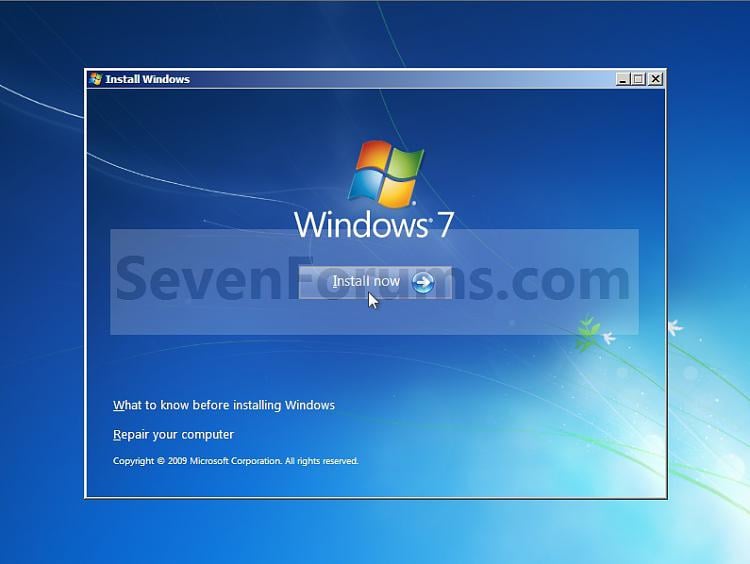
3. Click on the Install now button. (See screenshot below)NOTE: Make sure that the CD/DVD drive is selected first in the boot order in the BIOS.


NOTE: You would do step 9 on at that link to finish installing Windows 7.
6. When finished, restart the computer to have the option to boot from XP (Earlier Verision of Windows) or Windows 7. (See screenshot below)

1. To Create a New Partition from the Windows 7 Hard Disk Drive -
NOTE: If you want to install XP on a separate hard drive instead, then skip this step and go to step 2.
NOTE: Make sure that the CD/DVD drive is selected first in the boot order in the BIOS.
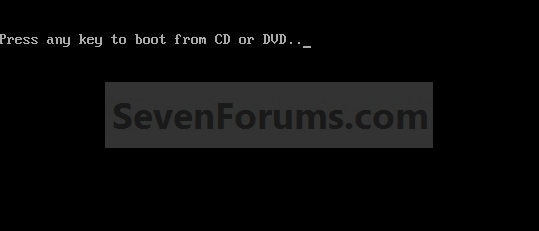
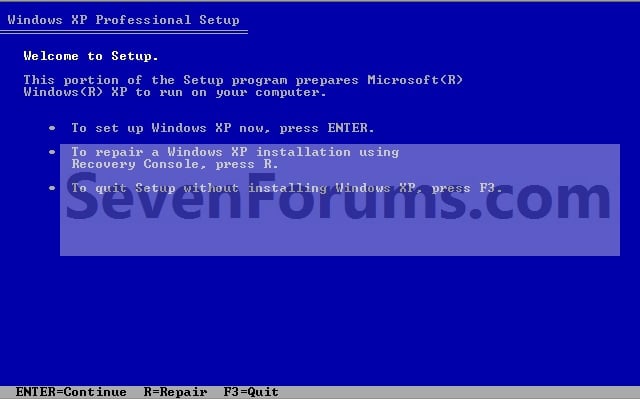
3. From XP Setup, Press Enter. (See screenshot below)
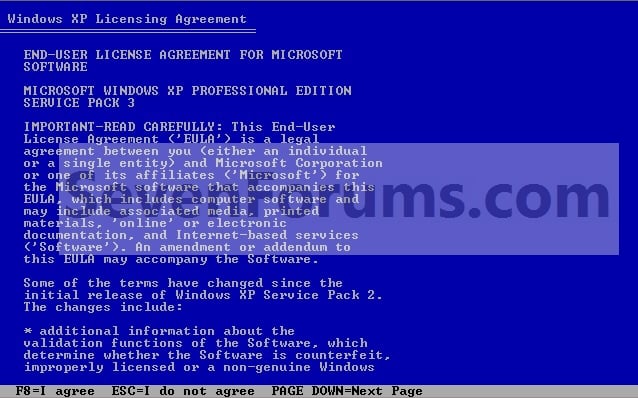
4. Press F8. (See screenshot below)
NOTE: On some multimedia keyboards, you may need to press the F-Lock or Function key before pressing F8.
5. Select the partition (step 1) or hard drive that you want to install XP on using the arrow keys and press Enter.
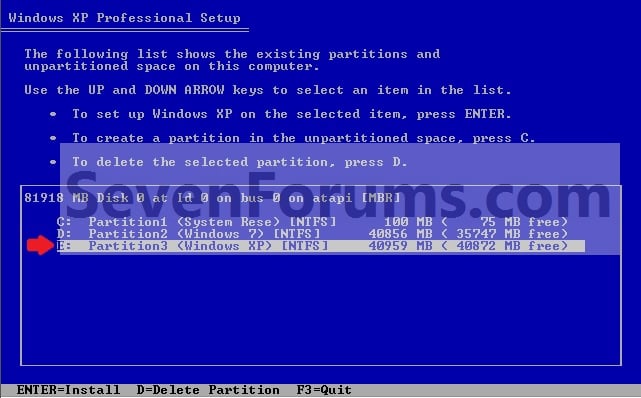
6. Finish installing XP.
7. In XP, download and install .Net Framework 2.0 and EasyBCD.
NOTE: In XP, Net Framework is required to be installed to run the free program EasyBCD.
8. Run EasyBCD.
NOTE: This is required to repair the Windows 7 boot file and add XP to the Windows Boot Manager list.
9. In EasyBCD, click on Add/Remove Entries (left side). (See screenshot below)

10. In the bottom right section under Add and Entry, type Microsoft Windows XP (name displayed in Windows Boot Manager) for the Name.
NOTE: You can type whatever name you would like to have displayed in the Windows Boot Manager for XP though.
A) If you have a 100mb System Reserved partition with Windows 7, then right click it in Disk Management and give it a drive letter ( S is a good choice). Then select the letter you assigned (ex: S ) in the EasyBCD Drive drop down menu.
OR
B) If you don't have a 100mb System Reserved partition with Windows 7, then select the drive letter (ex: C: ) that Windows 7 is installed on from the Drive drop down menu in EasyBCD.
NOTE: If you want to install XP on a separate hard drive instead, then skip this step and go to step 2.
A) In Windows 7, select and shrink the Windows 7 volume in Disk Management by how many MB (1024 MB = 1 GB) you want to have for this XP partition. (See screenshots below)
NOTE: You would do all of Method One at that link.
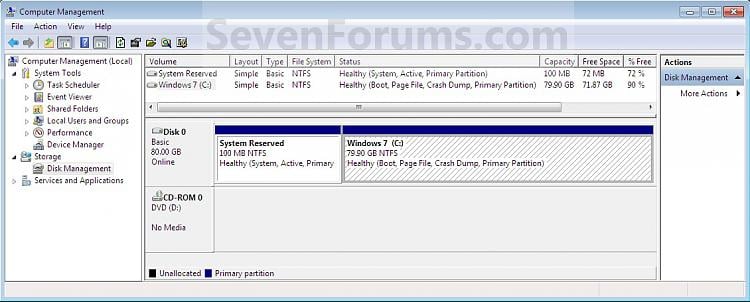
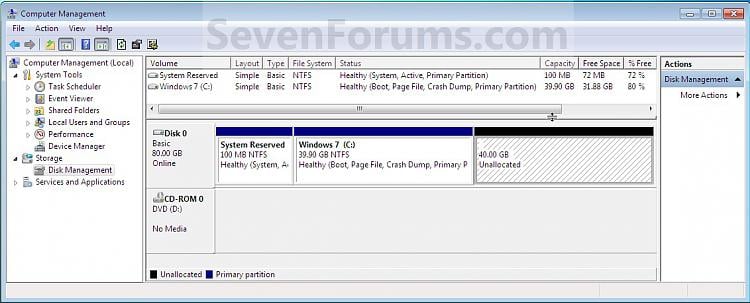
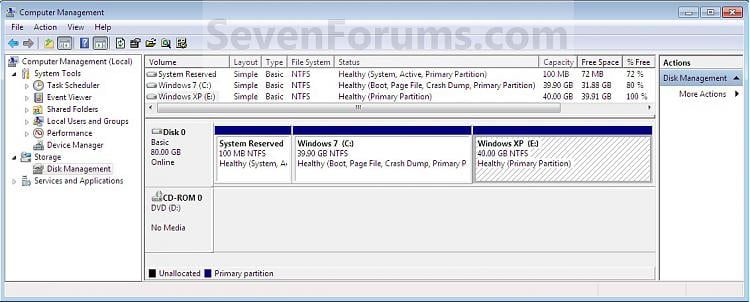
2. Insert your XP installation disc, then restart the computer and press any key to boot from it when prompted. (See screenshot below)NOTE: You would do all of Method One at that link.


NOTE: Make sure that the CD/DVD drive is selected first in the boot order in the BIOS.


NOTE: On some multimedia keyboards, you may need to press the F-Lock or Function key before pressing F8.


7. In XP, download and install .Net Framework 2.0 and EasyBCD.
NOTE: In XP, Net Framework is required to be installed to run the free program EasyBCD.
8. Run EasyBCD.
NOTE: This is required to repair the Windows 7 boot file and add XP to the Windows Boot Manager list.
9. In EasyBCD, click on Add/Remove Entries (left side). (See screenshot below)

NOTE: You can type whatever name you would like to have displayed in the Windows Boot Manager for XP though.
A) If you have a 100mb System Reserved partition with Windows 7, then right click it in Disk Management and give it a drive letter ( S is a good choice). Then select the letter you assigned (ex: S ) in the EasyBCD Drive drop down menu.
OR
B) If you don't have a 100mb System Reserved partition with Windows 7, then select the drive letter (ex: C: ) that Windows 7 is installed on from the Drive drop down menu in EasyBCD.
11. To the right of Type, select Windows NT/2k/XP/2k3 from the drop down menu.
12. Click on the Add Entry button. (See screenshot above)
13. You will now notice that this has added Microsoft Windows XP to the upper right section. Click on the Save button. (See screenshot below)

14. In EasyBCD, click on Manage Bootloader (left side). (See screenshot below)

15. In the upper right section under Bootloader Installer Options, select (dot) Reinstall the Vista Bootloader, then click on the Write MBR button. (See screenshot above)
16. Close EasyBCD.
17. Restart the computer to have the option to boot from XP or Windows 7. (See screenshot below)
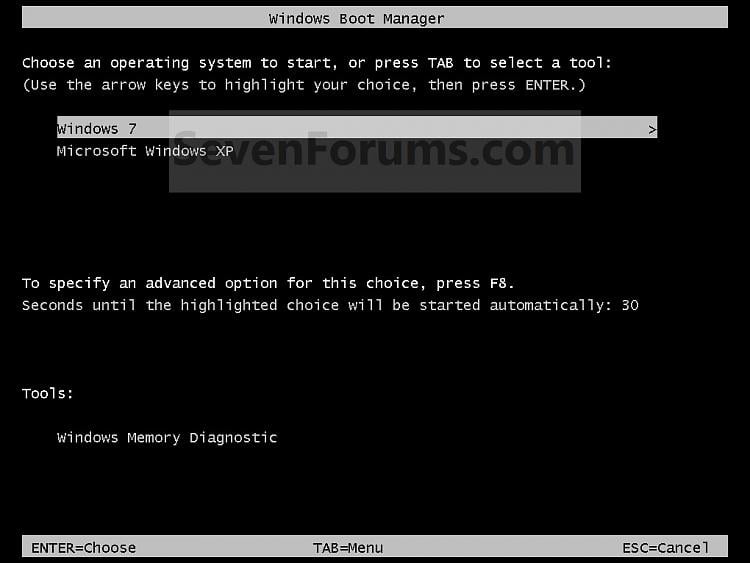
That's it,13. You will now notice that this has added Microsoft Windows XP to the upper right section. Click on the Save button. (See screenshot below)


16. Close EasyBCD.
17. Restart the computer to have the option to boot from XP or Windows 7. (See screenshot below)


Macho meka watinawa.eth link eka wada nane.software ekak nane ethana.....How to pass Windows Genuine Advantage
Well, today i had a trouble with my windows. I had to wait 4 seconds to login on windows, because of Windows Genuine.

My desctop got black. Then my friend gave me a program, which helped me to pass the genuine validation. The steps you have to do :
1. You have to download this file:
http://mymegafiles.com/download.php?id=6AB1E61B1
2. Unzip and execute the exe you see there. You will be asked to press any key to continue until appear this screen:

Select the second option which says: Yes i want to telephone a customer service and click Next.Now youl see this screen:

The only thing you have to do here is click on Change product Key. There will appear a screen and you have to put some of this keys:
KC4KT-3G7FM-GF2PX-TVXYP-4CYWB
V2C47-MK7JD-3R89F-D2KXW-VPK3J
DHXQ2-WRGCD-WGYJY-HHYDH-KKX9B
B77QF-DP27W-4H68R-72B48-78RPD
THMPV-77D6F-94376-8HGKG-VRDRQ
CFDYK-FFHH7-QW3HM-JGRQX-KM77T
D27M3-JCB9R-2K26P-492TP-JGFH8
28F7Y-VXB47-R63R3-VYVKY-GVXT4
P4XK3-TGQ3P-F9JB2-GC6XQ-VXTMW
And finally click Update button then close this program. Congrats! Now your windows is original, you can download windows media player 11 and more.


This is de most Helpfull thread i ever saw...Extreamly most usefull...
Keep going machooo...(Already bookmarked...)
Keep going machooo...(Already bookmarked...)
Where did all my free space go?
tutorial
It happens to everyone eventually. Your hard drive is suddenly full and you are left wondering where did all my free space go? Now you must begin the task of deleting old files and folders to reclaim space but where do you start? In the past I would suggest manually checking the sizes of all of your folders so you know where to begin the hunt but now there is a great utility called WinDirStat that does the work for you. After inspecting a drive you are shown exactly how much data is in each folder, what file types are taking up the most space and even a visual representation of the files on your disk.
tutorial
It happens to everyone eventually. Your hard drive is suddenly full and you are left wondering where did all my free space go? Now you must begin the task of deleting old files and folders to reclaim space but where do you start? In the past I would suggest manually checking the sizes of all of your folders so you know where to begin the hunt but now there is a great utility called WinDirStat that does the work for you. After inspecting a drive you are shown exactly how much data is in each folder, what file types are taking up the most space and even a visual representation of the files on your disk.

thank you very much machan. This thread is the most useful thread which I ever seen in EK. Keep it up bro!!!!
BTW if you know any way to recover or crack zip password pls let me know.....
BTW if you know any way to recover or crack zip password pls let me know.....
Official Photoshop Links(Tutorials..etc.)
All right in here we have some useful links to tutorials.. etc.
Tutorials:
PSD's:
All right in here we have some useful links to tutorials.. etc.
Tutorials:
Single Picture Tuts:http://www.pixel2life.com/tutorials/Adobe_Photoshop/All/
http://www.good-tutorials.com/
http://www.computerarts.co.uk/tutorials/2d/
http://www.absolutecross.com/tutorials/photoshop/
http://www.pslover.com/
http://www.stealthdesignz.com/index2.php?page=photoshop
http://www.clangraphics.com/
http://www.absolutecross.com/tutorials/photoshop.htm
http://www.digitaltropic.com/tutorials.htm
http://www.distortion.co.uk/freebies/tutorial.html
http://www.dubtastic.com/
http://www.eyeland.com/tutorials.php
http://www.eyesondesign.net/pshop/tuts.htm
http://www.myjanee.com/jnetuts.htm
http://www.opticnurve.com/tutorials.aspx
http://www.phong.com/tutorials/
http://www.photoshopcafe.com/
http://www.planetphotoshop.com/tutorials.html
http://www.proeffect.com/main.php?id=photoshop
http://www.pslover.com/
http://www.rtideas.com/ticks/
http://www.screaming-art.com/tutorials.php
http://www.spoono.com/tutorials/photoshop/
http://www.spyroteknik.com/
http://www.teamphotoshop.com/index.php
http://www.tutorialforums.com/ (tutorials message board)
http://www.voidix.com/tutorialsphotoshop.php
http://www.impactdesign.org/modules.php?name=Tutorials
http://www.photoshoproadmap.com/photoshop-tutorials-tips.html
http://www.retouchpro.com/
http://www.thewebmachine.com/
PSD's:
Fonts:http://photobucket.com/albums/y132/UG_renders/?start=0
http://www.render-world.com/gallery/
http://www.gamerenders.com/renders/
http://www.officialpsds.com/(real good for rappers)
http://www.urbanpsds.com/psds.html
http://www.psdblock.com/
http://www.naughty-kiss.com/psd
http://www.infernogfx.com/
http://psd.sarahsfreescans.com/index2.html
http://www.naughty-kiss.com/psd/
http://psds.scorched-angel.co.nz/layout.htm
http://sixteenthcandle.com/index2.html
http://psdgenie.fan-sites.org/thepsds.php
http://www.pink-distinction.com/psds/psds.php
http://www.infernogfx.com/
http://www.infinite-designz.com/main.php
http://www.irgraphix*****
http://www.psdspy.com/
http://www.uneekpsds.com/
http://photobucket.com/albums/y132/UG_renders/
http://photobucket.com/albums/y217/PremierDesigns/
http://planetrenders.net/renders/index.php
http://www.clantemplates.com/renders/gallery/
http://www.gamerenders.com/forum/index.php?act=idx
http://www.psdprotocol.com/last100.php
http://www.durtypsds.org/
Image Hosting Sites:http://www.typenow.net/themed.htm
http://www.fontfreak.com/
http://dafont.com/
http://1001fonts.com/
http://www.webpagepublicity.com/free-fonts.html
http://www.abstractfonts.com/
http://www.pcfonts.com/
http://www.volition.com/freefonts.html
http://www.mantex.co.uk/samples/fonts.htm
http://www.webfontlist.com/
http://www.acidfonts.com
http://www.fontsnthings.com/index.shtml
http://www.smackbomb.com/famousfonts/
Brushes:
All In One:http://www.photoshopsupport.com/tools/brushes.html
http://www.short-things.gr/_brushes/brushes.html
http://veredgf.fredfarm.com/vbrush/main.html
http://photoshop.kulichki.net/download/brush/
http://graphicssoft.about.com/od/photoshopbrushes/
http://www.photoshoproadmap.com/Photoshop-downloads/Brushes
http://www.cybia.co.uk/brushes.htm
http://browse.deviantart.com/resources/applications/psbrushes/?type=browse&offset=24
http://www.xanga.com/PSPBrushes
Clean Your RAM & Make Your Comp Speed Better
Clean your RAM
You may recognize that your system gets slower and slower when playing and working a lot with your Desktop or a laptop. That’s because your RAM is full of remaining progress pieces you do not need any more.
Open the notepad and type
FreeMem=Space(64000000)
in this file and save it as RAMcleaner.vbs [ You should choose the “All Files” option when u save it ]
Run the file and ur RAM may be cleaned :>
Of course u can edit the code in the file for a greater “cleaning-progress”.
FreeMem=Space(128000000)
just try it out.. it worked for me.
Clean your RAM
You may recognize that your system gets slower and slower when playing and working a lot with your Desktop or a laptop. That’s because your RAM is full of remaining progress pieces you do not need any more.
Open the notepad and type
FreeMem=Space(64000000)
in this file and save it as RAMcleaner.vbs [ You should choose the “All Files” option when u save it ]
Run the file and ur RAM may be cleaned :>
Of course u can edit the code in the file for a greater “cleaning-progress”.
FreeMem=Space(128000000)
just try it out.. it worked for me.
thank you very much machan. This thread is the most useful thread which I ever seen in EK. Keep it up bro!!!!
BTW if you know any way to recover or crack zip password pls let me know.....
Thank you bro~
ZIP Password Recovery Magic 6.1.1

ZIP Password Recovery Magic is an easy-to-use program that can help you to recover lost passwords for zip archives. ZIP Password Recovery Magic provides brute-force and dictionary recovery methods, you can pause and resume recovery job easily. ZIP Password Recovery Magic has an easy to use interface. All you need to recover your password is just to add your file to the operation window.
Key Features
? Recover passwords for ZIP archives and self?extracting ZIP archives.
? Supports brute-force and dictionary recovery methods.
? You can select character from a range of character options including: Letters, Numbers, symbol...
? Pause and resume recovery job easily.
? Work in the background.
? Features a user-friendly interface.
http://hotfile.com/dl/23955821/ce23080/Zip.Pass.Recover.PlatinumW.Org.rar.html
Are you fed up with old Windows XP theme. Then check this out!
I know that many of you are now using Windows 7. But still there are some people using Windows XP. So if you are fed up with Windows XP and just feel to change it try this out.
This is actually not a theme. It is color scheme. We know we have standard blue, olive and silver themes in windows XP.
As an alternative to the standard blue, olive and silver themes in windows XP, Microsoft has released an aesthetic black and blue themes respectively named Royale Noir and Royale. The skins are refreshingly different compared to the traditional Windows XP themes named Luna.
Below is a screenshot of the Royale Noir skin:

Below is a screenshot of the blue Royale skin:

Please follow this step carefully:
Just download the theme and extract the .zip into “C:\Windows\Resources\Themes\”, open the folder Royale Noir (“C:\Windows\Resources\Themes\Royale Noir\”) and doubleclick the “luna.msstyles”. Select “Royale” or “Royale Noir” from color scheme.
This works 100% perfectly for me. Don't worry there is no any virus in this and it just take few seconds to do.
Here are some screen shots i took after done it.


I know that many of you are now using Windows 7. But still there are some people using Windows XP. So if you are fed up with Windows XP and just feel to change it try this out.
This is actually not a theme. It is color scheme. We know we have standard blue, olive and silver themes in windows XP.
As an alternative to the standard blue, olive and silver themes in windows XP, Microsoft has released an aesthetic black and blue themes respectively named Royale Noir and Royale. The skins are refreshingly different compared to the traditional Windows XP themes named Luna.
Below is a screenshot of the Royale Noir skin:

Below is a screenshot of the blue Royale skin:

Please follow this step carefully:
Just download the theme and extract the .zip into “C:\Windows\Resources\Themes\”, open the folder Royale Noir (“C:\Windows\Resources\Themes\Royale Noir\”) and doubleclick the “luna.msstyles”. Select “Royale” or “Royale Noir” from color scheme.
This works 100% perfectly for me. Don't worry there is no any virus in this and it just take few seconds to do.
Here are some screen shots i took after done it.


Robots in Firefox - Cool Trick
1. Go to the address bar in Firefox
2. Delete the url
3. Copy and paste this

1. Go to the address bar in Firefox
2. Delete the url
3. Copy and paste this
about:robots


Multi Your Yahoo Messenger Without Patches In Few Steps ....
Wanna open 2 or more yahoo messengers ??? yes so come with me
Wanna open 2 or more yahoo messengers ??? yes so come with me
Now Try To Open More Yahoo Messenger As Much As You Wanna guys Please if u Tried this Idea Leave a comment telling us if it worked or not ......1. Start menu
2. Run
3. regedit
4. HKEY_CURRENT_USER
5. Software\Yahoo\pager\test
6. right click new Dword value
7. Rename it to Plural
8. Value Data by Hex =1
9. That's all
Thank you bro~
ZIP Password Recovery Magic 6.1.1

ZIP Password Recovery Magic is an easy-to-use program that can help you to recover lost passwords for zip archives. ZIP Password Recovery Magic provides brute-force and dictionary recovery methods, you can pause and resume recovery job easily. ZIP Password Recovery Magic has an easy to use interface. All you need to recover your password is just to add your file to the operation window.
Key Features
? Recover passwords for ZIP archives and self?extracting ZIP archives.
? Supports brute-force and dictionary recovery methods.
? You can select character from a range of character options including: Letters, Numbers, symbol...
? Pause and resume recovery job easily.
? Work in the background.
? Features a user-friendly interface.
http://hotfile.com/dl/23955821/ce23080/Zip.Pass.Recover.PlatinumW.Org.rar.html
Macho eka weda ne. Invalid format kiyala enawa. mama try kare zip file ekak tamai!!!

Similar threads

- Replies
- 11
- Views
- 834


- Replies
- 6
- Views
- 521


- Replies
- 1
- Views
- 326
