Podi Tricks tikak*

Supunqw

Well-known member
  • Jul 18, 2009
    5,620
    500
    113
    34
    නිගම්බු 7
    How to Create your Google

    logo_FunnyLogo.gif

    You can make your own personal Search Engine with your name as logo. Once created copy the URL and put it in you blog or website. Your visitors and friends will now see your personal search engine.


    More Options:


    ex:

    Enjoy
    wink.gif
     
    • Like
    Reactions: ranga_uoc

    Supunqw

    Well-known member
  • Jul 18, 2009
    5,620
    500
    113
    34
    නිගම්බු 7
    Adding several movies in 1 Dvd

    Many of us have download tv series, anime or other short movies, and want to put it in 1 dvd, the simplest way or the simplest application you can use is convertXto Dvd, but this application can't give all we want to , like motion menu with sound, or motion scene selection or DTS sound , put to much movie the result after converting is not very good, etc...
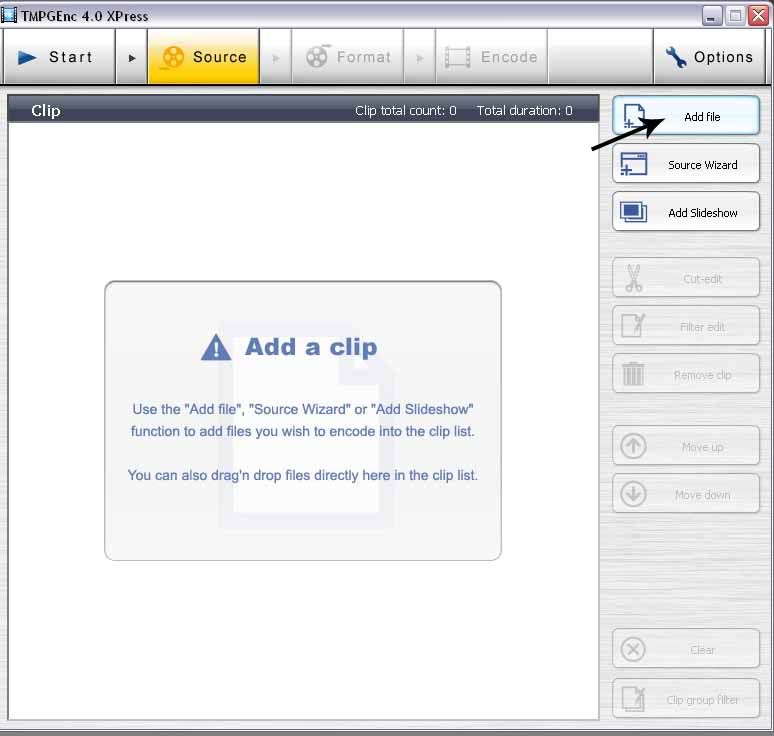
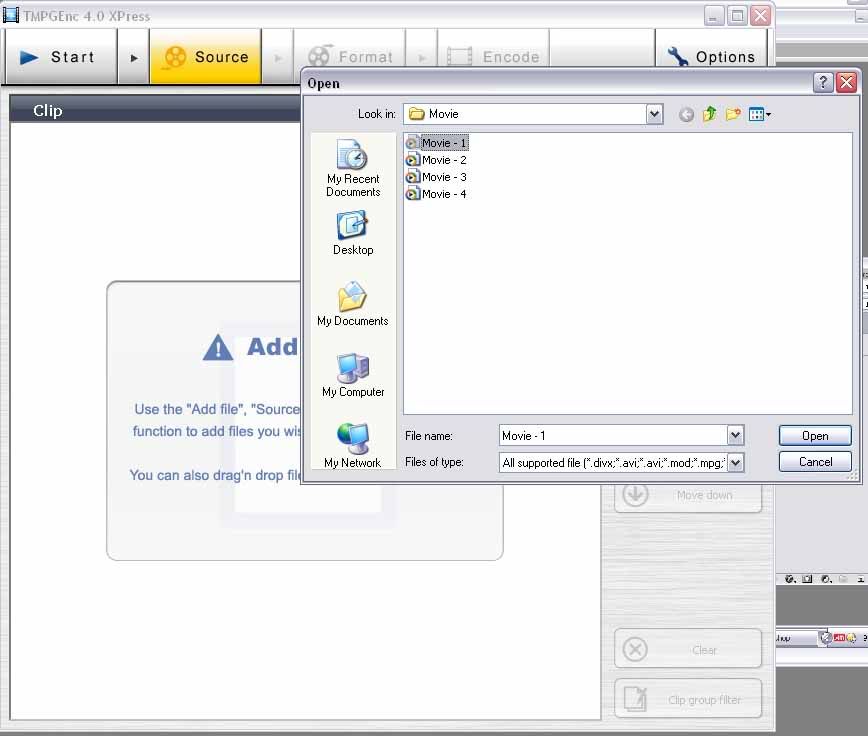
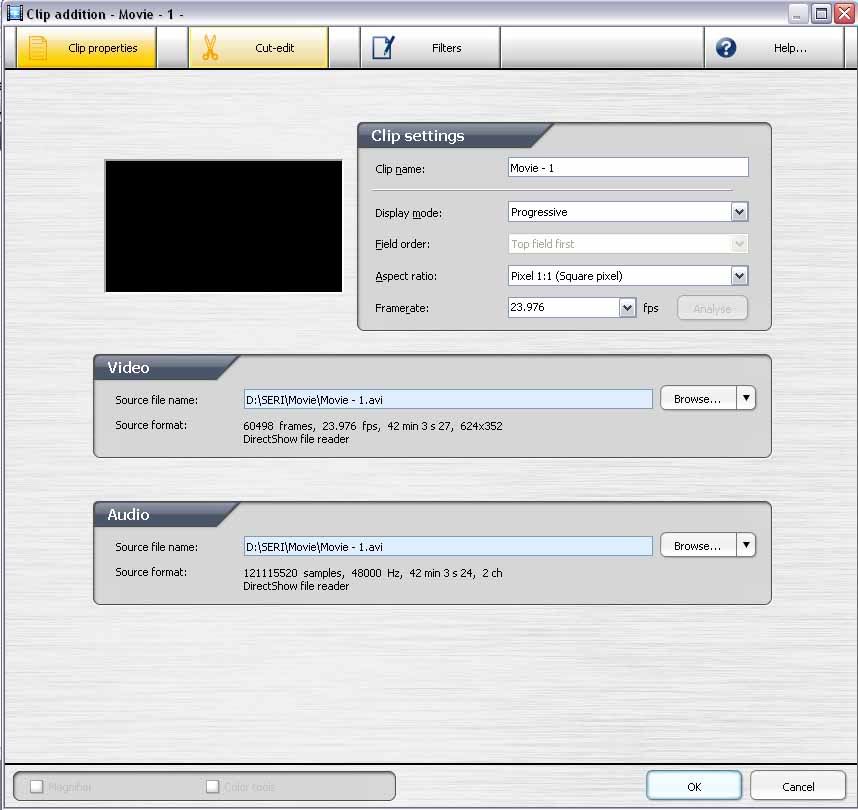
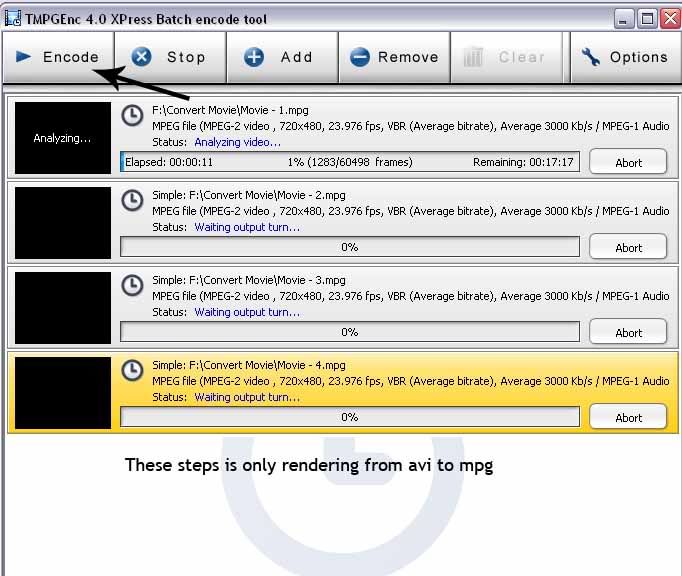
    and in here i want to share a little, with TMPGExpress and DVDlab pro , we can create almost all we want to

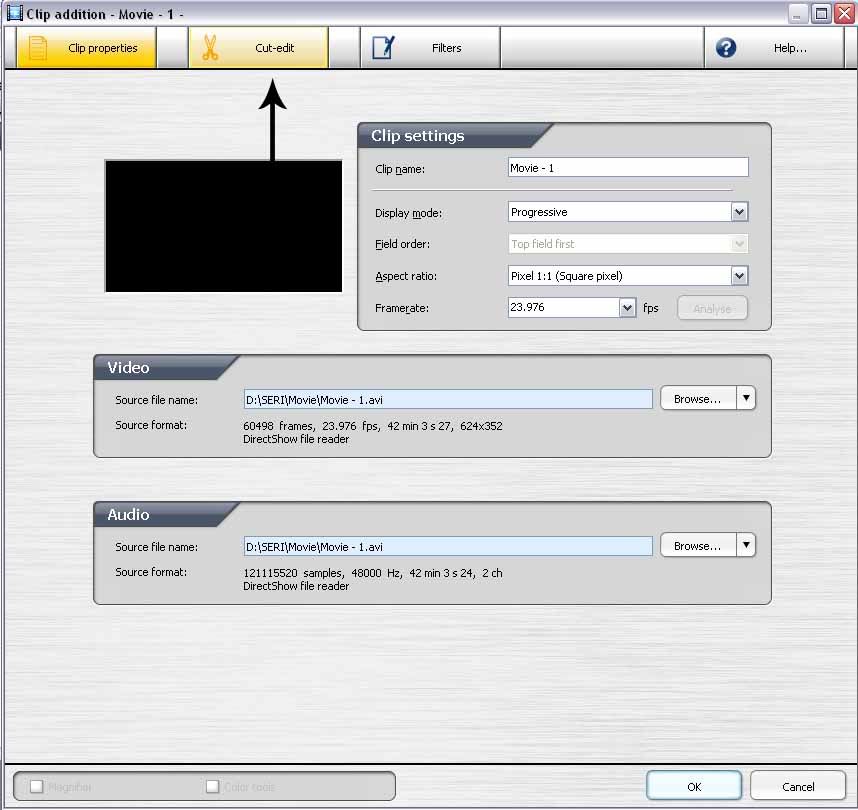
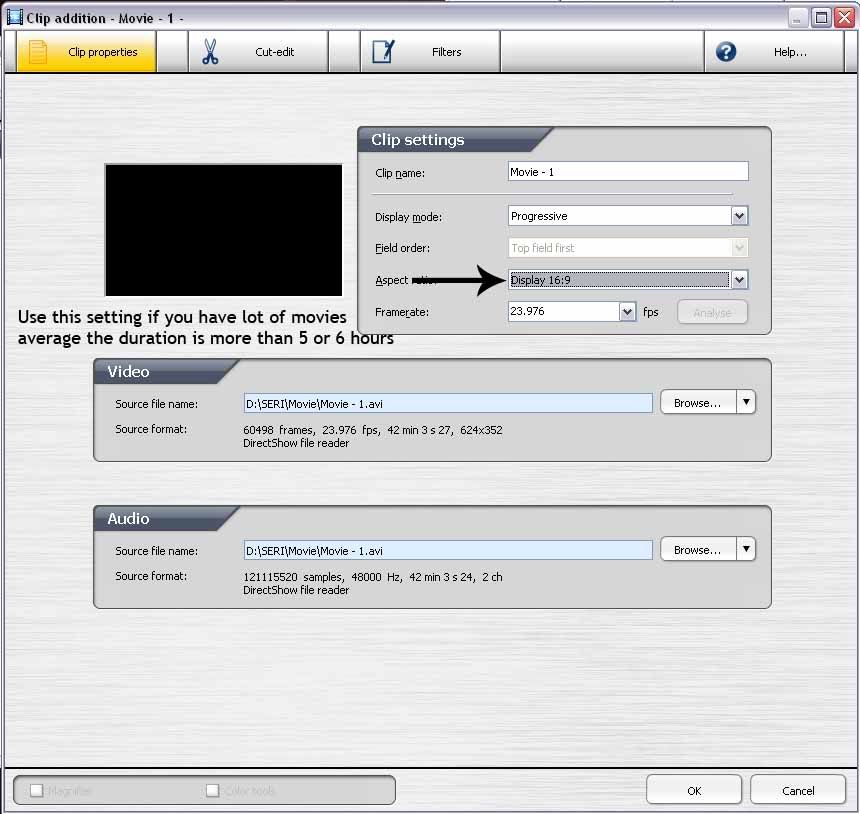
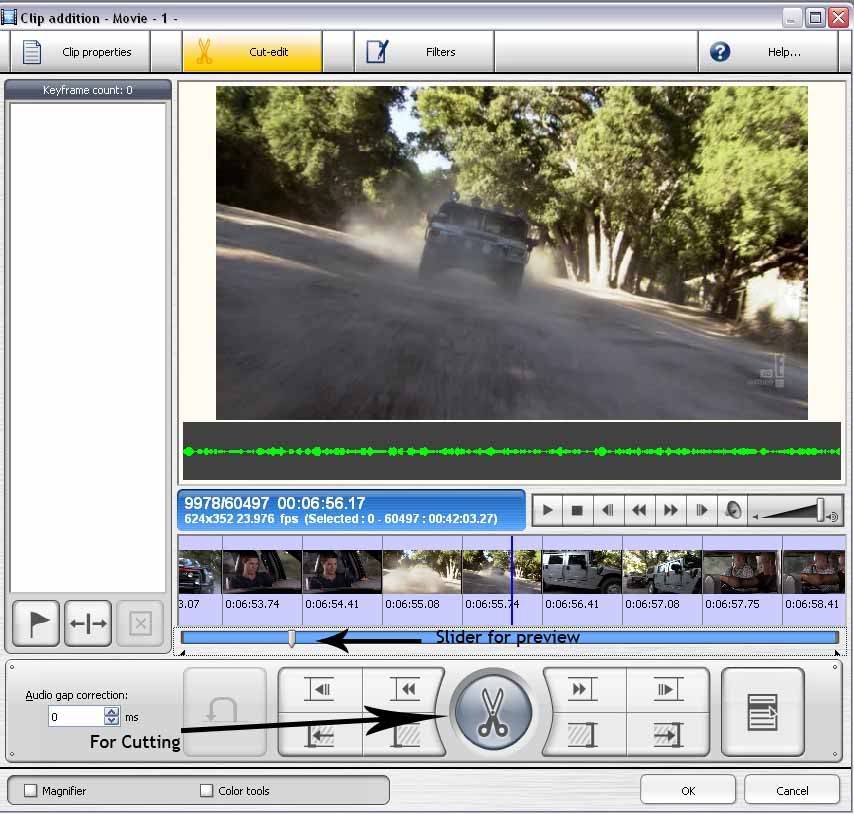
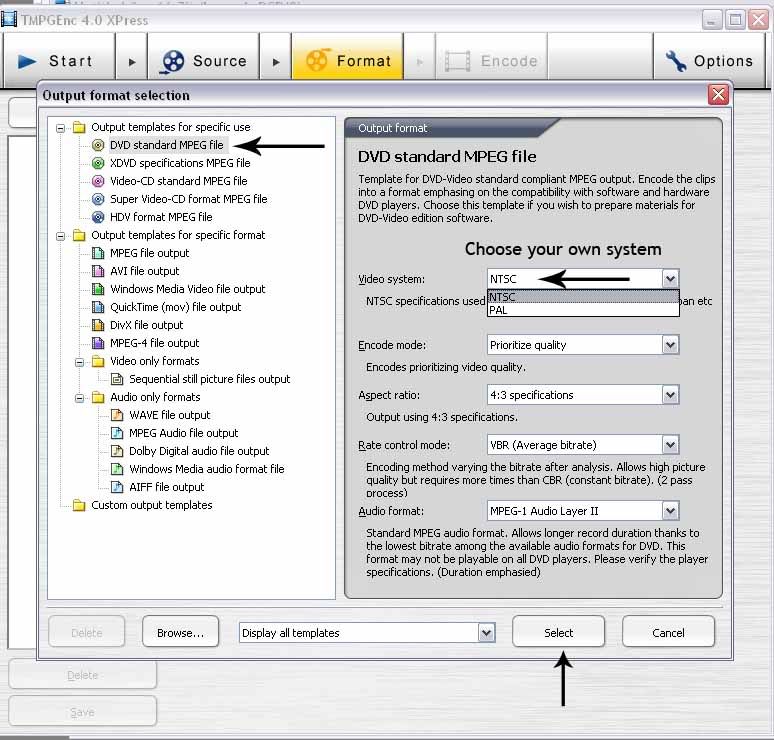
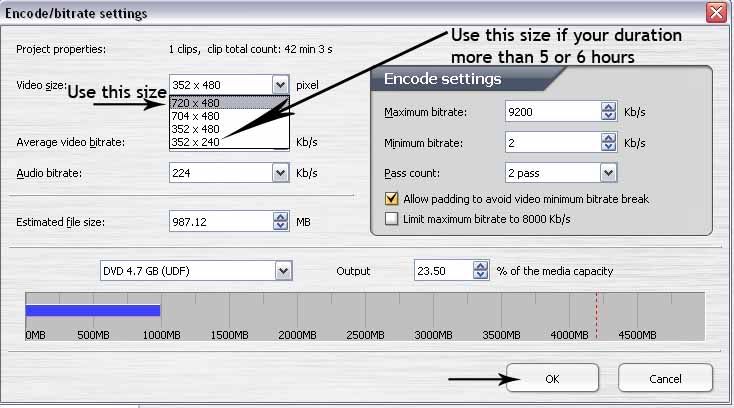
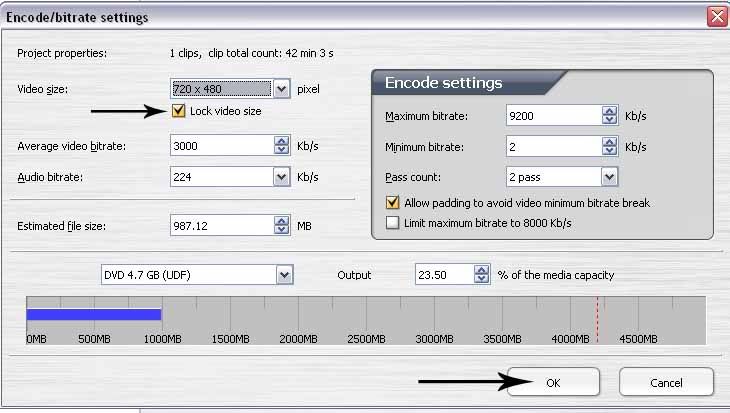
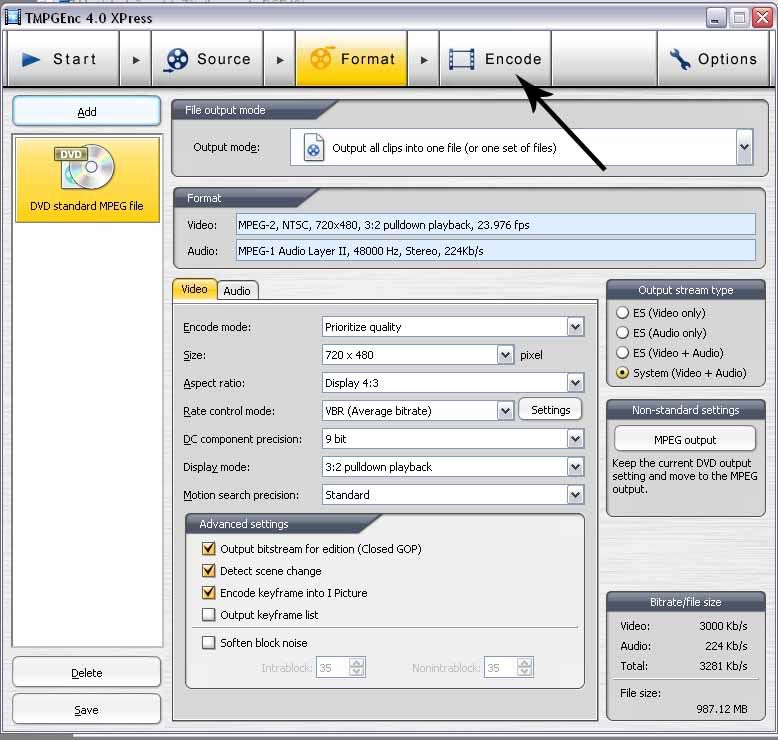
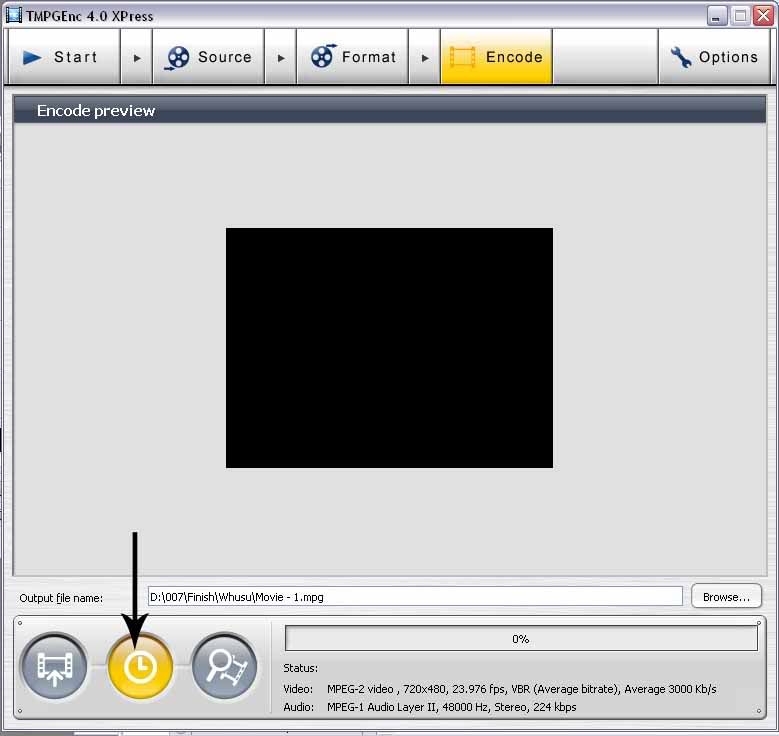
    In this tutor step by step from beginning till burn to disc
    i use 4 tv series with total length ( duration ) were 2:48:09
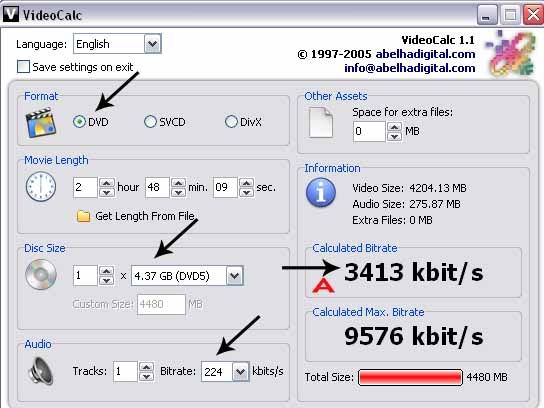
    and for summing bitrate for rendering i use VideoCalc


    VideoCalc ( Freeware )
    Quote:
    Video bitrate calculator for DVD/SVCD/DivX/etc formats. Use the DivX-option for all other video formats like XviD, MP4, MKV or whatever.


    Videocalc-1.jpg


    A. For Bitrate it shown 3413 kbit/s ( i will use 3000 kbit/s )

    TMPGEnc.XPress.v4.6.2.266

    http://www.mediafire.com/?ymm2ymimmom


    t-1.jpg


    t-2.jpg


    t-3.jpg


    t-4.jpg


    t-5.jpg


    t-6.jpg


    t-7.jpg


    t-8.jpg


    t-9.jpg


    t-10.jpg


    t-11.jpg


    Repeat again for movie 2, movie 3, movie 4

    t-12.jpg
     

    Supunqw

    Well-known member
  • Jul 18, 2009
    5,620
    500
    113
    34
    නිගම්බු 7
    How to join .001 movie files ??

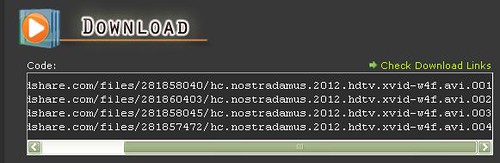
    For the sake of explanation lets say that you have downloaded "Nostradamus 2012 HDTV " from the board and you don't know how to join .001 files.

    4328000298_fd5458a961.jpg


    1. Go to http://www.freebyte.com/hjsplit/ and select the version of HJSPLIT compatible with your operating system.


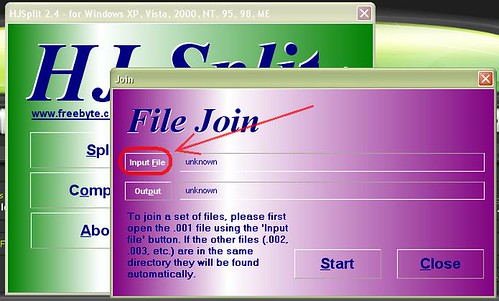
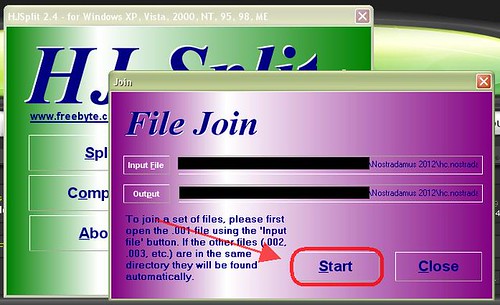
    2. After dowloading HJsplit run it and click on join as shown below !

    4327996882_c74498fe66.jpg


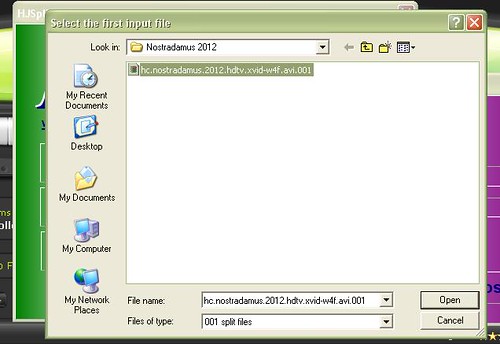
    3. Click input and go to the folder where the parts has been stored (here the folder name is "Nostradamus 2012") .

    4327265479_0b1d22820f.jpg


    4. Don't worry ! it automatically shows only .001 file .Note that all parts should be stored in the same folder.After clicking on the .001 files click "open" .

    4327997846_eeb8733d9b.jpg


    5. Then click "Start".

    4327266527_4e190cd373.jpg


    6. As you can see the files are being joined !

    4327267251_a0be862f13.jpg


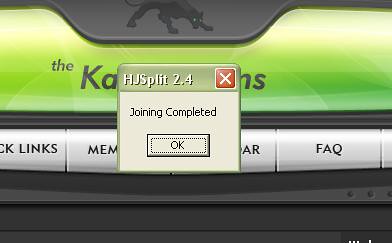
    7. The joining process in complete !
    4327999400_7615dabcaa.jpg


    8. Results !
    4327267689_61fd5f9285.jpg


    9. File is now ready to be played !
    4328000058_9a6d1a97ba.jpg


    Hope this will help all members
     

    Supunqw

    Well-known member
  • Jul 18, 2009
    5,620
    500
    113
    34
    නිගම්බු 7
    [PS] Rain Animation

    1.Open up a image
    smile.png


    obrazekrx6.jpg


    2.Make 4 new layers and add noise-Filter/Noise/Add Noise..with these setings:

    noiseor6.jpg


    with every new layer add 1% more amount (for expamle layer 1- 60% layer 2- 61 % layer 3 62% etc)

    Then use Motion Blur tool -Filter/Blur/Motion Blur.. Setting:
    Angle: 80
    Distance: 30

    screenwx3.jpg


    3.on each layer with "rain" we use Bleniding mode on screen like this

    irrw5.jpg


    4 We now go to image ready

    5 turn of the layer place we turn of the visability of the layers with "rain" and leave only the background and layer 1

    firstfs2.jpg


    6 in the Animation tabel we duplicate the first layer

    dupliod7.jpg


    We repeate steps 5-6 and we get this thingy ;]
    optimize save it and its ready

    untitled1fp2.gif
     

    Supunqw

    Well-known member
  • Jul 18, 2009
    5,620
    500
    113
    34
    නිගම්බු 7
    How to download unlimited music from Rhapsody

    No need to buy song or something, it's FREE.

    Some things you need:
    1. Firefox 3.0+
    2. DownloadHelper Add-On for Firefox
    3. i.e. = in example if you didn't know

    If you don't already have Firefox, then go get it at www.getfirefox.com
    If you don't already have DownloadHelper then go to addons.mozilla.org and search "DownloadHelper" and install it as a Firefox Add-On.

    Once installed, go to Rhapsody.com (Well known online music store) and type in the artist or track you want to search. Find a song and click the Play button next (left) to it. It will play the song or a preview of the song, now here's the important part, when your "Previewing" a song the DownloadHelper icon in the Firefox navigation toolbar will light up and move around. Move the mouse over the icon and click the small arrow to the right of it.. It should say something like #######.mp3 yes? Ok then just click that "(i.e.)2515626.mp3" section and you should either get the option of where to save it or a small window that says "Open With" and "Save File..". Click Save File if it does come up, then choose a folder to save it in, like "Music" or something and change the numbers to the name of the song or something that will help you find it later (iTunes users) and VERY VERY importantly: you HAVE to put .mp3 at the end every time you download a song, so for example, if I download Enter Sandman by Metallica:

    Change 23463473(i.e.) to EnterSandman.mp3
    NOT EnterSandman .mp3 (NO SPACE between the last letter or number)

    Also, as you can see on Rhapsody you have 25 Free Plays which means you can play 25 full songs, when you reach zer0 the previews will limit to 30-second ones BUT you can still download the full song anyways!

    Then go put it on iTunes or your MP3Player/PSP or whatever.

    For iTunes just Do this:
    File>>Add File To Library>> & Find the song.

    Enjoy! & and if you know how to this already please don't flame me.
    smile.gif
     

    Supunqw

    Well-known member
  • Jul 18, 2009
    5,620
    500
    113
    34
    නිගම්බු 7
    How to remove programs not listed in Add/Remove Programs

    This problem can occur if the program you installed creates a registry key name that is longer than 60 characters in length. Add/Remove Programs only lists program names it locates up to the point it encounters this situation.Follow the steps given to solve the problem.

    * Go to C:\Windows\Inf folder. In the right pane, scroll down to sysoc.inf. Open it with notepad. It will look like…

    [Components]
    NtComponents=ntoc.dll,NtOcSetupProc,,4
    msmsgs=msgrocm.dll,OcEntry,msmsgs.inf,hide,7

    * The word “HIDE” in an entry hides that application from your Add/Remove Programs dialog box. To add ms messenger to the Add/Remove menu, delete the word HIDE from its entry. Don’t delete the “,”(comma) after it.

    * Save the file and restart your machine and now you can see that app listed in the add/remove programs list.
     

    Supunqw

    Well-known member
  • Jul 18, 2009
    5,620
    500
    113
    34
    නිගම්බු 7
    How to Terminate Full Screen Game when Hanged ! The Fool-Proof Way !

    One Day i was really fed up of my Half-Life 2 getting hanged again and again so i decided to work out a solution for it.

    I’ve tried pressing Alt+Tab to switch between Windows, Alt+F4 to close the active program, Ctrl+Shift+Esc to launch Windows Task Manager, Ctrl+Alt+Del to launch Windows Security dialog box, but NOTHINGreset button in my computer case. Hard resetting a computer is never good because it can damage the hard drive and cause data corruption.


    Now I’ve figured a way to automatically terminate the game by pressing a shortcut key when it hangs.


    Actually it is pretty simple and doesn’t require any advance level of computer knowledge. First you need to know what is the process name used by the game. Let’s take Half-Life 2 as an example. You can check the process name for the game by right clicking the Half Life shortcut and select Properties. Go to the Shortcut tab to view the Target.

    Now you need to create a batch file that will kill the hl2.exe processOpen Notepad (Start > Programs > Accessories > Notepad), and type the command line shown below.


    Check Download Links Code:
    taskkill /IM hl2.exe
    You should replace the hl2.exe with the target of your game that you want to kill. Save the text file as killhf.bat or whatever you want to call it as long as the extension is .bat and not .txt. When you run the killhf.bat file, it should be able to close the game. Now we will assign a shortcut key to run the batch file.

    Right click the killhf.bat file
    and select “Create Shortcut”. A new file named “Shortcut to killhf.bat” will appear. Right click at “Shortcut to killcss.bat” file and select Properties. Click at the Shortcut Key blank area and type any key of your choice. If you type the letter “L”, it will automatically assign Ctrl + Alt + L as the shortcut key to run the killcss.bat file.

    worked! The only way is to hard reboot the computer by pressing the when you simultaneously hit a combination of shortcut keys. One very more important rule is that the .bat file MUST be placed at desktop for the shortcut key to take effect.

    When the game hangs in future, I just need to hit Ctrl + Alt + L key to kill the game so I can restart the game without hard resetting my computer.


    ALSO THIS METHOD CAN BE USED FOR HEAVY APPLICATIONS TOO!!
    dance.gif